
Generate Novel Views with NuRec#
NuRec supports novel view synthesis, allowing you to render from camera positions that were not present in the original dataset. You can shift the virtual camera along the X, Y, and Z axes, or apply roll-pitch-yaw rotations, to simulate a sensor rig that drove a slightly different path — for example, a lane shift, a height change, or a different vehicle orientation.
This is useful when you need to cover edge cases beyond the original trajectory: training an AV model on adjacent-lane perspectives, testing sensor configurations that weren’t physically present, or augmenting your dataset with plausible camera variations.
Note: In NuRec, novel view synthesis produces shifted camera viewpoints from a reconstructed static scene. For controllable dynamic actors (moving vehicles, pedestrians) in a live simulation, use the gRPC API with the
--enable-editing-actorsflag — see Use the NuRec gRPC API Server.
This guide assumes you have already trained a NuRec reconstruction model. If you haven’t, see Reconstruct a Scene with NuRec first.
How It Works#
The diagram below illustrates the X-, Y-, and Z-axis shifts available for novel view generation.
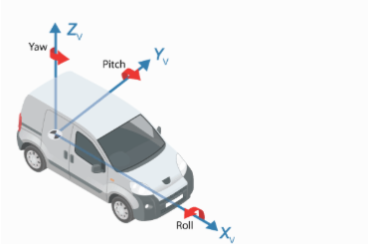
Novel views are generated by running the NuRec validation pipeline (mode=val) with spatial translation or rotation overrides applied to the sensor position. This produces new rendered frames from the shifted viewpoints.
Run Novel View Synthesis#
This guide assumes you have already trained a NuRec reconstruction model. Modify the following command to reflect the output directory from your training run:
nurec_dev bazelisk run //:run -- \
  --config-name="$NUREC_SRC/outputs/<RUN-ID>/config/parsed.yaml" \
  mode=val \
  resume="$NUREC_SRC/outputs/<RUN-ID>/checkpoints/last.ckpt" \
  out_dir="$NUREC_SRC/outputs" \
  dataset.val_sensor_transl_delta_m="[0,2,0]" \
  model.renderer.active_tile_mask.enabled=False
Notes:
model.renderer.active_tile_mask.enabled=Falseis required whenever you move the camera. The active-tile mask inherited from training skips rays that the shifted viewpoint needs, and the run exits successfully while writing entirely black frames. Disabling the optimization costs render speed and is why this command is slower than a stationary validation pass.$NUREC_SRC/outputsshould match theout_diryou passed to your training run.<RUN-ID>is the identifier NuRec auto-generated for that training run. Training writes its artifacts to$NUREC_SRC/outputs/<RUN-ID>/, soconfig/andcheckpoints/live one level below it. List that directory to find the run ID, or passlogger.run_id=<name>during training to choose it yourself.This step may prompt you to configure
wandb. Select option (3) to skip it.
Camera Shift Parameters#
Translation shifts — Move the virtual camera along each axis (values in meters, no spaces):
dataset.val_sensor_transl_delta_m="[x,y,z]"
For example, "[0,2,0]" shifts the camera 2 meters to the left (Y axis). Typical lane-shift values are in the 1–4 meter range. Very large shifts will move the camera outside the region covered by the training data and produce degraded results.
Rotation shifts — Apply roll-pitch-yaw Euler angles relative to the car (values in degrees, no spaces):
dataset.val_sensor_rot_delta_deg="[degree1,degree2,degree3]"
You can combine both parameters in a single command to shift and rotate simultaneously.
Output Artifacts#
The novel view synthesis run writes its artifacts under $NUREC_SRC/outputs/<RUN-ID>/, reusing the run ID restored from the checkpoint you resumed:
Renders land in
val/, one subdirectory per output type — base reconstruction, depth map, and opacity — with a further subdirectory per camera.MP4 videos are written beside those subdirectories as
<output-type>-<camera>.mp4.metrics.yamlrecords timing statistics inval/. If you settest.separate_val_dir_per_step, it moves one level deeper into a zero-padded step directory such asval/030000/.
Note
metrics.yaml reports image-quality metrics such as test/psnr only when the rendered views have matching reference images. A shifted or rotated viewpoint has no recorded ground truth, so its metrics.yaml contains timing statistics alone. To get PSNR, render the recorded poses — omit dataset.val_sensor_pos_delta_m and dataset.val_sensor_rot_delta_deg.
Use the Render Command Instead#
For quick offline novel view generation without a full validation pass, the render command is a lighter-weight option. It takes a USDZ file directly and applies fixed translation and rotation offsets via --rig-translation-offset and --rig-rotation-offset, without needing the original dataset.
Use the validation pipeline (this guide) when you need a metrics.yaml alongside your renders. Use the render command when you just need images quickly.
Next Steps#
Once you’ve confirmed the novel view renders look correct, use the NuRec gRPC API to serve rendered frames at arbitrary camera poses in real time, including with dynamic actor control via --enable-editing-actors.
–>
Help include for NuRec command#
Get Help#
To view all available arguments for training, validation, and export utilities, run the following:
nurec_dev bazelisk run //:run -- --help
To get help for a specific export utility:
nurec_dev bazelisk run //:run -- <EXPORT_UTILITY_NAME> --help