> For clean Markdown of any page, append .md to the page URL.
> For a complete documentation index, see https://docs.nvidia.com/nvcf/llms.txt.
> For full documentation content, see https://docs.nvidia.com/nvcf/llms-full.txt.
> For AI client integration (Claude Code, Cursor, etc.), connect to the MCP server at https://docs.nvidia.com/nvcf/_mcp/server.
# Function Lifecycle
Cloud "functions" are an abstraction that allows you to run your code without managing deployments and infrastructure. Cloud Functions simplifies hosting AI inference and fine-tuning workloads in the cloud by automatically enabling access to GPU capacity and autoscaling. Cloud functions are generally considered stateless.
Therefore, **function authors are only responsible for maintaining their AI models and associated code**. This is highlighted in the diagram below in green. To use Cloud Functions, you create a function, then define a deployment specification for it, and deploy it on one of the available GPU-backed clusters hosted by NVIDIA.
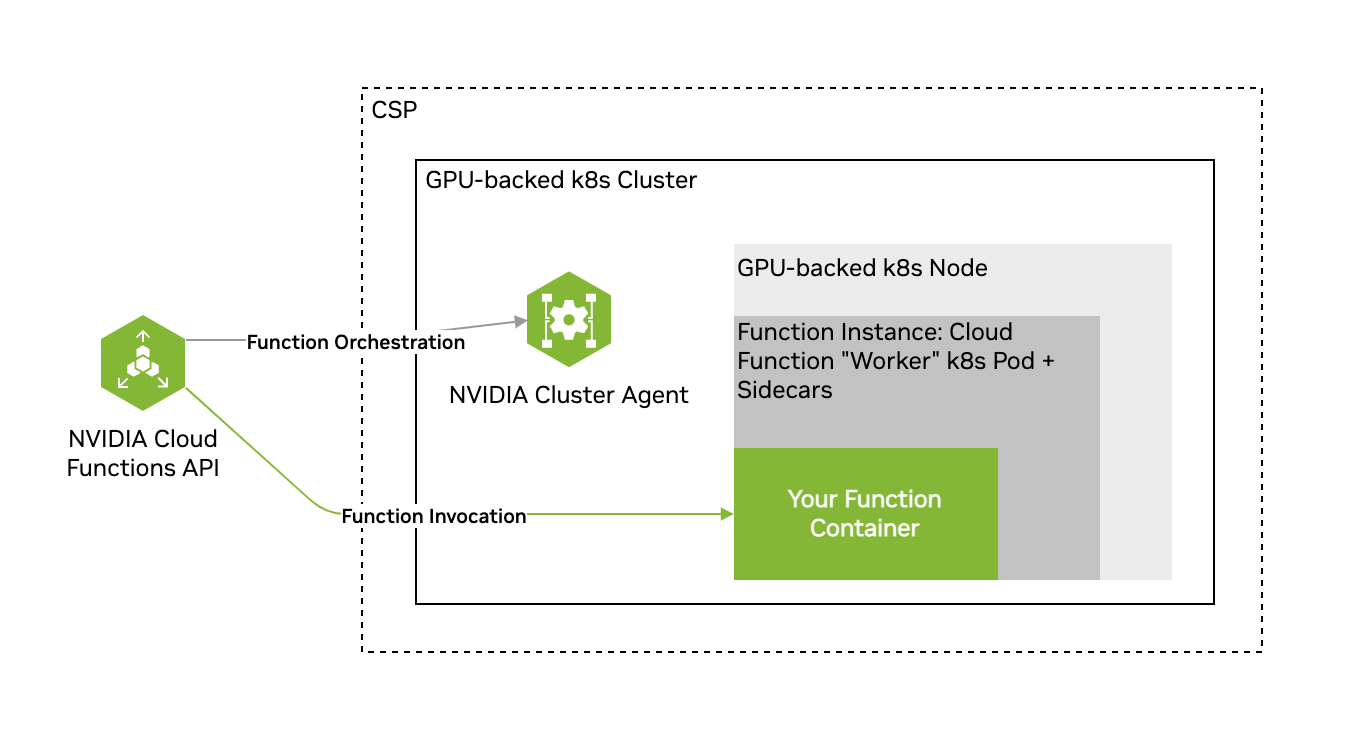
A Cloud Functions account can contain multiple functions, each with multiple function versions. Each function created also creates a single function version.
Cloud Functions supports function invocation (calling of the function's inference endpoint) at the function ID level or the function version ID level. You can create a single function and version and invoke only this function version, or create multiple versions of the same function and spread invocation across all versions.
## Key Concepts
See below for an overview of some key basic concepts within Cloud Functions.
| Term | Description |
| --- | --- |
| NVIDIA GPU Cloud (NGC) | A portal of enterprise services, software, and management tools supporting end-to-end AI. |
| NGC Private Registry | Registry integrated with Cloud Functions for storing custom containers, models, resources, and helm charts. |
| NVIDIA Cloud Account ID (NCA ID) | NVIDIA customer billing entity that cloud services are associated with. |
| Function | User-defined encapsulated code that implements a server exposing at least one inference endpoint, either based on a container, or helm chart. |
| Function Instance | A single deployed copy of a function running on a cluster. |
| Function Deployment | One or more function instances running on a cluster. |
| Function Invocation | The action of calling (via the Cloud Functions API) a function's inference endpoint. |
| Cluster | A collection of GPU-powered Kubernetes nodes/pods. |
| GPU Instance Type | Refers to any one of the supported GPU configurations within Cloud Functions, including the GPU model, number of GPUs on a single node, number of CPU cores, etc. |
## Function States
A function can be in any of the following states:
- `ACTIVE` - If the function can receive invocations. Only when a function is `ACTIVE` or `DEGRADING` can it be invoked.
- `ERROR` - If all function instances are in an ERROR state.
- `INACTIVE` - When a function is created but not yet deployed, it is `INACTIVE`. When a function is undeployed, the state is changed from `ACTIVE` to `INACTIVE`.
- `DEPLOYING` - When a function is being deployed and the instances are still coming up to reach the minimum instance count.
- `DEGRADING` - If `ACTIVE` is losing its instances and number of active is below deployment configuration field `minInstance`, but there are some active instances. In this state a function can be invoked. When it gets back all required instances, it will be `ACTIVE` again.
- `DEGRADED` - If `ACTIVE` or `DEGRADING` has lost all its instances. In this state a function can **NOT** be invoked. When it gets some instances it will be back `DEGRADING`. When it gets back all required instances, it will be `ACTIVE` again.
## Workflow
The workflow when using Cloud Functions is usually as follows.
- **Function Creation**: Define your function with a container, or helm chart.
- **Function Deployment**: Deploy your function on a cluster.
- **Function Invocation**: Invoke your function's inference endpoint.
- **Function Management**: Manage your deployed function, for example, add new versions.
## Function Lifecycle Endpoints
### Function Creation, Management & Deployment
The table below provides an overview of the function lifecycle API endpoints and their respective usages.
| Name | Method | Endpoint | Usage |
| --- | --- | --- | --- |
| Register Function | POST | `/v2/nvcf/functions` | Creates a new function. |
| Register Function Version | POST | `/v2/nvcf/functions/{functionId}/versions` | Creates a new version of a function. |
| Delete Function Version | DELETE | `/v2/nvcf/functions/{functionId}/versions/{functionVersionId}` | Deletes a function specified by its ID. |
| List Functions | GET | `/v2/nvcf/functions` | Retrieves a list of functions associated with the account. |
| List Function Versions | GET | `/v2/nvcf/functions/{functionId}/versions` | Retrieves a list of versions for a specific function. |
| Retrieve Function Details | GET | `/v2/nvcf/functions/{functionId}/versions/{functionVersionId}` | Retrieves details of a specific function version. |
| Create Function Version Deployment | POST | `/v2/nvcf/deployments/functions/{functionId}/versions/{functionVersionId}` | Initiates the deployment process for a function version. |
| Delete Function Version Deployment | DELETE | `/v2/nvcf/deployments/functions/{functionId}/versions/{functionVersionId}` | Initiates the undeployment process for a function version. |
| Retrieve Function Version Deployment | GET | `/v2/nvcf/deployments/functions/{functionId}/versions/{functionVersionId}` | Retrieves details of a specific function version deployment. |
| Update Function Version Deployment | PUT | `/v2/nvcf/deployments/functions/{functionId}/versions/{functionVersionId}` | Updates the configuration of a function version deployment. |
#### Function Metadata
When using the Cloud Functions API to create a function, it's possible to specify a function description and a list of tags as strings as part of the function creation request body. This metadata is then returned in all responses that include the function definition. This is an API-only feature at this time. Please see the open-api for usage.
### Function Invocation
The table below provides an overview of the Function invocation API endpoints and their respective usages.
| Name | Method | Endpoint | Usage |
| --- | --- | --- | --- |
| Invoke Function | ANY | `{functionId}.invocation.api.nvcf.nvidia.com/{any-path}?{any-query-string}` | Invokes the client provided endpoint and returns the results, if available. Cloud Functions randomly selects one of the active versions of the specified function for inference. |
Read more about using the invocation API in the Function Invocation section.
### Visibility, Cluster Groups & GPUs
| Name | Method | Endpoint | Usage |
| --- | --- | --- | --- |
| Get Queue Length for Function id | GET | `/v2/nvcf/queues/functions/{functionId}` | Returns a list containing a single element with corresponding queue length for the specified Function. |
| Get Queue Length for Version id | GET | `/v2/nvcf/queues/functions/{functionId}/versions/{functionVersionId}` | Returns a list containing a single element with corresponding queue length for the specified Function version id. |
| Get Available GPUs | GET | `/v2/nvcf/supportedGpus` | Returns a list of GPU types you have access too. |
| Get Queue Position for Request id | GET | `/v2/nvcf/queues/{requestId}/position` | Returns estimated position in queue, up to 1000, for a specific request id of a function invocation request. |