> For clean Markdown of any page, append .md to the page URL.
> For a complete documentation index, see https://docs.nvidia.com/nvcf/llms.txt.
> For AI client integration (Claude Code, Cursor, etc.), connect to the MCP server at https://docs.nvidia.com/nvcf/_mcp/server.
# Deployment
Self-hosted NVCF installation includes the core components required for NVCF inference. Optional components such as caching and low latency streaming support are also available. Vanity Gateway routing is available only in stack packages that include the Vanity Gateway addon.
For a local k3d fresh install, start with the [Quickstart](/nvcf/v0.6.0-rc/quickstart). The quickstart uses `nvcf-cli self-hosted up` to install the control plane, register the local k3d cluster, install NVCA, and run basic health checks.
For a full list of required artifacts, see [self-hosted-artifact-manifest](/nvcf/v0.6.0-rc/manifest).
Want to try NVCF locally first? See [Local Development](/nvcf/v0.6.0-rc/local-development) to create a k3d cluster, then use the [Quickstart](/nvcf/v0.6.0-rc/quickstart) local k3d flow.
## Choose an installation path
| Path | Use when | Starting point |
| --- | --- | --- |
| Local one-click CLI installation | You want the fastest local k3d install and cluster registration path. | [Quickstart](/nvcf/v0.6.0-rc/quickstart) |
| Helmfile installation | You need manual release control, partial recovery, upgrades, or detailed Helmfile operations. | [Helmfile Installation](/nvcf/v0.6.0-rc/helmfile-installation) |
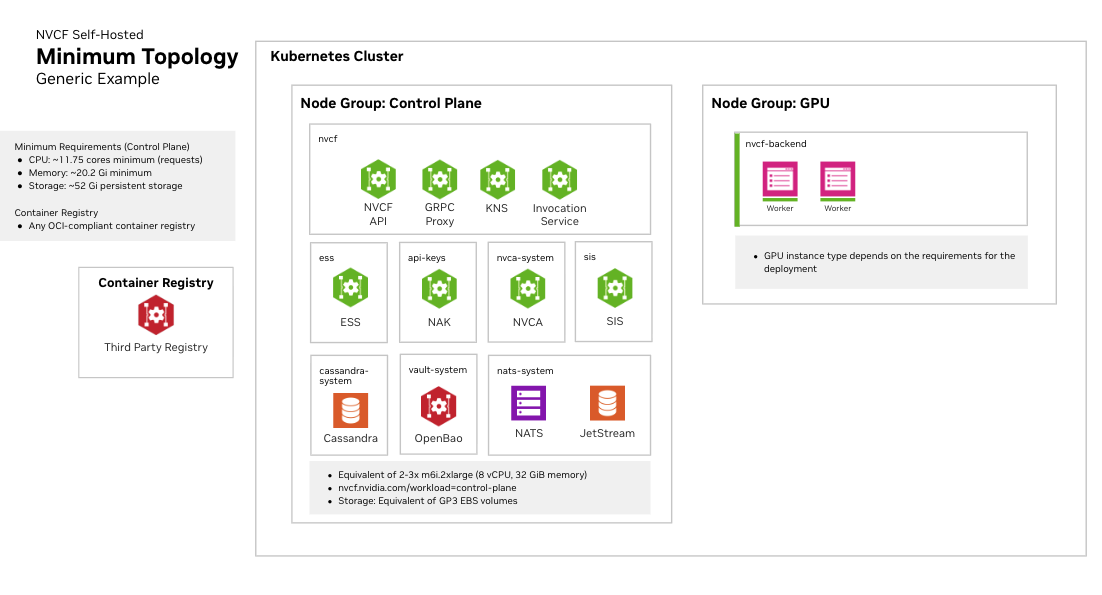
The control plane and GPU cluster can be the same Kubernetes cluster or separate clusters when you use Helmfile or the explicit CLI install primitives. The quickstart supports only a single local k3d cluster. For a complete Amazon EKS example of both topologies, see the [CSP End-to-End Example](/nvcf/v0.6.0-rc/csp-end-to-end-example).
For remote installs, prepare the Gateway API ingress path and CLI endpoint
configuration before registering GPU clusters or running post-install CLI
checks. See [Helmfile Installation](/nvcf/v0.6.0-rc/helmfile-installation),
[Self-Managed Clusters](/nvcf/v0.6.0-rc/self-managed-clusters), and
[Gateway Routing](/nvcf/v0.6.0-rc/gateway-routing).
## Overview
Every installation path follows the same high-level sequence:
1. Clone the [NVCF source repository](https://github.com/nvidia/nvcf) and run
repository-based commands from its root directory.
2. Make NVCF artifacts available to your Kubernetes clusters. Pull them
directly from NGC when the clusters have NGC access, or follow the
[image mirroring instructions](/nvcf/v0.6.0-rc/image-mirroring) to copy them to a
registry that the clusters can access.
3. Create or select Kubernetes cluster targets. You need a cluster for the control plane and a GPU cluster for function workloads. These can be the same cluster or separate clusters.
4. Install the self-hosted control plane. Use the [Quickstart](/nvcf/v0.6.0-rc/quickstart) for a local k3d install or [Helmfile Installation](/nvcf/v0.6.0-rc/helmfile-installation) for manual Helmfile operations.
5. Register a GPU cluster and install the NVIDIA Cluster Agent. The local quickstart performs this step for the local k3d cluster. For manual installation paths, see [Self-Managed Clusters](/nvcf/v0.6.0-rc/self-managed-clusters).
6. Install Low Latency Streaming if needed for streaming workloads. See [LLS Installation](/nvcf/v0.6.0-rc/lls-installation).
7. Install optional enhancements, such as caches, low latency streaming, or Vanity Gateway routing when your stack package includes that addon. See [Optional Enhancements](/nvcf/v0.6.0-rc/optional-enhancements).
## Kubernetes Cluster Requirements
### Cluster Version
- Supported versions are the latest Kubernetes minor release and the two prior minor releases (N-2). See official Kubernetes docs for current supported [versions](https://kubernetes.io/releases/version-skew-policy/#supported-versions).
- Support for dynamic persistent volume provisioning
### Required Operators and Components
#### NVIDIA GPU Operator
Required for GPU workload scheduling. The GPU Operator automates the management of all NVIDIA software components needed to provision GPUs in Kubernetes, including:
- NVIDIA device drivers
- Kubernetes device plugin for GPU discovery
- GPU feature discovery for node labeling
- Container runtime integration (containerd, CRI-O, or Docker)
- Monitoring and telemetry tools
See [NVIDIA GPU Operator documentation](https://docs.nvidia.com/datacenter/cloud-native/gpu-operator/latest/) for installation instructions.
Fake GPU Operator for development and testing:
For environments without actual GPU hardware, install the fake GPU operator to simulate
GPU resources. See [fake-gpu-operator](/nvcf/v0.6.0-rc/fake-gpu-operator) for full instructions.
#### SMB CSI Driver
The [SMB CSI driver](https://github.com/kubernetes-csi/csi-driver-smb)
(`smb.csi.k8s.io`) must be installed on every GPU cluster. NVCA uses the
driver for shared model cache storage that function worker pods mount. Install
and verify the driver before registering the GPU cluster. See the
[Self-Managed Clusters prerequisites](/nvcf/v0.6.0-rc/self-managed-clusters#prerequisites)
for the installation command.
#### Network Policies
Your cluster must support Kubernetes Network Policies if network isolation is required.
#### Persistent Storage
A StorageClass must be configured for persistent volumes. Common options:
- Amazon EKS: `gp3` (default)
- Local development: `local-path`
- Other platforms: Any CSI-compatible storage class
Some cloud providers have minimum PVC size requirements. For example, AWS EBS gp3 volumes have a 1Gi minimum.
### Cluster Sizing and Storage
See [infrastructure-sizing](/nvcf/v0.6.0-rc/infrastructure-sizing) for node pool specifications, storage
recommendations, and three recommended sizing tiers (Development, Minimal HA,
and Production).