How OpenShell Works
OpenShell runs inside a Docker container. Each sandbox is an isolated environment managed through the gateway. Three components work together to keep agents secure.
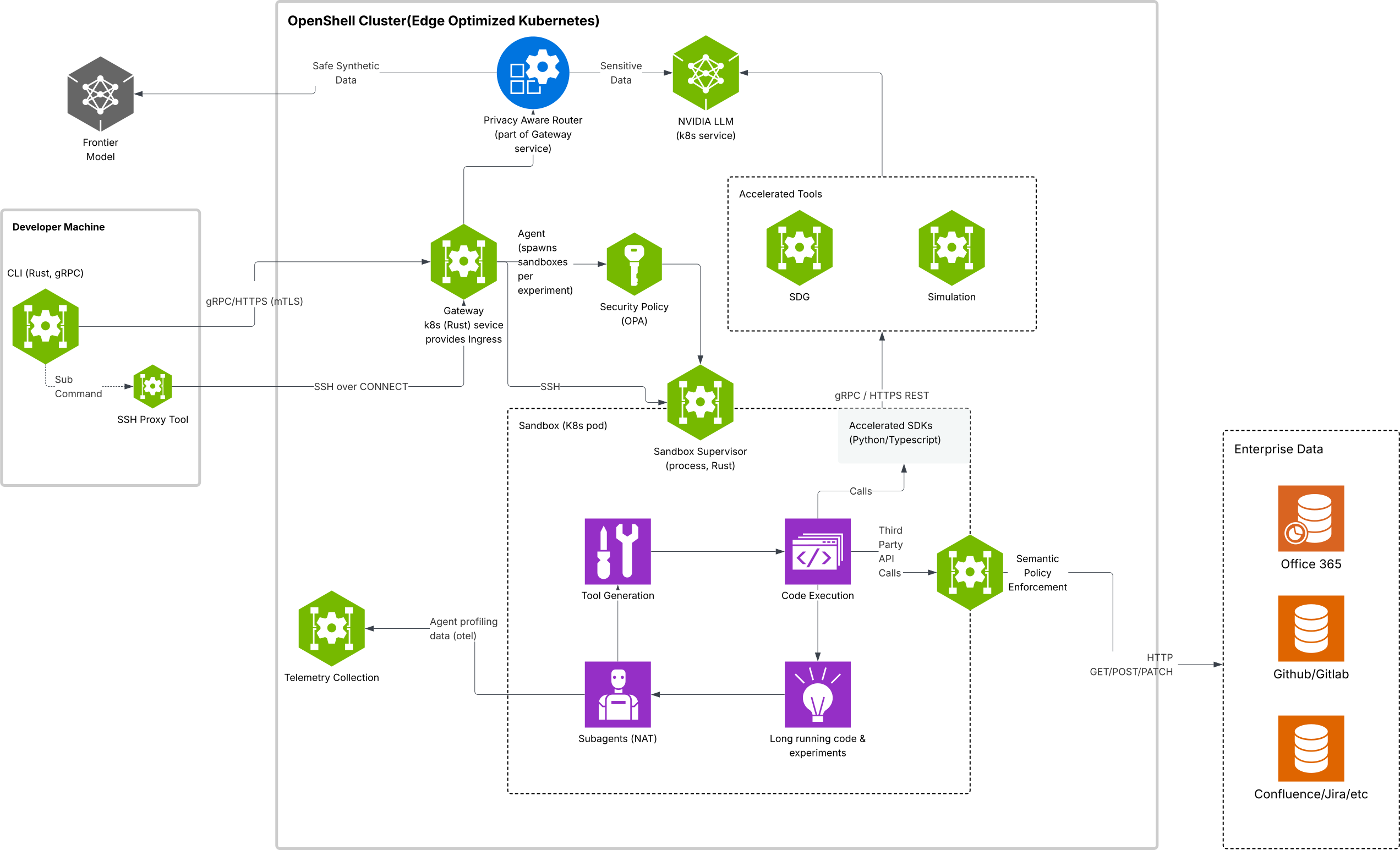
Components
The following table describes each component and its role in the system:
How a Request Flows
Every outbound connection from agent code passes through the same decision path:
-
The agent process opens an outbound connection (API call, package install, git clone, and so on).
-
The proxy inside the sandbox intercepts the connection and identifies which binary opened it.
-
If the target is
https://inference.local, the proxy handles it as managed inference before policy evaluation. OpenShell strips sandbox-supplied credentials, injects the configured backend credentials, and forwards the request to the managed model endpoint. -
For every other destination, the proxy queries the policy engine with the destination, port, and calling binary.
-
The policy engine returns one of the following decisions. Explicit deny takes precedence over allow, and allow takes precedence over implicit deny.
For REST endpoints, the proxy auto-detects Transport Layer Security (TLS) by peeking the first bytes of each tunnel. When TLS is detected, the proxy terminates it transparently using a per-sandbox ephemeral certificate authority (CA) so each HTTP request can be checked against per-method, per-path rules before forwarding. To trust a corporate or internal CA for upstream traffic, add the PEM-encoded certificate to the sandbox container’s trust store at image build time.
Gateway Lifecycle
OpenShell preserves sandbox state across gateway restarts. After openshell gateway stop and openshell gateway start, running sandboxes resume from their saved state. Existing SSH sessions reconnect without re-authenticating.
Observability
The sandbox emits operational decisions as Open Cybersecurity Schema Framework (OCSF) v1.7.0 structured logs. The events cover network connections, HTTP requests, SSH sessions, process lifecycle, detection findings, and configuration changes. For event classes and the JSON Lines (JSONL) export format, refer to OCSF JSON Export.
Deployment Modes
OpenShell can run locally, on a remote host, or behind a cloud proxy. The architecture is identical in all cases. Only the Docker container location and authentication mode change.
You can register multiple gateways and switch between them with openshell gateway select. For the full deployment and management workflow, refer to the Gateways section.
Next Steps
Continue with one of the following:
- To deploy or register a gateway, refer to Gateways.
- To create your first sandbox, refer to the Quickstart.
- To learn how OpenShell enforces isolation across all protection layers, refer to Sandboxes.

