
Agentic RAG for NVIDIA RAG Blueprint#
Overview#
Standard Retrieval-Augmented Generation answers in one pass: embed the query, retrieve top-k chunks, and have an LLM answer from them. That fits direct factual questions but falters when the query is ambiguous, spans documents, needs several facts combined, or targets precise locations in a large or noisy corpus.
Agentic RAG treats the query as something to reason about, not a single retrieval call. Instead of one retrieve-then-generate step, an LLM-driven agent plans short, focused sub-questions, runs each against the retriever, weighs partial answers, retries with reformulated queries when results are thin, then synthesizes a coherent answer. Optional verification checks the synthesis for gaps and triggers targeted re-retrieval when needed.
The NVIDIA RAG Blueprint implements Agentic RAG as a LangGraph plan-and-execute pipeline next to the standard RAG chain. It includes:
Two-phase planning: an initial scope-discovery phase learns what the corpus holds for ambiguous queries, then a targeted answer-planning phase yields concrete retrieval tasks.
Mini-agent task execution: each task runs a small retrieve-answer-retry loop; a seed-query generator LLM reformulates search when the partial answer shows missing information.
Synthesis: task sub-answers and initial retrieval context merge into one final answer.
Optional verification: after synthesis, a quality gate flags coverage gaps, vague claims, and wrong-subject drift, then re-retrieves to close them.
The pipeline defaults to off because Agentic RAG trades latency and extra LLM calls for accuracy. Use it for multi-hop questions, ambiguity, cross-document queries, and numeric pulls from tables or charts. Enable it for a whole deployment or per request. See Enable Agentic RAG.
Key Benefits#
No dataset-specific configuration. Scope discovery adapts to any collection; you do not need per-corpus rules.
Handles ambiguous queries. Scope discovery probes the vector database before planning, so under-specified questions align with what is actually in the corpus.
Adaptive cost. Basic queries use the initial retrieval only (few LLM calls); complex queries get full planning, retries, and verification.
Parallel tasks. Independent plan tasks run together to reduce wall time.
Verification gate. Post-synthesis checks catch incomplete coverage, vague answers, false negatives, and wrong-subject drift, then re-retrieve to fill gaps.
Limitations#
Latency and LLM-call count exceed the standard chain. Prefer the per-request override (Enable per request) over a global default on latency-sensitive paths.
The agentic path does not use NeMo Guardrails, Self-Reflection, Query Decomposition, or VLM Inference. Query rewriting, multi-turn history, multi-collection retrieval, citations, filter generation, and reranking are supported.
Verification runs once; there is no nested verification loop.
Tasks in a plan run at one parallel level; there is no DAG or depends-on construct.
Response metadata that is specific to the Standard RAG single-pass pipeline can be omitted or returned empty for Agentic RAG when it does not map cleanly to the multi-step agentic flow.
Observability#
When observability is enabled, Agentic RAG exports aggregate agentic_ Prometheus metrics for retrieval calls, task outcomes, stage latency, LLM usage, and verification behavior. These metrics are separate from the Standard RAG dashboard because Agentic RAG can issue multiple retrieval and LLM calls across initial retrieval, task execution, retries, synthesis, and verification.
Use deploy/config/agentic-rag-metrics-dashboard.json to view these metrics in Grafana. See Observability Setup for dashboard import steps.
Architecture Overview#
The pipeline is a LangGraph state machine with five parts:
Initial Retrieval: runs the user query through the standard
/searchpath (vector DB and reranker to top-k chunks) so planning reflects what is in the corpus.Planner (two-phase). One LLM picks among three plan shapes:
Scope discovery plan: two or three discovery tasks probe the corpus when the query is ambiguous; the planner runs again with those results.
Answer plan: answer tasks tied to what turned up.
Empty plan: no tasks; initial retrieval is enough and synthesis follows directly (the low-cost path for basic queries).
Task Execute: each task is a mini-agent: retrieve, answer, and if the answer is partial, the seed-query generator issues a follow-up query for what is missing, then retries. Tasks in a plan run concurrently.
Synthesis: merges task sub-answers, initial retrieval context, and the resolved query into one answer. If every task returns
[NO DATA], it falls back to the initial context.Verification (optional): checks the answer for gaps. On
pass, you are done. Onfail, follow-up tasks use the same execute engine and synthesis runs again with the gap data.
The diagram below shows how the stages connect, including the scope-replan loop back into the planner and the verify-replan loop back into task execution.
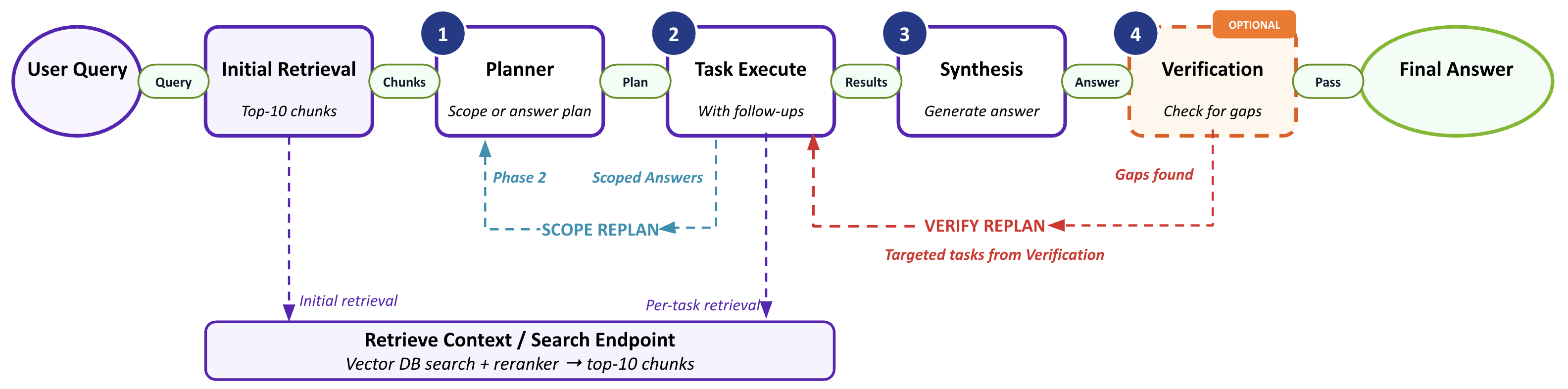
Agentic RAG pipeline — initial retrieval feeds the planner, which emits an empty, answer, or scope-discovery plan; tasks execute with per-task retrieval and optional follow-ups; synthesis produces the answer, and optional verification can trigger a targeted re-plan.#
Enable Agentic RAG#
Enable per request (API) (recommended)#
Prefer enabling Agentic RAG per request with the agentic field in the /v1/generate body.
The server ENABLE_AGENTIC_RAG env var only sets the default when agentic is omitted.
{
  "messages": [{"role": "user", "content": "..."}],
  "use_knowledge_base": true,
  "agentic": true,
  "collection_names": ["..."]
}
When agentic is omitted or null, the server uses ENABLE_AGENTIC_RAG. Agentic RAG applies only if use_knowledge_base=true. The agentic path respects enable_streaming: when true (default), it streams stage events and final tokens as Server-Sent Events; when false, the graph finishes and returns the full answer in one chunk. The standard RAG chain always streams.
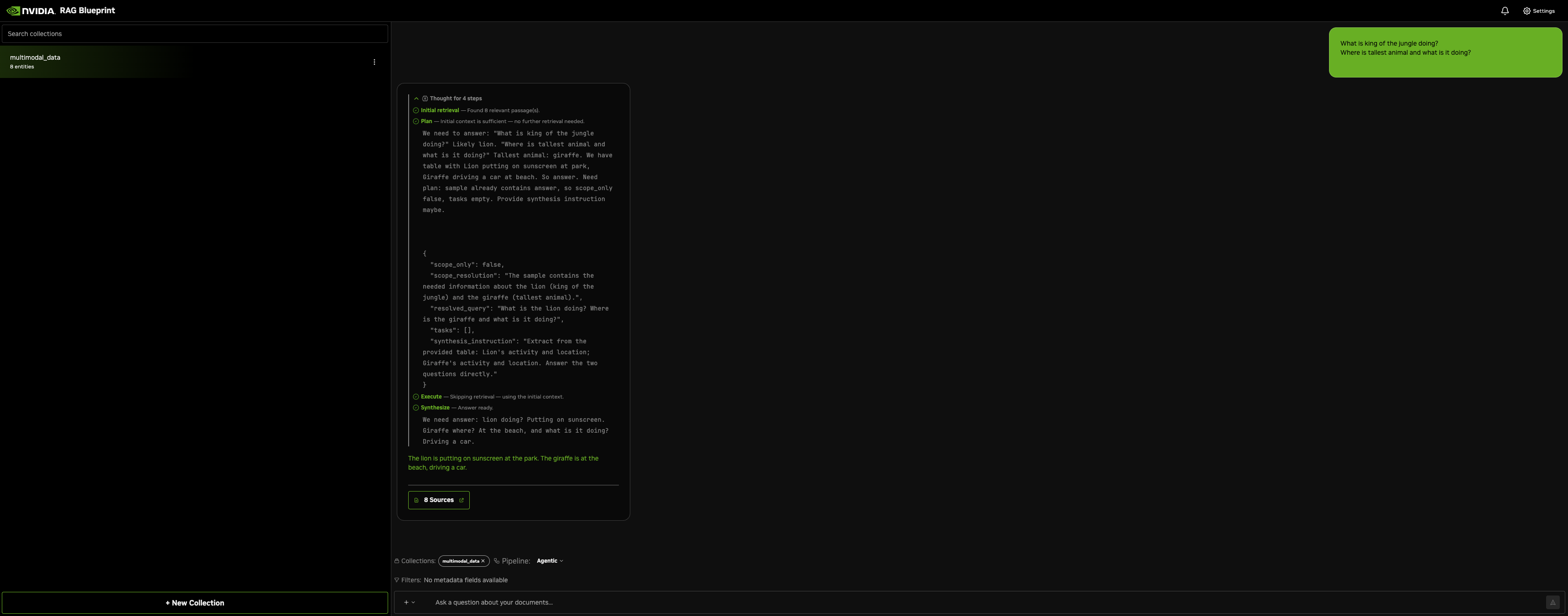
With streaming on (the default), the RAG UI surfaces each stage as the graph runs: initial retrieval, the plan, per-task execution, and synthesis stream in before the final answer.
Change the deployment default (environment variable)#
Use this to change the default for requests that do not set agentic.
Docker Deployment#
Follow Self-Hosted Models or NVIDIA-Hosted Models. The reference compose env file (deploy/compose/nvdev.env) already includes agentic LLM settings; flip the enable flag only.
export ENABLE_AGENTIC_RAG=true
Restart the RAG server:
docker compose -f deploy/compose/docker-compose-rag-server.yaml up -d
Helm Deployment#
Edit values.yaml:
envVars:
  # ... existing configurations ...
  ENABLE_AGENTIC_RAG: "true"

# Optional—per-role API keys (required only when overriding NVIDIA_API_KEY).
envSecrets:
  agenticPlannerLlmApiKey: ""
  agenticTaskLlmApiKey: ""
  agenticSeedGenLlmApiKey: ""
  agenticSynthesisLlmApiKey: ""
Apply changes as in Change a Deployment.
Configuration#
Agentic behavior is driven by environment variables from deploy/compose/docker-compose-rag-server.yaml and the matching Helm values.yaml.
Top-level#
The following table summarizes the main toggles:
Variable |
Default |
Description |
|---|---|---|
|
|
Route knowledge-base queries through the agentic pipeline. Override per request with the |
|
|
Agent log level ( |
|
|
Run verification after first synthesis. Improves accuracy at higher LLM cost. |
|
|
Token budget for chunk context in agent prompts; chunks beyond this are truncated. |
Per-role LLMs#
Each role has its own env prefix. Docker Compose chains these role-specific settings through the main APP_LLM_* settings, so one APP_LLM_MODELNAME, APP_LLM_SERVERURL, and APP_LLM_APIKEY configuration applies to every agentic role unless a role-specific AGENTIC_*_LLM_* value is set. If a role’s MODEL is empty, the builder uses the planner LLM, then the main RAG LLM.
Role |
Used for |
Server URL |
Model |
API Key |
|---|---|---|---|---|
Planner |
Scope resolution, task creation, verification |
|
|
|
Task |
Answering sub-questions |
|
|
|
Seed-gen |
Retry follow-up queries |
|
|
|
Synthesis |
Final answer |
|
|
|
Default Compose values come from the main LLM config: APP_LLM_SERVERURL defaults to nim-llm:8000 and APP_LLM_MODELNAME defaults to nvidia/nemotron-3-super-120b-a12b. Set SERVERURL="" to use the NVIDIA-hosted API. API keys fall back through the role-specific value, APP_LLM_APIKEY, and the usual NVIDIA-hosted defaults.
Per-request /v1/generate model and llm_endpoint values override every agentic role for that request. Omit those fields to use the deployment or role-specific configuration.