> This page is for Multi-Tenant, version v3.0 (default).
> For other versions, use one of these documentation indexes:
> - v3.0 (default): https://docs.nvidia.com/run-ai/multi-tenant/v3.0/llms.txt
> - v2.26: https://docs.nvidia.com/run-ai/multi-tenant/v2.26/llms.txt
> - v2.25: https://docs.nvidia.com/run-ai/multi-tenant/v2.25/llms.txt
> - v2.24: https://docs.nvidia.com/run-ai/multi-tenant/v2.24/llms.txt
> For clean Markdown of any page, append .md to the page URL.
> For a complete documentation index, see https://docs.nvidia.com/run-ai/llms.txt.
> For AI client integration (Claude Code, Cursor, etc.), connect to the MCP server at https://docs.nvidia.com/run-ai/_mcp/server.
# External Access to Critical Services
NVIDIA Run:ai requires certain network connectivity and access. This page outlines the network endpoints and protocols that must be reachable from your NVIDIA Run:ai control plane and tenant cluster nodes to support installation, artifact retrieval, and ongoing platform communication.
Meeting these requirements ensures that:
* Users and API clients can reach the NVIDIA Run:ai control plane and each tenant cluster
* Tenant clusters can sync with and report metrics to the control plane
* The control plane can reach the external metrics store
* The control plane and tenant cluster nodes can pull the images required for installation
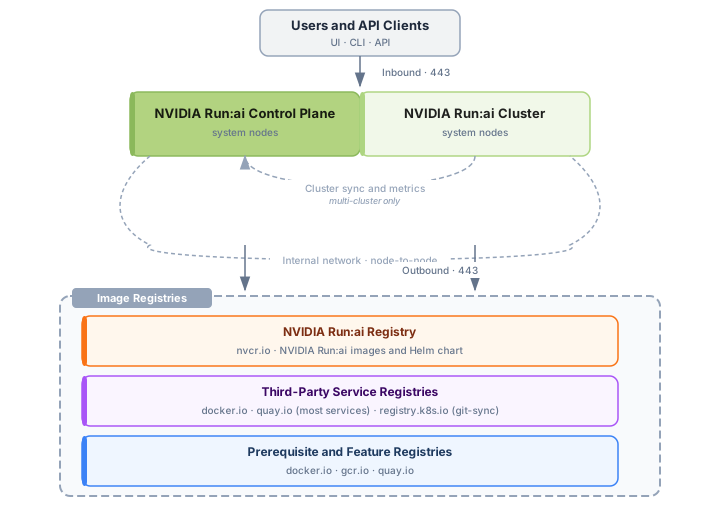 | Category | Requirement | Details |
|---|---|---|
| Inbound | Ports open for user and API access | See [Inbound Rules](#inbound-rules) |
| Outbound | Control plane and tenant cluster sync | See [Control Plane and Tenant Cluster Sync](#control-plane-and-tenant-cluster-sync) |
| Outbound | Metrics store access | See [Metrics Store](#metrics-store) |
| Outbound | NVIDIA Run:ai registry and catalog access | See [NVIDIA Run:ai Registry and Catalogs](#nvidia-runai-registry-and-catalogs) |
| Outbound | Networking component registry access | See [Networking Component Registries](#networking-component-registries) |
| Outbound | Third-party service registry access | See [Third-Party Service Registries](#third-party-service-registries) |
| Outbound | Prerequisite and feature component registry access | See [Prerequisite and Feature Registries](#prerequisite-and-feature-registries) |
| Internal | Node-to-node connectivity | See [Internal Network](#internal-network) |
**Note**
Ensure the inbound and outbound rules below are correctly applied to your firewall before proceeding with installation.
## Inbound Rules
To allow your organization's NVIDIA Run:ai users to interact with the cluster using the NVIDIA Run:ai Command-line interface, or access specific UI features, certain inbound ports need to be open:
| Name | Description | Source | Destination | Port |
| --------------------------- | ----------------- | ------- | --------------------------- | ---- |
| NVIDIA Run:ai control plane | HTTPS entry point | 0.0.0.0 | NVIDIA Run:ai system nodes | 443 |
| NVIDIA Run:ai cluster | HTTPS entry point | 0.0.0.0 | NVIDIA Run:ai system nodes | 443 |
## Outbound Rules
### Control Plane and Tenant Cluster Sync
| Name | Description | Source | Destination | Port |
| ------------- | --------------------------------------------------------------------------------- | ----------------------------------- | --------------------------------- | ---- |
| Cluster sync | Sync a tenant cluster with the NVIDIA Run:ai control plane | Tenant cluster system nodes | NVIDIA Run:ai control plane FQDN | 443 |
| Metric store | Push tenant cluster metrics to the NVIDIA Run:ai control plane's metric store | Tenant cluster system nodes | NVIDIA Run:ai control plane FQDN | 443 |
### Metrics Store
The NVIDIA Run:ai control plane requires outbound access to the external metrics store configured for the deployment. See [Metrics Store Requirements](/run-ai/multi-tenant/documentation/installation-and-configuration/system-requirements/metrics-store-requirements) for the supported backends and their connection details.
| Name | Description | Source | Destination | Port |
| ------------- | -------------------------------------------------------------------- | ------------------------------------------- | ---------------------------------------------- | ---- |
| Metrics store | Read and write metrics to the configured external metrics store | NVIDIA Run:ai control plane system nodes | Grafana Labs endpoint, or your Mimir instance's FQDN | 443 |
### NVIDIA Run:ai Registry and Catalogs
| Name | Description | Source | Destination | Port |
| -------------------------- | ------------------------------------------------------------ | ------------------------------------------ | ------------------- | ---- |
| NVIDIA Run:ai NGC Registry | Pull NVIDIA Run:ai images and Helm chart for installation | All Kubernetes nodes | nvcr.io | 443 |
| NVIDIA NGC | Browse NGC catalog | NVIDIA Run:ai control plane system nodes | api.ngc.nvidia.com | 443 |
| Hugging Face | Browse Hugging Face models | NVIDIA Run:ai control plane system nodes | huggingface.co | 443 |
### Networking Component Registries
The ingress controller you install as part of [Networking Setup](/run-ai/multi-tenant/documentation/installation-and-configuration/system-requirements/networking-setup) is pulled from the following registry:
| Name | Description | Source | Destination | Port |
| ---------------------------- | ------------------------------------------------ | ---------------------- | ----------- | ---- |
| Ingress Controller Registry | HAProxy ingress controller image repository | All Kubernetes nodes | docker.io | 443 |
### Third-Party Service Registries
NVIDIA Run:ai deploys the following third-party services as part of installation. Images are pulled from Docker Hub, Quay, or the Kubernetes registry. For the full list of services, see [Third-Party Services](/run-ai/multi-tenant/documentation/installation-and-configuration/system-requirements/third-party-services).
| Name | Description | Source | Destination | Port |
| ------------- | ------------------------------------ | ------------------------------------ | ------------------ | ---- |
| Keycloak | Identity federation and SSO service | NVIDIA Run:ai control plane system nodes | docker.io / quay.io | 443 |
| PostgreSQL | Centralized platform database | NVIDIA Run:ai control plane system nodes | docker.io / quay.io | 443 |
| Traefik | API gateway | NVIDIA Run:ai control plane system nodes | docker.io / quay.io | 443 |
| NATS | Message broker | NVIDIA Run:ai control plane system nodes | docker.io / quay.io | 443 |
| Valkey | Workload cache | Tenant cluster system nodes | docker.io / quay.io | 443 |
| oauth2-proxy | Workload access authentication | Tenant cluster system nodes | docker.io / quay.io | 443 |
| git-sync | Git data source sync | Tenant cluster system nodes | registry.k8s.io | 443 |
### Prerequisite and Feature Registries
NVIDIA Run:ai requires additional prerequisite and feature components to be installed on each tenant cluster, such as the GPU Operator and Prometheus Operator. These components are pulled from the following registries:
| Name | Type | Description | Source | Destination | Port |
| ---------------------------- | ------------- | ------------------------------------------------ | ---------------------- | ----------- | ---- |
| NVIDIA NGC Catalog | Prerequisite | GPU Operator image repository | All Kubernetes nodes | nvcr.io | 443 |
| Red Hat Container Registry | Prerequisite | Prometheus Operator image repository | All Kubernetes nodes | quay.io | 443 |
| Google Container Registry | Feature | Knative image repository | All Kubernetes nodes | gcr.io | 443 |
| Docker Hub Registry | Feature | Kubeflow Training Operator image repository | All Kubernetes nodes | docker.io | 443 |
## Internal Network
Ensure that all Kubernetes nodes can communicate with each other across all necessary ports. Kubernetes assumes full interconnectivity between nodes, so you must configure your network to allow this seamless communication. Specific port requirements may vary depending on your network setup.
## IPv6 Considerations
For IPv6-only environments, `nvcr.io` only has an IPv4 DNS record, so clients on IPv6-only networks cannot resolve it and image pulls will fail. Two options:
* **Configure NAT64/DNS64** - Translates between IPv6 and IPv4 so the cluster reaches the registry transparently.
* **Deploy an internal mirror registry** - Use Harbor, Artifactory, or a similar registry over IPv6, configured to pull from `nvcr.io` over IPv4. Point the cluster at the mirror through the container runtime config and NVIDIA Run:ai Helm image-registry overrides.
`gcr.io`, `quay.io`, and `docker.io` are reachable over IPv6 directly.
| Category | Requirement | Details |
|---|---|---|
| Inbound | Ports open for user and API access | See [Inbound Rules](#inbound-rules) |
| Outbound | Control plane and tenant cluster sync | See [Control Plane and Tenant Cluster Sync](#control-plane-and-tenant-cluster-sync) |
| Outbound | Metrics store access | See [Metrics Store](#metrics-store) |
| Outbound | NVIDIA Run:ai registry and catalog access | See [NVIDIA Run:ai Registry and Catalogs](#nvidia-runai-registry-and-catalogs) |
| Outbound | Networking component registry access | See [Networking Component Registries](#networking-component-registries) |
| Outbound | Third-party service registry access | See [Third-Party Service Registries](#third-party-service-registries) |
| Outbound | Prerequisite and feature component registry access | See [Prerequisite and Feature Registries](#prerequisite-and-feature-registries) |
| Internal | Node-to-node connectivity | See [Internal Network](#internal-network) |
**Note**
Ensure the inbound and outbound rules below are correctly applied to your firewall before proceeding with installation.
## Inbound Rules
To allow your organization's NVIDIA Run:ai users to interact with the cluster using the NVIDIA Run:ai Command-line interface, or access specific UI features, certain inbound ports need to be open:
| Name | Description | Source | Destination | Port |
| --------------------------- | ----------------- | ------- | --------------------------- | ---- |
| NVIDIA Run:ai control plane | HTTPS entry point | 0.0.0.0 | NVIDIA Run:ai system nodes | 443 |
| NVIDIA Run:ai cluster | HTTPS entry point | 0.0.0.0 | NVIDIA Run:ai system nodes | 443 |
## Outbound Rules
### Control Plane and Tenant Cluster Sync
| Name | Description | Source | Destination | Port |
| ------------- | --------------------------------------------------------------------------------- | ----------------------------------- | --------------------------------- | ---- |
| Cluster sync | Sync a tenant cluster with the NVIDIA Run:ai control plane | Tenant cluster system nodes | NVIDIA Run:ai control plane FQDN | 443 |
| Metric store | Push tenant cluster metrics to the NVIDIA Run:ai control plane's metric store | Tenant cluster system nodes | NVIDIA Run:ai control plane FQDN | 443 |
### Metrics Store
The NVIDIA Run:ai control plane requires outbound access to the external metrics store configured for the deployment. See [Metrics Store Requirements](/run-ai/multi-tenant/documentation/installation-and-configuration/system-requirements/metrics-store-requirements) for the supported backends and their connection details.
| Name | Description | Source | Destination | Port |
| ------------- | -------------------------------------------------------------------- | ------------------------------------------- | ---------------------------------------------- | ---- |
| Metrics store | Read and write metrics to the configured external metrics store | NVIDIA Run:ai control plane system nodes | Grafana Labs endpoint, or your Mimir instance's FQDN | 443 |
### NVIDIA Run:ai Registry and Catalogs
| Name | Description | Source | Destination | Port |
| -------------------------- | ------------------------------------------------------------ | ------------------------------------------ | ------------------- | ---- |
| NVIDIA Run:ai NGC Registry | Pull NVIDIA Run:ai images and Helm chart for installation | All Kubernetes nodes | nvcr.io | 443 |
| NVIDIA NGC | Browse NGC catalog | NVIDIA Run:ai control plane system nodes | api.ngc.nvidia.com | 443 |
| Hugging Face | Browse Hugging Face models | NVIDIA Run:ai control plane system nodes | huggingface.co | 443 |
### Networking Component Registries
The ingress controller you install as part of [Networking Setup](/run-ai/multi-tenant/documentation/installation-and-configuration/system-requirements/networking-setup) is pulled from the following registry:
| Name | Description | Source | Destination | Port |
| ---------------------------- | ------------------------------------------------ | ---------------------- | ----------- | ---- |
| Ingress Controller Registry | HAProxy ingress controller image repository | All Kubernetes nodes | docker.io | 443 |
### Third-Party Service Registries
NVIDIA Run:ai deploys the following third-party services as part of installation. Images are pulled from Docker Hub, Quay, or the Kubernetes registry. For the full list of services, see [Third-Party Services](/run-ai/multi-tenant/documentation/installation-and-configuration/system-requirements/third-party-services).
| Name | Description | Source | Destination | Port |
| ------------- | ------------------------------------ | ------------------------------------ | ------------------ | ---- |
| Keycloak | Identity federation and SSO service | NVIDIA Run:ai control plane system nodes | docker.io / quay.io | 443 |
| PostgreSQL | Centralized platform database | NVIDIA Run:ai control plane system nodes | docker.io / quay.io | 443 |
| Traefik | API gateway | NVIDIA Run:ai control plane system nodes | docker.io / quay.io | 443 |
| NATS | Message broker | NVIDIA Run:ai control plane system nodes | docker.io / quay.io | 443 |
| Valkey | Workload cache | Tenant cluster system nodes | docker.io / quay.io | 443 |
| oauth2-proxy | Workload access authentication | Tenant cluster system nodes | docker.io / quay.io | 443 |
| git-sync | Git data source sync | Tenant cluster system nodes | registry.k8s.io | 443 |
### Prerequisite and Feature Registries
NVIDIA Run:ai requires additional prerequisite and feature components to be installed on each tenant cluster, such as the GPU Operator and Prometheus Operator. These components are pulled from the following registries:
| Name | Type | Description | Source | Destination | Port |
| ---------------------------- | ------------- | ------------------------------------------------ | ---------------------- | ----------- | ---- |
| NVIDIA NGC Catalog | Prerequisite | GPU Operator image repository | All Kubernetes nodes | nvcr.io | 443 |
| Red Hat Container Registry | Prerequisite | Prometheus Operator image repository | All Kubernetes nodes | quay.io | 443 |
| Google Container Registry | Feature | Knative image repository | All Kubernetes nodes | gcr.io | 443 |
| Docker Hub Registry | Feature | Kubeflow Training Operator image repository | All Kubernetes nodes | docker.io | 443 |
## Internal Network
Ensure that all Kubernetes nodes can communicate with each other across all necessary ports. Kubernetes assumes full interconnectivity between nodes, so you must configure your network to allow this seamless communication. Specific port requirements may vary depending on your network setup.
## IPv6 Considerations
For IPv6-only environments, `nvcr.io` only has an IPv4 DNS record, so clients on IPv6-only networks cannot resolve it and image pulls will fail. Two options:
* **Configure NAT64/DNS64** - Translates between IPv6 and IPv4 so the cluster reaches the registry transparently.
* **Deploy an internal mirror registry** - Use Harbor, Artifactory, or a similar registry over IPv6, configured to pull from `nvcr.io` over IPv4. Point the cluster at the mirror through the container runtime config and NVIDIA Run:ai Helm image-registry overrides.
`gcr.io`, `quay.io`, and `docker.io` are reachable over IPv6 directly.