> For clean Markdown of any page, append .md to the page URL.
> For a complete documentation index, see https://docs.nvidia.com/run-ai/multi-tenant/v3.0/documentation/installation-and-configuration/install/guided-installation/llms.txt.
> For AI client integration (Claude Code, Cursor, etc.), connect to the MCP server at https://docs.nvidia.com/run-ai/_mcp/server.
# Guided Installation
The `runai-installer` CLI is the recommended way to install the NVIDIA Run:ai control plane in multi-tenant mode, for both Open Source and Support-Entitled Release installations. It enhances the installation experience by doing everything through a single configuration file - see [Installer Flow](#installer-flow) below for what it does step by step.
## When to Use the Installer
Use `runai-installer` when:
- You are deploying a new NVIDIA Run:ai multi-tenant control plane (upgrades are not yet supported by the installer).
- You want built-in preflight validation before any changes are applied.
- You prefer a single tool that validates your configuration, runs preflight checks, and deploys the NVIDIA Run:ai control plane.
For environments with an existing GitOps pipeline (Argo CD) or where administrators manage Helm releases directly, see [Manual Helm](/run-ai/multi-tenant/documentation/installation-and-configuration/install/manual-helm/preparations).
## Installer Flow
The `runai-installer` CLI installs the NVIDIA Run:ai control plane from a configuration YAML file. Before applying any changes, it validates your configuration, runs preflight checks, and deploys the NVIDIA Run:ai control plane. The installer runs once, against the control plane's dedicated Kubernetes cluster.
The following diagram shows the installer flow - from downloading the `runai-installer` CLI to a verified, running control plane:
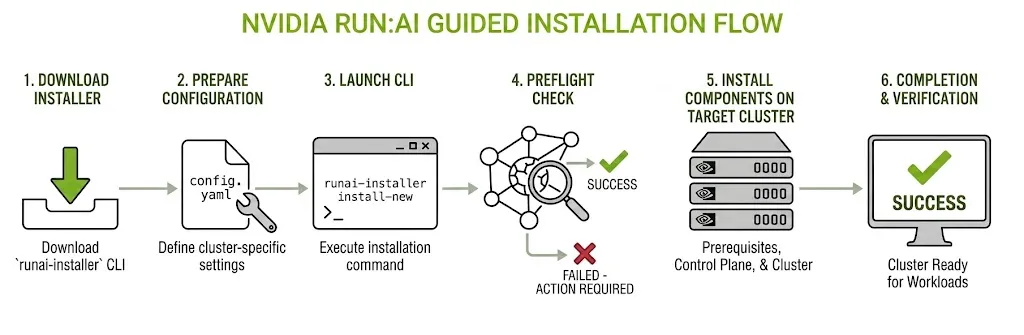 The installation is built from two artifacts: the `runai-installer` binary (available for AMD64 and ARM64) and a declarative `config.yaml` file - the single input that describes what to install and how. At run time, the installer writes detailed logs to a local directory and persists session state in the cluster, so an interrupted installation can be resumed without re-entering configuration values.
The installer is not a one-time step - rerunning it against an already-installed control plane with an updated `config.yaml` adds any configuration that was skipped initially, installing only what is missing and leaving the rest of the deployment untouched.
**Note**
The installer runs once for the control plane, and once for each tenant's NVIDIA Run:ai cluster. A tenant cluster is registered with its tenant through the control plane's Management API first - see [Create a Tenant and Cluster](/run-ai/multi-tenant/documentation/installation-and-configuration/install/guided-installation/onboard-a-tenant/create-a-tenant-and-cluster) - the installer itself does not create tenants or associate a cluster with one.
## What the Installer Does
The installer assumes your control plane's and each tenant cluster's Kubernetes cluster and infrastructure already meet [System Requirements](/run-ai/multi-tenant/documentation/installation-and-configuration/system-requirements) - deployment model, infrastructure (hardware, OS, Kubernetes distribution, storage, and permissions), networking (load balancer, ingress controller, FQDNs, DNS, and TLS certificates), third-party services, the external metrics store, and external access to critical services. The following sections describe what the installer itself configures and deploys, across both its control plane run and its tenant cluster run.
### Configures Networking
Configures routing, FQDNs, and TLS for the control plane and for each tenant cluster. See [Networking Setup](/run-ai/multi-tenant/documentation/installation-and-configuration/system-requirements/networking-setup) for how these components work and how to prepare them beforehand.
- **Routing** - `externalConnection.type` routes traffic through your own Ingress Controller and Load Balancer (`ingress`) or an existing Gateway resource (`gatewayApi`), for both the control plane and a tenant cluster. Host-based routing is used by default; a tenant cluster can instead use path-based routing via `cluster.workloadRouting`.
- **FQDN and DNS** - Takes the control plane's wildcard domain, or a tenant cluster's domain (plus its inference wildcard domain, if installing Knative), as configuration fields, and wires them into the routing and TLS the installer configures.
- **TLS** - Accepts your own certificate and private key per FQDN, or generates a self-signed certificate automatically when `tls.generateSelfSigned` is enabled.
### Handles Registry Authentication
NVIDIA Run:ai's images and Helm charts are pulled from NGC, configured with `registry.type: ngc`. Open Source installations use this same setting and do not require any credentials; Support-Entitled Release installations require an NGC API Key to authenticate, using an NGC Personal Key - a token beginning with `nvapi-`, presented with the literal username `$oauthtoken`. See [Registry Credentials](/run-ai/multi-tenant/documentation/installation-and-configuration/install/guided-installation/preparations#registry-credentials) for how to generate and configure it.
### Installs Prerequisites
The GPU Operator and Prometheus are required for every tenant cluster - the GPU Operator provisions and manages GPUs on worker nodes, so the cluster can run AI workloads at all, and Prometheus provides the metrics NVIDIA Run:ai's own monitoring is built on. Additional prerequisites apply depending on your environment - for example, the Network Operator, for RDMA or Multi-Node NVLink-capable nodes. See [Prerequisites and Features](/run-ai/multi-tenant/documentation/installation-and-configuration/install/guided-installation/onboard-a-tenant/prerequisites-and-features#prerequisites) for what each component does and when you need it.
The installer configures and installs each required prerequisite automatically, before deploying the NVIDIA Run:ai cluster itself, when its `mode` is set to `install`.
**Note**
A missing prerequisite does not block the cluster from coming up, but affected workloads cannot schedule and metrics do not work.
### Installs Features
Features extend NVIDIA Run:ai to support specific workload types on a tenant cluster, and only need enabling for the workload types that tenant actually plans to run - Knative Serving for standard (single-node) inference, the Kubeflow Training Operator for distributed training, and so on for each supported workload type. See [Prerequisites and Features](/run-ai/multi-tenant/documentation/installation-and-configuration/install/guided-installation/onboard-a-tenant/prerequisites-and-features#features) for what each component does and when you need it.
The installer configures and enables each feature automatically when its `mode` is set to `install`.
### Deploys the NVIDIA Run:ai Control Plane and Cluster
The NVIDIA Run:ai control plane and cluster each ship as a single Helm chart, and the installer deploys whichever one `install.mode` calls for - `runai_control_plane_only` for the control plane, or `runai_cluster_only` for a tenant cluster, each in its own installer run with its own configuration file.
Each chart also bundles the third-party services it depends on (PostgreSQL, Keycloak, and others), installed as part of the same chart. These images are sourced from their official upstream registries (Docker Hub, Quay, registry.k8s.io) - see [Third-Party Services](/run-ai/multi-tenant/documentation/installation-and-configuration/system-requirements/third-party-services) for which services each chart brings in.
NVIDIA Run:ai's images are pulled directly from NGC, and each third-party service's images directly from its own upstream registry, during installation, over the outbound access you prepare beforehand - see [External Access to Critical Services](/run-ai/multi-tenant/documentation/installation-and-configuration/system-requirements/external-access-to-critical-services) for the outbound connectivity the install needs.
## Next Steps
Continue with:
* **[Preparations](/run-ai/multi-tenant/documentation/installation-and-configuration/install/guided-installation/preparations)** - System requirements, external metrics store, registry credentials, and downloading the installer.
* **[Control Plane Installation](/run-ai/multi-tenant/documentation/installation-and-configuration/install/guided-installation/control-plane-setup/control-plane-installation)** - Install the control plane.
* **[API Access Setup](/run-ai/multi-tenant/documentation/installation-and-configuration/install/guided-installation/control-plane-setup/api-access-setup)** - Configure programmatic API access using service account credentials.
* **[Create a Tenant and Cluster](/run-ai/multi-tenant/documentation/installation-and-configuration/install/guided-installation/onboard-a-tenant/create-a-tenant-and-cluster)** - Create a tenant, provision and register its cluster, and install that cluster.
* **[Configuration Templates](/run-ai/multi-tenant/documentation/installation-and-configuration/install/guided-installation/control-plane-setup/configuration-templates)** - Complete, ready-to-use configurations for specific use cases.
See also the [Configuration Reference](/run-ai/multi-tenant/documentation/installation-and-configuration/install/guided-installation/configuration-reference) for all configuration YAML fields and their accepted values, to build your own configuration from scratch.
## Docs
- [Preparations](https://docs.nvidia.com/run-ai/multi-tenant/v3.0/documentation/installation-and-configuration/install/guided-installation/preparations.md)
- [Control Plane Installation](https://docs.nvidia.com/run-ai/multi-tenant/v3.0/documentation/installation-and-configuration/install/guided-installation/control-plane-setup/control-plane-installation.md)
- [API Access Setup](https://docs.nvidia.com/run-ai/multi-tenant/v3.0/documentation/installation-and-configuration/install/guided-installation/control-plane-setup/api-access-setup.md)
- [Configuration Templates](https://docs.nvidia.com/run-ai/multi-tenant/v3.0/documentation/installation-and-configuration/install/guided-installation/control-plane-setup/configuration-templates.md)
- [Create a Tenant and Cluster](https://docs.nvidia.com/run-ai/multi-tenant/v3.0/documentation/installation-and-configuration/install/guided-installation/onboard-a-tenant/create-a-tenant-and-cluster.md)
- [Prerequisites and Features](https://docs.nvidia.com/run-ai/multi-tenant/v3.0/documentation/installation-and-configuration/install/guided-installation/onboard-a-tenant/prerequisites-and-features.md)
- [Configuration Templates](https://docs.nvidia.com/run-ai/multi-tenant/v3.0/documentation/installation-and-configuration/install/guided-installation/onboard-a-tenant/configuration-templates.md)
- [Delete a Tenant](https://docs.nvidia.com/run-ai/multi-tenant/v3.0/documentation/installation-and-configuration/install/guided-installation/onboard-a-tenant/delete-a-tenant.md)
- [Configuration Reference](https://docs.nvidia.com/run-ai/multi-tenant/v3.0/documentation/installation-and-configuration/install/guided-installation/configuration-reference.md)
- [Command Reference and Troubleshooting](https://docs.nvidia.com/run-ai/multi-tenant/v3.0/documentation/installation-and-configuration/install/guided-installation/command-reference-and-troubleshooting.md)
The installation is built from two artifacts: the `runai-installer` binary (available for AMD64 and ARM64) and a declarative `config.yaml` file - the single input that describes what to install and how. At run time, the installer writes detailed logs to a local directory and persists session state in the cluster, so an interrupted installation can be resumed without re-entering configuration values.
The installer is not a one-time step - rerunning it against an already-installed control plane with an updated `config.yaml` adds any configuration that was skipped initially, installing only what is missing and leaving the rest of the deployment untouched.
**Note**
The installer runs once for the control plane, and once for each tenant's NVIDIA Run:ai cluster. A tenant cluster is registered with its tenant through the control plane's Management API first - see [Create a Tenant and Cluster](/run-ai/multi-tenant/documentation/installation-and-configuration/install/guided-installation/onboard-a-tenant/create-a-tenant-and-cluster) - the installer itself does not create tenants or associate a cluster with one.
## What the Installer Does
The installer assumes your control plane's and each tenant cluster's Kubernetes cluster and infrastructure already meet [System Requirements](/run-ai/multi-tenant/documentation/installation-and-configuration/system-requirements) - deployment model, infrastructure (hardware, OS, Kubernetes distribution, storage, and permissions), networking (load balancer, ingress controller, FQDNs, DNS, and TLS certificates), third-party services, the external metrics store, and external access to critical services. The following sections describe what the installer itself configures and deploys, across both its control plane run and its tenant cluster run.
### Configures Networking
Configures routing, FQDNs, and TLS for the control plane and for each tenant cluster. See [Networking Setup](/run-ai/multi-tenant/documentation/installation-and-configuration/system-requirements/networking-setup) for how these components work and how to prepare them beforehand.
- **Routing** - `externalConnection.type` routes traffic through your own Ingress Controller and Load Balancer (`ingress`) or an existing Gateway resource (`gatewayApi`), for both the control plane and a tenant cluster. Host-based routing is used by default; a tenant cluster can instead use path-based routing via `cluster.workloadRouting`.
- **FQDN and DNS** - Takes the control plane's wildcard domain, or a tenant cluster's domain (plus its inference wildcard domain, if installing Knative), as configuration fields, and wires them into the routing and TLS the installer configures.
- **TLS** - Accepts your own certificate and private key per FQDN, or generates a self-signed certificate automatically when `tls.generateSelfSigned` is enabled.
### Handles Registry Authentication
NVIDIA Run:ai's images and Helm charts are pulled from NGC, configured with `registry.type: ngc`. Open Source installations use this same setting and do not require any credentials; Support-Entitled Release installations require an NGC API Key to authenticate, using an NGC Personal Key - a token beginning with `nvapi-`, presented with the literal username `$oauthtoken`. See [Registry Credentials](/run-ai/multi-tenant/documentation/installation-and-configuration/install/guided-installation/preparations#registry-credentials) for how to generate and configure it.
### Installs Prerequisites
The GPU Operator and Prometheus are required for every tenant cluster - the GPU Operator provisions and manages GPUs on worker nodes, so the cluster can run AI workloads at all, and Prometheus provides the metrics NVIDIA Run:ai's own monitoring is built on. Additional prerequisites apply depending on your environment - for example, the Network Operator, for RDMA or Multi-Node NVLink-capable nodes. See [Prerequisites and Features](/run-ai/multi-tenant/documentation/installation-and-configuration/install/guided-installation/onboard-a-tenant/prerequisites-and-features#prerequisites) for what each component does and when you need it.
The installer configures and installs each required prerequisite automatically, before deploying the NVIDIA Run:ai cluster itself, when its `mode` is set to `install`.
**Note**
A missing prerequisite does not block the cluster from coming up, but affected workloads cannot schedule and metrics do not work.
### Installs Features
Features extend NVIDIA Run:ai to support specific workload types on a tenant cluster, and only need enabling for the workload types that tenant actually plans to run - Knative Serving for standard (single-node) inference, the Kubeflow Training Operator for distributed training, and so on for each supported workload type. See [Prerequisites and Features](/run-ai/multi-tenant/documentation/installation-and-configuration/install/guided-installation/onboard-a-tenant/prerequisites-and-features#features) for what each component does and when you need it.
The installer configures and enables each feature automatically when its `mode` is set to `install`.
### Deploys the NVIDIA Run:ai Control Plane and Cluster
The NVIDIA Run:ai control plane and cluster each ship as a single Helm chart, and the installer deploys whichever one `install.mode` calls for - `runai_control_plane_only` for the control plane, or `runai_cluster_only` for a tenant cluster, each in its own installer run with its own configuration file.
Each chart also bundles the third-party services it depends on (PostgreSQL, Keycloak, and others), installed as part of the same chart. These images are sourced from their official upstream registries (Docker Hub, Quay, registry.k8s.io) - see [Third-Party Services](/run-ai/multi-tenant/documentation/installation-and-configuration/system-requirements/third-party-services) for which services each chart brings in.
NVIDIA Run:ai's images are pulled directly from NGC, and each third-party service's images directly from its own upstream registry, during installation, over the outbound access you prepare beforehand - see [External Access to Critical Services](/run-ai/multi-tenant/documentation/installation-and-configuration/system-requirements/external-access-to-critical-services) for the outbound connectivity the install needs.
## Next Steps
Continue with:
* **[Preparations](/run-ai/multi-tenant/documentation/installation-and-configuration/install/guided-installation/preparations)** - System requirements, external metrics store, registry credentials, and downloading the installer.
* **[Control Plane Installation](/run-ai/multi-tenant/documentation/installation-and-configuration/install/guided-installation/control-plane-setup/control-plane-installation)** - Install the control plane.
* **[API Access Setup](/run-ai/multi-tenant/documentation/installation-and-configuration/install/guided-installation/control-plane-setup/api-access-setup)** - Configure programmatic API access using service account credentials.
* **[Create a Tenant and Cluster](/run-ai/multi-tenant/documentation/installation-and-configuration/install/guided-installation/onboard-a-tenant/create-a-tenant-and-cluster)** - Create a tenant, provision and register its cluster, and install that cluster.
* **[Configuration Templates](/run-ai/multi-tenant/documentation/installation-and-configuration/install/guided-installation/control-plane-setup/configuration-templates)** - Complete, ready-to-use configurations for specific use cases.
See also the [Configuration Reference](/run-ai/multi-tenant/documentation/installation-and-configuration/install/guided-installation/configuration-reference) for all configuration YAML fields and their accepted values, to build your own configuration from scratch.
## Docs
- [Preparations](https://docs.nvidia.com/run-ai/multi-tenant/v3.0/documentation/installation-and-configuration/install/guided-installation/preparations.md)
- [Control Plane Installation](https://docs.nvidia.com/run-ai/multi-tenant/v3.0/documentation/installation-and-configuration/install/guided-installation/control-plane-setup/control-plane-installation.md)
- [API Access Setup](https://docs.nvidia.com/run-ai/multi-tenant/v3.0/documentation/installation-and-configuration/install/guided-installation/control-plane-setup/api-access-setup.md)
- [Configuration Templates](https://docs.nvidia.com/run-ai/multi-tenant/v3.0/documentation/installation-and-configuration/install/guided-installation/control-plane-setup/configuration-templates.md)
- [Create a Tenant and Cluster](https://docs.nvidia.com/run-ai/multi-tenant/v3.0/documentation/installation-and-configuration/install/guided-installation/onboard-a-tenant/create-a-tenant-and-cluster.md)
- [Prerequisites and Features](https://docs.nvidia.com/run-ai/multi-tenant/v3.0/documentation/installation-and-configuration/install/guided-installation/onboard-a-tenant/prerequisites-and-features.md)
- [Configuration Templates](https://docs.nvidia.com/run-ai/multi-tenant/v3.0/documentation/installation-and-configuration/install/guided-installation/onboard-a-tenant/configuration-templates.md)
- [Delete a Tenant](https://docs.nvidia.com/run-ai/multi-tenant/v3.0/documentation/installation-and-configuration/install/guided-installation/onboard-a-tenant/delete-a-tenant.md)
- [Configuration Reference](https://docs.nvidia.com/run-ai/multi-tenant/v3.0/documentation/installation-and-configuration/install/guided-installation/configuration-reference.md)
- [Command Reference and Troubleshooting](https://docs.nvidia.com/run-ai/multi-tenant/v3.0/documentation/installation-and-configuration/install/guided-installation/command-reference-and-troubleshooting.md)