

Finetuning Microservices Overview#
Fine-Tuning Micro-Services (FTMS) is TAO Toolkit’s interface for accelerating model training without the overhead of setting up and managing the compute infrastructure. This interface makes it easy to offer a managed training service to your development teams. It automates model finetuning flows and improves user experience for non-domain experts, avoiding training flow intricacies and significantly reducing user input mistakes. It also makes it easy to integrate into other applications and MLOps services.
If you are looking on using this version of TAO Toolkit with the legacy TAO Launcher CLI, please refer to TAO Launcher. Or directly with DNN containers, please refer to Working With The Containers.
TAO API v2 Architecture#
The TAO API v2 introduces a unified job-centric architecture that simplifies interactions with the TAO Toolkit. Key improvements include:
- Unified Jobs API
All operations (experiment training, dataset processing, inference) are now handled through a single unified Jobs API endpoint. This eliminates the complexity of separate experiment and dataset endpoints from v1.
- Environment Variable Authentication
Authentication now uses environment variables (
TAO_BASE_URL,TAO_ORG,TAO_TOKEN) that are automatically set by the login command. This approach provides improved security and easier integration with CI/CD pipelines and containerized environments.- Resource-Specific Metadata
Dedicated metadata endpoints for workspaces, datasets, and jobs provide clearer and more efficient access to resource information.
- Enhanced Job Control
Comprehensive job management with pause, resume, cancel, and delete operations for better workflow control.
The following diagram depicts the high-level architecture where clients can access the API using three methods:
REST API - Direct HTTP/HTTPS requests to API endpoints
Python SDK - The
nvidia-tao-clientPython package for programmatic accessCLI - The
taocommand-line interface for terminal-based workflows
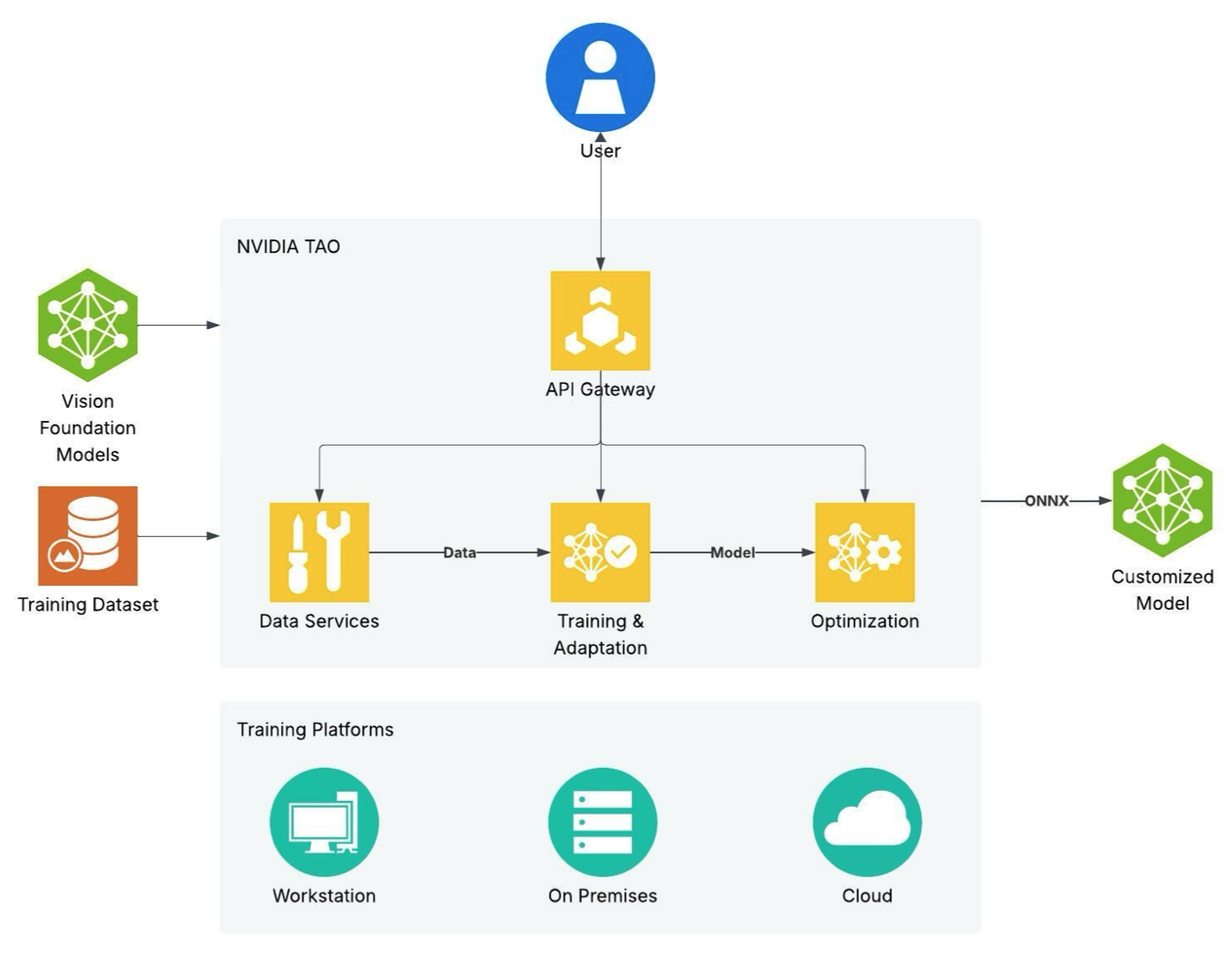
The FTMS securely accesses remotely stored datasets and pushes experiment artifacts to your remote storage.
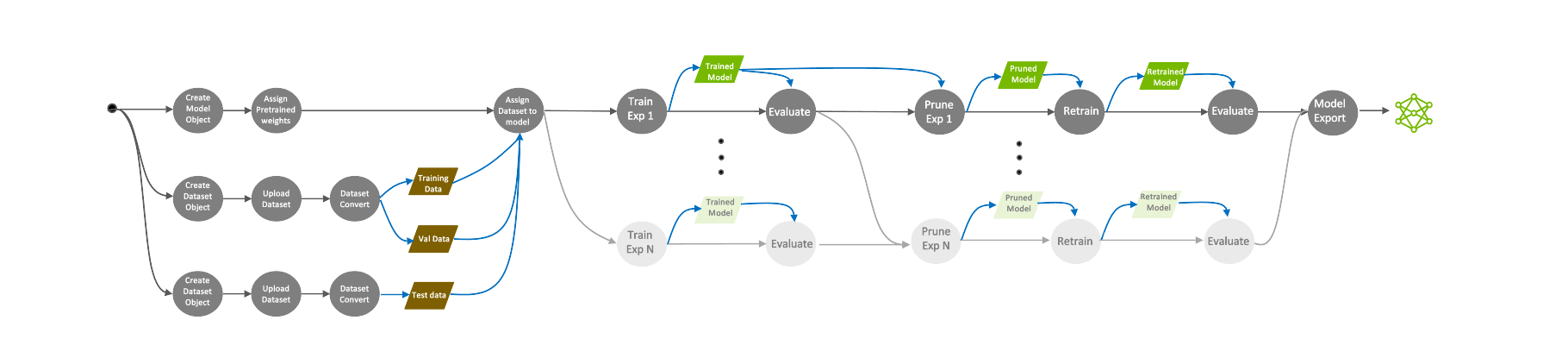
Actions such as train, evaluate, prune, retrain, export, and inference can be spawned using API calls. For each action, you can request the action’s default parameters, update said parameters to your liking, then pass them while running the action. The specs are in the JSON format.
The unified Jobs API endpoint allows you to create, cancel, download, and monitor jobs. Job API endpoints also provide useful information such as epoch number, accuracy, loss values, and ETA.
API v2 Key Features#
- Unified Jobs Interface
Create both experiment jobs and data processing jobs through a single
jobsendpoint using thekindparameter set toexperimentordataset.- Job-Centric Operations
All operations return job IDs that you can monitor, control, and manage through consistent job control endpoints.
- Inference Microservices
Deploy trained models as scalable inference endpoints with dedicated microservice management APIs.
- AutoML Integration
Built-in AutoML support with Bayesian and Hyperband algorithms for hyperparameter optimization.
- MLOps Integration
Native support for Weights & Biases, ClearML, and TensorBoard for experiment tracking and visualization.
Access Methods#
After FTMS deployment, you can access the TAO API through:
- REST API Documentation
Swagger UI:
/api/v2/swaggerReDoc:
/api/v2/redocOpenAPI Specs:
/api/v2/openapi.jsonor/api/v2/openapi.yamlExample Notebooks:
/api/v2/tao_api_notebooks.zip
- Python SDK
Install the SDK via pip:
pip install nvidia-tao-client
The SDK provides a
TaoClientclass with methods for all API operations. See Remote Client for details.- Command-Line Interface (CLI)
The CLI is included with the SDK and provides network-specific commands:
tao login --ngc-key YOUR_KEY --ngc-org-name YOUR_ORG
tao classification_pyt list-jobs
tao rtdetr create-job --kind experiment --action train ...
See Remote Client for comprehensive CLI documentation.
Migration from v1 to v2#
If you are migrating from TAO API v1, note these key changes:
- Endpoint Structure
v1:
/api/v1/orgs/{org}/experimentsand/api/v1/orgs/{org}/datasets/{id}/actionsv2:
/api/v2/orgs/{org}/jobs(unified endpoint withkindparameter)
- Authentication
v1: File-based configuration (
~/.tao/config)v2: Environment variables (
TAO_BASE_URL,TAO_ORG,TAO_TOKEN) set by login command
- Job Creation
v1: Separate experiment creation and action execution
v2: Unified job creation with
kind,action, andspecsin a single call
- Resource Management
v1: Limited deletion capabilities
v2: Full CRUD operations on workspaces, datasets, and jobs
For detailed migration guidance, consult the TAO API v1 to v2 migration guide in the SDK documentation.
Getting Started#
To get started with TAO API v2:
Setup: Follow the Microservices Setup guide to deploy FTMS.
Authentication: Use the
/api/v2/loginendpoint ortao loginCLI command.Choose Your Interface: Select REST API, Python SDK, or CLI based on your needs.
Create Resources: Set up workspaces, datasets, and jobs.
Monitor & Deploy: Track job progress and deploy models as inference microservices.
For detailed examples and workflow guides, see: