


Infrastructure Branch Lifecycle and Compatibility#
NVIDIA AI Enterprise Infrastructure software manages GPU drivers, orchestration, and networking. Infrastructure components follow a consistent lifecycle with compatibility across stack layers, enabling independent updates and coordinated upgrades.
Infrastructure Branch#
An Infrastructure Branch contains software for managing and optimizing infrastructure and workloads. The GPU Drivers (NVIDIA vGPU for Compute and the Data Center GPU Driver) are supported for 1 year unless the branch is designated as an LTSB Infrastructure Branch, in which case it is supported for 3 years. During that period, GPU drivers receive regular bug fixes and security updates.
Release Type |
Cadence |
Description |
|---|---|---|
Major Release (x.0) |
Every 6 months |
First release in an Infrastructure Branch. Introduces significant new functionality and can also contain bug fixes and security updates. |
Minor Release (x.y) |
Every 3 months |
Updates a Major Release within the same Infrastructure Branch. Does not introduce significant new functionality but contains bug fixes and security updates. |
Certain Infrastructure Releases are designated as LTSB Infrastructure Releases, extending the support window from 1 year to 3 years.
Policy |
Details |
|---|---|
Designation cadence |
An Infrastructure Release is designated as an LTSB Infrastructure Release at least once every 2 years and at least once for each hardware architecture. |
Notification timeline |
An Infrastructure Release will be designated an LTSB release within 6 months of its general availability. Customers will be notified if the current Infrastructure Release is designated an LTSB Infrastructure Release before the general availability of the next Infrastructure Release. |
The NVIDIA Infrastructure releases include products such as the NVIDIA Container Toolkit, the NVIDIA GPU Operator, the NVIDIA Network Operator, and NVIDIA Run:ai self-hosted. Each product has a different lifecycle. For more information, refer to the individual product documentation.
Products available as an Infra Branch can be found in the Infra Collections on the NGC Catalog.
Note
NVIDIA Run:ai SaaS Lifecycle
NVIDIA Run:ai SaaS is also included in NVIDIA AI Enterprise but is not released through the Infrastructure Branch. Instead, it is delivered as an NVIDIA-managed cloud service, with NVIDIA managing control-plane upgrades on its own schedule. NVIDIA Run:ai SaaS uses the same Major Version-based Full Support / Extended Support / End of Support phase model as the self-hosted offering.
For SaaS lifecycle and release information, refer to:
Interactive Lifecycle and Compatibility Explorer#
Use the interactive explorer below to check cross-stack compatibility between infrastructure components. Select one of four query modes:
By Software Branch - Select an Infrastructure Branch to see all releases and compatible component versions.
By Release - Select a specific release to view the complete compatibility matrix.
By Component - Enter a component type and version to find which releases include it.
Full Stack Check - Enter your GPU driver version to identify your release and validate compatibility.
Note
Refer to the Infra Collections on the NGC Catalog for the latest release information.
This explorer covers cross-stack compatibility for the NVIDIA AI Enterprise Infrastructure Branch, which includes NVIDIA Run:ai self-hosted. NVIDIA Run:ai SaaS is an NVIDIA-managed cloud service with its own cluster compatibility matrix - refer to the NVIDIA Run:ai SaaS Documentation instead.
Infrastructure Lifecycle and Compatibility Explorer
Stack Architecture and Alignment#
NVIDIA AI Enterprise Infrastructure software follows a consistent lifecycle approach across all stack layers, ensuring compatibility and coordinated updates.
Attention
This diagram illustrates the alignment strategy for NVIDIA AI Enterprise Infrastructure components. Version numbers and branch labels shown are illustrative examples only - they are not current component versions or release branches. For current infrastructure releases and cross-stack compatibility, use the Interactive Lifecycle and Compatibility Explorer.
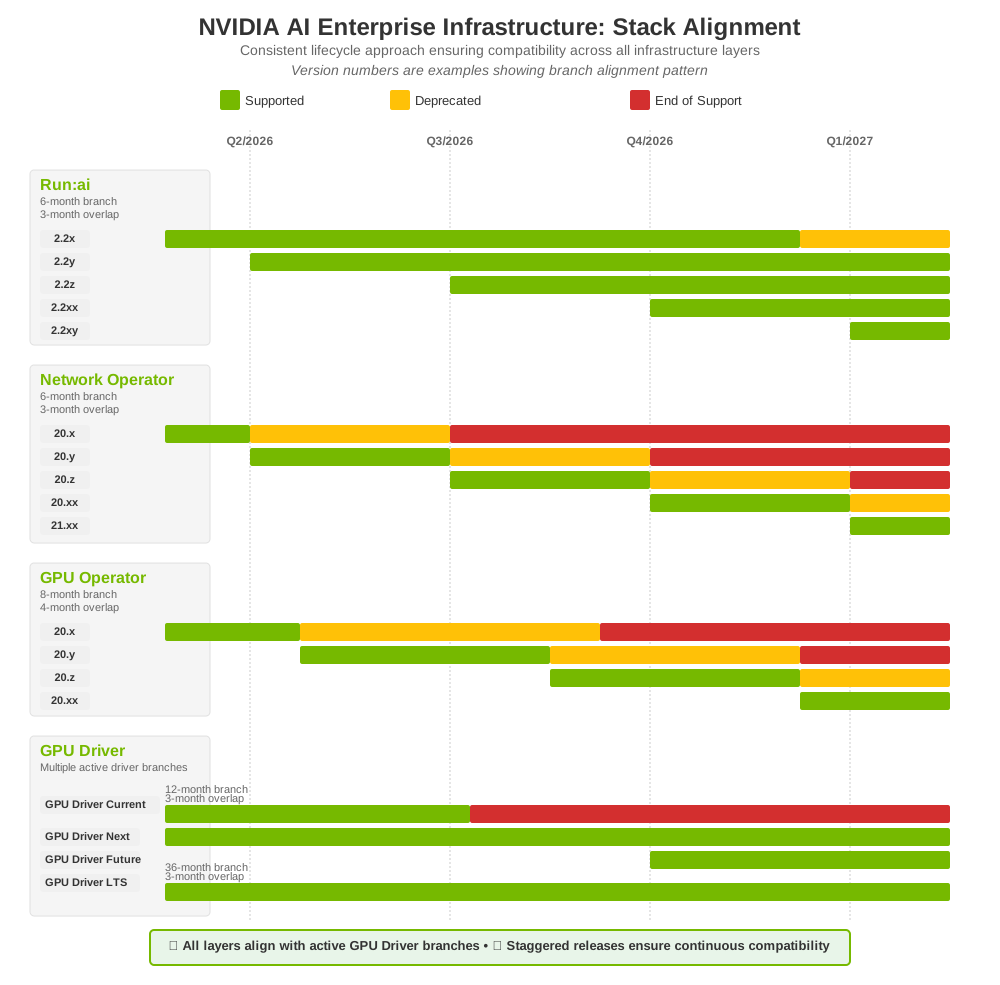
Lifecycle State Definitions#
The following lifecycle states define the support posture for each infrastructure component branch. These states apply to all layers of the NVIDIA AI Enterprise Infrastructure stack.
State |
Definition |
|---|---|
Supported |
Active support with committed resourcing. The branch receives CVE patches, bug fixes, and updates at the cadence defined for its branch type. |
Deprecated |
Still supported with CVE patches and bug fixes, but a deprecation date has been set and customers have been notified. Customers should plan migration to a newer supported branch during this window. |
End of Support |
No longer supported. Older versions of this artifact remain available on the NGC Catalog for download but are no longer supported. Only the latest supported version receives CVE patches, bug fixes, and new features. Upgrade to the latest supported version to continue receiving patches and support. |
End of Life |
The branch is no longer supported and no migration or update path is provided. The branch may remain available on the NGC Catalog as part of the release but is not maintained in any capacity. Customers should not use End of Life branches for any workload. |
Key Observations:
Staggered Releases: Upper stack components release on independent cadences with shorter branch lifecycles (6-8 months)
Extended Driver Support: GPU Driver branches have longer support windows (12-month branch with 3-month overlap for datacenter; 36-month branch for LTS)
Multiple Active Driver Branches: At any given time, multiple GPU driver branches are active and supported
Cross-Stack Compatibility: Upper stack components are compatible across GPU driver branches where supported. Use the Interactive Explorer to verify component availability for a specific release.
Branch Overlap Updates: The overlap between branches enables zero-downtime infrastructure updates
Branch and Version Guidance#
GPU Drivers
Note
Driver tier names (GPU Driver Current, GPU Driver Next, GPU Driver Future, GPU Driver LTS) and upper stack version numbers (2.2x, 20.x) are placeholders used to illustrate the branch alignment pattern. Refer to the Infra Collections on the NGC Catalog for actual release versions.
Driver Tier |
Branch Duration |
Overlap |
Recommended For |
|---|---|---|---|
GPU Driver Current |
12 months |
3 months |
Most production deployments. Latest datacenter driver with full active development and support. |
GPU Driver Next |
12 months |
3 months |
Next datacenter driver branch with full support. Enables proactive migration from the current branch. |
GPU Driver Future |
Pre-release |
Early validation and proactive compatibility verification before general availability. |
|
GPU Driver LTS |
36 months |
3 months |
Highly regulated environments requiring extended stability and support. |
Upper Stack Components (NVIDIA Run:ai self-hosted, NVIDIA Network Operator, NVIDIA GPU Operator)
Guidance |
Details |
|---|---|
Version selection |
Choose any currently supported version. All versions are engineered to work with all active GPU driver branches. |
Update cadence |
Update independently based on your operational needs. Upper stack components do not require lockstep updates with GPU drivers. |
Infrastructure Update Strategy#
Step |
Practice |
Details |
|---|---|---|
1 |
Test in lower environments |
Validate new branches in dev/staging before production. |
2 |
Use overlap windows |
Use the overlap period where multiple GPU Driver branches are under Supported simultaneously to plan migrations without downtime. |