Skip to navigation

System Setup and Installation

View as MarkdownOpen in Claude

Blackwell Ultra System Configuration

The tested environment is one NVIDIA DGX B300 running Ubuntu 24.04.5 LTS and a single full-node KVM guest running Ubuntu 24.04.4 LTS. All eight B300 GPUs, sixteen ConnectX-8 PCIe physical functions (PFs), and four ConnectX-7 bridge functions are passed through to the guest VM. Host storage and both BlueField-3 DPUs are owned and managed by the host. In all essence, it emulates an NVIDIA HGX B300.

The following table outlines the details of the system that was used to run single-node training and inference workloads using a Linux KVM hypervisor.

ComponentTested B300 Configuration
ServerNVIDIA DGX B300
Host CPU2 x Intel® Xeon® 6776P, 64 physical cores per socket, SMT2, 256 logical CPUs
Host memory2 TB across two NUMA nodes
Cache Storage8 x 3.84 TB E1.S NVMe
Boot Storage2 x 1.92 TB M.2 NVMe
Guest CPU240 pinned vCPUs: 2 sockets x 60 cores x 2 threads
Guest memory1.5 TiB backed by 1 GiB hugepages, 768 GiB from each host NUMA node (Do not use all available memory as it will be fully reserved)
Accelerators8 x NVIDIA B300
Cluster NICs8 x dual-port ConnectX-8; 2 PCI physical functions per adapter. 16 PFs passed through, delivering up to 800 Gb/s per adapter
Fabric management4 x ConnectX-7 bridge PFs passed through; Guest Fabric Manager and NVLSM
Storage / management NICs2 x dual-port BlueField-3, 200 Gb/s per port

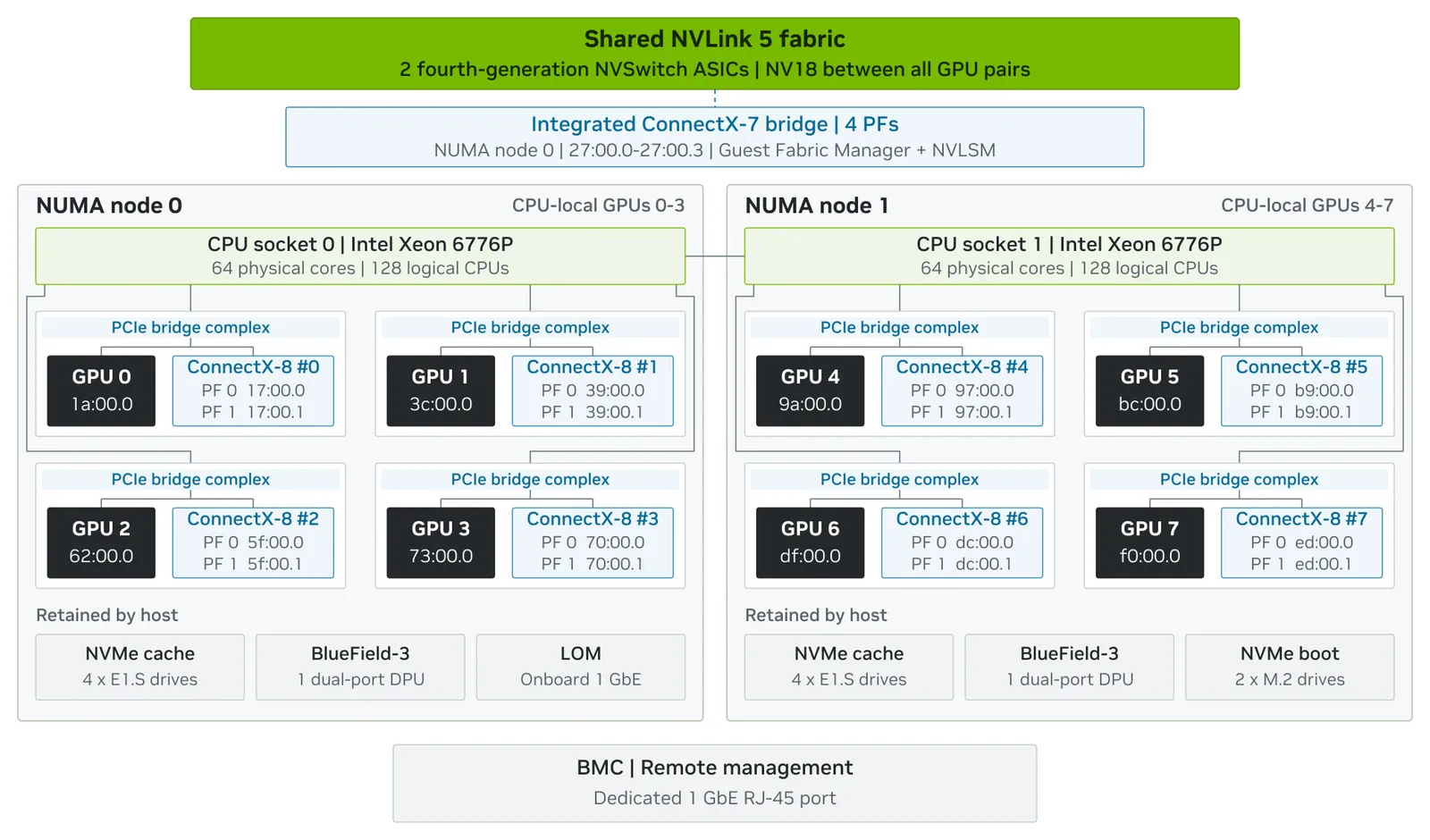
B300 NVL8 Physical Topology

Figure 2. Physical B300 NVL8 topology

Figure 2. Physical B300 NVL8 topology

Blackwell Ultra System Software Configuration

The following table outlines the B300 NVL8 host and guest VM software used for testing.

ComponentVerified version
Ubuntu24.04.4 LTS
Active kernel6.17.0-1032-nvidia
NVIDIA Linux driver580.178.04, open kernel modules (GPU Operator driver container)
Fabric Manager580.178.04, open kernel modules (GPU Operator driver container)
DOCA OFED3.2.3-020000 (host)
NCCL2.29.2+cuda13.1, in nvcr.io/nvidia/hpc-benchmarks:26.02
DCGMnvcr.io/nvidia/k8s/dcgm-exporter:4.5.3-4.8.2 (GPU Operator)
QEMU10.1.0+nvidia6
libvirt11.9.0+nvidia4
Container Toolkit1.20.1-1 (host); GPU Operator-managed (guest)
Docker Engine29.8.1 (host); docker.io 29.1.3 (guest)
NVSM26.06.03
Kubernetes1.34.9 (NVIDIA Cloud Native Stack), containerd 2.3.1
NVIDIA GPU Operatorv26.3.3
NVIDIA Dynamo platform1.3.0

Firmware verified on the tested system

ComponentVersion
SBIOS01.00.06
BMC01.01.35
GPU VBIOS x897.10.73.00.09
GPU InfoROM x8G540.0216.00.03
ConnectX-8 x840.48.1126
BlueField-3 x232.47.1088
E1.S / M.2 NVMeF3MU090 / 51094A30
CPU microcode0x1000405

Guest VM Software Baseline and Topology Information

The following table outlines the guest VM software stack and topology information.

Guest checkObserved result
Operating system / kernelUbuntu 24.04.4 LTS; 6.17.0-1032-nvidia
CPU / memory240 vCPUs, two vNUMA nodes, 1.5 TiB memory
NVIDIA stackNVIDIA GPU Operator v26.3.3: driver 580.178.04 (open kernel modules) and Fabric Manager; container toolkit enabled
RDMA stack20 mlx5 devices (16 ConnectX-8 and 4 ConnectX-7 functions)
PCI passthrough8 B300 GPU Physical Functions (PFs), 16 ConnectX-8 PFs, and 4 PFs from one integrated ConnectX-7 bridge
NVLink fabricNV18 between every GPU pair
GPU / NIC localityEach GPU reports PIX to its paired CX-8 functions, PHB to other same-node pairs, and SYS across sockets
Fabric servicesFabric Manager and NVLSM running; nvidia-smi -q reports Fabric State Completed and Status Success on all eight GPUs
KubernetesNode Ready; 8 GPUs in capacity and allocatable

Qualified stack reference: DGX OS 7 release notes.

Installing the Hypervisor

This guide is based on Linux KVM hypervisors. The validation used Linux KVM with QEMU and libvirt on an Ubuntu 24.04.5 host and an Ubuntu 24.04.4 guest, both on kernel 6.17.0-1032-nvidia and compatible NVIDIA packages can implement the same topology, but package names and service behavior differ. Please consult your vendor documentation for a detailed installation process and validate the following prerequisites before attaching devices to a guest:

  • Install the host OS on the B300 NVL8 boot storage and retain a host-managed network path. Keep the BlueField-3 DPUs and boot-storage NVMe controllers with the host; do not pass them to the VM.

  • Use a LOM or a separate Ethernet NIC for host OS installation and management.

  • Do not use a ConnectX-8 function, or any other NIC that will be passed through to the VM, as the host’s only management path.

  • In full-passthrough mode the host does not need any NVIDIA GPU software for the passed-through devices; the guest runs the NVIDIA driver, Fabric Manager and NVLSM. Before starting the VM, stop all host GPU workloads and stop the host NVIDIA driver, Fabric Manager and NVLSM completely. On the tested host these are managed by the NVIDIA GPU Operator, so setting the node label nvidia.com/gpu.deploy.operands=false stops them.

  • Bind the eight GPUs, sixteen ConnectX-8 functions and four ConnectX-7 functions to vfio-pci at boot:

    • Add vfio-pci.ids=10de:3182,15b3:1023,15b3:1021 to the kernel command line.

    • In /etc/modprobe.d/, add options vfio-pci ids=10de:3182,15b3:1023,15b3:1021 disable_idle_d3=1, softdep nvidia pre: vfio-pci and softdep mlx5_core pre: vfio-pci.

    • Add an initramfs hook that loads vfio, vfio_iommu_type1 and vfio_pci, run update-initramfs -u and update-grub, then reboot.

  • To return to bare-metal mode, shut down the VM, remove these settings, reboot, and restart the host GPU software (remove the nvidia.com/gpu.deploy.operands=false label).

  • Install and verify the virtualization stack:

# Tested: NVIDIA builds of QEMU and libvirt from the Canonical NVIDIA virtualization PPA
sudo add-apt-repository ppa:canonical-nvidia/nvidia-virtualization
sudo apt update
sudo apt install qemu-system-x86=1:10.1.0+nvidia6-1 qemu-utils=1:10.1.0+nvidia6-1 libvirt-daemon-system=11.9.0+nvidia4-1 libvirt-clients=11.9.0+nvidia4-1 ovmf virtinst cpu-checker
# Verify virtualization and the platform services
kvm-ok
virsh version
systemctl is-active libvirtd
cat /proc/cmdline
The complete tested host kernel command line was captured as follows:
BOOT_IMAGE=/vmlinuz-6.17.0-1032-nvidia root=/dev/mapper/ubuntu--vg-ubuntu--lv ro vfio-pci.disable_idle_d3=1 hugepagesz=1G hugepages=0:768,1:768 vfio-pci.ids=10de:3182,15b3:1023,15b3:1021 init_on_alloc=0 iommu=pt intel_iommu=on console=tty0 console=ttyS0,115200n8 pci=realloc=off crashkernel=1G-:0M
ParameterPurpose
intel_iommu=onEnables the Intel IOMMU (VT-d) required for VFIO device assignment
iommu=ptUses identity mapping for devices that stay with the host (NVMe, BlueField-3)
vfio-pci.ids=10de:3182,15b3:1023,15b3:1021Binds the GPUs, ConnectX-8 functions and ConnectX-7 bridge functions to vfio-pci at boot
vfio-pci.disable_idle_d3=1Keeps vfio-pci devices out of the D3 low-power state while they wait for the VM
hugepagesz=1G hugepages=0:768,1:768Reserves 768 x 1 GiB pages on each NUMA node at boot for the 1.5 TiB guest
init_on_alloc=0, pci=realloc=off, console=…, crashkernel=1G-:0MDGX OS host defaults, unchanged
  • Create a base UEFI guest VM with a virtio NIC and virtual disk. Add vCPU pinning, hugepages, vNUMA, PCIe topology, and passthrough devices later by updating the domain XML. Size the disk for the workload; the tested guest used a 3 TiB disk because the inference model cache needs at least 1,210 GiB free. The following command creates the base VM with the required CPU, memory, boot, disk, and management-network settings:
sudo virt-install \
--name b300-ubuntu24-full-passthrough \
--description 'B300 NVL8 full-node passthrough VM' \
--os-variant ubuntu24.04 \
--memory 1572864 \
--vcpus 240,sockets=2,cores=60,threads=2 \
--cpu host-passthrough \
--boot uefi \
--disk path=/var/lib/libvirt/images/b300-guest.qcow2,bus=virtio,size=3072 \
--cdrom /var/lib/libvirt/images/ubuntu-24.04.4-live-server-amd64.iso \
--graphics none \
--network network=default,model=virtio

Understanding system topology

Before writing the VM XML, capture the host topology with lstopo -sv (package hwloc; not installed by default in many distributions) to identify the CPU numbering, PCIe root ports and device BDFs of the system under test, and save the output. Use the topology of the system you are configuring rather than copying an example. The commands below collect the CPU, NUMA, PCI, GPU and RDMA information used in the following sections; run the same commands in the guest after boot and confirm that GPU-to-NIC locality and NUMA placement match the host.

Identify the GPUs, NICs, and other devices that share a NUMA node or PCIe switch. Use those groupings when you define the guest vNUMA and virtual PCIe hierarchy. Keep each GPU aligned with its local ConnectX-8 functions. On a system with switched PCIe topology, a GPU and a peer NIC can communicate through GPUDirect RDMA only when the IOMMU, device capabilities and the peer-to-peer PCIe path are supported.

The reference B300 NVL8 system has 256 logical cores (128 physical cores with hyperthreading enabled) across two NUMA nodes. NUMA node 0 contains logical cores 0-63 and 128-191 with GPUs 0-3 and four dual-port ConnectX-8 adapters. NUMA node 1 contains logical cores 64-127 and 192-255 with GPUs 4-7 and the remaining four adapters. The BlueField-3 DPUs and NVMe controllers are not passed through to the VM.

Run the following commands on the host before writing the VM XML, and run them again in the guest after it boots. On the host they record the CPU numbering, NUMA layout, PCI addresses and GPU-to-NIC locality used to build the domain XML. In the guest they confirm that the VM reproduces the same layout. The table below the commands lists what each command shows on the tested host and guest.
lscpu -e=CPU,CORE,SOCKET,NODE,ONLINE # CPU numbering, SMT siblings and the NUMA node of each CPU
numactl --hardware # NUMA nodes with their CPUs and memory
lstopo-no-graphics --of console # Full CPU, cache and PCIe tree (package hwloc)
lspci -Dnnk # PCI address, vendor:device ID and driver in use per device
nvidia-smi -L # GPU list
nvidia-smi topo -m # GPU-GPU and GPU-NIC connection types, CPU and NUMA affinity
ibv_devices # RDMA devices, one per ConnectX function
rdma link # RDMA links and their state
CheckCommandHost (Bare Metal)Guest VM / Expected Result
CPUs and SMTlscpu256 logical CPUs: 2 sockets × 64 cores × 2 threads240 vCPUs: 2 sockets × 60 cores × 2 threads (4 cores per socket reserved for QEMU)
NUMA CPUslscpu, numactl —hardwareNode 0: CPUs 0-63,128-191 Node 1: CPUs 64-127,192-255Node 0: vCPUs 0-119 Node 1: vCPUs 120-239 (Each vCPU pinned to host CPU on same NUMA node)
NUMA Memorynumactl —hardwareNode 0: 1031836 MB Node 1: 1032090 MBNode 0: 773988 MB Node 1: 774091 MB (~768 GiB per guest node, less kernel reservations)
GPUsnvidia-smi -L8 × NVIDIA B300 SXM6 AC8 × NVIDIA B300 SXM6 AC (Guest PCI addresses 21-24:00.0, 81-84:00.0 differ from host)
NVLinknvidia-smi topo -mNV18 between every GPU pairNV18 between every GPU pair (Identical)
GPU-to-NIC Localitynvidia-smi topo -mPaired ConnectX-8: PXB Other same-node NICs: NODE Other node: SYSPaired ConnectX-8: PIX Other same-node NICs: PHB Other node: SYS
Driverslspci -Dnnk10de:3182 on nvidia 15b3:1023 and 15b3:1021 on mlx5_core8 × 10de:3182 on nvidia 16 × 15b3:1023 and 4 × 15b3:1021 on mlx5_core
RDMA Devicesibv_devices, rdma link24 mlx5 devices: 16 ConnectX-8, 4 ConnectX-7, 4 BlueField-320 mlx5 devices: 16 ConnectX-8, 4 ConnectX-7 (No BlueField-3)
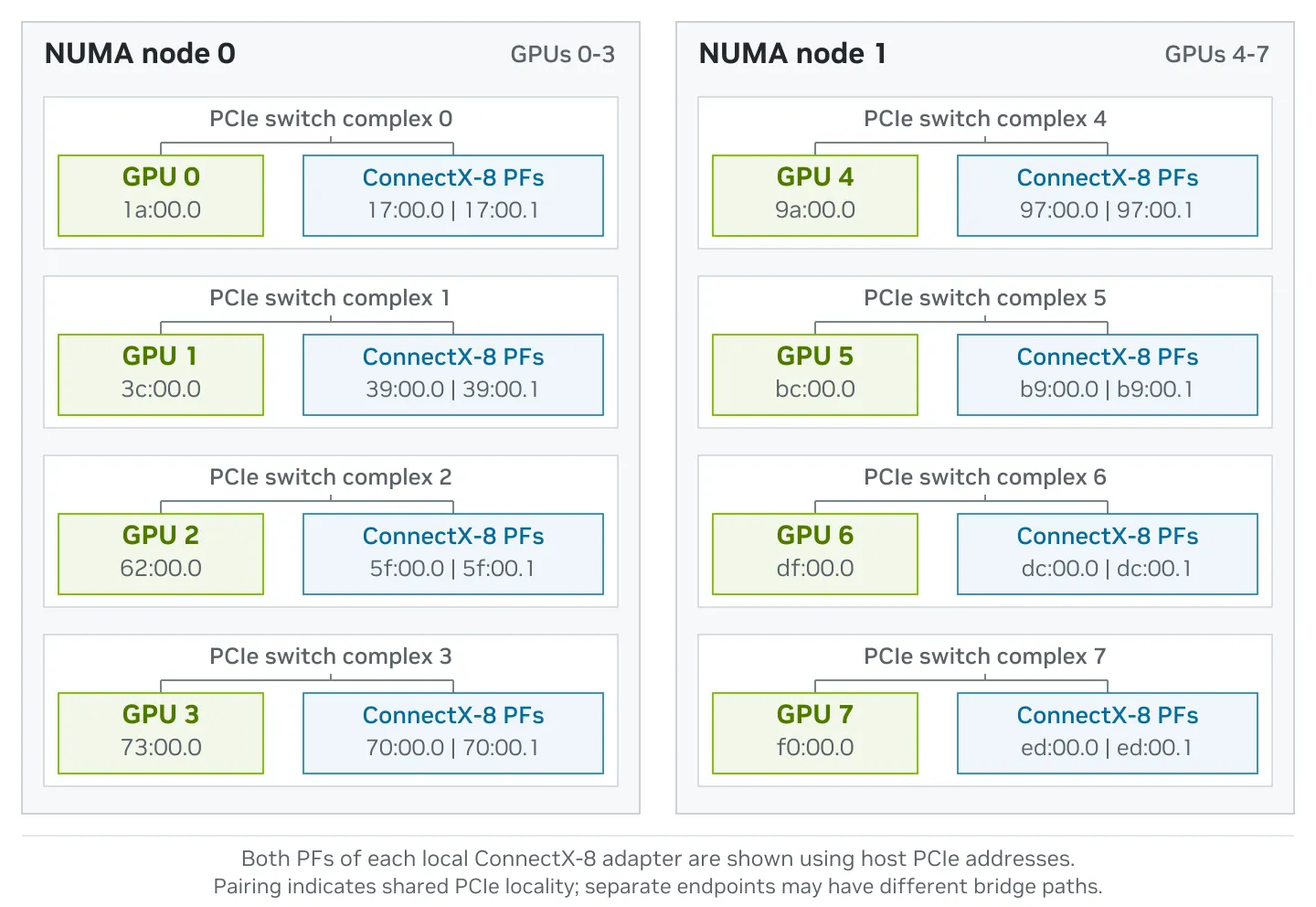
GPU and NIC locality on the B300 Host

Figure 3. GPU and ConnectX-8 pairing discovered on the B300 host.

Figure 3. GPU and ConnectX-8 pairing discovered on the B300 host.

Sample ‘lstopo’ output

Excerpt of lstopo-no-graphics --of console output for the tested B300 NVL8, showing GPU 0 and its ConnectX-8 below one PCIe switch. The full output is in the Appendix:

Machine (2016GB total)
Package L#0
NUMANode L#0 (P#0 1008GB)
HostBridge
PCIBridge
PCIBridge
PCIBridge
PCI 17:00.0 (Ethernet)
Net "eno10np0"
OpenFabrics "mlx5_4"
PCI 17:00.1 (Ethernet)
Net "enp23s0f1np1"
OpenFabrics "mlx5_5"
PCIBridge
PCIBridge
PCIBridge
PCI 1a:00.0 (3D)
CoProc(OpenCL) "opencl0d0"

Additional System Setup Considerations

The following setup items apply to the tested B300 NVL8 configuration.

  • Enable Intel IOMMU passthrough mode and confirm the IOMMU group for each device before assigning it to the guest.

  • Enable PCIe Address Translation Services (ATS) on every ConnectX-8 adapter and configure PCIe Access Control Services (ACS) on the root ports and PCIe switch ports on the GPU and ConnectX-8 paths, as described in the Appendix. Both are required by this configuration.

  • Use the NVIDIA open GPU kernel modules. The tested host and guest both used the NVIDIA GPU Operator (v26.3.3, driver.kernelModuleType: open), whose driver container provides a matched driver, GSP firmware and Fabric Manager (580.178.04).

  • Use the in-tree R580 nvidia-peermem module for GPUDirect RDMA and verify that it is loaded. Do not install the legacy peer-memory components alongside it.

  • Allocate 1 GiB hugepages symmetrically: reserve 768 GiB from each host NUMA node for the 1.5 TiB guest. Reserve them at boot with hugepagesz=1G hugepages=0:768,1:768 on the kernel command line, and mount a 1 GiB hugetlbfs for libvirt (for example /dev/hugepages1G with pagesize=1G).

  • Reserve physical cores for QEMU emulator and I/O threads. Do not include those cores in the guest vCPU pinning set.

  • Keep simultaneous multithreading (SMT) enabled to match the tested CPU mapping.

  • Assign the eight GPUs, sixteen ConnectX-8 functions, and four ConnectX-7 bridge functions to one owner at a time: either the host or the VM.

  • The four ConnectX-7 bridge functions are the management ConnectX-7 that connects to the two QM3 switches of the NVLink fabric. Identify them by the SMDL=SW_MNG string in their PCI VPD (27:00.0-27:00.3 on the tested system). After the VM boots, confirm in the guest that both QM3 switches are visible and that Fabric Manager completed fabric setup on all eight GPUs.

  • Use the GPU or NIC endpoint link state– speed and width– to validate or troubleshoot physical PCIe performance. Virtual root-port metadata inside a QEMU guest describes the guest topology, and not the physical B300 link.

  • Record firmware and topology for each system. Reuse a BDF map only across cluster nodes with matching hardware and firmware.

Verify the items above with the following commands. Run them on the host, except where a comment says to run them in the guest.

# IOMMU passthrough mode is active, and the IOMMU group of each device to be assigned
grep -o -E 'intel_iommu=on|iommu=pt' /proc/cmdline
find /sys/kernel/iommu_groups/ -type l | sort -V
# ATS enabled on every ConnectX-8 function (expect True(1))
for bdf in $(lspci -D -d 15b3:1023 | cut -d' ' -f1); do
echo "$bdf $(sudo mlxconfig -d "$bdf" q ATS_ENABLED | awk '$1=="ATS_ENABLED"{print $2}')"
done
# 1 GiB hugepages: 768 free on each NUMA node before the VM starts
grep -H . /sys/devices/system/node/node*/hugepages/hugepages-1048576kB/free_hugepages
# Physical PCIe link speed and width of an endpoint (example: GPU 0 at 1a:00.0)
sudo lspci -s 1a:00.0 -vv | grep -E 'LnkCap:|LnkSta:'
# Management ConnectX-7 (expect 27:00.0-27:00.3)
for bdf in $(lspci -d 15b3: | awk '{print $1}'); do
sudo lspci -vv -s "$bdf"
done
# In the guest: nvidia-peermem is loaded
lsmod | grep -E '^nvidia_peermem'
# In the guest: both QM3 switches are visible, and fabric setup completed
sudo mst start
sudo mst status -v | grep -c Quantum-3 # expect 2
nvidia-smi -q | grep -A2 -i '^ *Fabric' | grep -E 'State|Status' # expect Completed / Success

Optimal device selection

When assigning GPUs, NICs and storage controllers to a VM, preserve the physical relationships shown by lstopo, lspci and nvidia-smi topo -m. The tested full-node VM uses both sockets because it owns all eight GPUs.

1. Select devices on same CPU socket / NUMA node as VM vCPUs

Bandwidth and latency between PCIe devices and system memory is optimal when a device accesses memory attached to its local CPU socket/NUMA node. On the reference B300 NVL8 node–

  • NUMA node 0 contains GPUs 0-3, four ConnectX-8 adapters and host logical CPUs 0-63, and 128-191.

  • NUMA Node 1 contains GPUs 4-7, remaining four ConnectX-8 adapters and logical CPUs 64-127 and 192-255.

The guest VM mirrors this layout with vNUMA node 0 for vCPUs 0-119 and vNUMA node 1 for vCPUs 120-239.

Physical domainCPU and memoryGPU / network assignmentGuest domain
NUMA node 0CPUs 0-63,128-191; 1 TiB host memoryGPU 0-3; CX-8 at 17:00.0/.1, 39:00.0/.1, 5f:00.0/.1, 70:00.0/.1vNUMA Node 0: vCPUs 0-119; 768 GiB
NUMA node 1CPUs 64-127,192-255; 1 TiB host memoryGPU 4-7; CX-8 at 97:00.0/.1, b9:00.0/.1, dc:00.0/.1, ed:00.0/.1vNUMA Node 1: vCPUs 120-239; 768 GiB

The guest VM spans both NUMA nodes, but each guest NUMA node, memory cell and PCIe branch remains aligned with its host NUMA node.

2. Select NICs, Storage Controllers proximate to GPU

Proximity is the PCIe path between a GPU and a peer device. Best GPUDirect RDMA performance is obtained when the GPUs and peer devices (NICs, Storage Controllers) are below the same physical PCIe switch complex and are represented beneath the same virtual root-port group. Performance may degrade as the PCIe path length increases, traversing multiple PCIe switches or the PCIe root complex. Pair each GPU only with peer devices on the same CPU socket; cross-socket peer traffic must cross the inter-socket link.

On the reference B300 NVL8 system, every GPU is paired with the two functions of one ConnectX-8 adapter. The VM XML keeps each trio together.

Device topology relationshipB300 exampleUse
GPU and peer device below the same PCIe switchGPU 0 at 1a:00.0 with CX-8 17:00.0/.1Preferred
GPU and peer device below a common PCIe root complex/NUMA node, different GPU groupGPU 0 with CX-8 39:00.0/.1Functional but longer path
Cross-socket i.e. GPU and peer device on separate NUMA nodesGPU 0 with CX-8 97:00.0/.1Avoid for peer traffic

The tested B300 NVL8 VM does not pass through storage controllers. It uses a qcow2 disk with cache=none and io=native, while BlueField-3 and NVMe controllers remain host-owned.

NVIDIA SXM platforms have all-to-all GPU NVLink connectivity so GPU selection does not apply to the full-node configuration. On the reference node, the guest receives all eight B300 GPUs which form a single NVSwitch fabric, along with the four ConnectX-7 bridge functions required for guest Fabric Manager operation.

The nvidia-smi topo -m output reports NV18 between every GPU pair. Each GPU therefore has the same NVLink reachability within the full-node VM.