


NVIDIA vGPU for Compute Overview#
NVIDIA vGPU (Virtual GPU) for Compute lets multiple VMs share one physical GPU while each VM sees a dedicated-style device. This page explains core terms, how components fit together, the three vGPU modes—Time-Sliced vGPU, MIG-Backed vGPU, and Time-Sliced MIG-Backed vGPU—and headline features, before you install or size a deployment. For platform-specific known issues and host/guest constraints, see NVIDIA vGPU for Compute Limitations.
Key Terms#
For definitions of vGPU Manager, vGPU Guest Driver, NVIDIA Licensing System, and NVIDIA AI Enterprise Infra Collection, see the Glossary.
NVIDIA vGPU Architecture Overview#
Under the NVIDIA Virtual GPU Manager on the hypervisor, one physical GPU can expose multiple vGPUs, each attachable to a guest VM as its own GPU device.
Download the latest vGPU for Compute drivers from the NVIDIA AI Enterprise Infra 8 collection.
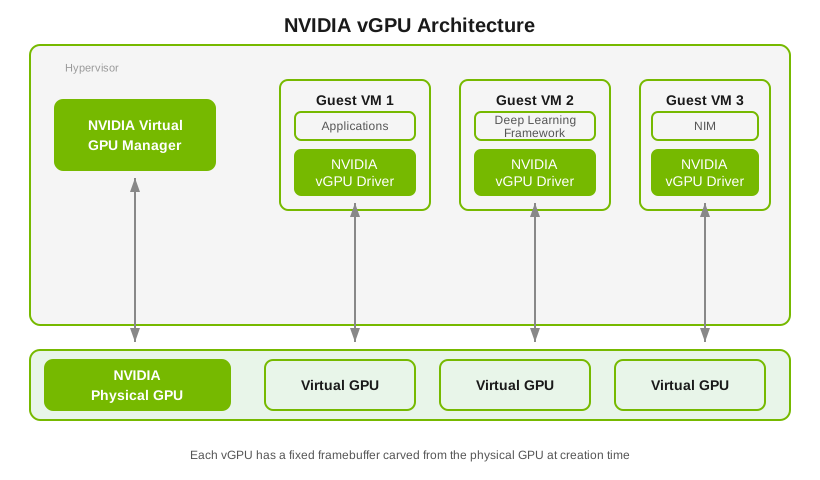
Each vGPU behaves like a GPU with a fixed framebuffer carved from the physical GPU at creation time; that memory stays reserved for that vGPU until the vGPU is destroyed.
NVIDIA vGPU for Compute Configurations#
Supported modes depend on the physical GPU:
Time-sliced vGPUs are available on all NVIDIA AI Enterprise supported GPUs.
On GPUs with Multi-Instance GPU (MIG), these MIG-backed variants are supported:
MIG-backed vGPUs that use a whole GPU instance
Time-sliced vGPUs within a MIG instance (time-sliced, MIG-backed)
vGPU Mode |
Description |
GPU Partitioning |
Isolation |
Use Cases |
Supported GPUs |
|---|---|---|---|---|---|
Time-Sliced vGPU |
Multiple Compute VMs time-share the same physical GPU: SMs and engines are used one vGPU at a time in scheduled slices. |
Temporal |
Strong hardware memory and fault isolation; round-robin scheduling yields solid throughput when strict per-VM compute isolation is not required. |
Workloads tolerating shared compute time, or platforms without MIG-backed vGPU. Typical fits: lighter inference, preprocessing, and model dev/test before large training. |
|
MIG-backed vGPU |
Built from one or more MIG slices on a MIG-capable GPU; each VM owns the SMs and engines of its GPU instance and runs in parallel with VMs on other instances on the same card. See Virtual GPU Types for Supported GPUs for profiles and sizing. |
Spatial |
Strong hardware memory and fault isolation; dedicated cache and memory bandwidth per instance with lower scheduling jitter than pure time-slicing on the full GPU. |
Multi-tenant or SLA-sensitive setups: consistent inference, fine-tuning, or smaller training jobs that need predictable isolation on one physical GPU. |
|
Time-Sliced, MIG-Backed vGPU |
Uses part of a MIG instance; VMs on that instance time-share its SMs and engines. Introduced with the RTX PRO 6000 and RTX PRO 4500 Blackwell Server Edition GPUs. Profile details: NVIDIA vGPU Types Reference. |
Spatial between MIG instances; temporal within each instance. |
Hardware isolation between instances; within an instance, time-sharing similar tradeoffs to full-GPU time-slicing but scoped to the MIG partition. |
Dense multi-tenant layouts that need hard boundaries between tenant groups but more than one light workload per MIG slice—for example:
|
RTX PRO 6000 Blackwell Server Edition, RTX PRO 4500 Blackwell Server Edition |
NVIDIA vGPU for Compute Key Features#
Beyond basic partitioning, vGPU for Compute adds networking, migration, scheduling, and memory features aimed at AI, ML, and HPC in virtualized clusters.
Capability |
Description |
|---|---|
MIG-Backed vGPU |
Hardware-level GPU partitioning with spatial isolation for multi-tenant workloads. |
Device Groups |
Automated detection and provisioning of physically connected devices for optimal topology. |
GPUDirect RDMA and Storage |
Direct memory access and storage I/O bypass that reduces CPU overhead and latency for GPU-to-GPU and GPU-to-storage transfers. |
Heterogeneous vGPU |
Mixed vGPU profiles on a single GPU for diverse workload requirements. |
Live Migration |
VM migration with minimal downtime (seconds of stun time) for maintenance and load balancing on supported hypervisors. |
Multi-vGPU and P2P |
Multiple vGPUs per VM with peer-to-peer communication. |
NVIDIA NVSwitch |
High-bandwidth GPU-to-GPU interconnect fabric through NVLink. |
NVLink Multicast |
Efficient one-to-many data distribution for distributed training. |
Scheduling Policies |
Workload-specific GPU scheduling algorithms. |
Suspend-Resume |
VM state preservation for flexible resource management. |
Unified Virtual Memory |
Single memory address space across CPU and GPU. |
For platform support, configuration requirements, and compatibility tables per feature, see NVIDIA vGPU for Compute Features.
Platform Limitations and Known Issues#
For host monitoring caveats, hypervisor-specific known issues, MMIO requirements for large-memory VMs, and Microsoft Windows Server constraints, see NVIDIA vGPU for Compute Limitations.