

Cloud Considerations And Choices With NVIDIA Base Command Manager
6.1 Differences Between Cluster On Demand And Cluster Extension
Some explicit differences between Cluster On Demand and Cluster Extension clusters are:
A note about the last entry: The access to the cloud director addresses can be restricted to an administrator-defined set of IP addresses, using the “Externally visible IP” entry in figure 3.1 of the Administrator Manual, after scrolling down in the screen to reach that entry.
6.2 Hardware And Software Availability
BCM head node AMIs are available for the following distributions: RHEL7 and CentOS7.
AMIs with GPU computing instances are available with Amazon cloud computing services, and can be used with BCM AMIs with hvm in the name (not xen in the name).
To power the system off, a shutdown -h now can be used, or the power commands for Base View or cmsh can be executed. These commands stop the instance, without terminating it. Any associated extra drives that were created need to be removed manually, via the Volumes screen in the Elastic Block Store resource item in the navigation menu of the AWS Management Console.
6.3 Reducing Running Costs
6.3.1 Spot Pricing
Spot prices are volatile prices that apply to the nodes within an AWS cluster extension. Tracking their values helps the user to take advantage of cheaper pricing made available at irregular times. The user can decide a threshold spot price (a price quote) in US dollars per hour for instances. Instances that run while under the threshold are called Spot Instances. Spot Instances are described further at http://aws.amazon.com/ec2/spot-instances/.
With the pricing threshold set:
-
If the set spot price threshold is above the instantaneous spot price, then the Spot Instances run.
-
If the set spot price threshold is below the instantaneous spot price, then the Spot Instances are killed.
-
If the set spot price threshold is
N/A, then no conditions apply, and the instances will run On-Demand regardless of the instantaneous spot price.
An On-Demand Instance is one that runs regardless of the price, according to the pricing at http://aws.amazon.com/ec2/pricing/on-demand/.
A persistent request is one that will retry running a Spot Instance if the conditions allow it.
6.3.1.1 Getting An On-Demand Price
The prices command is used to query AWS for On-Demand Prices.
One, or both, of the following items must be specified
-
A region, with the
-r|--regionoption. -
A type of cloud node instance, with the
-t|--typeoption.
For example, if the cloud provider instance for AWS is myaws, then a prices query can be run as follows, from within cloud mode (some output elided):
Example
The preceding query is for all regions, and asks for a price for all cloud node instances of type m5.large. Filtering further for a particular region can be done with the -r option:
Checking the price for a particular region for all types of cloud node instances can be carried out as follows (hundreds of lines of output omitted):
6.3.1.2 Getting A Spot Price
The spotprices command is used to query AWS for Spot Prices.
A region or availability zone must be specified with the -r|--region or the -z|--az options. Additionally, an extra filter can be used to specify the cloud node instance type with the -t|--type option.
For example, if the cloud provider instance for AWS is myaws, then a spotprices query can be run as follows, from within cloud mode (some hundreds of lines of output elided):
Example
An example of additionally filtering for the m5.large node instance type is:
Example
6.3.2 Storage Space Reduction
Reducing the amount of EBS disk storage used per cloud node or per cloud director is often feasible. 15 GB is usually enough for a cloud director, and 5 GB is usually enough for a cloud node with common requirements. In cmsh these values can be set with:
Example
The value for the cloud node EBS storage can also be set via Base View, using the navigation path:
Devices > Cloud Nodes > Edit > Settings > Cloud settings > STORAGE > Storage > ebs > Edit > size
6.4 Setting The Cloud Node Images
The default cloud node image can be set within the VPC instance of cmsh:
Example
The value of defaultami is set by specifying the AMI ID.
Example
A list of possible images is queried with the images command:
Example
Setting the default AMI to the special value latest means that the latest AMI is used.
Setting a default AMI means that cluster extension cloud nodes by default take that default AMI as their image:
Example
The inherited default value can be overridden within the device modei, within the cloudsettings submode:
Example
6.5 Cloud Provider Default Settings
6.5.1 Default Settings For AWS Cloud Nodes
The cloud provider level in cmsh for AWS has some defaults that can be managed:
Example
6.5.2 Default Settings For Azure Cloud Nodes
The cloud provider level in cmsh for Azure also has some defaults that can be managed:
Example
6.5.3 Default Settings For OCI Cloud Nodes
The cloud provider level in cmsh for OCI also has some defaults that can be managed:
Example
6.6 Address Resolution In Cluster Extension Networks
6.6.1 Resolution And globalnet
The globalnet network is introduced in section 3.2.3.5 of the Administrator Manual. It allows an extra level of redirection during node resolution. The reason for the redirection is that it allows the resolution of node names across the entire cluster in a hybrid cluster, regardless of whether the node is a cloud node (cloud director node or regular cloud node) or a non-cloud node (head node, regular node or networked device). A special way of resolving nodes is needed because the Amazon IP addresses are in the 10.0.0.0/8 network space, which conflicts with some of the address spaces used by BCM.
There are no IP addresses defined by globalnet itself. Instead, a node, with its domain defined by the globalnet network parameters, has its name resolved by another network to an IP address. The resolution is done by the nameserver on the head node for all nodes.
6.6.2 Resolution In And Out Of The Cloud
The networks, their addresses, their types, and their domains can be listed from the network mode in cmsh:
In a Type 1 network (section 3.3.9 of the Installation Manual), the head node is connected to internalnet. When a cloud service is configured, the head node is also “connected” to the CMDaemon-managed NetMap “network”. It is useful to think of NetMap as a special network, although it is actually a network mapping from the cloud to internalnet. That is, it connects (maps) from the nodes in one or more cloud networks such as the us-east-1 network provided by Amazon, to IP addresses provided by netmap. The mapping is set up when a cloud extension is set up. With this mapping, packets using NetMap go from the cloud, via an OpenVPN connection to the NetMap IP address. Once the packets reach the OpenVPN interface for that address, which is actually on the head node, they are forwarded via Shorewall’s IPtables rules to their destination nodes on internalnet.
With default settings, nodes on the network internalnet and nodes in a cloud network such as us-east-1 are both resolved with the help of the cm.cluster domain defined in globalnet. For a cluster with default settings and using the cloud network us-east-1, the resolution of the IP address of 1. a regular node and 2. a regular cloud node, takes place as follows:
-
node001, a regular node in theinternalnetnetwork, is resolved fornode001.cm.clusterto-
10.141.0.1, when at the head node. The cluster manager assigns this address, which is oninternalnet. It could also be anibnetaddress instead, such as10.149.0.1, if InfiniBand has been configured for the nodes instead of Ethernet. -
172.30.0.1when at the cloud director or regular cloud node. The cluster manager assigns this address, which is a NetMap address. It helps route from the cloud to a regular node. It is not actually an IP address on the interface of the regular node, but it is convenient to think of it as being the IP address of the regular node.
-
-
cnode001, a regular cloud node in theus-east-1network, is resolved forcnode001.cm.clusterto:-
172.21.0.1 when at the head node. The cluster manager assigns this address, which is an OpenVPN tunnel address on
us-east-1. -
an IP address within 10.0.0.0/8 (10.0.0.1–10.255.255.254) when at a regular cloud node or at a cloud director. The Amazon cloud network service assigns the addresses in this network to the cloud director and regular cloud nodes after it notices the regular cloud node interface is up.
-
An explanation of the networks mentioned in the preceding list follows:
-
The nodes within all available cloud networks (all networks such as for example,
us-east-1,us-west-1, and so on) are given CMDaemon-assigned addresses in the cloud node space range 172.16.0.0–172.29.255.255. In CIDR notation that is: 172.16.0.0/12 (172.16.0.0–172.31.255.255), except for 172.31.0.0/15 (172.30.0.0–172.31.255.255). -
The network address space 172.30.0.0/16 (172.30.0.0–172.30.255.255) is taken by the CMDaemon-assigned NetMap network, explained shortly.
-
Each node in a cloud network is also assigned an address in the network addressing space provided by Amazon VPC networking. The assignment of IP addresses to nodes within the 10.0.0.0/8 range is decided by Amazon via DHCP.
The VPC networks for regular cloud nodes and cloud director nodes are subnets in this range.
-
The
netmap“network” (figure 6.1) is a helper mapping reserved for use in routing from the cloud (that is, from a cloud director or a cloud node) to a regular node. The mapping uses the 172.30.0.0/16 addressing scheme. Its routing is asymmetrical, that is, a NetMap mapping from a regular node to the cloud does not exist. Packets from a regular node to the cloud do however resolve to thecloudnetwork as indicated by 2(a) in the preceding.
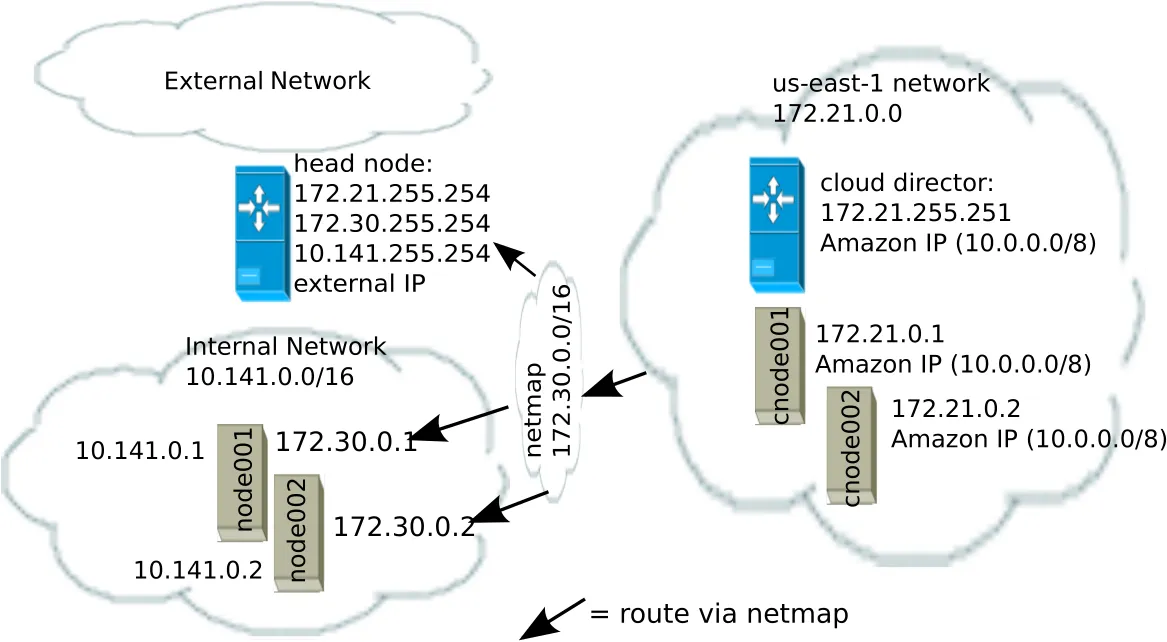
Figure 6.1: NetMap In Relation To The General Network Scheme
As pointed out in the introduction to this section (6.6), the main reason for the IP addressing network scheme used is to avoid IP address conflicts between nodes within the cloud and nodes outside the cloud.
The difference in resolution of the IP address for the nodes as listed in points 1 and 2 in the preceding text is primarily to get the lowest overhead route between the source and destination of the packet being routed. Thus, for example, a packet gets from the regular cloud node to the cloud director with less overhead if using the Amazon cloud IP addressing scheme (10.0.0.0/8) than if using the BCM OpenVPN addressing scheme (172.21.0.0/16). A secondary reason is convenience and reduction of networking complexity. For example, a node in the cloud may shut down and start up, and get an arbitrary Amazon IP address, but using an OpenVPN network such as us-east-1 allows it to retain its OpenVPN address and thus stay identified instead of having the properties that have been assigned to it under BCM become useless.
6.7 Internet Connectivity For Cloud Nodes
Cloud compute node types in cloudbursting setups—CX-AWS, CX-Azure, COD-AWS, and COD-Azure—can all access the internet by default.
This is elaborated upon in table 6.7:
6.8 Passing Kernel Parameters To Cloud Nodes
If a cluster administrator configures a non-cloud cluster, then kernel parameters can be set for a particular software image used by the regular nodes. For example, in cmsh, if a software image <image name> is used, then kernel parameters such as root=/dev/sda2 rootdelay=10 pti=auto can be set via the navigation path:
cmsh > softwareimage > use <image name> > set kernelparams "root=/dev/sda2 rootdelay=10 pti=auto"
However, kernel parameters are not passed to cloud nodes via this mechanism at the time of writing (November 2019). If there is a need to pass kernel parameters to cloud nodes, then BCM support should be contacted.
6.9 Setting Up And Creating A Custom VPC
From NVIDIA Base Command Manager version 7.3 onward, the Amazon EC2-classic platform is no longer available, and all nodes run via BCM within Amazon always run within an EC2-VPC platform.
Custom VPC for NVIDIA Base Command Manager 10 subnet allocation, and allocation of EIPs (External IPs, public IP addresses) is described in sections 6.9.1–6.9.3.
6.9.1 Elastic IP Addresses And Their Use In Configuring Static IP Addresses
Amazon elastic IP addresses (EIPs) can be used to assign a public IP address to a custom VPC.
EIP addresses are the public IP addresses that Amazon provides for the AWS account. These addresses can be associated with custom VPC instances. The public addresses in the set of addresses can then be used to expose the custom VPC instance. In this manual and in BCM, EIPs are referred to as “public IPs” in the cloud context. When allocating a public IP address, the exact IP address that is allocated is a random IP address from the pool of all public IP addresses made available in the specified region by the configured cloud provider.
6.9.2 Subnets In A Custom VPC
The components of a custom VPC include subnets, the nodes that run in them, and static IP addresses. The subnets are logical network segments within the network range of that custom VPC. Subnets can be thought of as interconnected with a central “magic” router, with BCM managing the routing tables on that router. The routing ensures correct subnet communication. Inside BCM, subnets are represented as a type of network (section 3.2 of the Administrator Manual), with a value for type set in cmsh to Cloud (VPC), or in Base View set to CLOUD.
Subnets for a custom VPC must have non-overlapping ranges. If there are multiple custom VPCs being managed by BCM, then a particular subnet may be assigned to one custom VPC at the most.
Two series of valid network ranges could be:
Example
-
-
10.0.0.0-10.0.31.255 (10.0.0.0/19),
-
10.0.32.0-10.0.63.255 (10.0.32.0/19),
-
10.0.64.0-10.0.95.255 (10.0.64.0/19).
-
-
-
192.168.0.0-192.168.0.255 (192.168.0.0/24),
-
192.168.1.0-192.168.1.255 (192.168.1.0/24).
-
The sipcalc command (here) is a useful tool for calculating appropriate subnet ranges. At least one subnet must be assigned to a custom VPC before an instance can be created in that cloud. Typically two or more subnets are assigned, as shown in the custom VPC creation example in the following section.
6.9.3 Creating The Custom VPC
After subnets have been configured, a custom VPC can be created by specifying:
-
the name
-
the default region
-
base address
-
number of netmask bits
The network of the custom VPC must obviously be a superset of its subnets. Any subnets of the custom VPC must also be specified. Subnets can be added to or removed from an already-created custom VPC, but only if any cloud node instances within them are terminated first.
There are several ways to set up and create the subnets and custom VPC instance in BCM:
-
by using
Advanced settingsoptions in theclusterextensionplugin options, in the command linecm-cluster-extensionutility (section 4.1), -
by using the Base View private cloud creation wizard (section 3.1),
-
by manually creating and configuring the
private cloudobject usingcmsh.
Option 3 is tedious, but does show to the reader some of what the cm-cluster-extension utility and cloud creation wizard do. To create and configure a private cloud as in option 3, the following example sessions show how a private cloud can be built with cmsh. In the sessions, the subnets to be used for the custom VPC are created first, before creating the private cloud:
-
Subnet creation and cloning: In the following example session, an arbitrary naming scheme is used for subnets, with a pattern of: <
name of custom VPC>-sn-<number>. Here,snis an arbitrary abbreviation for “subnet”:Example
Once the first subnet has been created, it can be cloned:
Example
-
Custom VPC creation: The following example session in the
vpcsubmode of thecloudmode, creates a private cloud calledvpc-0. The private cloud is actually a custom VPC, and belongs to a network that contains the two subnets specified earlier.Example