

Benchmarking Alignment and Variant Calling for Whole Genome Data from Complete Genomics using NVIDIA Parabricks on AWS
This is a quick start guide for benchmarking Parabricks germline workflows using data from Complete Genomics sequencers. Parabricks is a GPU accelerated toolkit for secondary analysis in genomics. In this guide, we will show that Parabricks runs in a fast, and therefore cost effective, manner on the cloud using data from the DNBSEQ-T7, DNBSEQ-G400 and DNASEQ-T1+ sequencers from Complete Genomics.
Genomic files such as FASTQ and BAM files can easily reach into the hundreds of GB each. When running studies that involve hundreds of thousands of these files, it easily becomes terabytes of data and processing all of that data becomes very costly. This is especially apparent when running on the cloud where users are charged by the hour, so every minute of compute counts. The faster we can churn through this data, the lower the cost will be.
Quick Start
To get started as quickly as possible, run the lines of code below:
The sample FASTQ files that run.sh needs are not currently publicly available. Refer to
Dataset to request access.
Prerequisites
GitHub Repo
All the code shown in this guide can be found on GitHub. Clone the repo by running:
Software Dependencies
These benchmarks were performed using Parabricks which is publicly available as a Docker container on the NVIDIA GPU Cloud (NGC) by running the following command:
Other software prerequisites include:
Hardware
For Parabricks, there are two categories of GPUs that we recommend: High Performance GPUs (A100, H100, L40S) and Low Cost GPUs (A10, L4). These benchmarks were run using L40S instances and L4 instances on AWS, however any similarly configured machine will work. Be sure to check the Parabricks documentation for minimum requirements.
Below are the exact configurations used in our validation:
Dataset
For these benchmarks we will use NA12878 whole genome (WGS) data from the DNBSEQ-T1+, DNBSEQ-T7 and DNBSEQ-G400 Complete Genomics sequencers. The reference and other accessory files are hosted publicly and can be downloaded using:
The sample FASTQ files for these benchmarks are not currently publicly available, so download.sh
cannot download them. To request access, contact the Parabricks team on the
developer forum.
Pre-Processing
The data as it exists publicly is almost ready to use for our benchmarking. For an apples-to-apples comparison, we want both of the WGS samples to have the same coverage. The DNBSEQ-T7 WGS data has a coverage of 46x and the G400 WGS data has a coverage of 30x. To resolve this, we will downsample the DNBSEQ-T7 WGS data to 65% of its reads, which brings it to about 30x. To achieve this, we can run the downsample script on both files:
The resulting coverages and file sizes are summarized for each sample in the table below:
After downsampling the data is ready to run through the benchmarks.
Running the Benchmarks
Looking in the benchmarks folder will show us what benchmarking scripts are available:
For each set of hardware there is a germline and a DeepVariant script. The separation is
due to different optimization flags used for each configuration. To learn more about
these optimizations, check out the
Parabricks documentation.
The germline.sh script runs
Parabricks germline pipeline,
which aligns the FASTQ files and runs HaplotypeCaller.
The deepvariant.sh script runs the
Parabricks DeepVariant
variant caller.
The benchmark.sh script accepts one argument for the hardware type, which
matches the folder name within the benchmarks folder. For example, to run the
L4 benchmarks, we can run:
Similarly, to run the L40S benchmarks, we can run:
Final Runtimes and Cost Analysis
The Parabricks software outputs how long each step of the pipeline ran and it is these numbers that we have recorded in the tables below. After running the benchmarks, the runtimes will be captured in log files located at ${DATA_DIR}/data/logs.
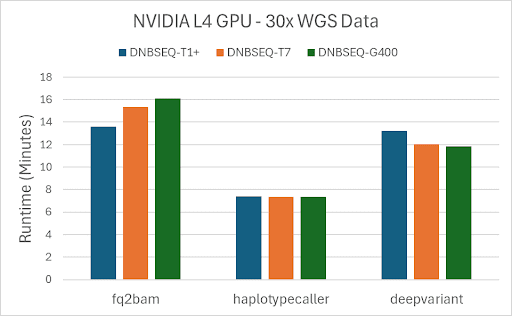
Figure 1. Runtimes for each sample on NVIDIA L4 GPUs for fq2bam, haplotypecaller and deepvariant.
As we expect, the runtime for the L40S instance is faster than the runtimes for the L4 instance, for each sample. This difference is reflected in the cost as well, shown in the table below:
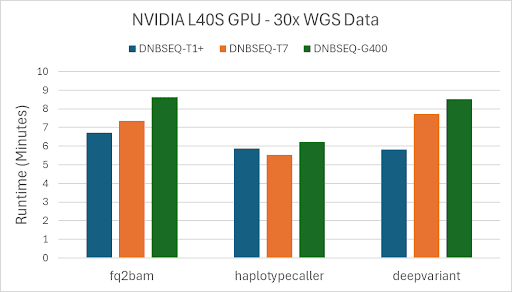
Figure 2. Costs for each sample on NVIDIA L40S GPUs for fq2bam, haplotypecaller, and deepvariant.
Concordance with the Truth Set
Aside from the runtime numbers, it’s important to check that the quality of the variants matches closely with the truth set.
The NA12878 ground truth VCF can be found on the NIH FTP. Since this VCF was run using the GRCh37 reference but our samples were run using UCSC hg19 reference, we first need to do a liftover and then we can run concordance.
As an optional step, this can be done using the liftover.sh and
concordance.sh scripts respectively.
The DNBSEQ-T7 concordance results (Tables 6 and 7) come from a separate HG002 (NA24385) T7 dataset, not
the NA12878 T7 data used for the runtime benchmarks above, and are compared against the
HG002 truth set.
The DNBSEQ-G400 results (Tables 8 and 9) use the NA12878 (HG001) data and the HG001 truth set linked above.
Because the two truth sets contain different numbers of variants, the TRUTH.TP and TRUTH.FN counts differ
between the T7 and G400 tables. Compare recall, precision, and F1 scores across samples, not the raw counts.
Below is a table of the results that we achieved using this workflow:
Just as we expect with Parabricks, we are seeing Precision and F1 scores above 99% for DeepVariant and above 98% for HaplotypeCaller on both samples, confirming that the variant callers are accurate with respect to the ground truth.
Conclusion
In this guide, we showed how to download WGS data from Complete Genomics, run it through alignment (fq2bam) and variant calling (haplotypecaller and deepvariant) on AWS, show the runtime and total cost per sample, and finally demonstrated the concordance results against a truth set. Combined, this shows that Parabricks supports data from Complete Genomics sequencers, in that it runs quickly and accurately on the tools.