

Data Model#
cuTile is an array-based programming model. The fundamental data structure is the multidimensional array whose elements share a single homogeneous type. cuTile Python exposes only arrays, not pointers.
An array-based model was chosen because:
Arrays know their bounds, so accesses can be checked for safety and correctness.
Array-based load/store operations can be efficiently lowered to speed-of-light hardware mechanisms.
Python programmers are already familiar with array-based frameworks such as NumPy.
Pointers are not a natural fit for Python.
Within tile code, only the types described in this section are supported.
Global Arrays#
A global array (or array) is a container of elements of a specific dtype arranged in a logical multidimensional space.
An array’s shape is a tuple of integers, each denoting the length of the corresponding dimension. The length of the shape tuple equals the array’s number of dimensions, and the product of its values equals the total number of logical elements in the array.
Arrays are stored in global memory using a strided memory layout: in addition to a shape, each array has an equally sized tuple of strides that maps logical indices to physical memory locations. For example, for a 3-dimensional float32 array with strides (s1, s2, s3), the memory address of the element at index (i1, i2, i3) is:
base_addr + 4 * (s1 * i1 + s2 * i2 + s3 * i3),
where base_addr is the base address of the array and 4 is the byte size of a float32
element.
New arrays can only be allocated by the host and passed to the tile kernel as arguments.
Tile code can only create new views of existing arrays, for example via
Array.slice(). As in Python, assigning an array to another variable does not copy
the underlying data but creates another reference to the same array.
Any object that implements the DLPack interface or the CUDA Array Interface can be passed as a kernel argument — for example, CuPy arrays and PyTorch tensors.
If two or more array arguments are passed to the kernel, their memory must not overlap. Otherwise, the behavior is undefined.
An array’s shape can be queried with the Array.shape attribute, which
returns a tuple of int32 scalars. These are non-constant, runtime values.
Using int32 improves performance at the cost of capping the maximum representable
shape at 2,147,483,647 elements. This limitation will be lifted in the future.
See also
Tiles and Scalars#
A tile is an immutable multidimensional collection of elements of a specific dtype.
A tile’s shape is a tuple of integers, each denoting the length of the corresponding dimension. The length of the shape tuple equals the tile’s number of dimensions, and the product of its values equals the total number of elements in the tile.
The shape of a tile must be known at compile time. Each dimension of a tile must be a power of 2.
A tile’s dtype and shape can be queried with the dtype and shape attributes, respectively.
For example, if x is a float32 tile, x.dtype returns a compile-time constant
equal to cuda.tile.float32.
A zero-dimensional tile is called a scalar. A scalar has exactly one element and its shape is the empty tuple (). Numeric literals like 7 or 3.14 are treated as constant scalars, i.e. zero-dimensional tiles.
Because scalars are tiles, they differ slightly from Python’s int/float objects.
For example, they have dtype and shape attributes:
a = 0
# The following line will evaluate to cuda.tile.int32 in cuTile,
# but would raise an AttributeError in Python:
a.dtype
Tiles can only be used in tile code, not in host code.
A tile’s contents do not necessarily have a physical representation in memory.
Tiles are created by loading from global arrays using functions such as
cuda.tile.load() and cuda.tile.gather(), or with factory functions
such as cuda.tile.zeros().
Tiles can be stored back into global arrays using functions such as cuda.tile.store()
and cuda.tile.scatter().
Scalar constants are loosely typed by default, for example, a literal 2 or
a constant attribute like Tile.ndim, Tile.shape, or Array.ndim.
See also
Element & Tile Space#
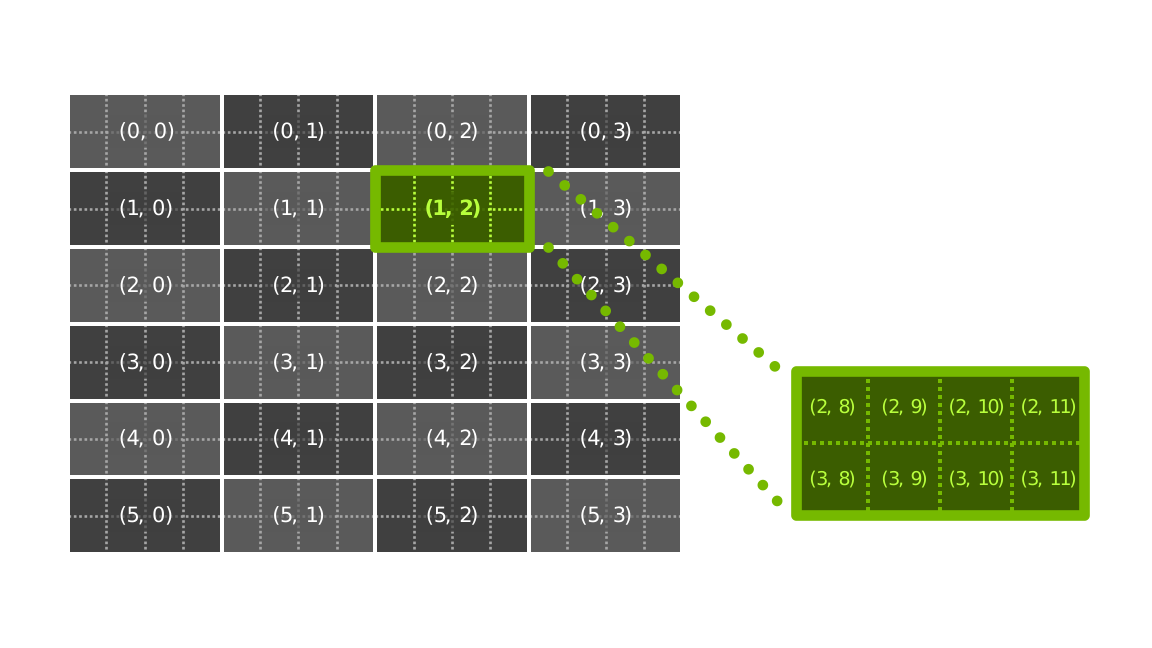
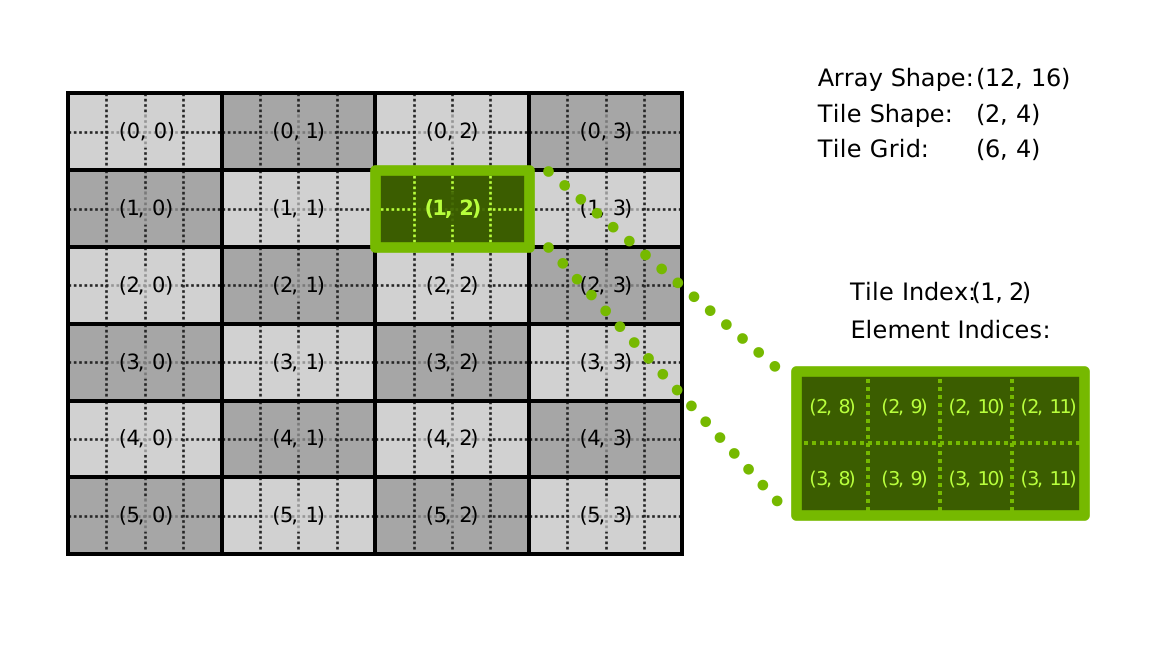
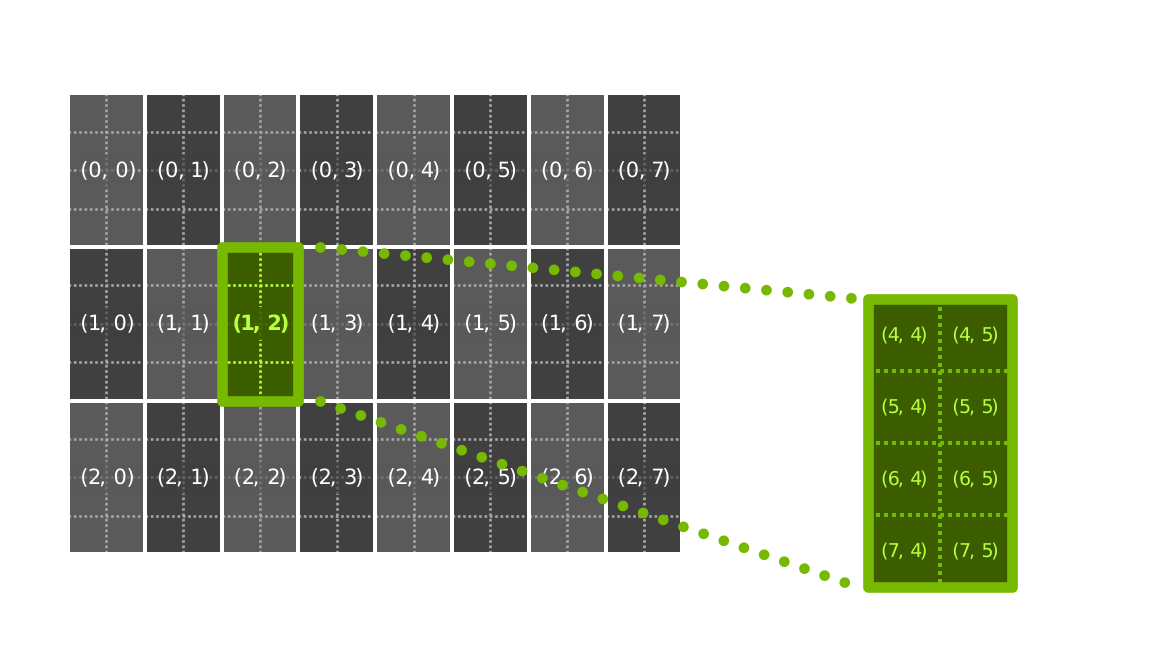
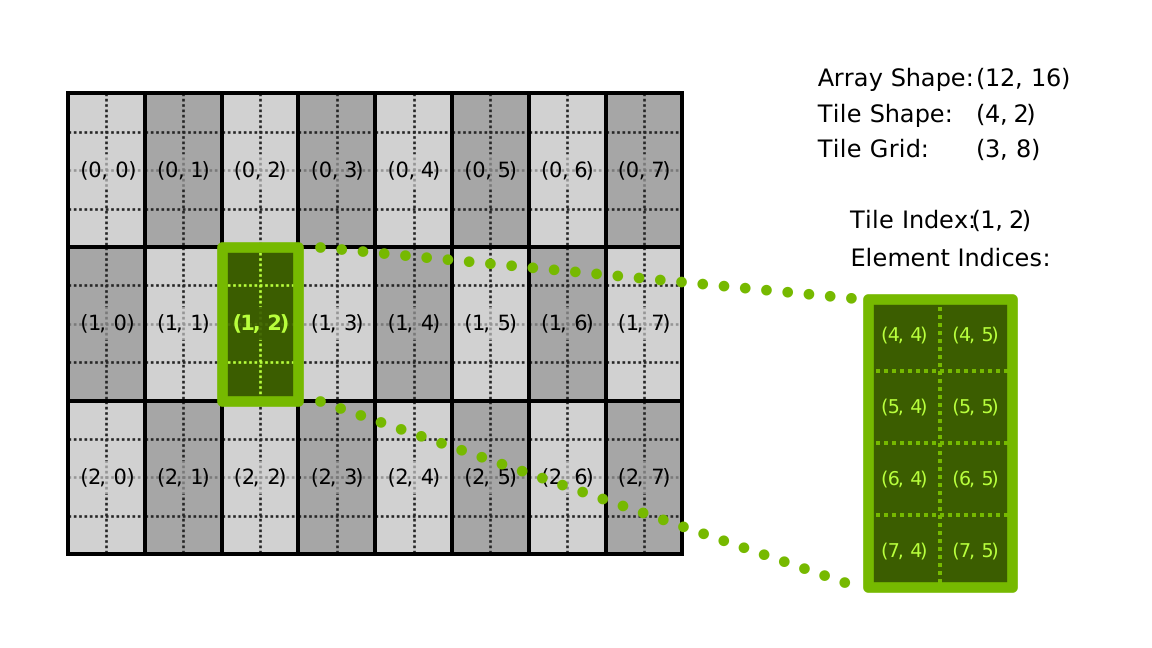
The element space of an array is the multidimensional space of its elements, stored in memory according to a given layout (row-major, column-major, etc.).
The tile space of an array is the multidimensional space of tiles of a given tile shape within
that array. A tile index (i, j, ...) with shape S refers to the elements belonging to the
(i+1)-th, (j+1)-th, … tile.
When accessing array elements via tile indices, the array’s multidimensional memory layout is used. To access the tile space with a different layout, use the order parameter of load/store operations.
Tiled Views#
A tiled view represents the tile space of a global array.
A tiled view’s num_tiles is a tuple of integers, each denoting the number of tiles along the corresponding dimension. The length of the num_tiles tuple equals the tile space’s number of dimensions, and the product of its values equals the total number of tiles in the tile space.
A tile in the tiled view can be loaded or stored by its tile index.
By default, consecutive tiles along each axis are adjacent with no overlap or gaps: the origin of
each successive tile advances by tile_shape[i] elements along axis i. Specifying
traversal_steps to Array.tiled_view() changes the advance per step to
traversal_steps[i], producing overlapping tiles when traversal_steps[i] < tile_shape[i]
or gapped tiles when traversal_steps[i] > tile_shape[i].
Shape Broadcasting#
Shape broadcasting allows tiles with different shapes to be combined in arithmetic operations. When an operation involves tiles of different shapes, the smaller tile is automatically extended to match the larger one, following these rules:
Tiles are aligned by their trailing dimensions.
If the corresponding dimensions have the same size or one of them is 1, they are compatible.
If one tile has fewer dimensions, its shape is padded with 1s on the left.
Broadcasting follows the same semantics as NumPy, keeping code concise and readable while maintaining computational efficiency.
Data Types#
- class cuda.tile.DType#
A data type (or dtype) describes the type of the objects of an array, tile, or operation.
Dtypes determine how values are stored in memory and how operations on those values are performed. Dtypes are immutable.
Dtypes can be used in host code and tile code. They can be kernel parameters.
- cuda.tile.bool_#
A 8-bit arithmetic dtype (
TrueorFalse).
- cuda.tile.uint8#
8-bit unsigned integer arithmetic dtype with values on the interval [0, +255]
- cuda.tile.uint16#
16-bit unsigned integer arithmetic dtype with values on the interval [0, +65535]
- cuda.tile.uint32#
32-bit unsigned integer arithmetic dtype with values on the interval [0, +4294967295]
- cuda.tile.uint64#
64-bit unsigned integer arithmetic dtype with values on the interval [0, +18446744073709551615]
- cuda.tile.int8#
8-bit signed integer arithmetic dtype with values on the interval [-128, +127]
- cuda.tile.int16#
16-bit signed integer arithmetic dtype with values on the interval [-32768, +32767]
- cuda.tile.int32#
32-bit signed integer arithmetic dtype with values on the interval [-2147483648, +2147483647]
- cuda.tile.int64#
64-bit signed integer arithmetic dtype with values on the interval [-9223372036854775808, +9223372036854775807]
- cuda.tile.float16#
A IEEE 754 half-precision (16-bit) binary floating-point arithmetic dtype (see IEEE 754-2019).
- cuda.tile.float32#
A IEEE 754 single-precision (32-bit) binary floating-point arithmetic dtype (see IEEE 754-2019).
- cuda.tile.float64#
A IEEE 754 double-precision (64-bit) binary floating-point arithmetic dtype (see IEEE 754-2019).
- cuda.tile.bfloat16#
A 16-bit floating-point arithmetic dtype with 1 sign bit, 8 exponent bits, and 7 mantissa bits.
- cuda.tile.tfloat32#
A 32-bit tensor floating-point numeric dtype with 1 sign bit, 8 exponent bits, and 10 mantissa bits (19-bit representation stored in 32-bit container).
- cuda.tile.float8_e4m3fn#
An 8-bit floating-point numeric dtype with 1 sign bit, 4 exponent bits, and 3 mantissa bits.
- cuda.tile.float8_e5m2#
An 8-bit floating-point numeric dtype with 1 sign bit, 5 exponent bits, and 2 mantissa bits.
- cuda.tile.float8_e8m0fnu#
An 8-bit floating-point numeric dtype with no sign bit, 8 exponent bits, and 0 mantissa bits.
- cuda.tile.float4_e2m1fn#
A 4-bit floating-point numeric dtype with 1 sign bit, 2 exponent bits, and 1 mantissa bit.
Numeric & Arithmetic Data Types#
A numeric data type represents numbers. An arithmetic data type is a numeric data type that supports general arithmetic operations such as addition, subtraction, multiplication, and division.
Arithmetic Promotion#
Binary operations can be performed on two tile or scalar operands of different numeric dtypes.
When both operands are loosely typed numeric constants, the result is also
a loosely typed constant: 5 + 7 is a loosely typed integral constant 12,
and 5 + 3.0 is a loosely typed floating-point constant 8.0.
If any of the operands is not a loosely typed numeric constant, both are promoted to a common dtype as follows:
Each operand is classified into one of the three categories: boolean, integral, or floating-point. The categories are ordered as follows: boolean < integral < floating-point.
If either operand is a loosely typed numeric constant, a concrete dtype is picked for it: integral constants are treated as int32, int64, or uint64, depending on the value; floating-point constants are treated as float32.
If one of the two operands has a higher category than the other, then its concrete dtype is chosen as the common dtype.
If both operands are of the same category, but one of them is a loosely typed numeric constant, then the other operand’s dtype is picked as the common dtype.
Otherwise, the common dtype is computed according to the table below.
b1 |
u8 |
u16 |
u32 |
u64 |
i8 |
i16 |
i32 |
i64 |
f16 |
f32 |
f64 |
bf |
tf32 |
f8e4m3fn |
f8e5m2 |
f8e8m0fnu |
f4e2m1fn |
|
|---|---|---|---|---|---|---|---|---|---|---|---|---|---|---|---|---|---|---|
b1 |
b1 |
u8 |
u16 |
u32 |
u64 |
i8 |
i16 |
i32 |
i64 |
f16 |
f32 |
f64 |
bf |
ERR |
ERR |
ERR |
ERR |
ERR |
u8 |
u8 |
u8 |
u16 |
u32 |
u64 |
ERR |
ERR |
ERR |
ERR |
f16 |
f32 |
f64 |
bf |
ERR |
ERR |
ERR |
ERR |
ERR |
u16 |
u16 |
u16 |
u16 |
u32 |
u64 |
ERR |
ERR |
ERR |
ERR |
f16 |
f32 |
f64 |
bf |
ERR |
ERR |
ERR |
ERR |
ERR |
u32 |
u32 |
u32 |
u32 |
u32 |
u64 |
ERR |
ERR |
ERR |
ERR |
f16 |
f32 |
f64 |
bf |
ERR |
ERR |
ERR |
ERR |
ERR |
u64 |
u64 |
u64 |
u64 |
u64 |
u64 |
ERR |
ERR |
ERR |
ERR |
f16 |
f32 |
f64 |
bf |
ERR |
ERR |
ERR |
ERR |
ERR |
i8 |
i8 |
ERR |
ERR |
ERR |
ERR |
i8 |
i16 |
i32 |
i64 |
f16 |
f32 |
f64 |
bf |
ERR |
ERR |
ERR |
ERR |
ERR |
i16 |
i16 |
ERR |
ERR |
ERR |
ERR |
i16 |
i16 |
i32 |
i64 |
f16 |
f32 |
f64 |
bf |
ERR |
ERR |
ERR |
ERR |
ERR |
i32 |
i32 |
ERR |
ERR |
ERR |
ERR |
i32 |
i32 |
i32 |
i64 |
f16 |
f32 |
f64 |
bf |
ERR |
ERR |
ERR |
ERR |
ERR |
i64 |
i64 |
ERR |
ERR |
ERR |
ERR |
i64 |
i64 |
i64 |
i64 |
f16 |
f32 |
f64 |
bf |
ERR |
ERR |
ERR |
ERR |
ERR |
f16 |
f16 |
f16 |
f16 |
f16 |
f16 |
f16 |
f16 |
f16 |
f16 |
f16 |
f32 |
f64 |
ERR |
ERR |
ERR |
ERR |
ERR |
ERR |
f32 |
f32 |
f32 |
f32 |
f32 |
f32 |
f32 |
f32 |
f32 |
f32 |
f32 |
f32 |
f64 |
f32 |
ERR |
ERR |
ERR |
ERR |
ERR |
f64 |
f64 |
f64 |
f64 |
f64 |
f64 |
f64 |
f64 |
f64 |
f64 |
f64 |
f64 |
f64 |
f64 |
ERR |
ERR |
ERR |
ERR |
ERR |
bf |
bf |
bf |
bf |
bf |
bf |
bf |
bf |
bf |
bf |
ERR |
f32 |
f64 |
bf |
ERR |
ERR |
ERR |
ERR |
ERR |
tf32 |
ERR |
ERR |
ERR |
ERR |
ERR |
ERR |
ERR |
ERR |
ERR |
ERR |
ERR |
ERR |
ERR |
tf32 |
ERR |
ERR |
ERR |
ERR |
f8e4m3fn |
ERR |
ERR |
ERR |
ERR |
ERR |
ERR |
ERR |
ERR |
ERR |
ERR |
ERR |
ERR |
ERR |
ERR |
f8e4m3fn |
ERR |
ERR |
ERR |
f8e5m2 |
ERR |
ERR |
ERR |
ERR |
ERR |
ERR |
ERR |
ERR |
ERR |
ERR |
ERR |
ERR |
ERR |
ERR |
ERR |
f8e5m2 |
ERR |
ERR |
f8e8m0fnu |
ERR |
ERR |
ERR |
ERR |
ERR |
ERR |
ERR |
ERR |
ERR |
ERR |
ERR |
ERR |
ERR |
ERR |
ERR |
ERR |
f8e8m0fnu |
ERR |
f4e2m1fn |
ERR |
ERR |
ERR |
ERR |
ERR |
ERR |
ERR |
ERR |
ERR |
ERR |
ERR |
ERR |
ERR |
ERR |
ERR |
ERR |
ERR |
f4e2m1fn |
Legend:
b1:
bool_u8:
uint8u16:
uint16u32:
uint32u64:
uint64i8:
int8i16:
int16i32:
int32i64:
int64f16:
float16f32:
float32f64:
float64bf:
bfloat16tf32:
tfloat32f8e4m3fn:
float8_e4m3fnf8e5m2:
float8_e5m2f8e8m0fnu:
float8_e8m0fnuf4e2m1fn:
float4_e2m1fnERR: Implicit promotion between these types is not supported
Tuples#
Tuples can be used in tile code. They cannot be kernel parameters.
Rounding Modes#
- class cuda.tile.RoundingMode#
Rounding mode for floating-point operations.
- RN = 'nearest_even'#
Round to nearest (ties to even).
- RZ = 'zero'#
Round towards zero (truncate).
- RM = 'negative_inf'#
Round towards negative infinity.
- RP = 'positive_inf'#
Round towards positive infinity.
- RA = 'nearest_away'#
Round to nearest (ties away from zero).
- FULL = 'full'#
Full precision rounding mode.
- APPROX = 'approx'#
Approximate rounding mode.
- RZI = 'nearest_int_to_zero'#
Round towards zero to the nearest integer.
Padding Modes#
- class cuda.tile.PaddingMode#
Padding mode for load operation.
- UNDETERMINED = 'undetermined'#
The padding value is not determined.
- ZERO = 'zero'#
The padding value is zero.
- NEG_ZERO = 'neg_zero'#
The padding value is negative zero.
- NAN = 'nan'#
The padding value is NaN.
- POS_INF = 'pos_inf'#
The padding value is positive infinity.
- NEG_INF = 'neg_inf'#
The padding value is negative infinity.