

Routing Examples#
This section contains examples for the cuOpt routing Python API.
Intra-factory Transport#
A capacitated pickup-and-delivery problem with time windows (PDPTW) for a fleet
of autonomous mobile robots (AMRs) moving parts between processing stations on a
factory floor. The example uses cuopt.distance_engine.WaypointMatrix to
derive a cost matrix from a weighted waypoint graph, sets up pickup/delivery
orders with demand and time windows, solves with cuopt.routing.Solve(),
and expands the target-location route back to a waypoint-level route per robot.
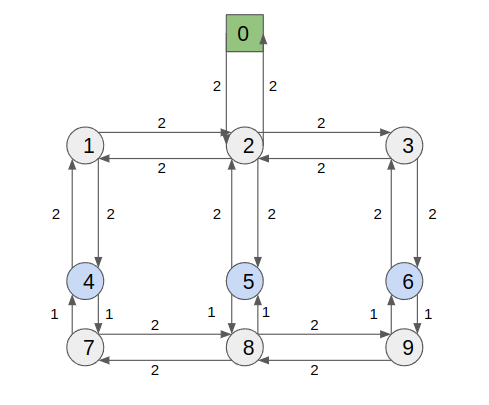
Problem details:
4 target locations: 1 start location for AMRs and 3 processing stations
6 transport orders (pickup/delivery pairs) with individual time windows
2 AMRs, each with a carrying capacity of 2 parts
Factory hours: 0 to 100 time units
  1# SPDX-FileCopyrightText: Copyright (c) 2025-2026, NVIDIA CORPORATION & AFFILIATES. All rights reserved.
  2# SPDX-License-Identifier: Apache-2.0
  3#
  4# Intra-factory transport example.
  5#
  6# Scenario: a small factory floor where a fleet of autonomous mobile robots
  7# (AMRs) pick up parts at processing stations and deliver them to other
  8# stations (or off the floor). cuOpt plans the routes for each robot such
  9# that every order is served within its pickup/delivery time windows and
 10# no robot exceeds its carrying capacity.
 11#
 12# This is a Capacitated Pickup-and-Delivery Problem with Time Windows
 13# (PDPTW) solved on a weighted waypoint graph.
 14
 15import cudf
 16import numpy as np
 17
 18from cuopt import distance_engine, routing
 19
 20# --- Factory layout --------------------------------------------------------
 21# Waypoints in the factory, referenced by integer id:
 22#     0 = AMR depot (robots start/return here)
 23#     4 = Station A
 24#     5 = Station B
 25#     6 = Station C
 26# Other waypoints (1, 2, 3, 7, 8, 9) are intermediate nodes that robots
 27# travel through but never stop at.
 28DEPOT = 0
 29STATION_A = 4
 30STATION_B = 5
 31STATION_C = 6
 32TARGET_LOCATIONS = np.array([DEPOT, STATION_A, STATION_B, STATION_C])
 33
 34# Factory operating hours (in time units).
 35FACTORY_OPEN = 0
 36FACTORY_CLOSE = 100
 37
 38# Weighted waypoint graph of the factory floor in Compressed Sparse Row
 39# (CSR) form: for node i, GRAPH_OFFSETS[i]:GRAPH_OFFSETS[i+1] indexes into
 40# GRAPH_EDGES (destination nodes) and GRAPH_WEIGHTS (edge costs). See the
 41# `cuopt.distance_engine.WaypointMatrix` API reference in the cuOpt User
 42# Guide for input requirements.
 43GRAPH_OFFSETS = np.array([0, 1, 3, 7, 9, 11, 13, 15, 17, 20, 22])
 44GRAPH_EDGES = np.array(
 45    [2, 2, 4, 0, 1, 3, 5, 2, 6, 1, 7, 2, 8, 3, 9, 4, 8, 5, 7, 9, 6, 8]
 46)
 47GRAPH_WEIGHTS = np.array(
 48    [2, 2, 2, 2, 2, 2, 2, 2, 2, 2, 1, 2, 1, 2, 1, 1, 2, 1, 2, 2, 1, 2]
 49)
 50
 51
 52def build_cost_matrix():
 53    """Compute an all-pairs cost matrix over the target locations."""
 54    graph = distance_engine.WaypointMatrix(
 55        GRAPH_OFFSETS, GRAPH_EDGES, GRAPH_WEIGHTS
 56    )
 57    cost_matrix = graph.compute_cost_matrix(TARGET_LOCATIONS)
 58    # waypoint id -> cost-matrix index (e.g. Station A [waypoint 4] -> index 1)
 59    wp_to_idx = {int(wp): i for i, wp in enumerate(TARGET_LOCATIONS)}
 60    return graph, cost_matrix, wp_to_idx
 61
 62
 63def build_orders():
 64    """Six transport orders. Each row is one pickup/delivery pair."""
 65    return cudf.DataFrame(
 66        {
 67            "pickup_location": [
 68                STATION_A,
 69                STATION_B,
 70                STATION_C,
 71                STATION_C,
 72                STATION_B,
 73                STATION_A,
 74            ],
 75            "delivery_location": [
 76                STATION_B,
 77                STATION_C,
 78                DEPOT,
 79                STATION_B,
 80                STATION_A,
 81                DEPOT,
 82            ],
 83            "demand": [1, 1, 1, 1, 1, 1],
 84            "earliest_pickup": [0, 0, 0, 0, 0, 0],
 85            "latest_pickup": [10, 20, 30, 10, 20, 30],
 86            "earliest_delivery": [0, 0, 0, 0, 0, 0],
 87            "latest_delivery": [45, 45, 45, 45, 45, 45],
 88            "pickup_service_time": [2, 2, 2, 2, 2, 2],
 89            "delivery_service_time": [2, 2, 2, 2, 2, 2],
 90        }
 91    )
 92
 93
 94def build_fleet():
 95    """Two AMRs, each able to carry two parts at once."""
 96    return cudf.DataFrame({"robot_id": [0, 1], "capacity": [2, 2]}).set_index(
 97        "robot_id"
 98    )
 99
100
101def build_data_model(cost_matrix, orders, fleet, wp_to_idx):
102    """Assemble the cuOpt routing DataModel from the problem inputs."""
103    n_locations = len(cost_matrix)
104    n_vehicles = len(fleet)
105    # Each order contributes two stops: one pickup and one delivery.
106    n_orders = len(orders) * 2
107
108    data_model = routing.DataModel(n_locations, n_vehicles, n_orders)
109    data_model.add_cost_matrix(cost_matrix)
110
111    # Capacity: pickups add load, deliveries remove it.
112    demand = cudf.concat(
113        [orders["demand"], -orders["demand"]], ignore_index=True
114    )
115    data_model.add_capacity_dimension("parts", demand, fleet["capacity"])
116
117    # Order locations are expressed as cost-matrix indices, not waypoint ids.
118    pickup_idx = orders["pickup_location"].map(wp_to_idx)
119    delivery_idx = orders["delivery_location"].map(wp_to_idx)
120    data_model.set_order_locations(
121        cudf.concat([pickup_idx, delivery_idx], ignore_index=True)
122    )
123
124    # Pickup at row i must be served before its delivery at row i + n.
125    n = len(orders)
126    data_model.set_pickup_delivery_pairs(
127        cudf.Series(range(n)), cudf.Series(range(n, 2 * n))
128    )
129
130    # Time windows.
131    data_model.set_order_time_windows(
132        cudf.concat(
133            [orders["earliest_pickup"], orders["earliest_delivery"]],
134            ignore_index=True,
135        ),
136        cudf.concat(
137            [orders["latest_pickup"], orders["latest_delivery"]],
138            ignore_index=True,
139        ),
140    )
141    data_model.set_order_service_times(
142        cudf.concat(
143            [orders["pickup_service_time"], orders["delivery_service_time"]],
144            ignore_index=True,
145        )
146    )
147    data_model.set_vehicle_time_windows(
148        cudf.Series([FACTORY_OPEN] * n_vehicles),
149        cudf.Series([FACTORY_CLOSE] * n_vehicles),
150    )
151    return data_model
152
153
154def print_schedule(solution, graph, wp_to_idx):
155    """Print a per-robot, human-readable schedule of stops and waypoint paths."""
156    idx_to_wp = {i: wp for wp, i in wp_to_idx.items()}
157    route = solution.get_route()
158
159    print(f"\nTotal route cost: {solution.get_total_objective():g}")
160    print(f"Robots used:      {solution.get_vehicle_count()}\n")
161
162    for robot_id in sorted(route["truck_id"].unique().to_arrow().to_pylist()):
163        stops_gpu = route[route["truck_id"] == robot_id]
164        stops = stops_gpu.to_pandas()
165
166        print(f"Robot {robot_id}:")
167        for _, s in stops.iterrows():
168            print(
169                f"  t={s['arrival_stamp']:>5g}  "
170                f"waypoint {idx_to_wp[s['location']]:<2}  {s['type']}"
171            )
172
173        # compute_waypoint_sequence mutates its input, so hand it a fresh copy.
174        wp_path = graph.compute_waypoint_sequence(
175            TARGET_LOCATIONS, stops_gpu.copy()
176        )
177        path_str = " -> ".join(
178            str(w) for w in wp_path["waypoint_sequence"].to_arrow().to_pylist()
179        )
180        print(f"  path: {path_str}\n")
181
182
183def main():
184    graph, cost_matrix, wp_to_idx = build_cost_matrix()
185    orders = build_orders()
186    fleet = build_fleet()
187
188    print("Target locations (waypoint -> cost-matrix index):", wp_to_idx)
189    print("\nCost matrix between target locations:")
190    print(cost_matrix)
191    print(f"\n{len(orders)} transport orders, {len(fleet)} AMRs.")
192
193    data_model = build_data_model(cost_matrix, orders, fleet, wp_to_idx)
194
195    settings = routing.SolverSettings()
196    settings.set_time_limit(5)
197
198    solution = routing.Solve(data_model, settings)
199    if solution.get_status() != 0:
200        print(
201            f"cuOpt failed to find a solution (status={solution.get_status()})"
202        )
203        return
204
205    print_schedule(solution, graph, wp_to_idx)
206
207
208if __name__ == "__main__":
209    main()
TSP Batch Mode#
The routing Python API supports batch mode for solving many TSP (or routing) instances in a single call. Instead of calling cuopt.routing.Solve() repeatedly, you build a list of cuopt.routing.DataModel objects and call cuopt.routing.BatchSolve(). The solver runs the problems in parallel to improve throughput.
When to use batch mode:
You have many similar routing problems (e.g., dozens or hundreds of small TSPs).
You want to maximize throughput by utilizing the GPU across multiple problems at once.
Problem sizes and structure are compatible with the same
cuopt.routing.SolverSettings(e.g., same time limit).
Returns: A list of cuopt.routing.Assignment objects, one per input data model, in the same order as data_model_list. Use cuopt.routing.Assignment.get_status() and other assignment methods to inspect each solution.
The following example builds several TSPs of different sizes, solves them in one batch, and prints a short summary per solution.
 1# SPDX-FileCopyrightText: Copyright (c) 2025-2026, NVIDIA CORPORATION & AFFILIATES. All rights reserved.
 2# SPDX-License-Identifier: Apache-2.0
 3#
 4# TSP batch solve example: solve multiple TSP instances in one call for higher throughput.
 5# Use this when you have many similar routing problems (e.g., many small TSPs) to solve.
 6
 7import cudf
 8import numpy as np
 9
10from cuopt import routing
11
12
13def create_tsp_cost_matrix(n_locations):
14    """Create a simple symmetric cost matrix for a TSP of size n_locations."""
15    cost_matrix = np.zeros((n_locations, n_locations), dtype=np.float32)
16    for i in range(n_locations):
17        for j in range(n_locations):
18            cost_matrix[i, j] = abs(i - j)
19    return cudf.DataFrame(cost_matrix)
20
21
22def main():
23    # Define multiple TSP sizes to solve in one batch
24    tsp_sizes = [5, 8, 10, 6, 7, 9]
25
26    # Build one DataModel per TSP
27    data_models = []
28    for n_locations in tsp_sizes:
29        cost_matrix = create_tsp_cost_matrix(n_locations)
30        dm = routing.DataModel(n_locations, 1)  # n_locations, 1 vehicle (TSP)
31        dm.add_cost_matrix(cost_matrix)
32        data_models.append(dm)
33
34    # Shared solver settings for the batch
35    settings = routing.SolverSettings()
36    settings.set_time_limit(5.0)
37
38    # Solve all TSPs in batch (parallel execution)
39    solutions = routing.BatchSolve(data_models, settings)
40
41    # Inspect results
42    print(f"Solved {len(solutions)} TSPs in batch.")
43    for i, (size, solution) in enumerate(zip(tsp_sizes, solutions)):
44        status = solution.get_status()
45        status_str = (
46            "SUCCESS" if status == routing.SolutionStatus.SUCCESS else status
47        )
48        vehicle_count = solution.get_vehicle_count()
49        print(
50            f"  TSP {i} (size {size}): status={status_str}, vehicles={vehicle_count}"
51        )
52
53
54if __name__ == "__main__":
55    main()
Sample output:
Solved 6 TSPs in batch.
  TSP 0 (size 5): status=SUCCESS, vehicles=1
  TSP 1 (size 8): status=SUCCESS, vehicles=1
  TSP 2 (size 10): status=SUCCESS, vehicles=1
  ...
Notes:
All problems in the batch use the same
cuopt.routing.SolverSettings(e.g., time limit, solver options).Callbacks are not supported in batch mode.
For best practices when batching many instances, see the Add best practices for batch solving note in the release documentation.