

Communication Libraries#
UCX, UCC, MPI, NCCL, and NVSHMEM must be validated against the Vera-Rubin NVL72 topology discovered on the target rack. The most common tuning issue is not a missing environment variable; it is rank, CPU, GPU, and NIC placement that does not match the physical system.
UCX#
Unified Communication X (UCX) provides low-latency and high-bandwidth communication paths for MPI, OpenSHMEM, NVSHMEM integrations, and other communication stacks. On Vera-Rubin NVL72, UCX is typically involved in paths that combine CUDA memory, GPUDirect RDMA, ConnectX-9, and CPU locality.
Start with the platform-provided HPC-X or UCX build. Then confirm that it was built with CUDA, verbs/rdma-core, and the transports expected by the deployment:
ucx_info -v
ucx_info -d | grep -Ei 'cuda|gdr|mlx5|rc|dc|ud|tcp|self|sm'
Do not copy a transport list from another platform. Use ucx_info -d and the
site fabric policy to decide whether the job should use InfiniBand, RoCE, TCP,
shared memory, CUDA IPC, or CUDA copy paths.
Recommended UCX Baseline#
Begin with the release-qualified UCX build and required site configuration. Remove unnecessary application tuning overrides, not settings required by the platform or deployment. Inspect the installed build’s configuration rather than exporting a generic set of tuning variables:
ucx_info -c
ucx_info -cf
Use the scheduler or a site launcher to select each rank’s GPU. Add per-rank
UCX_NET_DEVICES only when explicit HCA selection is required and topology
discovery has identified the appropriate device and port. See the public
UCX configuration and tuning guidance.
If a job performs worse with explicit UCX_NET_DEVICES than with UCX auto
selection, dump the UCX device list and revisit the GPU/NIC affinity map. Fixed
device names are fragile across service actions.
UCC#
Unified Collective Communication (UCC) can route collective operations across UCX, NCCL, and other collective components. It is useful when an MPI application needs one collective interface while still using GPU-aware transports.
For UCC validation:
Confirm which collective layer handles each operation.
Keep NCCL and UCX debug logs for the same run.
Compare CPU-buffer and GPU-buffer collectives separately.
Test one tray before running partial-rack or full-rack jobs.
Open MPI#
Open MPI should be launched with process placement that matches the Vera CPU
and Rubin GPU topology. A full compute tray has four GPUs and two Vera CPUs,
each with 88 physical cores and up to 176 logical CPUs with two-way spatial
multithreading enabled. The tray therefore has 176 physical cores and up to
352 logical CPUs. Confirm the active topology with lscpu and the
scheduler’s CPU configuration; a SLURM CPU may represent a core or a hardware
thread. See the public NVIDIA Vera CPU specifications.
A common starting point is one MPI rank per GPU, with each rank pinned to CPU resources near its GPU and NIC path. Configure the allocation’s task count, GPUs, CPUs per task, and SMT policy for the deployment. The following template requires four GPU tasks per node and a previously allocated CPU count per task; it does not create the allocation.
Direct launch also requires a SLURM PMIx plugin compatible with the installed
Open MPI and PMIx stack. Check srun --mpi=list before using --mpi=pmix.
If direct launch is unavailable, use the site’s supported mpirun workflow.
See Open MPI launch guidance for SLURM.
Example SLURM application launch template:
 1#!/bin/bash
 2set -euo pipefail
 3
 4: "${SLURM_JOB_NUM_NODES:?Run inside a SLURM allocation}"
 5: "${SLURM_CPUS_PER_TASK:?Set CPUs per task in the SLURM allocation}"
 6
 7ranks_per_node=4
 8threads_per_rank=${SLURM_CPUS_PER_TASK}
 9total_ranks=$((SLURM_JOB_NUM_NODES * ranks_per_node))
10
11export OMP_NUM_THREADS="${threads_per_rank}"
12
13srun \
14  --ntasks="${total_ranks}" \
15  --ntasks-per-node="${ranks_per_node}" \
16  --cpus-per-task="${threads_per_rank}" \
17  --gpus-per-task=1 \
18  --cpu-bind=cores \
19  --gpu-bind=single:1 \
20  --mpi=pmix \
21  ./app
This template intentionally avoids hard-coded mlx5 names. If a benchmark
needs explicit rail selection, set per-rank UCX_NET_DEVICES through a site
launcher that maps local rank, GPU ID, HCA, and CPU cores from the current
topology.
GPU/NIC Affinity Template#
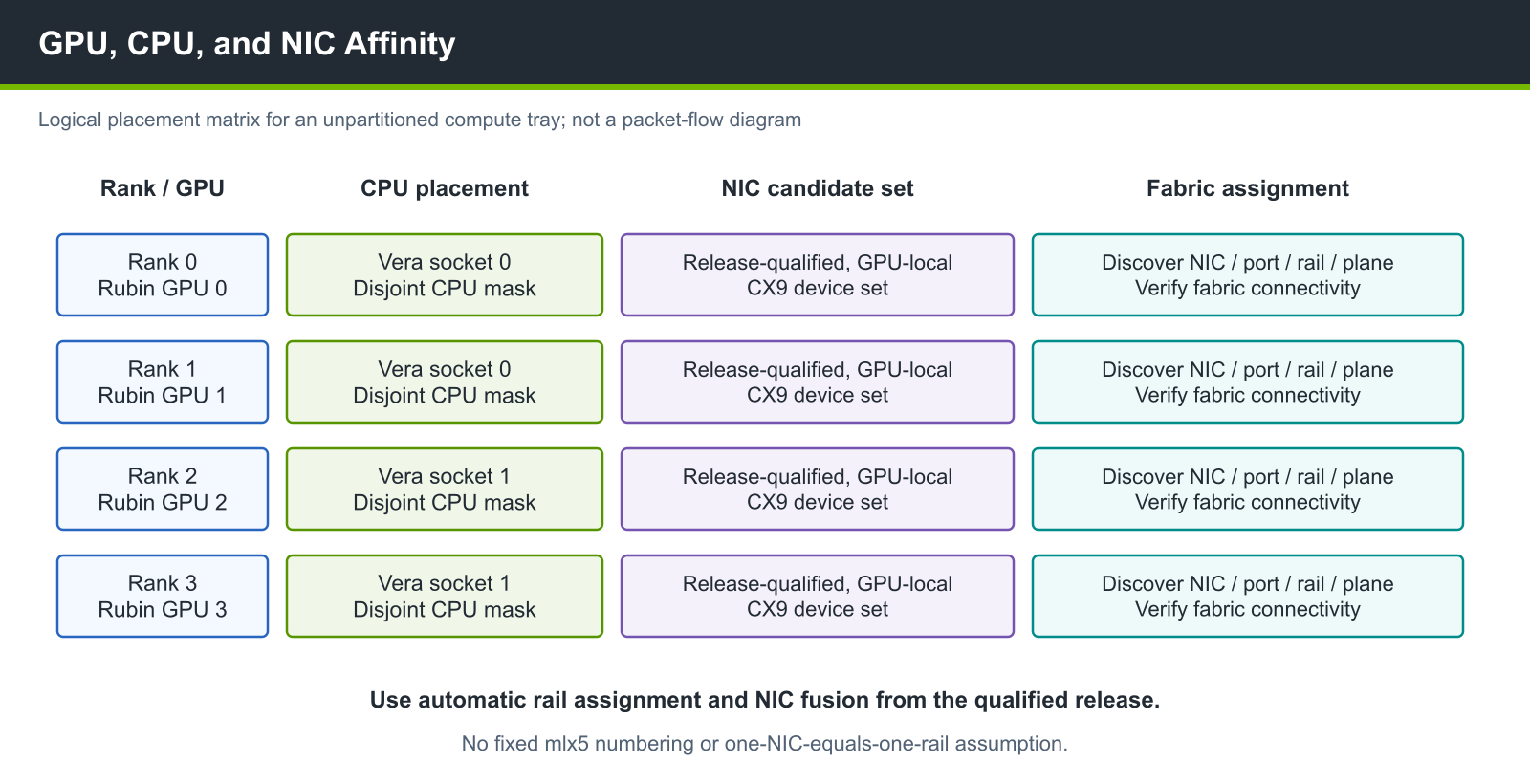
Figure 6 Logical placement matrix for Rubin GPUs, Vera CPUs, and ConnectX-9 NICs in a compute tray. Rows describe logical placement and affinity, not a physical data path. The NICs are CPU-attached over PCIe; validate actual affinity and rail mappings against platform discovery.#
The affinity model has two practical modes:
Dedicated mode: select CPU-attached CX9 paths local to each GPU rank.
Shared mode: allow multiple ranks to share CX9 paths and validate the impact with registered-buffer and GPUDirect RDMA settings.
Use the software and firmware qualified for the installed platform release. Validate the logical associations against discovered GPU, CPU, PCIe, HCA, port, rail, and plane information rather than deriving a rail map from the figure or device numbering.
UCX Microbenchmarks#
Use UCX tests to isolate host, device, and network paths before running full applications. In client/server mode, start the server on the peer before launching each client test, and ensure the client can reach the server’s bootstrap address and port. Select CPU affinity, GPU visibility, and any required HCA binding separately on each endpoint. CUDA-memory tests require CUDA support in the installed UCX build and its runtime transports. Follow the public UCX performance measurement instructions for the installed build’s server/client options and supported tests.
Run the same tests with automatic selection and with explicit HCA selection.
Keep ucx_info -d output, CPU masks, GPU IDs, HCA IDs, and link counters with
the results.