


Quick Start Guide#
This guide helps you get started with the TensorRT SDK. It demonstrates how to construct an application to run inference on a TensorRT engine.
Introduction#
What Is TensorRT?#
NVIDIA TensorRT is an SDK that takes a trained deep learning model and turns it into a fast, GPU-specific program for running inference, the act of computing predictions on new inputs after training is complete. It has two parts that you will see referenced throughout this guide:
A builder that compiles your model into a serialized, hardware-specific binary called an engine (sometimes also called a plan file). The builder picks the fastest available GPU kernel (a low-level GPU function) for each layer in your network.
A runtime that loads the engine into your application and executes it on the GPU.
You typically start from a trained model exported to ONNX, a framework-neutral interchange format that PyTorch, TensorFlow, and most other training frameworks can produce. TensorRT reads the ONNX file, builds the engine, and then your application uses the runtime to serve predictions.
The result: a compiled engine that runs your model on the GPU faster than executing it in the original training framework [1]. The actual speedup depends on the model, precision, batch size, and GPU. Refer to the NVIDIA Performance page and MLPerf inference submissions for authoritative comparative numbers.
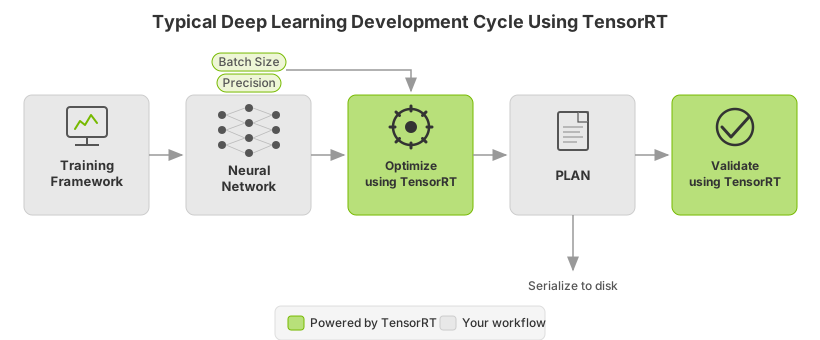
This section covers the basic installation, conversion, and runtime options available in TensorRT and when they are best applied.
What You’ll Build#
By the end of this guide, you will have:
TensorRT installed on your machine, with the
trtexeccommand-line tool available for building and benchmarking engines (Installing TensorRT).A ResNet-50 image classifier converted from ONNX to a TensorRT engine and deployed end to end, so you’ve seen every step of the build → optimize → run loop (Example Deployment Using ONNX).
A semantic-segmentation model running through both the C++ and Python TensorRT runtime APIs, so you know how to embed TensorRT into your own application in either language (Using the TensorRT Runtime API).
After completing these tutorials, you’ll be able to deploy your own trained model and pick the right TensorRT workflow for it.
Here is a quick summary of each chapter:
Installing TensorRT: Provides multiple ways to install TensorRT.
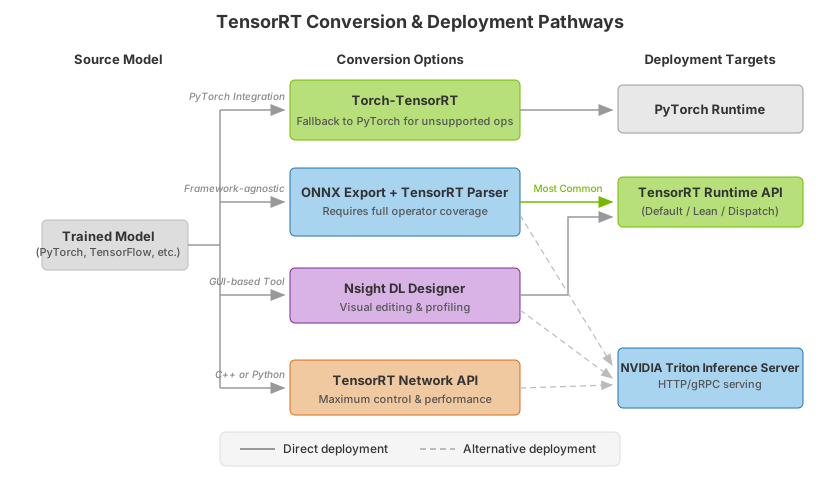
The TensorRT Ecosystem: Describes a flowchart showing the different types of conversion and deployment workflows and discusses their pros and cons.
Example Deployment Using ONNX: Examines the basic steps to convert and deploy your model, introduces concepts used in the rest of the guide, and walks you through the decisions you must make to optimize inference execution.
ONNX Conversion and Deployment: Walks through exporting a PyTorch model to ONNX and directs you to the ONNX deployment workflow for conversion and inference.
Using the TensorRT Runtime API: Provides a tutorial on semantic segmentation of images using the TensorRT C++ and Python API.
To deploy your model quickly using a higher-level application, refer to the NVIDIA Triton Inference Server Quick Start.
Installing TensorRT#
There are several installation methods for TensorRT. This section covers the most common options using:
A container
A Debian file
A standalone
pipwheel file
For other ways to install TensorRT, refer to the Alternative Installation Methods.
For advanced users who are already familiar with TensorRT and want to get their application running quickly, who are using an NVIDIA CUDA container, or who want to set up automation, follow the network repo installation instructions in Using The NVIDIA CUDA Network Repo For Debian Installation.
Before running the Python workflows in this guide, confirm your Python version against Prerequisites and the Support Matrix.
This section introduces the customized virtual machine images (VMI) that NVIDIA publishes and maintains regularly. NVIDIA NGC-certified public cloud platform users can access specific setup instructions by browsing the NGC website and identifying an available NGC container and tag to run on their VMI.
On each of the major cloud providers, NVIDIA publishes customized GPU-optimized VMIs with regular updates to OS and drivers. These VMIs are optimized for performance on the latest generations of NVIDIA GPUs. Using these VMIs to deploy NGC-hosted containers, models, and resources on cloud-hosted virtual machine instances with B200, B300, H100, A100, L40S, or T4 GPUs ensures optimum performance for deep learning, machine learning, and HPC workloads.
To deploy a TensorRT container on a public cloud, follow the steps associated with your NGC-certified public cloud platform.
Refer to the Debian Installation instructions.
Refer to the Python Package Index Installation instructions.
The TensorRT Ecosystem#
TensorRT is a large and flexible project. It can handle a variety of conversion and deployment workflows. The best workflow for you depends on your specific use case and problem setting.
TensorRT provides several deployment options, but all workflows involve converting your model to an optimized representation, which TensorRT refers to as an engine. Building a TensorRT workflow for your model involves picking the right deployment option and the right combination of parameters for engine creation.
Basic TensorRT Workflow#
Follow these steps to convert and deploy your model:
Export the model.
Select a precision.
Convert the model.
Deploy the model.
It is easiest to understand these steps in the context of a complete, end-to-end workflow: In Example Deployment Using ONNX, we will cover a simple framework-agnostic deployment workflow to convert and deploy a trained ResNet-50 model to TensorRT using ONNX conversion and TensorRT’s standalone runtime.
Conversion and Deployment Options#
The TensorRT ecosystem breaks down into two parts:
You can follow various paths to convert your models to optimized TensorRT engines.
The various runtimes users can target with TensorRT when deploying their optimized TensorRT engines.
Conversion#
There are four main options for converting a model with TensorRT:
Using Torch-TensorRT
Automatic ONNX conversion from
.onnxfilesUsing the GUI-based tool Nsight Deep Learning Designer
Manually constructing a network using the TensorRT API (either in C++ or Python)
The PyTorch integration (Torch-TensorRT) provides model conversion and a high-level runtime API for converting PyTorch models. It can fall back to PyTorch implementations where TensorRT does not support a particular operator. For more information about supported operators, refer to ONNX Operator Support.
A more performant option for automatic model conversion and deployment is to convert using ONNX. ONNX is a framework-agnostic option that works with models in TensorFlow, PyTorch, and more. TensorRT supports automatic conversion from ONNX files using the TensorRT API or trtexec, which we will use in this section. ONNX conversion requires full operator coverage; that is, all operations in your model must be supported by TensorRT (or you must provide custom plugins for unsupported operations). ONNX conversion results in a singular TensorRT engine that allows less overhead than Torch-TensorRT.
In addition to trtexec, Nsight Deep Learning Designer can convert ONNX files into TensorRT engines. The GUI-based tool provides model visualization and editing, inference performance profiling, and easy conversions to TensorRT engines for ONNX models. Nsight Deep Learning Designer automatically downloads TensorRT bits (including CUDA) on demand without requiring a separate installation of TensorRT.
You can manually construct TensorRT engines using the TensorRT network definition API for the most performance and customizability possible. This involves building an identical network to your target model in TensorRT operation by operation, using only TensorRT operations. After a TensorRT network is created, you will export just the weights of your model from the framework and load them into your TensorRT network. For this approach, more information about constructing the model using TensorRT’s network definition API can be found here:
Deployment#
There are three options for deploying a model with TensorRT:
Deploying within PyTorch
Using the standalone TensorRT runtime API
Using NVIDIA Triton Inference Server
Your choice for deployment will determine the steps required to convert the model.
When using Torch-TensorRT, the most common deployment option is simply to deploy within PyTorch. Torch-TensorRT conversion results in a PyTorch graph with TensorRT operations inserted into it. You can run Torch-TensorRT models like any other PyTorch model using Python.
The TensorRT runtime API allows for the lowest overhead and finest-grained control. However, operators that TensorRT does not natively support must be implemented as plugins (a library of prewritten plugins is available on GitHub: TensorRT plugin). The most common path for deploying with the runtime API is using ONNX export from a framework, which we cover in the following section.
Last, NVIDIA Triton Inference Server is open-source inference-serving software that enables teams to deploy trained AI models from any framework (TensorFlow, TensorRT, PyTorch, ONNX Runtime, or a custom framework), from local storage or Google Cloud Platform or AWS S3 on any GPU- or CPU-based infrastructure (cloud, data center, or edge). It is a flexible project with several unique features, such as concurrent model execution of heterogeneous models and multiple copies of the same model (multiple model copies can reduce latency further), load balancing, and model analysis. It is a good option if you must serve your models over HTTP - such as in a cloud inferencing solution. You can find the NVIDIA Triton Inference Server home page and the documentation.
Selecting the Correct Workflow#
Two of the most important factors in selecting how to convert and deploy your model are:
Your choice of framework
Your preferred TensorRT runtime to target
For more information on the runtime options available, refer to the Jupyter notebook included with this guide on Understanding TensorRT Runtimes.
Tutorials in this guide
Example Deployment Using ONNX walks through exporting a ResNet-50 ONNX model, building an engine, and deploying it.
Using the TensorRT Runtime API covers the TensorRT runtime API with a segmentation example.