Taints and Scheduling
Learn which taints Lepton adds to your nodes, and configure placement, tolerations, and readiness for your cluster.
Lepton adds taints to the nodes in its node groups. Your node components must tolerate these taints. Your cluster can also keep its own taints on nodes, or mark nodes ready with labels and annotations. Declare them in the scheduling settings.
Taints That Lepton Adds
Lepton adds these taints while it adds, operates, and releases a node. All of them have the NoSchedule effect. They do not evict the Pods that run on the node. Kubernetes does not schedule new Pods that do not tolerate them, for example the Pods of an updated or restarted DaemonSet.
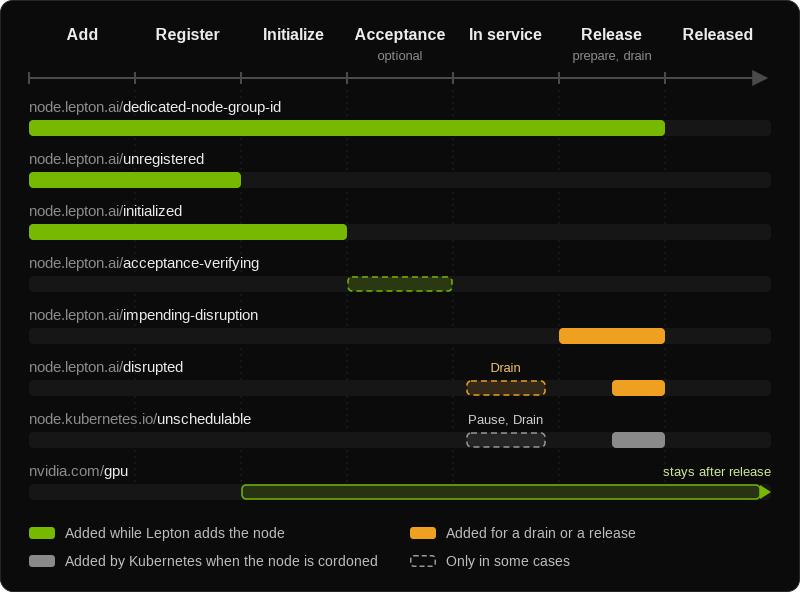
| Key | Added when | Removed when |
|---|---|---|
node.lepton.ai/dedicated-node-group-id | Addition starts | Release completes |
node.lepton.ai/unregistered | Addition starts | Registration completes |
node.lepton.ai/initialized | Addition starts | Initialization completes |
node.lepton.ai/acceptance-verifying | Initialization completes | Acceptance tests pass |
node.lepton.ai/impending-disruption | Release starts | Release completes |
node.lepton.ai/disrupted | Drain starts | Drain completes |
nvidia.com/gpu | Initialization completes | Never |
- The value of
node.lepton.ai/dedicated-node-group-idis the node group ID. The value ofnode.lepton.ai/disruptedisUserRequestorControllerHandling. The other taints have no value. - Lepton adds
node.lepton.ai/acceptance-verifyingonly if the node group has an Acceptance Baseline. - Drain, Graceful Drain, and a release start a drain. Resume Schedule also removes
node.lepton.ai/disrupted. - Lepton adds
nvidia.com/gpu:NoScheduleto a GPU node that does not have it. If the node hasnvidia.com/gpuwith another effect, Lepton changes the effect toNoSchedule. - When a release completes, or when Lepton cannot add a node, Lepton removes all taints with the
node.lepton.ai/prefix.
Kubernetes adds the node.kubernetes.io/unschedulable:NoSchedule taint to a cordoned node. Lepton cordons a node for Pause Schedule, Drain, and a release. If Auto Pause Schedule is enabled, Lepton also cordons an unhealthy node. Lepton uncordons the node for Resume Schedule, when a release completes, and when a paused unhealthy node is healthy again. Kubernetes adds a toleration for this taint to all DaemonSet Pods.
Tolerate Lepton Taints in Node Components
Node components are the DaemonSets that must run on each node, for example GPU Operator, network operators, and storage clients. They must also run while Lepton adds, operates, and releases the node. Add a toleration for all taints to each node component:
tolerations: - operator: ExistsA toleration without key and effect tolerates all taints. It also tolerates the taints that your cluster keeps, and the taints that later Lepton releases add.
If your tools need a toleration for each taint key, use this list. Do not set value or effect, so that each toleration matches all values and effects of its key:
tolerations: - key: node.lepton.ai/dedicated-node-group-id operator: Exists - key: node.lepton.ai/unregistered operator: Exists - key: node.lepton.ai/initialized operator: Exists - key: node.lepton.ai/acceptance-verifying operator: Exists - key: node.lepton.ai/impending-disruption operator: Exists - key: node.lepton.ai/disrupted operator: Exists - key: nvidia.com/gpu operator: ExistsThis list does not tolerate a taint that a later Lepton release adds. Also add tolerations for the taints that your cluster keeps on its nodes. Do not add these tolerations to your other workloads, such as Deployments.
Scheduling Settings
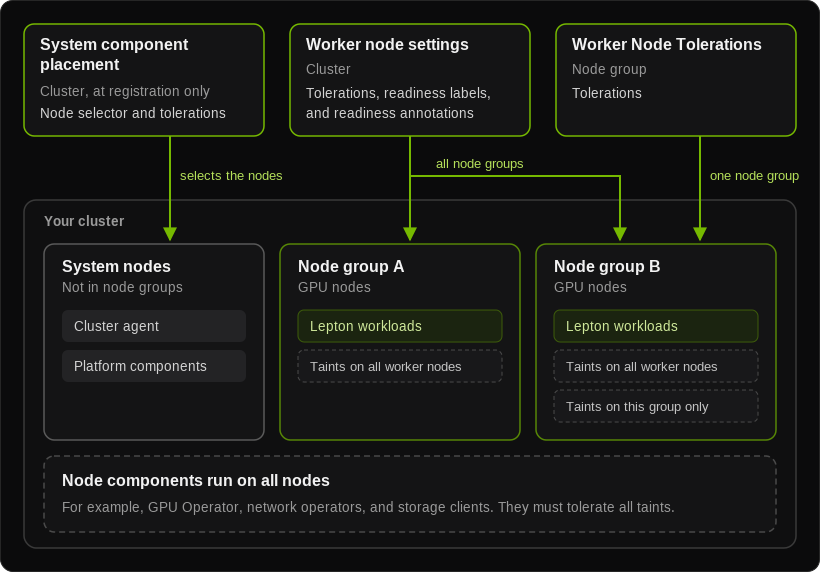
These settings do not add taints or labels to your nodes. They tell Lepton where to run its platform components, and which taints, labels, and annotations your nodes have.
System Component Placement
This setting selects the nodes for the cluster agent and the platform components. Set it when you register the cluster. Platform components that run on each node, such as DaemonSets, keep their placement.
- Node selector: The labels that the nodes must have. A node must have all of them.
- Tolerations: The taints on these nodes that the components tolerate. You must add a node selector to use tolerations.
Select nodes that you do not add to node groups. These nodes must have the necessary platform capacity. If you leave the section empty, Kubernetes selects the nodes.
You cannot change this setting in the Dashboard after registration. To change it, contact Lepton support. The install command includes the placement of the cluster agent. An upgrade of the cluster agent keeps it.
Worker Node Settings
Worker nodes are the nodes that you add to node groups. These settings apply to all node groups of the cluster. Set them when you register the cluster.
- Tolerations: The taints that your cluster keeps on all worker nodes, for example a taint that your Kubernetes distribution adds.
- Readiness labels and Readiness annotations: Lepton adds a node only after the node has all of them with the same values. Use them if your node components mark a node ready with a label or an annotation.
- Readiness selector: Lepton adds a node only when its labels match at least one rule, and a node matches a rule when it matches all expressions of the rule. An expression compares a label key with the
In,NotIn,Exists,DoesNotExist,Gt, orLtoperator, like the required node affinity of a Kubernetes Pod. Separate the values ofInandNotInwith commas, and enter one integer forGtandLt. For example, the expressionbreakfix.example.com/activeNotIntruekeeps Lepton from adding a node while the node is under repair.
You can change these settings at any time. See Change Worker Node Settings.
Worker Node Tolerations of a Node Group
Use Worker Node Tolerations for the taints that only the nodes of one node group keep. For example, the nodes of a GPU node pool can keep the is_gpu taint. Set them in Advanced configuration when you create or edit the node group. You can change them at any time.
How Lepton Uses the Tolerations
Lepton combines the tolerations of the cluster and the tolerations of the node group:
- Lepton adds them to the Pods of endpoints, dev pods, batch jobs, Ray clusters, and Slurm clusters in the node group.
- When you add a node to the node group, Lepton accepts the taints that they tolerate. Lepton always accepts its own taints and
nvidia.com/gpu. It does not add a node that has another taint. Add Nodes shows this node as Unadoptable.
When a Change Applies
A change applies to the nodes that Lepton adds and the workloads that Lepton creates after you save:
- Lepton checks the nodes that wait in Requested again.
- Lepton does not check the nodes in a node group again. It does not remove a node that gets a new taint, loses a readiness label or annotation, or stops matching the readiness selector.
- Workloads that exist keep their tolerations. To apply the change to a workload, create it again. You can also restart an endpoint.
Remove a taint from the nodes before you remove its toleration. If the nodes keep the taint, Kubernetes does not schedule new Lepton Pods on them.
Reserved Keys
In Worker node settings and Worker Node Tolerations, you cannot add a toleration for these taint keys:
nvidia.com/gpu. Lepton workloads already tolerate it.- Keys in the
lepton.ai,kubernetes.io, andk8s.iodomains and their subdomains, for examplenode.kubernetes.io/unschedulable. ToBeDeletedByClusterAutoscaler,DeletionCandidateOfClusterAutoscaler, and keys that start withkarpenter.sh/.
Remove a taint with a reserved key at its source. Readiness labels, annotations, and selector expressions cannot use keys in the lepton.ai domain or its subdomains.