


Networking#
DGX Vera Rubin NVL72 rack scale systems use NVLink, InfiniBand, and Ethernet for communication within and across racks.
NVLink forms the ultra-fast, memory-coherent scale-up fabric within each rack, making 72 GPUs act as one.
InfiniBand provides the high-bandwidth, low-latency scale-out compute fabric between racks, enabling massive multi-node AI training clusters.
Ethernet handles storage, management (in-band and out-of-band), and external connectivity, ensuring all components are integrated and manageable.
NVLink Networking#
NVIDIA NVLink is a high-speed, low-latency interconnect technology designed to overcome PCIe bandwidth limitations in multi-GPU and GPU-to-CPU communication, crucial for HPC and AI platforms. NVLink enables unified memory access across GPUs, simplifying programming, and scales efficiently through NVSwitch chips, which act as non-blocking switches between servers, creating high-bandwidth fabrics.
Connectors at the back of the trays connect to cable cartridges that interconnect the compute and NVLink switch trays along the rear of the system. This fabric is managed by NVIDIA Fabric Manager (or NVLSM), integrated with GPU drivers and the CUDA software stack (like NCCL), which configures the NVSwitch topology and monitors performance. Additionally, NVSwitch incorporates in-network computing (SHARP) to accelerate collective operations, further optimizing distributed AI training by performing computations within the network.
For more information about NVIDIA NMX, refer to the NVIDIA NMX documentation.
Network Overview#
A DGX Vera Rubin NVL72 rack installation uses several discrete networks:
externalnet- This network provides external communication for the head node to the enterprise network or to the internet, if allowed.internalnet- This network provides provisioning capabilities as well as system management to the control plane nodes.dgxnet- This network is used to provision and manage the compute trays.ipminet- This network provides Base Command Manager and the head node access to the out-of-band/BMC interfaces of all the components in the rack, including the compute trays, NVLink switch trays, the power shelves, the top-of-rack switches, and the control plane nodes.computenet- This network is used for RDMA communication across racks (east/west traffic).storagenet- This network provides each node access to storage.failovernet- This network is used only by head nodes in a redundant failover configuration.
The following image identifies the network ports on the compute and switch trays. Each number corresponds to a network in the preceding list.
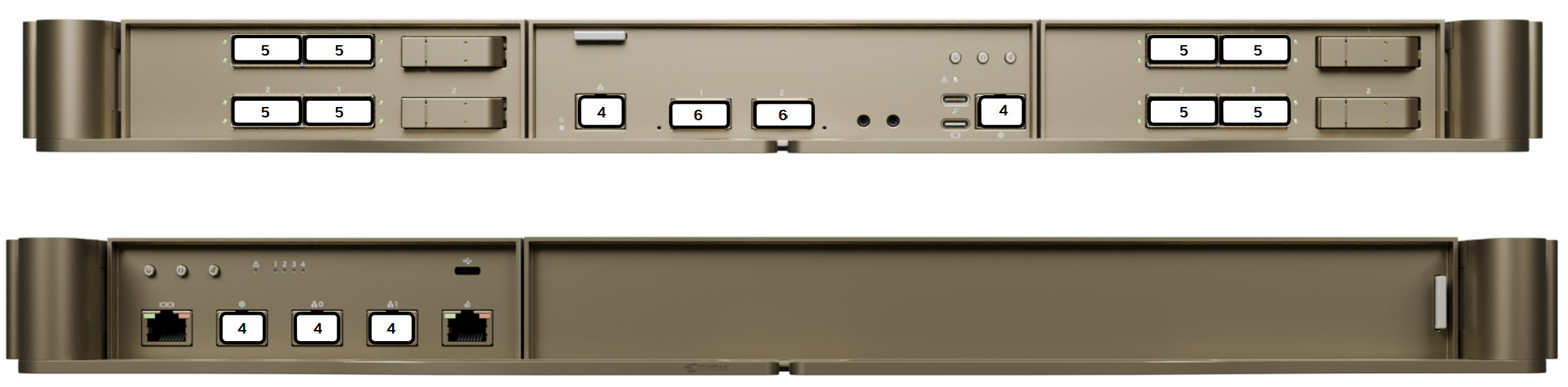
DGX Vera Rubin NVL72 Compute and Switch Trays - Identification of network port locations#
The following image describes the port types available in the compute tray.
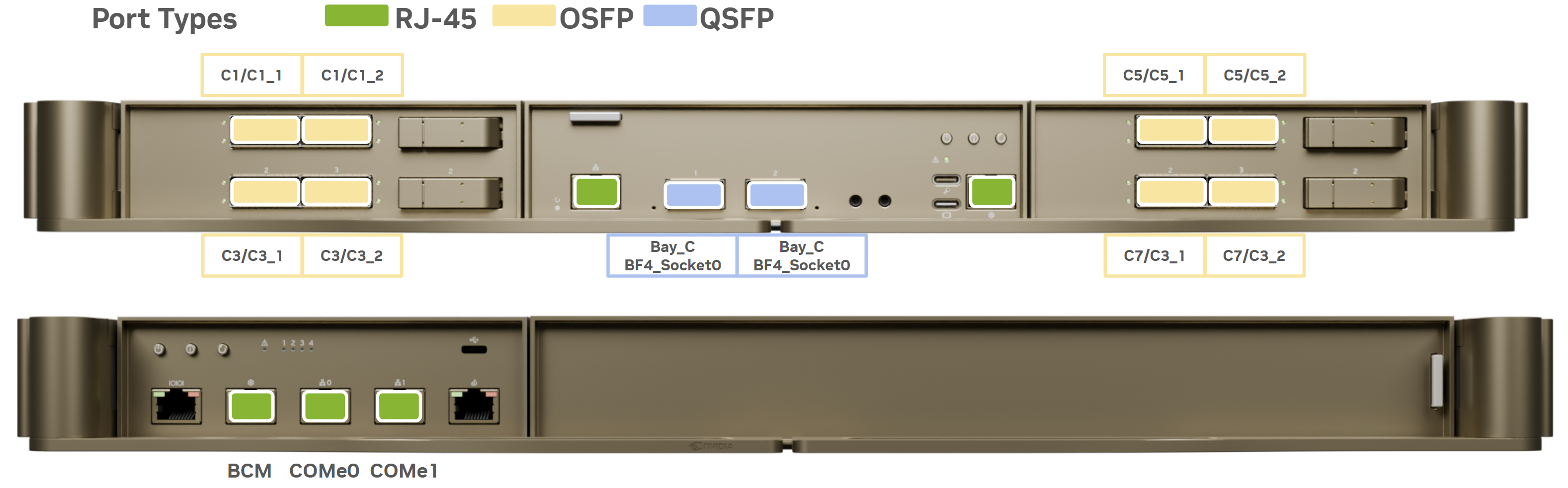
DGX Vera Rubin NVL72 Compute and Switch Trays - Identification of network port types#
Compute Tray Network Ports#
The following table describes the function and type of each of the compute tray network ports.
Port |
Port Type |
Network / Switch |
|---|---|---|
ConnectX-9 port |
OSFP |
computenet (InfiniBand) |
BlueField-4 left port |
QSFP |
storagenet (Ethernet) |
BlueField-4 right port |
QSFP |
storagenet (Ethernet) |
BlueField-4 RJ-45 port |
RJ45 |
ipminet (Ethernet) |
1 GbE LAN port |
RJ45 |
Not connected |
1 GbE BMC port |
RJ45 |
ipminet (Ethernet) |
Network Interface Names#
The following table describes the network interface names for each of the ports on the compute tray.
Port |
PCIe Bus |
Interface |
RDMA |
|---|---|---|---|
C1/C1_1 |
0001:03:00.0 |
enP1p3s0f0np0 |
mlx5_0 |
Bay_B_L E1.s_Top |
0001:06:00.0 |
N/A |
N/A |
C1/C1_2 |
0003:01:00.0 |
enP3p1s0f0np0 |
mlx5_4 |
C3/C3_1 |
0004:03:00.0 |
enP4p3s0f0np0 |
mlx5_8 |
Bay_B_L E1.s_Bottom |
0004:06:00.0 |
N/A |
N/A |
C3/C3_2 |
0006:01:00.0 |
enP6p1s0f0np0 |
mlx5_14 |
C7/C7_1 |
0009:03:00.0 |
enP9p3s0f0np0 |
mlx5_18 |
Bay_B_R E1.s_Bottom |
0009:06:00.0 |
N/A |
N/A |
C7/C7_2 |
000b:01:00.0 |
enP11p1s0f0np0 |
mlx5_22 |
C5/C5_1 |
000c:03:00.0 |
enP12p3s0f0np0 |
mlx5_26 |
Bay_B_R E1.s_Top |
000c:06:00.0 |
N/A |
N/A |
C5/C5_2 |
000e:01:00.0 |
enP14p1s0f0np0 |
mlx5_32 |
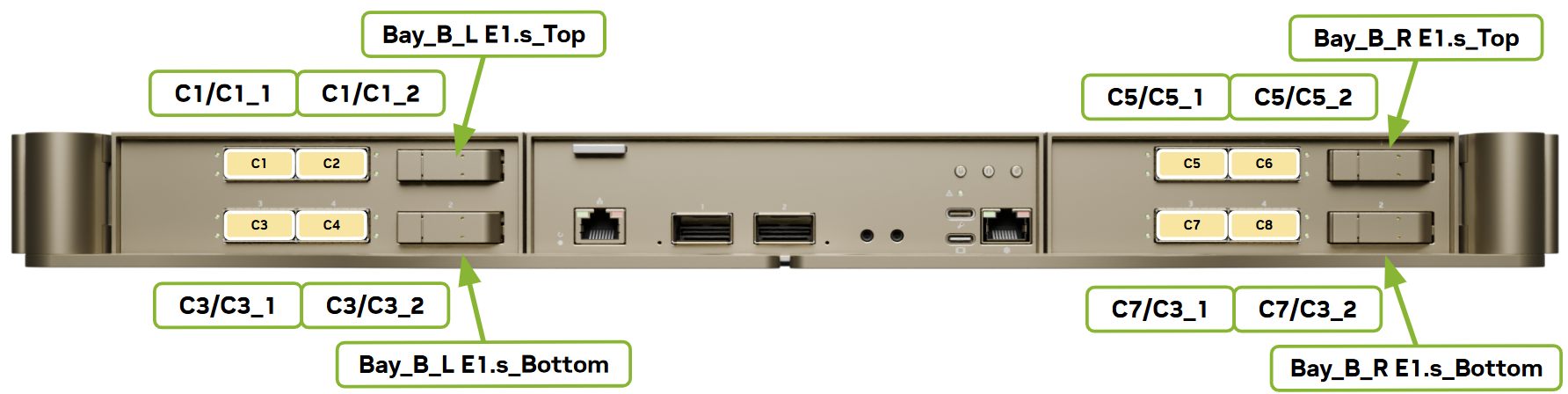
DGX Vera Rubin NVL72 Compute Tray Networking PCIe Labels Front View#
Port |
PCIe Bus |
Interface |
RDMA |
|---|---|---|---|
HPM_L GPU_0 |
0002:81:00.0 |
N/A |
N/A |
Bay_C BMC Bridge |
0002:a1:00.0 |
N/A |
N/A |
Bay_C BMC |
0002:a2:00.0 |
N/A |
N/A |
HPM_L GPU_1 |
0002:c1:00.0 |
N/A |
N/A |
Bay_C USB |
0002:e1:00.0 |
N/A |
N/A |
Bay_C BF4_Socket0 |
0005:41:00.0 |
enP5p65s0f0np0 |
mlx5_12 |
HPM_R GPU_2 |
000a:81:00.0 |
N/A |
N/A |
Bay_C E1.S_Boot Drive |
000a:a1:00.0 |
N/A |
N/A |
HPM_R GPU_3 |
000a:e1:00.0 |
N/A |
N/A |
Bay_C BF4_Socket1 |
000d:41:00.0 |
enP13p65s0f0np0 |
mlx5_30 |
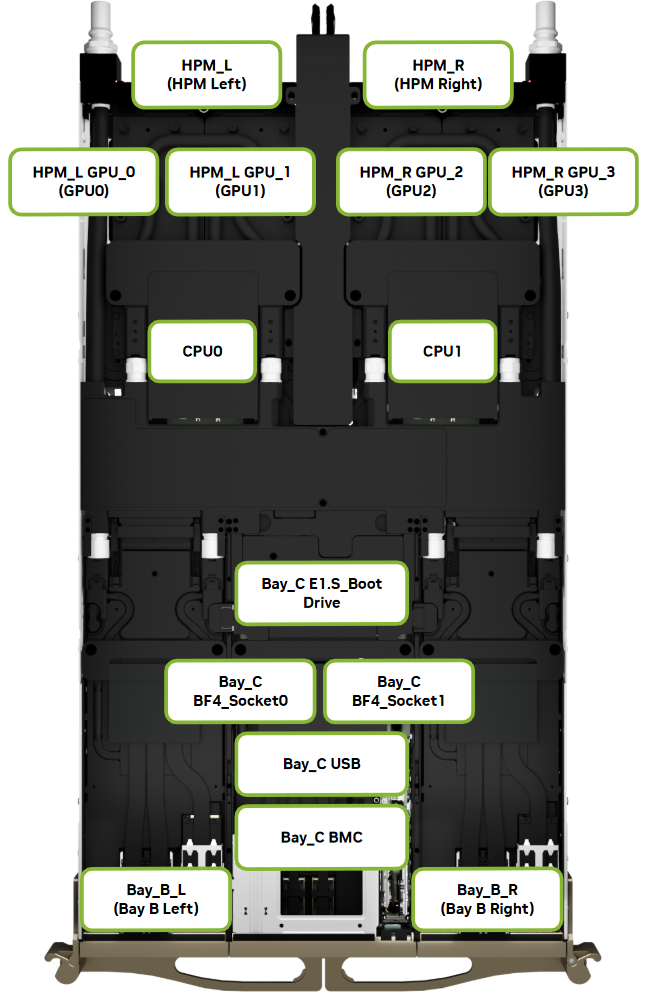
DGX Vera Rubin NVL72 Compute Tray Networking PCIe Labels Top View#
NVLink Switch Network Ports#
The following table describes the function and type of each of the NVLink switch network ports.
Port (from left to right) |
Port Type |
Network / Switch |
|---|---|---|
RS232 for BMC |
RJ45 |
Not connected |
Ethernet port BMC |
RJ45 |
ipminet (Ethernet) |
Ethernet for switch management |
RJ45 |
ipminet (Ethernet) |
Ethernet for switch management |
RJ45 |
ipminet (Ethernet) |
Leakage connector |
RJ45 |
Not connected |