 |
DriveWorks SDK Reference| 0.6.67 Release |
|
|
DriveWorks SDK Reference| 0.6.67 Release |
The DriveNet sample is a sophisticated, multi-class, higher resolution example that uses the NVIDIA proprietary deep neural network (DNN) to perform object detection. For a simpler, basic, single-class example, see Object Detector using dwDetector.
The DriveNet sample shows a more complete and sophisticated implementation of object detection built around the NVIDIA proprietary network architecture. It provides significantly enhanced detection quality when compared to Basic Object Detector Sample using dwDetector. For more information on DriveNet and how to customize it for your applications, consult your NVIDIA sales or business representative.
The table below shows the differences between Basic Object Detector Sample using dwDetector and DriveNet:
| Basic Object Detector (dwDetector) | DriveNet | |
|---|---|---|
| Input Video Format | H.264 RGB | RAW video (RCCB fp16) or RCCB live camera |
| Detection Quality | Basic | High quality |
| Object Classes | Car/truck only | Car/truck, person, bicycle/motorcycle, road sign |
| Network | GoogLeNet-derived, network structure available as prototxt | NVIDIA proprietary DriveNet architecture |
| Conditions Supported | Daytime, clear weather | Daytime, clear weather |
| Post-processing for False Positive Reduction | Basic | More advanced, confidence model-based |
| Object tracking over time | Enabled | Enabled |
| Camera position supported | Front | Front, rear, or side |
DriveNet detects objects by performing inference on each frame of a RAW video/camera stream. It clusters and tracks the objects with parameters defined in the sample.
Depending on the run platform, this sample supports Camera and Video modes:
The DriveNet sample expects RAW video or live camera input data from an AR0231 (revision >= 4) sensor with an RCCB color filter and a resolution of 1920 x 1208, which is then cropped and scaled down by half to 960 x 540 in typical usage.
The DriveNet sample uses foveal detection mode. It sends two images to the DriveNet network:
A follow-up algorithm clusters detections from both images to compute a more stable response.
The DriveNet network is trained to support any of the following six camera configurations:
The DriveNet network works on any of the above camera positions, without additional configuration changes.
The DriveNet network is trained primarily on data collected in the United States. It may have reduced accuracy in other locales, particularly for road sign shapes that do not exist in the U.S.
./sample_drivenet --input-type=video --video=<video file.raw>
./sample_drivenet --input-type=camera --camera-type=<rccb camera type> --csi-port=<csi port> --camera-index=<camera idx on csi port>
where <rccb camera type> is one of the following: ar0231-rccb, ar0231-rccb-ssc, ar0231-rccb-bae, ar0231-rccb-ss3322, ar0231-rccb-ss3323
./sample_drivenet --video=<video file.raw> --stopFrame=<frame idx>
This runs sample_drivenet until frame <frame_idx>. Default value is 0, for which the sample runs endlessly.
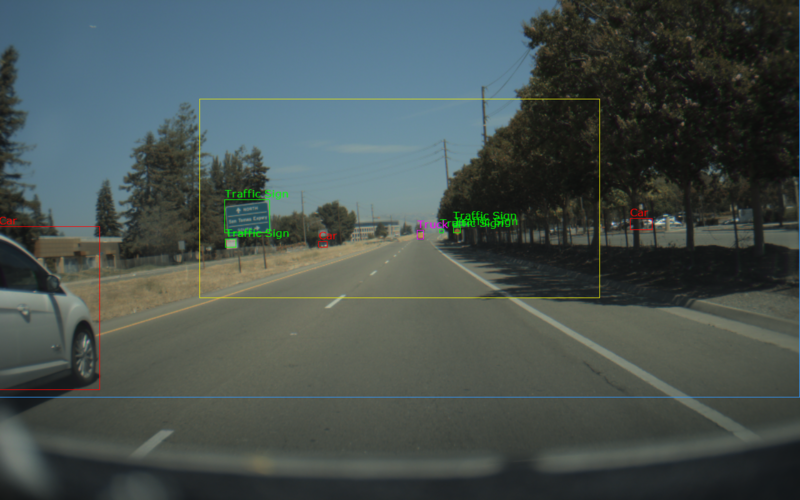
The sample creates a window, displays a video, and overlays bounding boxes for detected objects. The color of the bounding boxes represent the classes that it detects:
Red: Cars
Green: Traffic Signs
Blue: Bicycles
Magenta: Trucks
Orange: Pedestrians