Developing the Operator with Tilt
Fast, live-reload development loop for the Dynamo Kubernetes operator
Overview
Tilt provides a live-reload development environment for the Dynamo Kubernetes operator. Instead of manually building images, pushing to a registry, and redeploying on every change, Tilt watches your source files and automatically recompiles the Go binary, syncs it into the running container, and restarts the process — all in seconds.
Under the hood, the Tiltfile:
- Compiles the Go manager binary locally (
CGO_ENABLED=0). - Builds a minimal Docker image containing only the binary.
- Renders the production Helm chart (
deploy/helm/charts/platform) withhelm template, applies CRDs viakubectl, and deploys all rendered resources. - Live-updates the binary inside the running container on every code change — no full image rebuild required.
This gives you a fully working cluster where you can apply DynamoGraphDeployment
and DynamoGraphDeploymentRequest resources and have them reconcile into real
workloads — while iterating on controller logic with sub-second feedback.
Prerequisites
You also need a container registry that is accessible to your cluster’s nodes, so they can pull the operator image Tilt builds. If you use a local cluster like kind with a local registry, Tilt can push there directly.
Quick Start
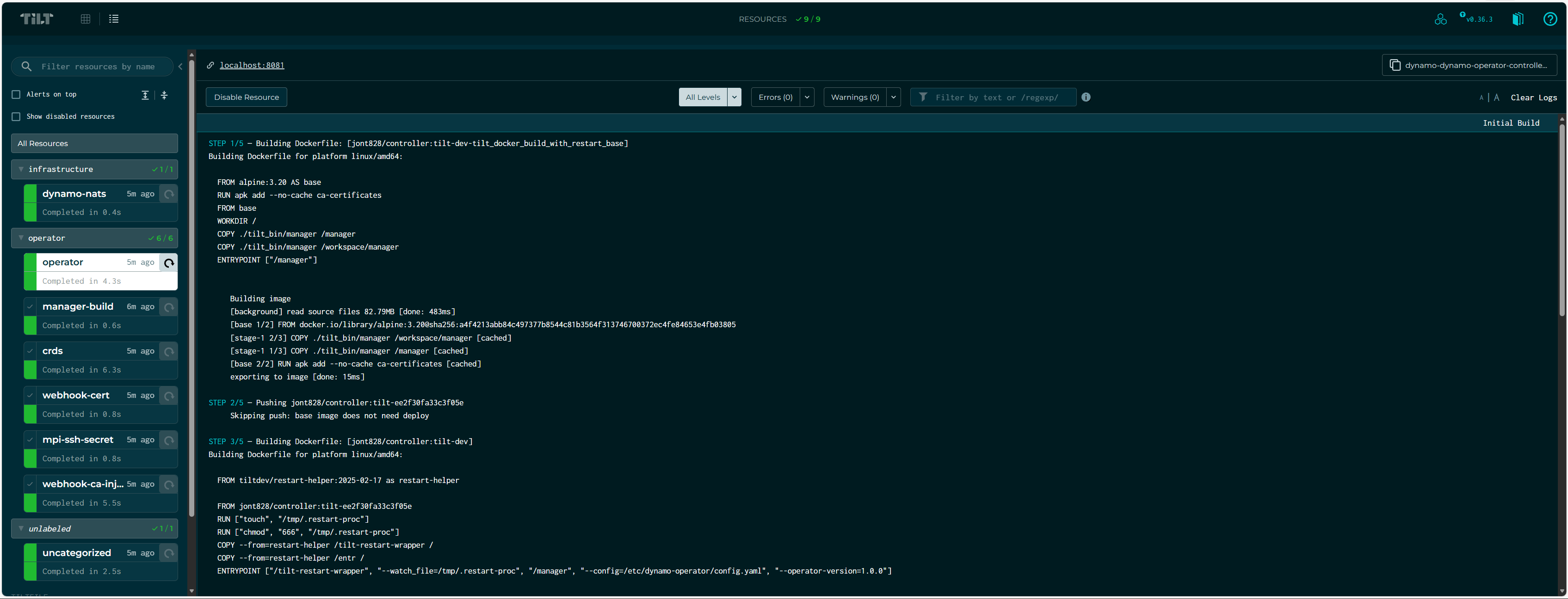
Tilt opens a terminal UI and a web dashboard at http://localhost:10350. The dashboard shows resource status, build logs, and port-forwards.
Press Space in the terminal to open the web UI. Press Ctrl-C to
shut everything down (resources remain deployed; run tilt down to tear
them down).
Configuration
All configuration is optional. The Tiltfile defines sensible defaults for every
setting, and tilt-settings.yaml is gitignored so your personal values
(cluster context, registry, etc.) never leak into the repo.
Create deploy/operator/tilt-settings.yaml with any of the settings below:
Settings Reference
Registry Configuration
The operator image needs to be pullable by your cluster’s nodes. The registry is resolved in priority order:
REGISTRYenv var —REGISTRY=docker.io/myuser tilt upregistryintilt-settings.yaml
The image is pushed as {registry}/controller:tilt-dev.
If no registry is configured, the image is only available locally. This works with kind using a local registry but will fail on remote clusters.
How It Works
When you run tilt up, the following resources are created in order:
The operator handles webhook certificate generation, CA bundle injection, and MPI SSH key provisioning at runtime — no external setup needed.
What Each Resource Does
manager-build — Runs CGO_ENABLED=0 GOOS=linux GOARCH=amd64 go build to
compile the operator binary. Re-runs on changes to api/, cmd/, internal/,
go.mod, or go.sum.
crds — Applies CRDs from the Helm chart via kubectl apply --server-side.
When skip_codegen is false, runs make generate && make manifests first.
operator — The operator Deployment itself. Tilt watches the compiled binary
and uses live_update to sync it into the running container and restart the
process — no image rebuild needed. On startup, the operator’s built-in cert
controller generates a self-signed TLS certificate, injects the CA bundle into
webhook configurations, and creates the MPI SSH secret — matching production
behavior exactly.
Live Update Cycle
The inner development loop looks like this:
- You edit Go source files under
deploy/operator/. - Tilt detects the change and recompiles the binary (~2-5 seconds).
- The new binary is synced into the running container via
live_update. - The process restarts automatically.
- Your controller changes are live — test by applying a DGD/DGDR.
No docker build, no docker push, no kubectl rollout restart.
Webhook Certificates
The operator handles webhook TLS certificates automatically at runtime using a built-in cert controller (based on OPA cert-controller). On startup it:
- Creates a self-signed CA and webhook serving certificate.
- Stores them in the
webhook-server-certSecret. - Injects the CA bundle into
ValidatingWebhookConfigurationandMutatingWebhookConfigurationresources.
This matches production behavior and requires no external tooling. For
alternative certificate management (cert-manager or external certs), see the
webhook documentation and configure via
helm_values in tilt-settings.yaml.
Typical Workflows
Iterating on Controller Logic
The most common workflow — you’re modifying reconciliation logic and want fast feedback:
Changing API Types (CRDs)
When you modify files under api/, you need codegen to run:
Tilt will run make generate && make manifests and re-apply CRDs whenever
api/ files change.
Testing Multi-Node Features
Enable the necessary subcharts:
Using Environment Variables
You can override the registry without editing the settings file:
Tilt UI
The web UI at http://localhost:10350 shows:
- Resource status — green/red/pending for each resource
- Build logs — compilation output and errors
- Runtime logs — operator logs streamed in real time
- Port forwards — the health endpoint is forwarded to
localhost:8081
Resources are grouped by label (operator and infrastructure) to keep the
UI organized.
Cleanup
Troubleshooting
Image Pull Errors
If pods show ImagePullBackOff:
- Verify
registryis set intilt-settings.yamlor viaREGISTRYenv var. - Ensure your cluster nodes can pull from that registry.
- For kind with a local registry, follow the kind local registry guide.
Webhook TLS Errors
If applying a DGD/DGDR fails with x509: certificate signed by unknown authority:
- Check the operator logs in the Tilt UI — the cert controller logs its progress on startup.
- Verify the
webhook-server-certSecret exists and has been populated: - The operator may need a few seconds after startup to generate certs and
inject the CA bundle. Wait for the
cert-controllerlog messages before applying resources.
CRD Codegen Failures
If crds fails with codegen errors:
- Ensure
controller-genis installed:make controller-gen - Try running codegen manually:
make generate && make manifests - Set
skip_codegen: truetemporarily to bypass if you haven’t changed API types.
Context Safety Guard
If Tilt refuses to start with a context error, add your cluster context to
allowed_contexts in tilt-settings.yaml:

