
2. Benchmarking GPUDirect Storage#
GDS enables high throughput and low latency data transfer between storage and GPU memory, which allows you to program the DMA engine of a PCIe device with the correct mappings to move data in and out of a target GPU’s memory. As such, it becomes clear the path between the GPU and the network card or storage device/controller factors significantly into delivered performance, both throughput and latency. The PCIe topology, PCIe root complex, switches and the physical location of the GPU and network and storage devices need to be examined and factored into the configuration details when benchmarking GDS.
Achieving optimal performance with GDS benchmarking requires working through the PCIe topology and determining:
which IO devices and GPUs are on the same PCIe switch or root complex
which device communication paths require traversing multiple PCIe ports and possibly crossing CPU socket boundaries
The diagram in the following section illustrates an example of PCIe topology, showing different devices across multiple PCIe switches.
Determining PCIe device proximity is not necessarily an easy task, as it requires using multiple Linux utilities
to correlate device names and numbers to the hierarchical numbering scheme used to identify PCIe devices, referred
to as BDF notation (bus:device.func) or extended BDF notation, which adds a PCIe domain identifier to the
notation, as in domain:bus:device.func.
$ lspci | grep -i nvidia
36:00.0 3D controller: NVIDIA Corporation Device 20b0 (rev a1)

$ lspci -D | grep -i nvidia
0000:36:00.0 3D controller: NVIDIA Corporation Device 20b0 (rev a1)
In the first example, note the standard PCIe BDF notation for the first NVIDIA GPU, 36:00.0. In the second example,
the -D flag was added to show the PCIe domain (extended BDF), 0000:36:00.0.
2.1. Determining PCIe Device Affinity#
The examples in this section were performed on an NVIDIA DGX-2™ system. The figure below shows a subset of the DGX-2 system architecture, illustrating the PCIe topology:
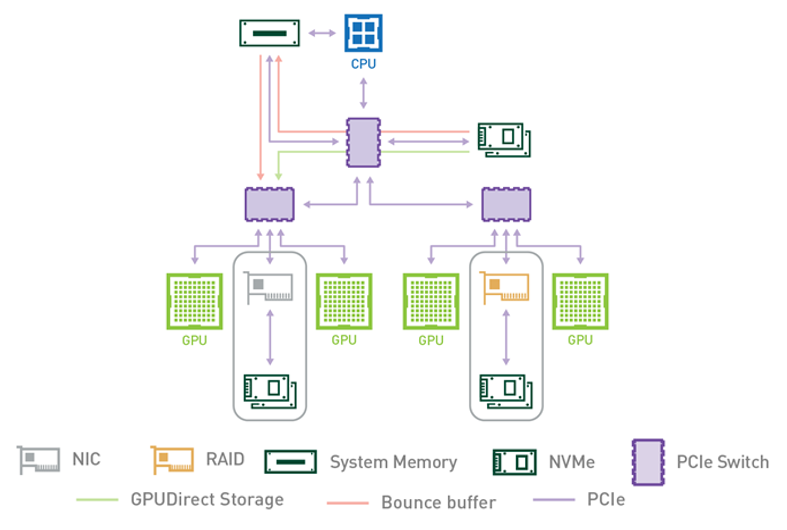
Figure 2.1 PCIe Topology#
A DGX-2 system has two CPU sockets, and each socket has two PCIe trees. Each of the four PCIe trees (only one is shown above) has two levels of switches. Up to four NVMe drives hang off of the first level of switches. Each second-level switch has a connection to the first level switch, a PCIe slot that can be populated with a NIC or RAID card, and two GPUs.
The commands and methodology in the following sample output apply to any system that runs Linux. The goal
is to associate GPUs and NVMe drives in the PCIe hierarchy and determine which device names to use for
GPUs and NVMe drives that share the same upstream PCIe switch. To resolve this issue, you must correlate
Linux device names with PCIe BDF values. For the locally attached NVMe disks, here is an example that
uses Linux /dev/disk/by-path directory entries:
dgx2> ls -l /dev/disk/by-path
total 0
lrwxrwxrwx 1 root root  9 Nov 19 12:08 pci-0000:00:14.0-usb-0:8.1:1.0-scsi-0:0:0:0 -> ../../sr0
lrwxrwxrwx 1 root root  9 Nov 19 12:08 pci-0000:00:14.0-usb-0:8.2:1.0-scsi-0:0:0:0 -> ../../sda
lrwxrwxrwx 1 root root 13 Nov 19 12:08 pci-0000:01:00.0-nvme-1 -> ../../nvme0n1
lrwxrwxrwx 1 root root 15 Nov 19 12:08 pci-0000:01:00.0-nvme-1-part1 -> ../../nvme0n1p1
lrwxrwxrwx 1 root root 15 Nov 19 12:08 pci-0000:01:00.0-nvme-1-part2 -> ../../nvme0n1p2
lrwxrwxrwx 1 root root 13 Nov 19 12:08 pci-0000:05:00.0-nvme-1 -> ../../nvme1n1
lrwxrwxrwx 1 root root 15 Nov 19 12:08 pci-0000:05:00.0-nvme-1-part1 -> ../../nvme1n1p1
lrwxrwxrwx 1 root root 15 Nov 19 12:08 pci-0000:05:00.0-nvme-1-part2 -> ../../nvme1n1p2
lrwxrwxrwx 1 root root 13 Nov 19 12:08 pci-0000:2e:00.0-nvme-1 -> ../../nvme2n1
lrwxrwxrwx 1 root root 13 Nov 19 12:08 pci-0000:2f:00.0-nvme-1 -> ../../nvme3n1
lrwxrwxrwx 1 root root 13 Nov 19 12:08 pci-0000:51:00.0-nvme-1 -> ../../nvme4n1
lrwxrwxrwx 1 root root 13 Nov 19 12:08 pci-0000:52:00.0-nvme-1 -> ../../nvme5n1
lrwxrwxrwx 1 root root 13 Nov 19 12:08 pci-0000:b1:00.0-nvme-1 -> ../../nvme6n1
lrwxrwxrwx 1 root root 13 Nov 19 12:08 pci-0000:b2:00.0-nvme-1 -> ../../nvme7n1
lrwxrwxrwx 1 root root 13 Nov 19 12:08 pci-0000:da:00.0-nvme-1 -> ../../nvme8n1
lrwxrwxrwx 1 root root 13 Nov 19 12:08 pci-0000:db:00.0-nvme-1 -> ../../nvme9n1
Since the current system configuration has nvme0 and nvme1 devices configured into a RAID0 device (/dev/md0
not shown here), the focus is on the remaining available nvme devices, nvme2 through nvme9. You can get
the same PCIe-to-device information for the GPUs that use the nvidia-smi utility and specify the GPU attributes to query:
dgx2> nvidia-smi --query-gpu=index,name,pci.domain,pci.bus,pci.device,pci.device_id,pci.sub_device_id --format=csv
index, name, pci.domain, pci.bus, pci.device, pci.device_id, pci.sub_device_id
0, Tesla V100-SXM3-32GB, 0x0000, 0x34, 0x00, 0x1DB810DE, 0x12AB10DE
1, Tesla V100-SXM3-32GB, 0x0000, 0x36, 0x00, 0x1DB810DE, 0x12AB10DE
2, Tesla V100-SXM3-32GB, 0x0000, 0x39, 0x00, 0x1DB810DE, 0x12AB10DE
3, Tesla V100-SXM3-32GB, 0x0000, 0x3B, 0x00, 0x1DB810DE, 0x12AB10DE
4, Tesla V100-SXM3-32GB, 0x0000, 0x57, 0x00, 0x1DB810DE, 0x12AB10DE
5, Tesla V100-SXM3-32GB, 0x0000, 0x59, 0x00, 0x1DB810DE, 0x12AB10DE
6, Tesla V100-SXM3-32GB, 0x0000, 0x5C, 0x00, 0x1DB810DE, 0x12AB10DE
7, Tesla V100-SXM3-32GB, 0x0000, 0x5E, 0x00, 0x1DB810DE, 0x12AB10DE
8, Tesla V100-SXM3-32GB, 0x0000, 0xB7, 0x00, 0x1DB810DE, 0x12AB10DE
9, Tesla V100-SXM3-32GB, 0x0000, 0xB9, 0x00, 0x1DB810DE, 0x12AB10DE
10, Tesla V100-SXM3-32GB, 0x0000, 0xBC, 0x00, 0x1DB810DE, 0x12AB10DE
11, Tesla V100-SXM3-32GB, 0x0000, 0xBE, 0x00, 0x1DB810DE, 0x12AB10DE
12, Tesla V100-SXM3-32GB, 0x0000, 0xE0, 0x00, 0x1DB810DE, 0x12AB10DE
13, Tesla V100-SXM3-32GB, 0x0000, 0xE2, 0x00, 0x1DB810DE, 0x12AB10DE
14, Tesla V100-SXM3-32GB, 0x0000, 0xE5, 0x00, 0x1DB810DE, 0x12AB10DE
15, Tesla V100-SXM3-32GB, 0x0000, 0xE7, 0x00, 0x1DB810DE, 0x12AB10DE
Use the Linux lspci command to tie it all together:
dgx2> lspci -tv | egrep -i "nvidia | micron"
-+-[0000:d7]-+-00.0-[d8-e7]----00.0-[d9-e7]--+-00.0-[da]----00.0  Micron Technology Inc 9200 PRO NVMe SSD
 |           |                               +-01.0-[db]----00.0  Micron Technology Inc 9200 PRO NVMe SSD
 |           |                               +-04.0-[de-e2]----00.0-[df-e2]--+-00.0-[e0]----00.0  NVIDIA Corporation GV100GL [Tesla V100 SXM3 32GB]
 |           |                               |                               \-10.0-[e2]----00.0  NVIDIA Corporation GV100GL [Tesla V100 SXM3 32GB]
 |           |                               \-0c.0-[e3-e7]----00.0-[e4-e7]--+-00.0-[e5]----00.0  NVIDIA Corporation GV100GL [Tesla V100 SXM3 32GB]
 |           |                                                               \-10.0-[e7]----00.0  NVIDIA Corporation GV100GL [Tesla V100 SXM3 32GB]
 +-[0000:ae]-+-00.0-[af-c7]----00.0-[b0-c7]--+-00.0-[b1]----00.0  Micron Technology Inc 9200 PRO NVMe SSD
 |           |                               +-01.0-[b2]----00.0  Micron Technology Inc 9200 PRO NVMe SSD
 |           |                               +-04.0-[b5-b9]----00.0-[b6-b9]--+-00.0-[b7]----00.0  NVIDIA Corporation GV100GL [Tesla V100 SXM3 32GB]
 |           |                               |                               \-10.0-[b9]----00.0  NVIDIA Corporation GV100GL [Tesla V100 SXM3 32GB]
 |           |                               +-0c.0-[ba-be]----00.0-[bb-be]--+-00.0-[bc]----00.0  NVIDIA Corporation GV100GL [Tesla V100 SXM3 32GB]
 |           |                               |                               \-10.0-[be]----00.0  NVIDIA Corporation GV100GL [Tesla V100 SXM3 32GB]
 |           |                               \-10.0-[bf-c7]----00.0-[c0-c7]--+-02.0-[c1]----00.0  NVIDIA Corporation Device 1ac2
 |           |                                                               +-03.0-[c2]----00.0  NVIDIA Corporation Device 1ac2
 |           |                                                               +-04.0-[c3]----00.0  NVIDIA Corporation Device 1ac2
 |           |                                                               +-0a.0-[c5]----00.0  NVIDIA Corporation Device 1ac2
 |           |                                                               +-0b.0-[c6]----00.0  NVIDIA Corporation Device 1ac2
 |           |                                                               \-0c.0-[c7]----00.0  NVIDIA Corporation Device 1ac2
 +-[0000:4e]-+-00.0-[4f-67]----00.0-[50-67]--+-00.0-[51]----00.0  Micron Technology Inc 9200 PRO NVMe SSD
 |           |                               +-01.0-[52]----00.0  Micron Technology Inc 9200 PRO NVMe SSD
 |           |                               +-04.0-[55-59]----00.0-[56-59]--+-00.0-[57]----00.0  NVIDIA Corporation GV100GL [Tesla V100 SXM3 32GB]
 |           |                               |                               \-10.0-[59]----00.0  NVIDIA Corporation GV100GL [Tesla V100 SXM3 32GB]
 |           |                               +-0c.0-[5a-5e]----00.0-[5b-5e]--+-00.0-[5c]----00.0  NVIDIA Corporation GV100GL [Tesla V100 SXM3 32GB]
 |           |                               |                               \-10.0-[5e]----00.0  NVIDIA Corporation GV100GL [Tesla V100 SXM3 32GB]
 |           |                               \-10.0-[5f-67]----00.0-[60-67]--+-02.0-[61]----00.0  NVIDIA Corporation Device 1ac2
 |           |                                                               +-03.0-[62]----00.0  NVIDIA Corporation Device 1ac2
 |           |                                                               +-04.0-[63]----00.0  NVIDIA Corporation Device 1ac2
 |           |                                                               +-0a.0-[65]----00.0  NVIDIA Corporation Device 1ac2
 |           |                                                               +-0b.0-[66]----00.0  NVIDIA Corporation Device 1ac2
 |           |                                                               \-0c.0-[67]----00.0  NVIDIA Corporation Device 1ac2
 +-[0000:2b]-+-00.0-[2c-3b]----00.0-[2d-3b]--+-00.0-[2e]----00.0  Micron Technology Inc 9200 PRO NVMe SSD
 |           |                               +-01.0-[2f]----00.0  Micron Technology Inc 9200 PRO NVMe SSD
 |           |                               +-04.0-[32-36]----00.0-[33-36]--+-00.0-[34]----00.0  NVIDIA Corporation GV100GL [Tesla V100 SXM3 32GB]
 |           |                               |                               \-10.0-[36]----00.0  NVIDIA Corporation GV100GL [Tesla V100 SXM3 32GB]
 |           |                               \-0c.0-[37-3b]----00.0-[38-3b]--+-00.0-[39]----00.0  NVIDIA Corporation GV100GL [Tesla V100 SXM3 32GB]
 |           |                                                               \-10.0-[3b]----00.0  NVIDIA Corporation GV100GL [Tesla V100 SXM3 32GB]
In the above example, we explicitly searched for SSDs from the given vendor. To determine the manufacturer of the
NVMe SSD devices on your system, simply run lsblk -o NAME,MODEL. Alternatively, use nvme as the string to
match with nvidia.
A few things to note here. First, the NVME SSD devices are grouped in pairs on each of the PCIe upstream switches,
as shown in the displayed extended BDF format (left most column), showing domain zero, and Bus IDs 0xd7 (0000:d7),
0xae, 0x4e and 0x2b. Also, two distinct NVIDIA device IDs are revealed (right-most column) - 0x1db8 and 0x1ac2.
The 0x1db8 devices are the Tesla V100 SXM3 32GB GPUs, and the 0x1ac2 devices are NVSwitches. Our interest here
is in the GPU devices, and the topology shows that there will be an optimal performance path between a pair of
NVMe SSDs and four possible V100 GPUs. Given this information, we can create a RAID0 device comprised of two
NVMe SSDs on the same PCIe switch, and determine which GPUs are on the same PCIe upstream switch.
Starting at the top of the lspci output, note two NVMe drives at PCIe bus 0xda and 0xdb. The disk-by-path
data indicates these are nvme8 and nvme9 devices. The four GPUs on the same segment, 0xe0, 0xe2, 0xe5 and 0xe7,
are GPUs 12, 13, 14 and 15 respectively, as determined from the nvidia-smi output. The following table s
hows the PCIe GPU-to-NVMe affinity for all installed GPUs and corresponding NVMe SSD pairs.
See |
See |
||
|---|---|---|---|
GPU # |
GPU PCIe |
NVMe # |
NVMe PCIe |
0, 1, 2, 3 |
0x34, 0x36, 0x39, 0x3b |
nvme2, nvme3 |
0x2e, 0x2f |
4, 5, 6, 7 |
0x57, 0x59, 0x5c, 0x5e |
nvme4, nvme5 |
0x51, 0x52 |
8, 9, 10, 11 |
0xb7, 0xb9, 0xbc, 0xbe |
nvme6, nvme7 |
0xb1, 0xb2 |
12, 13, 14, 15 |
0xe0, 0xe2, 0xe5, 0xe7 |
nvme8, nvme9 |
0xda, 0xdb |
With this information, we can configure a target workload for optimal throughput and latency, leveraging PCIe topology and device proximity of the GPUs and NVMe SSDs. This will be demonstrated in the next couple sections. Note that it is not guaranteed the actual PCIe BDF values will be the same for every NVIDIA DGX-2. This is because enumeration of the PCIe topology is based on specific configuration details and determined at boot time.
The same logic applies to storage that is network attached (NAS). The network interface (NIC) becomes the
“storage controller”, in terms of the data flow between the GPUs and storage. Fortunately, determining PCIe
topology is a much easier task for GPUs and NICs, as the nvidia-smi utility includes options for generating
this information. Specifically, nvidia-smi topo -mp generates a simple topology map in the form of a
matrix showing the connection(s) at the intersection of the installed GPUs and network interfaces.
For readability, the sample output below from a DGX-2 system shows the first eight columns, and the first
four Mellanox device rows, not the entire table generated when executing nvidia-smi topo -mp.
dgx2> nvidia-smi topo -mp
        GPU0   GPU1   GPU2   GPU3   GPU4   GPU5   GPU6   GPU7
GPU0     X     PIX    PXB    PXB    NODE   NODE   NODE   NODE
GPU1    PIX     X     PXB    PXB    NODE   NODE   NODE   NODE
GPU2    PXB    PXB     X     PIX    NODE   NODE   NODE   NODE
GPU3    PXB    PXB    PIX     X     NODE   NODE   NODE   NODE
GPU4    NODE   NODE   NODE   NODE    X     PIX    PXB    PXB
GPU5    NODE   NODE   NODE   NODE   PIX     X     PXB    PXB
GPU6    NODE   NODE   NODE   NODE   PXB    PXB     X     PIX
GPU7    NODE   NODE   NODE   NODE   PXB    PXB    PIX     X
GPU8    SYS    SYS    SYS    SYS    SYS    SYS    SYS    SYS
GPU9    SYS    SYS    SYS    SYS    SYS    SYS    SYS    SYS
GPU10   SYS    SYS    SYS    SYS    SYS    SYS    SYS    SYS
GPU11   SYS    SYS    SYS    SYS    SYS    SYS    SYS    SYS
GPU12   SYS    SYS    SYS    SYS    SYS    SYS    SYS    SYS
GPU13   SYS    SYS    SYS    SYS    SYS    SYS    SYS    SYS
GPU14   SYS    SYS    SYS    SYS    SYS    SYS    SYS    SYS
GPU15   SYS    SYS    SYS    SYS    SYS    SYS    SYS    SYS
mlx5_0  PIX    PIX    PXB    PXB    NODE   NODE   NODE   NODE
mlx5_1  PXB    PXB    PIX    PIX    NODE   NODE   NODE   NODE
mlx5_2  NODE   NODE   NODE   NODE   PIX    PIX    PXB    PXB
mlx5_3  NODE   NODE   NODE   NODE   PXB    PXB    PIX    PIX

Legend:

  X    = Self
  SYS  = Connection traversing PCIe as well as the SMP interconnect between NUMA nodes (for example, QPI/UPI)
  NODE = Connection traversing PCIe as well as the interconnect between PCIe Host Bridges within a NUMA node
  PHB  = Connection traversing PCIe as well as a PCIe Host Bridge (typically the CPU)
  PXB  = Connection traversing multiple PCIe bridges (without traversing the PCIe Host Bridge)
  PIX  = Connection traversing at most a single PCIe bridge
The optimal path between a GPU and NIC will be one PCIe switch path designated as PIX. The least optimal
path is designated as SYS, which indicates that the data path requires traversing the CPU-to-CPU
interconnect (NUMA nodes).
If you use this data when you configure and test GDS performance, the ideal setup would be, for example,
a data flow from mlx5_0 to/from GPUs 0 and 1, mlx5_1 to/from GPUs 1 and 2, and so on.
On systems where nvidia-smi is not available and cannot be installed, determining the ideal setup can
still be accomplished. Using tools such as lscpi or hwloc’s lstopo can enable administrators to
identify the best pairing of GPUs with NVMes and NICs. Below is an example output of lstopo from a
different DGX-2 machine:
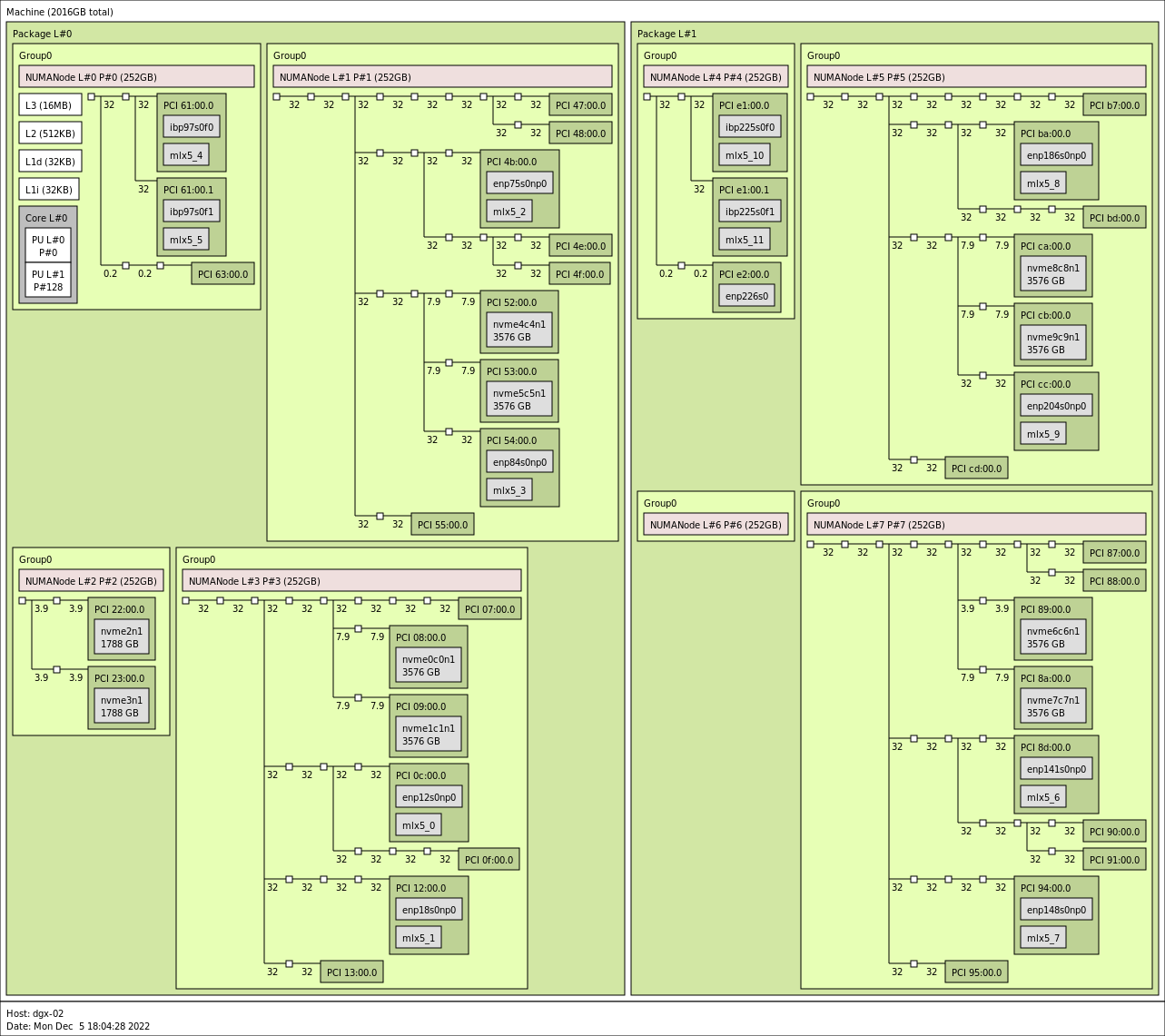
Figure 2.2 dgx2> lstopo –of png#
Taking the grouping associated with NUMANode L#3 in the bottom left quadrant for an example, it can be seen that
the GPU identified by PCI 07:00.0 would best be associated with the NVMes nvme0c0n1 (PCI 08:00.0) and
nvme1c1nc (PCI 09:00.0). The GPU identified by PCI 0f:00.0 can also be associated with those same NVMes
and nvidia-smi would categorize their relationship as PXB, but as the image shows this will involve crossing
a greater number of PCIe bridges compared to the 07 GPU. It should also be noted that since both GPUs must
communicate via a common switch down to the NVMes, concurrent communication by both GPUs with the NVMes may
reduce performance. Regarding NIC affinity, it likely makes sense to use mlx5_0 in conjunction with GPU
0f:00.0 and mlx5_1 with GPU 07:00.0 to avoid concurrent communication across shared bridges.
For machines that cannot render graphical output, the xml output of lstopo can also be used to identify the
same features. Below is a snippet of such an output, obtained by running lstopo --of xml, for the NUMANode
L#3 grouping just examined. Various lines have been removed for readability and brevity, but the topology
has not been altered.
<object type="Bridge" gp_index="867" bridge_type="1-1" depth="2" bridge_pci="0000:[02-13]" pci_busid="0000:01:00.0" pci_type="0604 [1000:c010] [1000:a096] b0" pci_link_speed="31.507692">
  <info name="PCIVendor" value="Broadcom / LSI"/>
  <object type="Bridge" gp_index="843" bridge_type="1-1" depth="3" bridge_pci="0000:[03-09]" pci_busid="0000:02:00.0" pci_type="0604 [1000:c010] [1000:a096] b0" pci_link_speed="31.507692">
    <info name="PCIVendor" value="Broadcom / LSI"/>
    <object type="Bridge" gp_index="822" bridge_type="1-1" depth="4" bridge_pci="0000:[04-09]" pci_busid="0000:03:00.0" pci_type="0604 [1000:c010] [1000:a096] b0" pci_link_speed="31.507692">
      <info name="PCIVendor" value="Broadcom / LSI"/>
      <object type="Bridge" gp_index="951" bridge_type="1-1" depth="5" bridge_pci="0000:[05-07]" pci_busid="0000:04:00.0" pci_type="0604 [1000:c010] [1000:a096] b0" pci_link_speed="31.507692">
        <info name="PCIVendor" value="Broadcom / LSI"/>
        <object type="Bridge" gp_index="924" bridge_type="1-1" depth="6" bridge_pci="0000:[06-07]" pci_busid="0000:05:00.0" pci_type="0604 [1000:c010] [10de:13b8] b0" pci_link_speed="31.507692">
          <info name="PCIVendor" value="Broadcom / LSI"/>
          <object type="Bridge" gp_index="903" bridge_type="1-1" depth="7" bridge_pci="0000:[07-07]" pci_busid="0000:06:00.0" pci_type="0604 [1000:c010] [10de:13b8] b0" pci_link_speed="31.507692">
            <info name="PCIVendor" value="Broadcom / LSI"/>
            <object type="PCIDev" gp_index="878" pci_busid="0000:07:00.0" pci_type="0302 [10de:20b2] [10de:1463] a1" pci_link_speed="31.507692">
              <info name="PCIVendor" value="NVIDIA Corporation"/>
              <object type="OSDev" gp_index="1017" name="opencl0d0" subtype="OpenCL" osdev_type="5">
                <info name="GPUModel" value="NVIDIA A100-SXM4-80GB"/>
...
      <object type="Bridge" gp_index="900" bridge_type="1-1" depth="5" bridge_pci="0000:[08-08]" pci_busid="0000:04:10.0" pci_type="0604 [1000:c010] [1000:a096] b0" pci_link_speed="7.876923">
        <info name="PCIVendor" value="Broadcom / LSI"/>
        <object type="PCIDev" gp_index="852" pci_busid="0000:08:00.0" pci_type="0108 [144d:a824] [144d:a801] 00" pci_link_speed="7.876923">
          <info name="PCIVendor" value="Samsung Electronics Co Ltd"/>
          <object type="OSDev" gp_index="984" name="nvme0c0n1" subtype="Disk" osdev_type="0">
...
      <object type="Bridge" gp_index="866" bridge_type="1-1" depth="5" bridge_pci="0000:[09-09]" pci_busid="0000:04:14.0" pci_type="0604 [1000:c010] [1000:a096] b0" pci_link_speed="7.876923">
        <info name="PCIVendor" value="Broadcom / LSI"/>
        <object type="PCIDev" gp_index="831" pci_busid="0000:09:00.0" pci_type="0108 [144d:a824] [144d:a801] 00" pci_link_speed="7.876923">
          <info name="PCIVendor" value="Samsung Electronics Co Ltd"/>
          <object type="OSDev" gp_index="983" name="nvme1c1n1" subtype="Disk" osdev_type="0">
...
  <object type="Bridge" gp_index="966" bridge_type="1-1" depth="3" bridge_pci="0000:[0a-0f]" pci_busid="0000:02:04.0" pci_type="0604 [1000:c010] [1000:a096] b0" pci_link_speed="31.507692">
    <info name="PCIVendor" value="Broadcom / LSI"/>
    <object type="Bridge" gp_index="870" bridge_type="1-1" depth="4" bridge_pci="0000:[0b-0f]" pci_busid="0000:0a:00.0" pci_type="0604 [1000:c010] [1000:a096] b0" pci_link_speed="31.507692">
      <info name="PCIVendor" value="Broadcom / LSI"/>
      <object type="Bridge" gp_index="848" bridge_type="1-1" depth="5" bridge_pci="0000:[0c-0c]" pci_busid="0000:0b:00.0" pci_type="0604 [1000:c010] [1000:a096] b0" pci_link_speed="31.507692">
        <info name="PCIVendor" value="Broadcom / LSI"/>
        <object type="PCIDev" gp_index="824" pci_busid="0000:0c:00.0" pci_type="0207 [15b3:101b] [15b3:0007] 00" pci_link_speed="31.507692">
          <info name="PCIVendor" value="Mellanox Technologies"/>
          <info name="PCIDevice" value="MT28908 Family [ConnectX-6]"/>
          <object type="OSDev" gp_index="995" name="ibp12s0" osdev_type="2">
          </object>
          <object type="OSDev" gp_index="1011" name="mlx5_0" osdev_type="3">
...
      <object type="Bridge" gp_index="948" bridge_type="1-1" depth="5" bridge_pci="0000:[0d-0f]" pci_busid="0000:0b:10.0" pci_type="0604 [1000:c010] [1000:a096] b0" pci_link_speed="31.507692">
        <info name="PCIVendor" value="Broadcom / LSI"/>
        <object type="Bridge" gp_index="954" bridge_type="1-1" depth="6" bridge_pci="0000:[0e-0f]" pci_busid="0000:0d:00.0" pci_type="0604 [1000:c010] [10de:13b8] b0" pci_link_speed="31.507692">
          <info name="PCIVendor" value="Broadcom / LSI"/>
          <object type="Bridge" gp_index="926" bridge_type="1-1" depth="7" bridge_pci="0000:[0f-0f]" pci_busid="0000:0e:00.0" pci_type="0604 [1000:c010] [10de:13b8] b0" pci_link_speed="31.507692">
            <info name="PCIVendor" value="Broadcom / LSI"/>
            <object type="PCIDev" gp_index="907" pci_busid="0000:0f:00.0" pci_type="0302 [10de:20b2] [10de:1463] a1" pci_link_speed="31.507692">
              <info name="PCIVendor" value="NVIDIA Corporation"/>
              <object type="OSDev" gp_index="1018" name="opencl0d1" subtype="OpenCL" osdev_type="5">
                <info name="GPUModel" value="NVIDIA A100-SXM4-80GB"/>
...
Examination of the XML will lead to the same conclusions regarding GPU and NVMe/NIC affinity, again for instance taking
the GPU associated with pci_busid=0000:07:00.0, we see that it shares an upstream bridge (gp_index="822") with
the NVMes nvme0c0n1 and nvme1c1n1 at a depth of 3. The GPU associated with pci_busid=0000:0f:00.0 also
shares an upstream bridge with these NVMes, but further upstream at a depth of 2 (gp_index="867"), matching up
with the depiction in the graphical output examined earlier.
2.2. GPUDirect Storage Configuration Parameters#
There are various parameters and settings that will factor into delivered performance. In addition to
storage/filesystem-specific parameters, there are system settings and GDS-specific parameters defined in /etc/cufile.json.
2.2.1. System Parameters#
On the system side, the following should be checked:
PCIe Access Control Service (ACS)
PCIe ACS is a security feature for peer-to-peer transactions Each transaction is checked to determine whether peer-to-peer communication is allowed between the source and destination devices. Each such transaction must be routed through the root complex, which induces latency and impacts sustainable throughput. The best GDS performance is obtained when PCIe ACS is disabled.
IOMMU
The PCIe Input/Output Memory Management Unit (IOMMU) is a facility for handling address translations for IO devices, and requires routing though the PCIe root complex. On most systems, it is recommended that the IOMMU be disabled as it can cause GDS IO operations to fail or perform poorly. For Grace Hopper based systems, the IOMMU does not need to be disabled.
2.2.2. GPUDirect Storage Parameters#
This section describes the JSON configuration parameters for cuFile and cuObject.
When GDS is installed, the /etc/cufile.json parameter file is installed with default values. The
implementation allows for generic GDS settings and parameters specific to a file system or storage partner.
The following table describes the cuFile configuration parameters. The cuObject client configuration is described
under cuObject Client Configuration later in this section.
Note
Consider compat_mode for systems or mounts that are not yet set up with GDS support.
Parameter |
Default Value |
Description |
|---|---|---|
|
CWD |
Location of the GDS log file. |
|
ERROR |
Verbosity of logging. |
|
false |
Boolean which if set to true, generates NVTX traces for profiling. |
|
0 |
Enable cuFile IO stats. Level 0 means no cuFile statistics. |
|
16384(legacy/commented) |
Maximum IO chunk size (4K aligned) used by cuFile for each IO request (in KB). In slab mode, this value is set automatically based on the configured slabs. |
|
131072(legacy/commented) |
Maximum device memory size (4K aligned) for reserving bounce buffers for the entire GPU (in KB). Do not set this when using the gpu_bounce_buffer_slab_config properties. |
|
[1024, 8192, 16384, 65536] |
Array of GPU bounce buffer slab sizes, in KB. Values must be 4 KB aligned and in strictly increasing order. Include a slab size less than or equal to 16384 KB for nvidia-fs based I/O. |
|
[128, 8, 4, 2] |
Array that specifies the number of GPU bounce buffers for each corresponding entry in slab_size_kb. The array length must match slab_size_kb and each value must be positive. |
|
33554432 |
Maximum per-GPU memory size in KB, including the memory for the internal bounce buffers, that can be pinned. |
|
false |
Boolean that indicates whether the cuFile library uses polling or synchronous wait for the storage to complete IO. Polling might be useful for small IO transactions. Refer to Poll Mode below. |
|
4 |
Maximum IO request size (4K aligned) in or equal to which library will be polled (in KB). |
|
4 4 4 false |
Maximum IO request size (4K aligned) in or equal to which library will be polled (in KB).
Maximum IO request size (4K aligned) in or equal to which library will be polled (in KB).
Maximum IO request size (4K aligned) in or equal to which library will be polled (in KB).
If true, this option can be used to force all IO to use compatibility mode. Alternatively the admin can unload the |
|
true |
If true, enables the compatibility mode, which allows cuFile to issue POSIX read/write. To switch to GDS-enabled I/O, set this to |
|
false |
If true, enables GDS to preferentially use p2pdma over the traditional nvidia-fs path if the kernel supports it. Otherwise, the traditional path via nvidia-fs is used. Refer to P2P Mode below. |
|
[] |
Provides the list of relevant client IPv4 addresses for all the interfaces that can be used for RDMA. |
|
RoundRobin |
Specifies the load balancing policy for RDMA memory registration. By default, this value is set to RoundRobin. Here are the valid values that can be used for this property:
|
|
false |
Boolean parameter applicable only to Network Based File Systems. This could be enabled for platforms where GPUs and NICs do not share a common PCIe-root port. |
|
|
The routing order applies only if |
|
128 |
The max number of IO operations per batch. |
|
true |
Enable GDS write support for RDMA based storage. |
|
default |
Enable io priority w.r.t. compute streams Valid options are “default”, “low”, “med”, “high” Tuning this might be helpful in cases where |
|
false |
Setting to |
|
4KB |
Applicable for the Amazon FSx for Lustre and EXAScaler filesystem. This is applicable for reads and writes. IO threshold for read/write (4K aligned) that is equal to or below the threshold that cuFile will use for a POSIX read/write. It was observed that for smaller IO size such as 4KB/8KB, setting this threshold to 4KB/8KB yields better performance. |
|
[] |
Provides the list of relevant client IPv4 addresses for all the interfaces that can be used by a single lustre mount. This property is used by the cuFile dynamic routing feature to infer preferred RDMA devices. |
|
[] |
Specifies a dictionary of IPv4 mount addresses against a Lustre mount point.This property is used by the cuFile dynamic routing feature. Refer to the default |
|
false |
If true, enables GDS to preferentially use p2pdma over the traditional nvidia-fs path for lustre. This property should be enabled only if lustre is enabled with p2pdma support, otherwise the IO will fail via p2pdma path and not be re-tried via nvidia-fs path. |
|
[] |
Provides the list of IPv4 addresses for all the interfaces a single NFS mount can use. This property is used by the cuFile dynamic routing feature to infer preferred RDMA devices. |
|
false |
If true, enables GDS to preferentially use p2pdma over the traditional nvidia-fs path for NFS. This property should be enabled only if NFS is enabled with p2pdma support, otherwise the IO will fail via p2pdma path and not be re-tried via nvidia-fs path. |
|
[] |
Specifies a dictionary of IPv4 mount addresses against a Lustre mount point. This property is used by the cuFile dynamic routing feature. Refer to the default |
|
false |
If set to true, cuFileWrite will use RDMA writes instead of falling back to posix writes for a WekaFs mount. |
|
[] |
Provides the list of relevant client IPv4 addresses for all the interfaces a single WekaFS mount can use. This property is also used by the cuFile dynamic routing feature to infer preferred rdma devices. |
|
[] |
Specifies a dictionary of IPv4 mount addresses against a WekaFS mount point. This property is used by the cuFile dynamic routing feature. Refer to the default |
|
false |
If true, enables GDS to preferentially use p2pdma over the traditional nvidia-fs path for NVMe. This property should be enabled only if NVMe is enabled with p2pdma support, otherwise the IO will fail via p2pdma path and not be re-tried via nvidia-fs path. |
|
false |
If true, enables GDS to preferentially use p2pdma over the traditional nvidia-fs path for NVMeoF. This property should be enabled only if NVMeoF is enabled with p2pdma support, otherwise the IO will fail via p2pdma path and not be re-tried via nvidia-fs path. |
|
false |
If true, enables GDS to preferentially use p2pdma over the traditional nvidia-fs path for NVMe Raid. This property should be enabled only if NVMe Raid path is enabled with p2pdma support, otherwise the IO will fail via p2pdma path and not be re-tried via nvidia-fs path. |
|
[] |
Administrative setting that disables supported storage drivers on the node. |
|
[] |
Administrative setting that disables specific supported block devices on the node. Not applicable for DFS. |
|
[] |
Administrative setting that disables specific mounts in the supported GDS-enabled filesystems on the node. |
|
[] |
Administrative setting that disables specific supported GDS-ready filesystems on the node. |
|
false |
Setting this to true will skip topology detection in compat mode. This will reduce the high startup latency seen in compat mode on systems with multiple PCI devices. |
|
false |
Enables loading routing preferences from a static topology file. Independent of static hardware configuration. |
|
/etc/cufile-static-topology.json |
Path to the topology file. Required when |
|
false |
Enables loading cached GPU BAR size and PCI P2PDMA support to reduce initialization overhead. Independent of static routing. |
|
/etc/cufile-static-config.json |
Path to the hardware configuration file. Required when |
|
128 |
This specifies the maximum number of pending work items that can be held by the cuFile library’s internal threadpool sub-system. |
|
4 |
This specifies the number of threadpool threads that can process work items produced into a work queue corresponding to a single GPU on the system. |
|
true |
Setting this to true will allow parallel processing of work items by enqueuing into the threadpool subsystem provided by the cuFile library |
|
8192 |
This option specifies the size in KB that the I/O work item submitted by the application would be split into, when enqueuing into threadpool sub-system, provided there are enough parallel buffers available. |
|
4 |
This number specifies the maximum number of parallel buffers available, that the original I/O work item buffer can be split into, when enqueuing into the threadpool sub-system. |
Note
Workload/application-specific parameters can be set by using the CUFILE_ENV_PATH_JSON environment variable
that is set to point to an alternate cufile.json file, for example, CUFILE_ENV_PATH_JSON=/home/gds_user/my_cufile.json.
There are two mode types that you can set in the cufile.json configuration file:
Poll Mode
The cuFile API set includes an interface to put the driver in polling mode. Refer to
cuFileDriverSetPollMode()in the cuFile API Reference Guide for more information. When the poll mode is set, a read or write issued that is less than or equal toproperties:poll_mode_max_size_kb(4KB by default) will result in the library polling for IO completion, rather than blocking (sleep). For small I/O size workloads, enabling poll mode may reduce latency.Compatibility Mode
There are several possible scenarios where GDS might not be available or supported, for example, when the GDS software is not installed, the target file system is not GDS supported,
O_DIRECTcannot be enabled on the target file, and so on. When you enable compatibility mode, and GDS is not functional for the IO target, the code that uses the cuFile APIs fall backs to the standard POSIX read/write path. To learn more about compatibility mode, refer to cuFile Compatibility Mode.
In more recent Linux kernels, support has been added for peer-to-peer DMA amongst devices without the use of custom kernel modules. Starting in CUDA 12.8, GDS supports this new P2P mode of operation and nvidia-fs is no longer needed under certain configurations. Refer to the GDS Troubleshooting Guide for more information on system requirements and how to enable this mode.
From a benchmarking and performance perspective, the default settings work very well across a variety of I/O loads and
use cases. We recommend that you use the default gpu_bounce_buffer_slab_config and max_device_pinned_mem_size_kb
values unless a storage provider has a specific recommendation, or analysis and testing show better performance after
you change one or more of the defaults.
The gpu_bounce_buffer_slab_config parameter configures the internal GPU bounce buffer cache as multiple pools of
different buffer sizes. In this mode, the total GPU bounce buffer cache size is the sum of slab_size_kb[i] multiplied
by slab_count[i]. The legacy uniform bounce buffer sizing parameters, max_direct_io_size_kb,
max_device_cache_size_kb, and per_buffer_cache_size_kb, should not be set together with
gpu_bounce_buffer_slab_config.
The cufile.json file has been designed to be extensible such that parameters can be set that are either generic
and apply to all supported file systems (fs:generic), or file system specific (fs:lustre). The
fs:generic:posix_unaligned_writes parameter enables the use of the POSIX write path when unaligned writes are
encountered. Unaligned writes are generally sub-optimal, as they can require read-modify-write operations.
If the target workload generates unaligned writes, you might want to set posix_unaligned_writes to true, as
the POSIX path for handling unaligned writes might be more performant, depending on the target filesystem and
underlying storage. Also, in this case, the POSIX path will write to the page cache (system memory).
When the IO size is less than or equal to posix_gds_min_kb, the fs:lustre:posix_gds_min_kb setting invokes
the POSIX read/write path rather than cuFile path. When using Lustre, for small IO sizes, the POSIX path can have
better (lower) latency.
The GDS parameters are among several elements that factor into delivered storage IO performance. It is advisable to start with the defaults and only make changes based on recommendations from a storage vendor or based on empirical data obtained during testing and measurements of the target workload.
This is the JSON schema:
# /etc/cufile.json
{
  "logging": {
    // log directory, if not enabled will create log file under current working directory
    //"dir": "/home/<xxxx>",

    // NOTICE|ERROR|WARN|INFO|DEBUG|TRACE (in decreasing order of severity)
    "level": "ERROR"

    // max log file size in MB (default: 32, -1 = no limit)
    // can also be set via env var CUFILE_LOGFILE_MAX_SIZE_MB
    //"max_file_size_mb": 32
  },

  "profile": {
    // nvtx profiling on/off
    "nvtx": false,
    // cufile stats level(0-3)
    "cufile_stats": 0
  },

  "execution": {
    // max number of workitems in the queue
    "max_io_queue_depth": 128,
    // max number of host threads per GPU to spawn for parallel IO
    "max_io_threads": 4,
    // enable support for parallel IO
    "parallel_io": true,
    // minimum IO threshold before splitting the IO
    "min_io_threshold_size_kb": 8192,
    // maximum parallelism for a single request
    "max_request_parallelism": 4
  },

  "properties": {
    // GPU bounce buffer slab configuration.
    // slab_size_kb defines the buffer sizes in KB.
    // slab_count defines the number of buffers for each corresponding size.
    "gpu_bounce_buffer_slab_config": {
      "slab_size_kb": [1024, 8192, 16384, 65536],
      "slab_count": [128, 8, 4, 2]
    },

    // Legacy uniform GPU bounce buffer configuration.
    // Do not set these parameters together with gpu_bounce_buffer_slab_config.
    // "max_direct_io_size_kb": 16384,
    // "max_device_cache_size_kb": 131072,
    // "per_buffer_cache_size_kb": 1024,

    // limit on maximum device memory size that can be pinned for a given process
    "max_device_pinned_mem_size_kb": 33554432,

    // POSIX pool slab configuration
    "posix_pool_slab_size_kb": [4, 1024, 16384],
    "posix_pool_slab_count": [128, 64, 64],

    "use_poll_mode": false,
    "poll_mode_max_size_kb": 4,
    "use_pci_p2pdma": false,
    "allow_compat_mode": true,
    "gds_rdma_write_support": true,
    "io_batchsize": 128,
    "io_priority": "default",
    "rdma_dev_addr_list": [],
    "rdma_load_balancing_policy": "RoundRobin",
    //"rdma_dc_key": "0xffeeddcc",
    //"rdma_access_mask": "0x1f",

    "rdma_dynamic_routing": false,
    "rdma_dynamic_routing_order": ["GPU_MEM_NVLINKS", "GPU_MEM", "SYS_MEM", "P2P"]
  },

  "fs": {
    "generic": {
      "posix_unaligned_writes": false
    },

    "beegfs": {
      "posix_gds_min_kb": 0
      //"rdma_dev_addr_list": [],
      //"mount_table": {}
    },

    "lustre": {
      "posix_gds_min_kb": 0
      //"rdma_dev_addr_list": [],
      //"mount_table": {}
    },

    "nfs": {
      "use_pci_p2pdma": false
      //"rdma_dev_addr_list": [],
      //"mount_table": {}
    },

    "gpfs": {
      "gds_write_support": true,
      "gds_async_support": true
      //"rdma_dev_addr_list": [],
      //"mount_table": {}
    },

    "weka": {
      "rdma_write_support": false
    }
  },

  "block": {
    "nvme": {
      "use_pci_p2pdma": false
    },
    "nvmeof": {
      "use_pci_p2pdma": false
    },
    "raid": {
      "use_pci_p2pdma": false
    }
  },

  "denylist": {
    "drivers": [],
    "devices": [],
    "mounts": [],
    "filesystems": []
  },

  "miscellaneous": {
    "api_check_aggressive": false,
    "enable_static_routing": false,
    "static_routing_filepath": "/etc/topology.json"
  }
}
2.2.3. cuObject Client Configuration#
Starting with cuObject client v1.4.0 in CUDA 13.5, cuObject provides a separate JSON configuration file and supported CUOBJ_* environment variables. These settings apply to the cuObject client.
Configuration file selection
Client |
Default Configuration file |
Custom Configuration |
|---|---|---|
cuFile |
|
|
cuObject |
|
A nonempty |
For cuObject, JSON and environment settings are applied in the following order:
Initialize built-in configuration defaults.
Load the file selected by
CUOBJ_ENV_PATH_JSON, or/etc/cuobj.jsonif the variable is unset or empty.Apply supported environment-variable overrides.
Only one cuObject JSON file is loaded. When a custom file is selected, /etc/cuobj.json is not loaded first. Settings omitted from the selected file retain their built-in values unless overridden by supported environment variables.
For supported environment-variable pairs, the CUOBJ_* variable takes precedence when present. If it is absent, the corresponding CUFILE_* variable is accepted as a migration fallback. For example, CUOBJ_LOGGING_LEVEL takes precedence over CUFILE_LOGGING_LEVEL, and CUOBJ_RDMA_DC_KEY takes precedence over CUFILE_RDMA_DC_KEY.
This fallback applies only to supported individual settings. cuObject does not use CUFILE_ENV_PATH_JSON or /etc/cufile.json to select its JSON configuration. Applications that previously supplied cuObject settings through those locations must move the settings to /etc/cuobj.json or a file selected by CUOBJ_ENV_PATH_JSON.
Set configuration environment variables before initializing the client.
cuObject JSON configuration parameters
The following table describes the active settings and commented examples in the supplied cuobj.json for cuObject client v1.4.0. Dotted parameter names identify nested JSON fields. Commented entries take effect only when enabled.
The values shown are values in the supplied file; they are not a complete list of built-in defaults or every setting accepted by the shared configuration parser.
Parameter |
Value in supplied cuobj.json |
Description |
|---|---|---|
|
Commented out |
Directory for runtime log files. |
|
|
Logging verbosity. |
|
Commented example: |
Maximum log-file size in MB. A value of |
|
|
Statistics collection level, from 0 through 3. A value of 0 disables collection. |
|
|
GPU memory registration backend. Supported backends include |
|
|
Local RDMA device names or IP addresses. Configure this list for the client, for example, |
|
|
Policy for distributing RDMA operations across configured devices. |
|
|
RDMA transport configuration. |
|
Commented example: |
Nonzero 32-bit DC key, expressed as a hexadecimal string. |
|
Commented example: |
Hexadecimal RDMA access mask. Bits 0-4 control local write, remote write, remote read, remote atomic operations, and relaxed ordering, respectively. |
|
|
Enables RDMA multipath failover across configured devices. |
|
|
Maximum number of backup RDMA devices. |
|
|
Number of retries for retryable RDMA I/O failures. |
|
|
Delay between I/O retries, in milliseconds. |
|
|
Enables automatic failback to the primary device after recovery. |
|
|
Minimum delay after failover before attempting failback, in milliseconds. |
|
|
Interval between device health checks, in milliseconds. |
|
|
Enables RDMA asynchronous-event monitoring for failure detection. |
|
|
Number of consecutive failed health checks before a device is considered unhealthy. |
The statistics field retains the name profile.cufile_stats for cuObject. The corresponding cuObject environment override is CUOBJ_STATS_LEVEL.
cuObject disables the cuFile parallel I/O thread pool during configuration. Setting execution.parallel_io to true in a cuObject JSON file does not enable that thread pool.
Configuration example
The following example sets logging, statistics collection, and RDMA device selection:
{
  "logging": {
    "level": "WARN"
  },
  "profile": {
    "cufile_stats": 0
  },
  "properties": {
    "rdma_peer_type": "dmabuf",
    "rdma_dev_addr_list": ["mlx5_0"],
    "rdma_load_balancing_policy": "RoundRobin"
  }
}
Replace mlx5_0 with an appropriate local RDMA device. Save the configuration to a file and select it before starting the application:
export CUOBJ_ENV_PATH_JSON=/path/to/cuobj.json
Configuration errors
A missing selected JSON file does not, by itself, cause configuration loading to fail. Built-in settings and supported environment overrides are used. If a custom file is selected but missing, cuObject does not fall back to /etc/cuobj.json.
File-access errors other than a missing file, malformed JSON, and parameter values rejected by configuration validation cause initialization to fail. Check the client connection status and runtime logs when diagnosing initialization failures.
Shared-runtime limitation
In this release, cuFile and cuObject share a runtime within a process. Separate configuration files and environment variables do not provide independent runtime configurations.
The first successful initialization selects the configuration for the shared runtime. This may occur through an explicit initialization call or another operation that initializes the runtime implicitly. Subsequent initialization through either interface reuses the active configuration; it does not load another JSON file or reapply that interface’s environment settings. Configuration selection occurs again only after the shared runtime has been fully torn down and initialized again.
For example, if cuFile initializes first, a later cuObject initialization continues using the active cuFile configuration. If cuObject initializes first, a later cuFileDriverOpen() continues using the active cuObject configuration.
Mixed initialization can generate a warning, but implicit cuFile initialization does not always produce one. Applications must not rely on a warning to detect this condition.
Direct application use of both the cuFile and cuObject interfaces in the same process is unsupported in this release. Use separate processes when independent configurations are required. This restriction does not apply to cuObject’s internal use of cuFile functionality.
2.3. GPUDirect Storage Benchmarking Tools#
There are several storage benchmarking tools and utilities for Linux systems, with varying degrees of
features and functionality. The fio utility is one of the more
popular and powerful tools that is used to generate storage IO loads and offers significant flexibility
for tuning IO generation based on the desired IO load characteristics. For those familiar with fio on
Linux systems, the use of gdsio will be very intuitive.
Since GDS is relatively new technology, with support dependencies and a specific set of libraries and APIs
that fall outside standard POSIX IO APIs, none of the existing storage IO load generation utilities include
GDS support. As a result, the installation of GDS includes the gdsio load generator which provides
several command line options that enable generating various storage IO load characteristics via both the
traditional CPU and the GDS data path.
2.3.1. gdsio Utility#
The gdsio utility is similar to a number of disk/storage IO load generating tools. It supports a series
of command line arguments to specify the target files, file sizes, IO sizes, number of IO threads, and so on.
Additionally, gdsio includes built-in support for using the traditional IO path (CPU), as well as the
GDS path - storage to/from GPU memory.
Starting 12.2, the tool also supports three new memory (-m <2, 3, 4>) types to exercise the host memory support
option using cuFile APIs. The new memory type option is only supported with certain transfer modes such as
-x (0, 5, 6, 7). Additionally support for non O_DIRECT file descriptors is also introduced. It can be specified
by the option -O 1. By default the gdsio utility works with O_DIRECT file descriptors which is represented
by -O 0, although that need not be specified explicitly.
dgx2> ./gdsio --help
gdsio version :1.1
Usage [using config file]: gdsio rw-sample.gdsio
Usage [using cmd line options]:./gdsio
         -f <file name>
         -D <directory name>
         -d <gpu_index (refer nvidia-smi)>
         -n <numa node>
         -m <memory type(0 - (cudaMalloc), 1 - (cuMem), 2 - (cudaMallocHost), 3 - (malloc) 4 - (mmap))>
         -w <number of threads for a job>
         -s <file size(K|M|G)>
         -o <start offset(K|M|G)>
         -i <io_size(K|M|G)> <min_size:max_size:step_size>
         -p <enable nvlinks>
         -b <skip bufregister>
         -o <start file offset>
         -V <verify IO>
         -x <xfer_type>
         -I <(read) 0|(write)1| (randread) 2| (randwrite) 3>
         -T <duration in seconds>
         -k <random_seed> (number e.g. 3456) to be used with random read/write>
         -U <use unaligned(4K) random offsets>
         -R <fill io buffer with random data>
         -F <refill io buffer with random data during each write>
         -B

xfer_type:
0 - Storage->GPU (GDS)
1 - Storage->CPU
2 - Storage->CPU->GPU
3 - Storage->CPU->GPU_ASYNC
4 - Storage->PAGE_CACHE->CPU->GPU
5 - Storage->GPU_ASYNC_STREAM
6 - Storage->GPU_BATCH
7 - Storage->GPU_BATCH_STREAM


Note:
read test (-I 0) with verify option (-V) should be used with files written (-I 1) with -V option
read test (-I 2) with verify option (-V) should be used with files written (-I 3) with -V option, using same random seed (-k),
same number of threads(-w), offset(-o), and data size(-s)
write test (-I 1/3) with verify option (-V) will perform writes followed by read
These gdsio options provide the necessary flexibility to construct IO tests based on a specific set of
requirements, and/or simply to assess performance for several different load types. Important to note that
when using the -D flag to specify a target directory, gdsio must first execute write loads
(-I 1 or -I 3) to create the files. The number of files created is based on the thread count
(-w flag); 1 file is created for each thread. This is an alternative to using the-fflag where
file pathnames are specified. The -D and-f flags cannot be used together.
The transfer types (-x flag) are further defined in the following table:
x |
Transfer Type |
File Open O_DIRECT? |
Host Memory Allocation Type |
Device Memory Allocation Type |
Copies |
|---|---|---|---|---|---|
0 |
XFER_GPU_DIRECT |
Yes |
|
|
Zero copy |
1 |
XFER_CPU_ONLY |
Yes |
Posix_mem_align (4k) |
N/A |
Zero copy |
2 |
XFER_CPU_GPU |
Yes |
|
(use of multiple CUDA streams for |
One copy |
3 |
XFER_CPU_ASYNC_GPU |
Yes |
|
(use |
One copy (streaming buffer) |
4 |
XFER_CPU_CACHED_GPU |
No (use page cache) |
|
(use of multiple CUDA streams for |
Two copies |
5 |
XFER_GPU_DIRECT_ASYNC |
Yes |
|
|
Zero copy |
6 |
XFER_GPU_BATCH |
Yes |
|
|
Zero copy |
7 |
XFER_GPU_BATCH_STREAM |
Yes |
|
|
Zero copy |
* Starting from GDS 1.7 release, if the poll mode is enabled through cufile.json then it will use poll
mode. Otherwise, the XFER_GPU_DIRECT_ASYNC option would exercise stream-based async I/O mechanism
Similar to the Linux fio storage load generator, gdsio supports the use of config files that contain
the parameter values to use for a gdsio execution. This offers an alternative to lengthy command line
strings, and the ability to build a collection of config files that can easily be reused for testing different
configurations and workloads. The gdsio config file syntax supports global parameters, as well as individual
job parameters. There are sample gdsio config files installed with GDS in /usr/local/cuda/gds/tools.
The files with the .gdsio extension are sample gdsio config files, and the README included in the
same directory provides additional information on the command line and config file syntax for gdsio.
With these options and the support of parameter config files, it is a relatively simple process to run
gdsio and assess performance using different data paths to/from GPU/CPU memory.
2.3.2. gds-stats Tool#
The gds_stats tool is used to extract per-process statistics on the GDS IO. It can be used in conjunction
with other generic tools (Linux iostat), and GPU-specific tools (nvidia-smi, the Data Center GPU
Manager (DCGM) command line tool, dcgmi) to get a complete picture of data flow on the target system.
To use gds_stats, the profile:cufile_stats attribute in /etc/cufile.json must be set to 1, 2 or 3.
Note
The default value of 0 disables statistics collection.
The different levels provide an increasing amount of statistical data. When profile:cufile_stats is set
to 3 (max level), the gds_stats utility provides a -l (level) CLI flag. Even when GDS is collecting
level 3 stats, only level 1 or level 2 stats can be displayed.
In the example below, a gdsio job is started in the background, and level 3 gds_stats are extracted:
dgx2> gdsio -D /nvme23/gds_dir -d 2 -w 8 -s 1G -i 1M -x 0 -I 0 -T 300 &
[1] 850272
dgx2> gds_stats -p 850272 -l 3
cuFile STATS VERSION : 3
GLOBAL STATS:
Total Files: 8
Total Read Errors : 0
Total Read Size (MiB): 78193
Read BandWidth (GiB/s): 6.32129
Avg Read Latency (us): 1044
Total Write Errors : 0
Total Write Size (MiB): 0
Write BandWidth (GiB/s): 0
Avg Write Latency (us): 0
READ-WRITE SIZE HISTOGRAM :
0-4(KiB): 0  0
4-8(KiB): 0  0
8-16(KiB): 0  0
16-32(KiB): 0  0
32-64(KiB): 0  0
64-128(KiB): 0  0
128-256(KiB): 0  0
256-512(KiB): 0  0
512-1024(KiB): 0  0
1024-2048(KiB): 78193  0
2048-4096(KiB): 0  0
4096-8192(KiB): 0  0
8192-16384(KiB): 0  0
16384-32768(KiB): 0  0
32768-65536(KiB): 0  0
65536-...(KiB): 0  0
PER_GPU STATS:
GPU 0 Read: bw=0 util(%)=0 n=0 posix=0 unalign=0 r_sparse=0 r_inline=0 err=0 MiB=0 Write: bw=0 util(%)=0 n=0 posix=0 unalign=0 err=0 MiB=0 BufRegister: n=0 err=0 free=0 MiB=0
GPU 1 Read: bw=0 util(%)=0 n=0 posix=0 unalign=0 r_sparse=0 r_inline=0 err=0 MiB=0 Write: bw=0 util(%)=0 n=0 posix=0 unalign=0 err=0 MiB=0 BufRegister: n=0 err=0 free=0 MiB=0
GPU 2 Read: bw=6.32129 util(%)=797 n=78193 posix=0 unalign=0 r_sparse=0 r_inline=0 err=0 MiB=78193 Write: bw=0 util(%)=0 n=0 posix=0 unalign=0 err=0 MiB=0 BufRegister: n=8 err=0 free=0 MiB=8
GPU 3 Read: bw=0 util(%)=0 n=0 posix=0 unalign=0 r_sparse=0 r_inline=0 err=0 MiB=0 Write: bw=0 util(%)=0 n=0 posix=0 unalign=0 err=0 MiB=0 BufRegister: n=0 err=0 free=0 MiB=0
. . .
GPU 15 Read: bw=0 util(%)=0 n=0 posix=0 unalign=0 r_sparse=0 r_inline=0 err=0 MiB=0 Write: bw=0 util(%)=0 n=0 posix=0 unalign=0 err=0 MiB=0 BufRegister: n=0 err=0 free=0 MiB=0
PER_GPU POOL BUFFER STATS:
PER_GPU POSIX POOL BUFFER STATS:
GPU 0 4(KiB) :0/0 1024(KiB) :0/0 16384(KiB) :0/0
GPU 1 4(KiB) :0/0 1024(KiB) :0/0 16384(KiB) :0/0
GPU 2 4(KiB) :0/0 1024(KiB) :0/0 16384(KiB) :0/0
. . .
GPU 14 4(KiB) :0/0 1024(KiB) :0/0 16384(KiB) :0/0
GPU 15 4(KiB) :0/0 1024(KiB) :0/0 16384(KiB) :0/0

PER_GPU RDMA STATS:
GPU 0000:34:00.0 :
GPU 0000:36:00.0 :
. . .
GPU 0000:39:00.0 :
GPU 0000:e5:00.0 :
GPU 0000:e7:00.0 :

RDMA MRSTATS:
peer name   nr_mrs      mr_size(MiB)
Here are the levels of gds_stats that are captured and displayed:
Level 3.
Shown above, includes (tarting at the top), a summary section, GLOBAL STATS, followed by a READ-WRITE SIZE HISTOGRAM section, PER_GPU STATS, PER_GPU POOL BUFFER STATS, PER_GPU POSIX POOL BUFFER STATS, PER_GPU RDMA STATS and RDMA MRSTATS.
Level 2
The GLOBAL STATS and READ-WRITE SIZE HISTOGRAM sections.
Level 1
GLOBAL STATS.
These are described as:
GLOBAL STATS - Summary data including read/write throughput and latency.
READ-WRITE SIZE HISTOGRAM - Distribution of the size of read and write IOs.
PER_GPU STATS - Various statistics for each GPU, including read and write throughput, counters for sparse IOs, POSIX IOs, errors, unaligned IOs and data on registered buffers.
The next two stats provide information on the buffer pool used for bounce buffers for both GDS IO and POSIX IO.
These pools use fixed size 1MB buffers in a 128MB pool (See “max_device_cache_size_kb” : 131072 in the
/etc/cufile.json parameters). This pool is used when buffers are not registered, unaligned buffer or
file offsets, and when the storage and GPU cross NUMA nodes (typically CPU sockets).
PER_GPU POOL BUFFER STATS - Bounce buffer stats when GDS is in use.
PER_GPU POSIX POOL BUFFER STATS - System memory bounce buffer stats when compat mode (POSIX IO) is used.
These last two stats provide data related to RDMA traffic when GDS is configured with Network Attached Storage (NAS):
PER_GPU RDMA STATS - RDMA traffic.
PER_GPU RDMA MRSTATS - RDMA memory registration data.
The gds_stats are very useful for understanding important aspects of the IO load. Not just performance
(BandWidth and Latency), but also the IO size distribution for understanding an important attribute of the
workload, and PER_GPU STATS enable a view into which GPUs are reading/writing data to/from the storage.
There are various methods that you can use to monitor gds_stats data at regular intervals, such as shell
wrappers that define intervals and extract the data of interest. Additionally, the Linux watch command
can be used to monitor gds_stats data at regular intervals:
Every 1.0s: gds_stats -p 951816 | grep 'BandWidth\|Latency'
psg-dgx2-g02: Fri Nov 20 13:16:36 2020

Read BandWidth (GiB/s): 6.38327
Avg Read Latency (us): 1261
Write BandWidth (GiB/s): 0
Avg Write Latency (us): 0
In the above example, gds_stats was started using the Linux watch command:
watch -n 1 "gds_stats -p 31470 | grep 'BandWidth\|Latency'"
This command results in the bandwidth and latency stats being updated in your Command Prompt window every second.