
1. NVIDIA cuObject: Accelerated CUDA libraries for Object Storage#
1.1. Overview#
cuObject (GPUDirect Storage for Objects) is a high performance suite of libraries designed to enable direct data transfers between GPU memory or system memory and S3 compatible object storage using RDMA. By relying on RDMA operations rather than TCP based transfers, cuObject avoids CPU kernel TCP processing and can bypass the CPU for data payload transfers. cuObject eliminates the traditional bottleneck of staging data in local scratch file systems, enabling high throughput data ingestion for AI training and inference at scale.
This technical guide provides an overview of cuObject libraries to storage solution architects, developers, and partners developing on premises object storage stacks.
1.2. Product Architecture and Design Philosophy#
Many AI workloads require massive bandwidth. Traditional object storage workflows often follow a data lake to scratch filesystem to GPU pattern, which introduces latency and redundancy. cuObject flattens this topology by facilitating direct access between GPUs and object storage.
1.2.1. Key Architectural Components#
The solution is delivered as two distinct libraries.
- cuObject client library
Integrated into the GPU application or middleware. It intercepts S3 requests and manages the RDMA data sink or source.
The cuObject client library is available in CUDA Toolkit 13.1.1 and later and is governed by the CUDA Toolkit End User License Agreement.
- cuObject server library
Integrated into the storage partner object server. It manages the RDMA data source or sink and handles buffer registration.
The cuObject server library is available in a separately downloadable package and is also governed by the CUDA Toolkit End User License Agreement.
1.2.2. The Control vs. Data Plane Split#
A defining feature of cuObject is the separation of control and data paths.
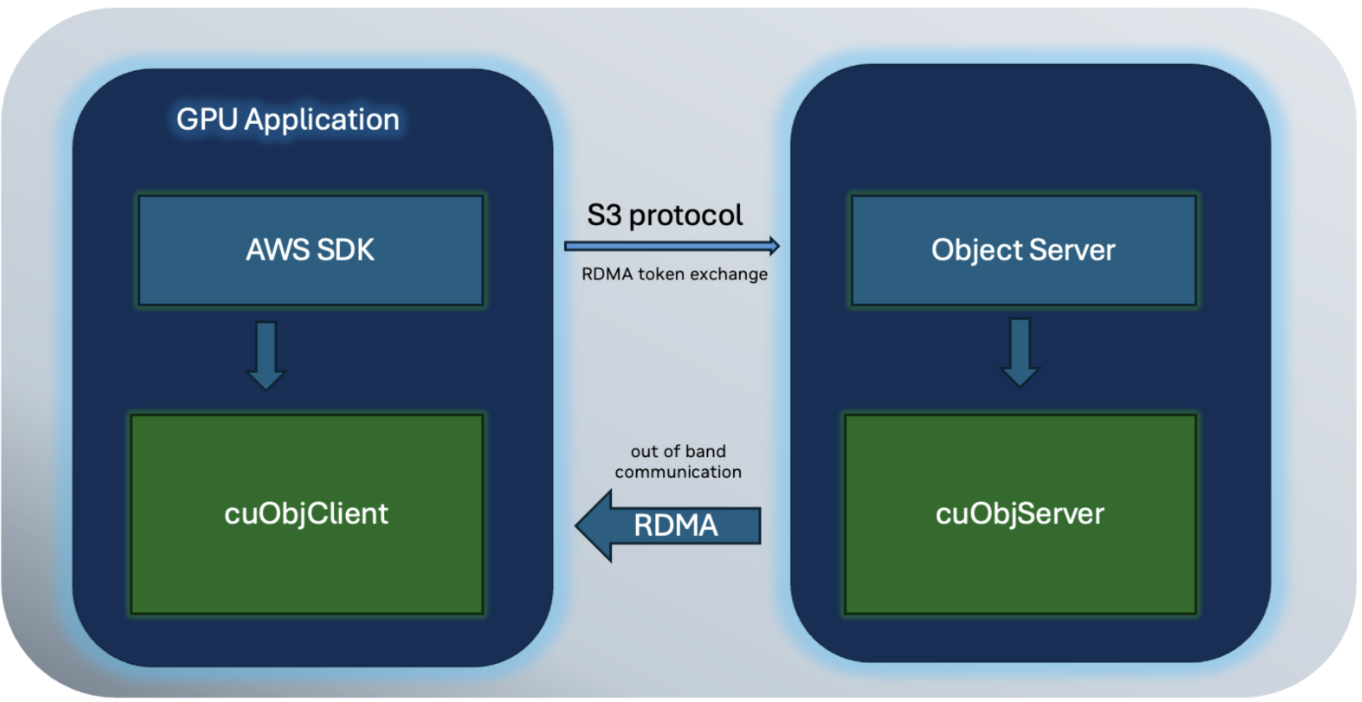
Figure 1.1 Control vs. data plane split in cuObject#
- Control plane (REST APIs)
Standard S3 GET and PUT requests are sent via the storage partner S3 SDK. These requests are modified to include specific metadata tags (for example,
x-amz-rdma-token).- Data plane (RDMA)
Actual data payloads are transferred directly between the storage node and GPU memory or system memory using RDMA operations, bypassing the host CPU.
1.3. Technical Specifications and Protocols#
1.3.1. Transport Layer: Dynamic Connection (DC)#
The current implementation of cuObject requires Dynamic Connection (DC) transport. Unlike Reliable Connections (RC), DC transport does not require pre establishing connections between every client and server pair.
- Scalability
Clients do not need knowledge of the storage server topology or object distribution.
- Resource Efficiency
Connections are established only when required for data transport, preserving NIC resources.
- Protocol Support
DC works over InfiniBand and RoCEv2.
1.3.2. RDMA enabled GET and PUT workflow#
To negotiate the RDMA transfer within a standard S3 HTTP request, cuObject uses custom header tags.
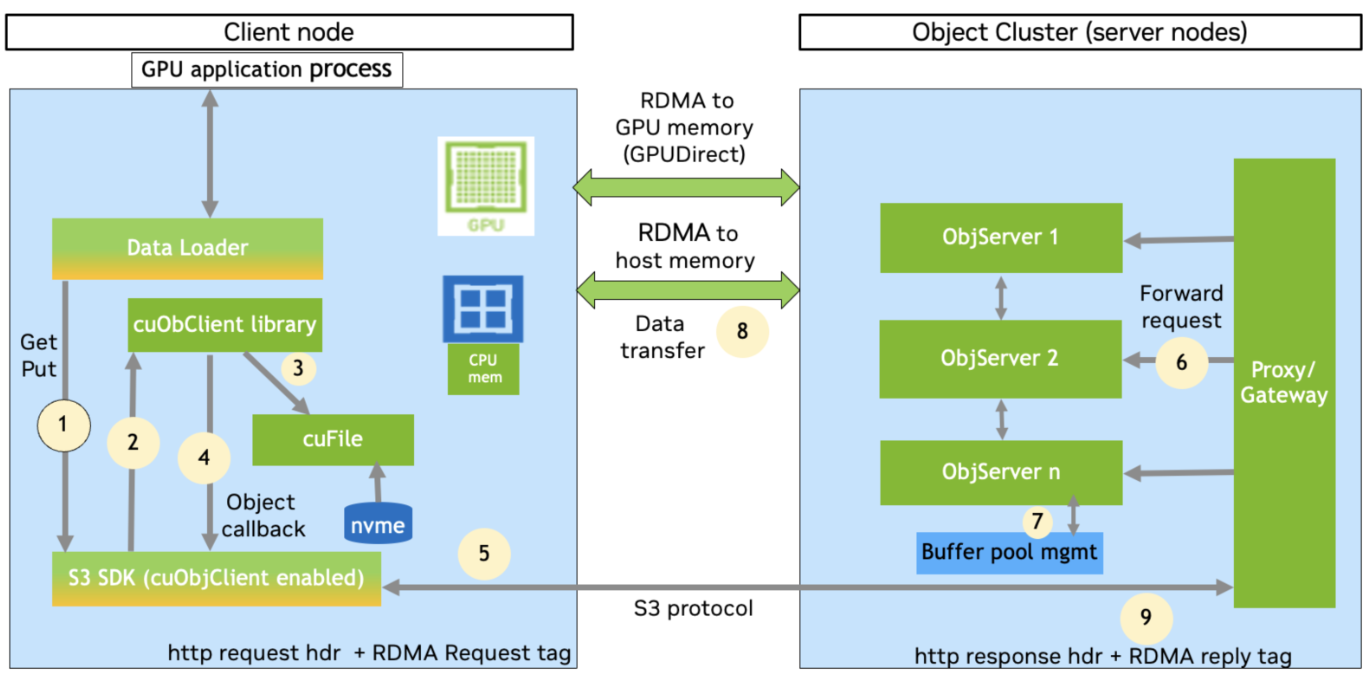
Figure 1.2 The x-amz-rdma-token protocol in cuObject#
- Request tag
The client sends
x-amz-rdma-tokencontaining RDMA metadata (for example,00007f7c...) to the proxy or gateway.- Reply tag
If the transfer is successfully offloaded to RDMA, the proxy responds with
x-amz-rdma-reply.
1.3.3. Data Flow Sequence (GET and PUT operation)#
Client: GPU application or data loader library issues an HTTP GET or PUT through an S3 SDK.
The S3 SDK checks for RDMA support, registers the memory, and initiates the GET or PUT request.
The cuObject client library checks request validity, selects an optimal NIC, and performs memory registration.
The cuObject client library performs a callback with the RDMA tag and context.
The S3 SDK resumes the operation and sends the RDMA tag (for example,
x-amz-rdma-token) to the storage gateway or endpoint.Gateway: parses the tag and, if enabled, instructs specific data nodes to transfer data using RDMA.
Data nodes allocate a local buffer and register it for RDMA using cuObject server APIs.
The cuObject server APIs synchronously or asynchronously perform IO using the local buffer and remote RDMA tag. The library establishes a DC connection with the client and pushes or pulls the data via RDMA (
RDMA_WRITEorRDMA_READ) directly to or from the client GPU or system memory.Gateway returns HTTP status
200 OKonce the RDMA transfer is complete. An RDMA reply tag (for example,x-amz-rdma-reply) is sent to inform the RDMA status.
1.4. API Reference for Developers#
Integration requires modifying the S3 SDK on the client side and the storage software on the server side.
1.4.1. Client Side API (cuObject client library)#
The client library manages RDMA configuration and memory registration.
- Initialization
cuObjClient(CUObjOps_t& ops, cuObjProto_t proto)- Data Operations
cuObjGet(...)Initiates a GET operation by inserting the
x-amz-rdma-tokentag in the HTTP header.cuObjPut(...)Initiates a PUT operation by inserting the
x-amz-rdma-tokentag in the HTTP header.
Both functions accept
void *ctx,void *ptr(buffer),size_t size, andloff_t offset.
1.4.2. Server Side API (cuObject server library)#
The server library handles RDMA buffer registration and performs RDMA operations.
- Buffer Management
registerBuffer(const void *ptr, size_t size)Registers a memory region for RDMA.
allocHostBuffer(size_t size)Allocates pinned memory on the CPU.
- Request Handling
handleGetObject(...)Performs
RDMA_WRITEto push data to the remote client.handlePutObject(...)Performs
RDMA_READto pull data from the remote client.
- Memory Descriptors
Supports simple blob data (
registerBuffer) and scatter gather lists (getRDMABufferFromSgList).
1.5. Supported S3 Operations#
NVIDIA provides support for the following S3 operations via RDMA offload.
Operation |
Description |
Data Direction |
Support Status |
|---|---|---|---|
PUT / PUTFILE |
Server pulls data from client via RDMA |
Client to Server |
Version 1 |
GET / GETFILE |
Server pushes data to client via RDMA |
Server to Client |
Version 1 |
UPLOAD_PART |
Chunked data upload (parallel or serial) |
Client to Server |
Version 1 |
RANGE_GET |
Byte range fetch from object |
Server to Client |
Version 1 |