

nsys-jax wrapper for Nsight Systems
nsys-jax wrapper for Nsight Systems
nsys-jax refers to a small ecosystem of Python-based tools for collecting and analysing Nsight Systems profiles of
JAX programs.
There are two command-line tools:
nsys-jax, which wrapsnsys profileand bundles the resulting profile data with additional JAX/XLA-specific metadata that allows for richer programmatic analysis of the profile data.nsys-jax-combine, which combines multiplensys-jaxoutput files (for example, collected from different processes in the same multi-process/multi-node distributed JAX program) into a single output file, with de-duplication and consistency checks.
Behind the scenes, there is a small Python library (nsys_jax) for loading and analysing the output of nsys-jax and
nsys-jax-combine, which allows the use of standard data science packages like numpy, pandas and matplotlib to
explore profile data.
There are three convenient ways of running profile data analyses:
nsys-jax ... --nsys-jax-analysis ANALYSIS ... program.py: after profile data have been collected,ANALYSISwill immediately be executed; results will be printed to the terminal and output data files will be embedded in the output archive (i.e. execution on the compute node immediately after execution)nsys-jax-combine ... --analysis ANALYSIS ...: after multiplensys-jaxoutputs have been combined,ANALYSISwill be executed on the merged output; results will be printed to the terminal and output data files will be embedded in the output archive (e.g. execution somewhere inside the compute cluster that has access to all processes’ outputs)- Manual execution; the output files of both
nsys-jaxandnsys-jax-combineinclude an installation script that sets up a local Python virtual environment including thensys_jaxlibrary, Jupyter Lab, and an example notebook for Jupyter-based exploration of profile data (e.g. run this on your laptop and explore your profile data in a Jupyter notebook). This installation script depends on thevirtualenvcommand.
Installation
The containers published from this repository (ghcr.io/nvidia/jax:XXX) have nsys-jax pre-installed; the recipes for
building these are public and can be used as a point of reference if you want to install nsys-jax in your own
containers.
Manual installation
The main installation step is simply
or, for an editable install from a specific branch/tag/commit:
You may want to include this in a global pip-compile-based dependency resolution (as is done in the containers built
from this repository), rather than running too many ad-hoc pip install commands.
This will install all of the components mentioned so far, but does not currently include the following implicit dependencies:
protocmust be installed at a version compatible with thegoogle.protobufruntime library;nsys-jaxincludes a helper script that can be run afterpip install, e.g. to install/usr/local/bin/protoc, runinstall-protoc /usr/local.- https://github.com/brendangregg/FlameGraph/blob/master/flamegraph.pl must be installed and executable if you want to
generate flame graph visualisations;
nsys-jaxincludes a helper script here too, e.g.install-flamegraph /usr/local. - Nsight Systems’s multi-report analysis system is used by
nsys-jaxinternally and has some additional dependencies that are not bundled in the Nsight Systems installation (doc), these are listed in<nsys_install_dir>/target-linux-x64/python/packages/nsys_recipe/requirements/common.txtand can be installed withpip install -r /path/to/common.txtor by including it in your globalpip-compile-based dependency resolution. - To interpret metadata dumped from XLA,
nsys-jaxneeds.protofiles from XLA that are not included in the JAX installation. If the relevant XLA source tree is not checked out at/opt/xla, the environment variableSRC_PATH_XLAshould be set to point to it. - A small patch to some Python files included in the installations of Nsight Systems versions 2024.5 and 2024.6 is
needed for compatibility with
nsys-jax, this can be applied by running thensys-jax-patch-nsyscommand and will not be required in other versions of Nsight Systems.
Only protoc is always needed, flamegraph.pl is an optional dependency, and the remaining dependencies are only
required when actually collecting profile data with the nsys-jax command, but not when merging collected profile data
with nsys-jax-combine or running local analyses of profile data.
Collecting profile data
The nsys-jax command loosely corresponds to nsys profile, as introduced in
the generic profiling documentation.
Simply run nsys-jax python my_program.py.
If you want to pass additional options to nsys profile, the syntax is
nsys-jax [nsys profile options] -- python my_program.py; the -- is compulsory.
nsys-jax collects additional JAX/XLA metadata from the program being profiled and automatically performs some
post-processing of the profile data to faciliate programmatic analysis.
It is usually a good idea to set the profile names to something meaningful using the --output (-o) option.
The syntax supported by nsys-jax is slightly more restricted than what nsys supports; only %q{ENV_VAR} expansions
are supported.
An example when using the Slurm job orchestrator is:
nsys-jax -o /out/job%q{SLURM_JOB_ID}/step%q{SLURM_STEP_ID}/rank%q{SLURM_PROCID} -- python my_program.py
which will result in an output archive /out/job42/step7/rank0.zip that contains rank0.nsys-rep and other metadata.
As well as running nsys profile, this automatically sets some configuration variables mentioned above, such as
JAX_TRACEBACK_IN_LOCATIONS_LIMIT, and sets XLA flags requesting that metadata be saved in Protobuf format.
Important: because
nsys-jaxmanipulates theXLA_FLAGSenvironment variable, you must make sure that this is not overwritten inside the executable that you pass. For examplensys-jax python my_program.pyis fine, butnsys-jax my_script_to_overwrite_xla_flags_and_run_my_program.shmay not be.
The only XLA flag that nsys-jax will overwrite is --xla_dump_to, which sets the output directory for the
Protobuf metadata. nsys-jax additionally changes the default value of --xla_dump_hlo_as_proto (true), but will
not modify this if it has been set explicitly.
Note: older versions of
nsys-jaxused to override the default value ofJAX_ENABLE_COMPILATION_CACHEtofalsebecause older versions of XLA did not dump the Protobuf metadata when reading from the JAX persistent compilation cache. Support for this was added to XLA in https://github.com/openxla/xla/pull/28928.
After collecting the Nsight Systems profile, nsys-jax triggers two extra processing steps:
- the
.nsys-repfile is converted into a.parquetand a.csv.xzfile for offline analysis - the metadata dumped by XLA is scanned for references to Python source code files — i.e. your JAX program and the Python libraries on which it depends. Those files are copied to the output archive.
Finally, a compressed .zip archive is generated. The post-processing uses a local, temporary directory. Only the
final archive is written to the given output location, which is likely to be on slower, shared storage.
Offline analysis
Copy an nsys-jax archive to an interactive system, and extract it. At the top level, there is an install.sh script
that will create a Python virtual environment containing Jupyter Lab and the dependencies of the Analysis.ipynb
notebook that is also distributed in the archive. Run this and the suggested launch command for Jupyter Lab.
The included notebook is intended to be a template for programmatic analysis of the profile data in conjunction with
the metadata from XLA. Out of the box it will provide some basic summaries and visualisations:
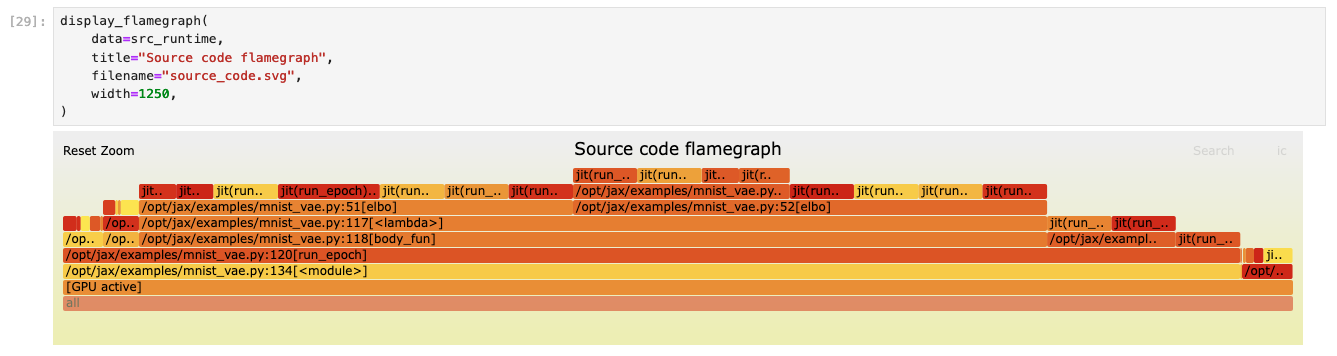
Examples include summaries of compilation time, heap memory usage, and straggler analysis of multi-GPU jobs.
You can see a rendered example of this notebook, as generated from the main branch of this repository, here:
https://gist.github.com/nvjax/e2cd3520201caab6b67385ed36fad3c1#file-analysis-ipynb.
Note: this code should be considered unstable, the bundled notebook and its input data format may change considerably, but it should provide a useful playground in which to experiment with your own profile data.