


AF_XDP Zero-Copy Ethernet Validation#
AF_XDP is a Linux socket interface for sending and receiving packets through XDP with low overhead. In zero-copy mode, packet buffers are shared between the application and the Ethernet driver, avoiding the normal socket-buffer copy in the data path.
On Jetson AGX Thor, AF_XDP zero-copy was validated on the MGBE interface for high-throughput packet processing and motor-control style latency workloads. This page describes what was tested, how it was tested, and the measured results.
The AF_XDP support described on this page is available in JetPack 7.2.2 and later.
Validated Functionality#
The validation covered the native XDP and AF_XDP support added to the NVIDIA MGBE Ethernet driver:
XDP program attach and detach support.
XDP actions for
XDP_PASS,XDP_DROP, andXDP_REDIRECT.AF_XDP zero-copy receive and transmit support.
AF_XDP queue setup, UMEM validation, DMA mapping, and teardown handling.
Transmit doorbell batching for AF_XDP zero-copy TX.
The transmit batching keeps descriptor ownership ordering intact, but reduces how often the driver has to notify hardware. In simple terms, each packet still gets a valid descriptor, but the hardware doorbell update can be amortized across a small batch.
Test Topology#
The validation used a Jetson AGX Thor device under test connected back-to-back to a Linux host:
Component |
Configuration |
|---|---|
Device under test |
Jetson AGX Thor running Jetson Linux with MGBE AF_XDP support |
DUT Ethernet port |
MGBE, tested with one AF_XDP queue |
Peer |
Linux host with a 10 GbE port |
Link |
10 Gbps full duplex |
Traffic model |
TX and RX, zero-copy, blocking poll and busy poll |
For performance testing, a single AF_XDP queue was used. RSS was configured so the test traffic reached the queue used by the AF_XDP socket.
Software and Package Requirements#
The performance setup has two endpoints: the Jetson device under test (DUT) and a Linux traffic-generator host. The automation controller can be the same machine as the traffic-generator host.
System |
Required tools and packages |
Purpose |
|---|---|---|
Linux host/controller |
|
Runs the sweep, controls both endpoints, configures the link, and
collects results. |
Linux traffic-generator host |
Kernel |
Generates fixed-MAC, line-rate Layer-2 traffic for AF_XDP RX tests. |
Jetson DUT |
|
Runs the AArch64 AF_XDP application, configures RSS, and provides
|
CPU trace analysis |
Python 3 and a kernel with tracefs, |
Produces workload-only CPU utilization from the idle and workload ftrace captures. |
On Ubuntu or Debian-based systems, the runtime tools can be installed with:
# Linux host/controller and performance traffic generator
sudo apt-get update
sudo apt-get install -y python3 openssh-client sshpass ethtool \
    iproute2 iputils-ping kmod file bzip2

# Jetson DUT runtime packages
sudo apt-get install -y ethtool iproute2 iputils-ping kmod file \
    util-linux procps libbpf1
Package names can differ on non-Ubuntu distributions. The Jetson Linux image
normally provides nvpmodel and jetson_clocks. The validation did not
change Ethernet interrupt-coalescing parameters.
Download nveth_af_xdp_src.tbz2 from the
Jetson Downloads page.
The archive contains the prebuilt AArch64 nveth_xsk_perf executable,
host runner scripts, application sources, and license notices.
See Test Tools and Deployment for extraction and deployment instructions.
The supplied nveth_xsk_perf application incorporates Linux kernel AF_XDP
selftest components. See THIRD_PARTY_NOTICES.txt and the accompanying
license files in the supplied archive for copyright and licensing
information.
The required test binaries are:
nveth_xsk_perfon the DUT for AF_XDP TX and RX performance.
Verify that the DUT binary is an AArch64 executable and that its runtime libraries resolve before testing:
file ./nveth_xsk_perf
ldd ./nveth_xsk_perf
nveth_xsk_perf requires libbpf.so.1.
Compilation is optional when using the supplied AArch64 executable. To build it from the supplied source archive, see Rebuild the Application on the DUT (Optional).
Root access, or equivalent capabilities, is required. AF_XDP program loading
needs CAP_NET_ADMIN and CAP_BPF; ftrace collection needs access to
tracefs; host pktgen setup needs administrative access. These requirements
apply to the AF_XDP TX and RX performance tests. The latency results that
follow are included for reference only.
Performance Methodology#
Each performance point used the same basic sequence:
Start from a clean boot or clean driver state.
Configure the DUT and peer Ethernet interfaces on the same private subnet.
Confirm link, carrier, and bidirectional ping before measurement.
Configure RSS so packets route to the AF_XDP queue under test.
Run the AF_XDP application and wait until the socket and UMEM are ready.
Run traffic with a 10-second warm-up and a 60-second measurement window.
Collect trace-derived workload CPU utilization for the measurement window.
Reject any run with link drop, application failure, or trace overwrite.
The performance matrix was:
Direction: TX and RX.
Mode: AF_XDP zero-copy.
Wait mode: blocking poll and busy poll.
Payload sizes: 64, 128, 512, 1024, and 1432 bytes.
Queue: one AF_XDP queue.
CPU utilization in the following tables is trace-derived workload CPU. It is summed across CPUs, so values can exceed 100%.
10 Gbps Performance Results#
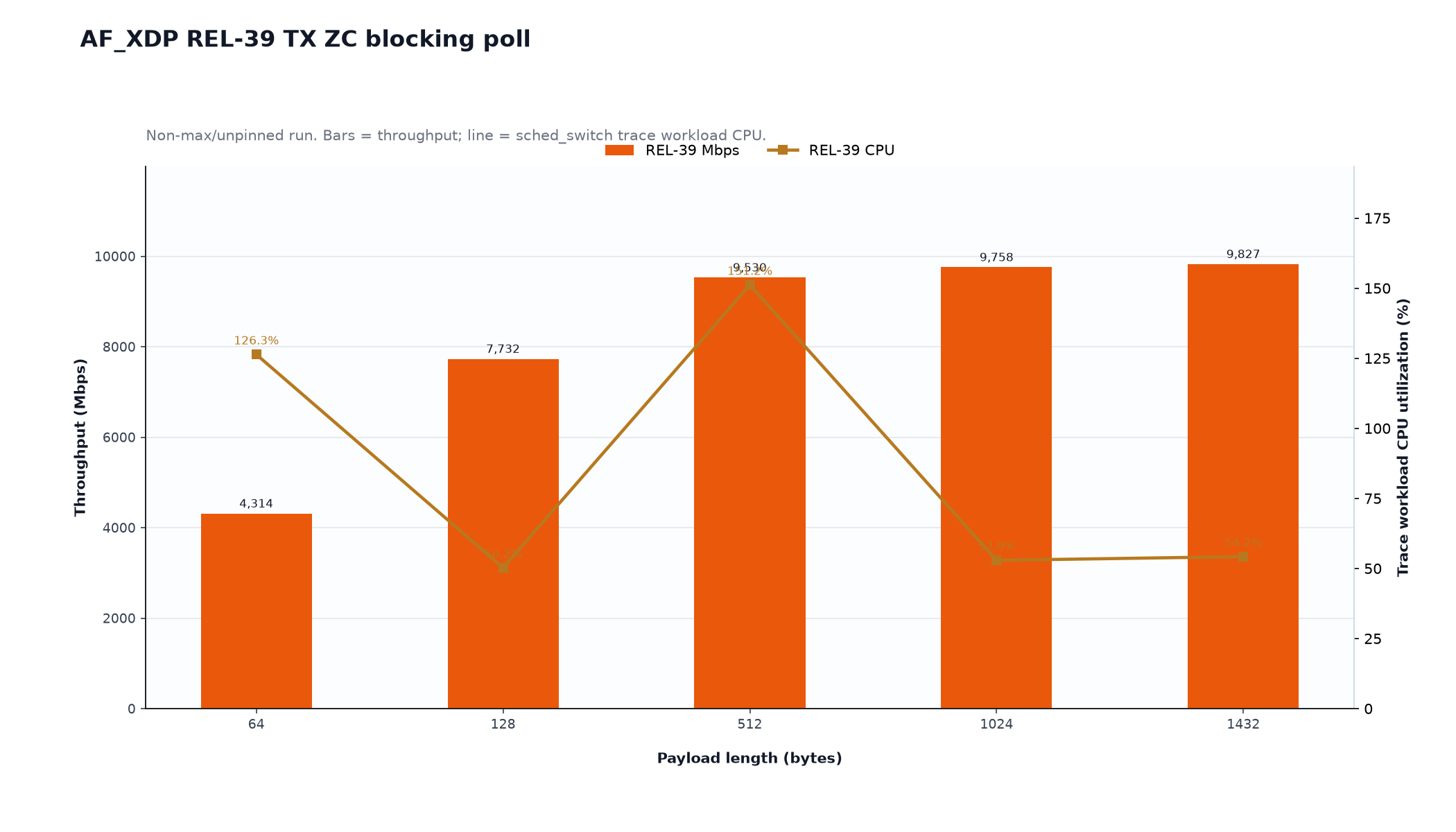
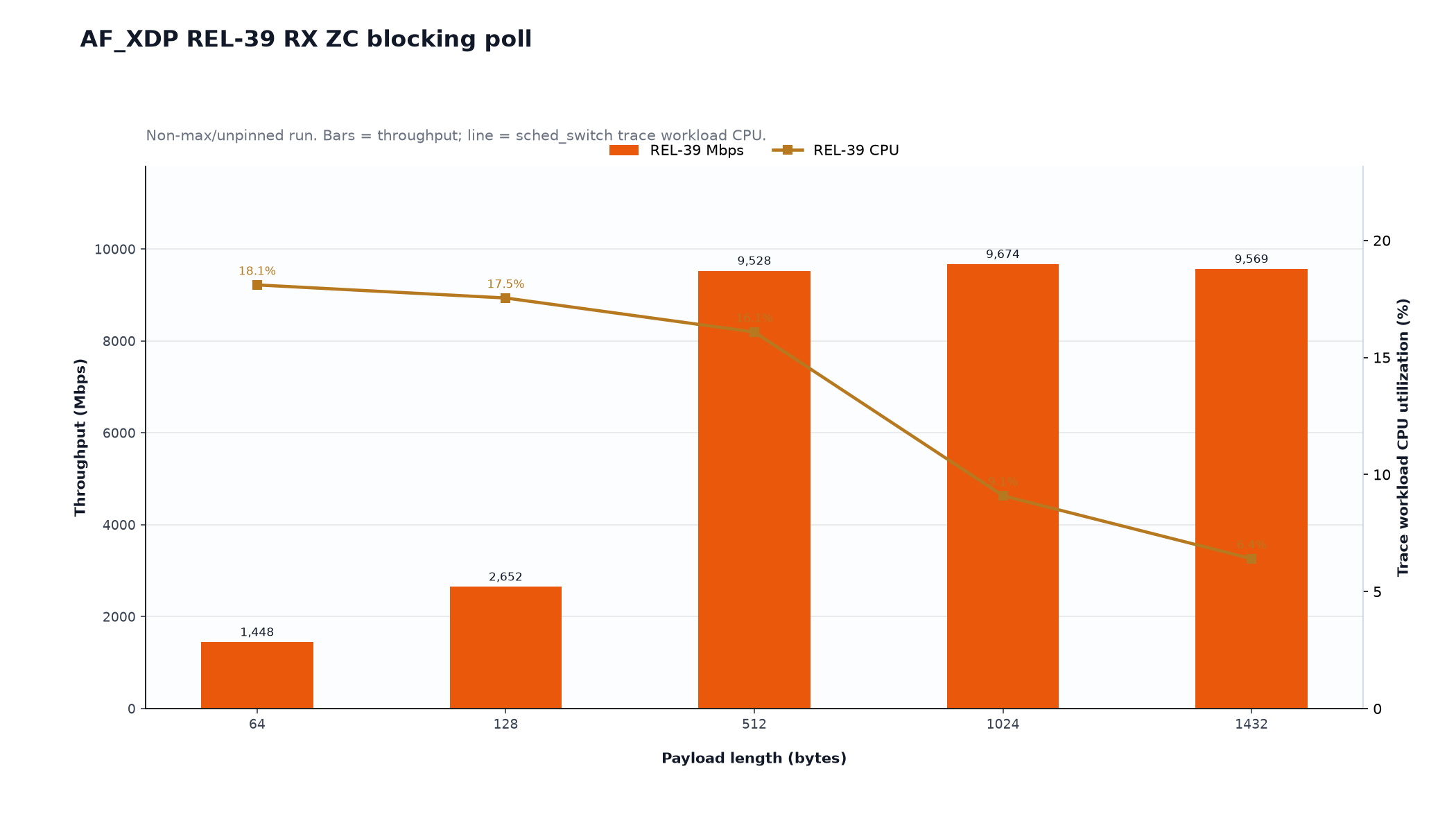
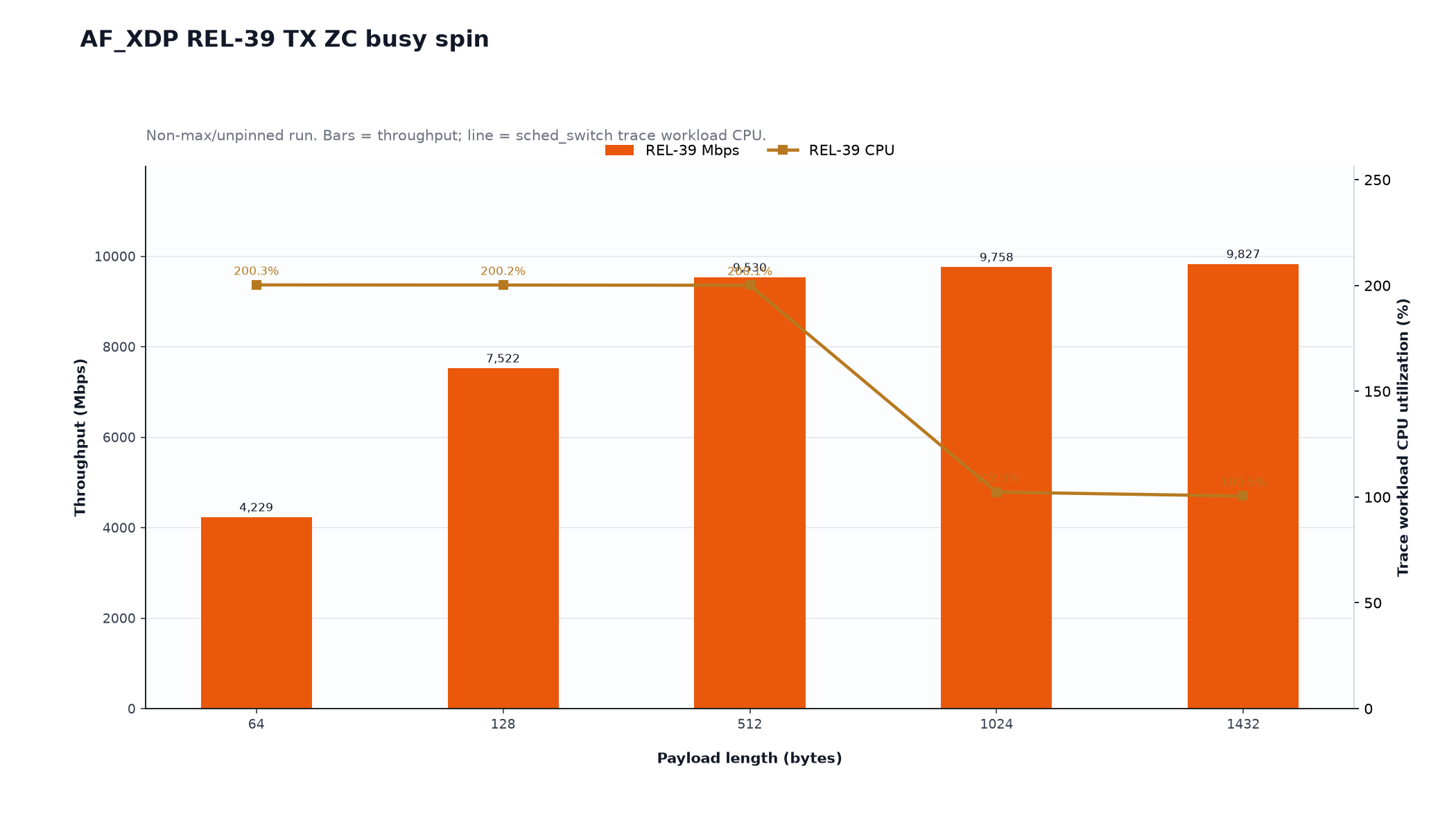
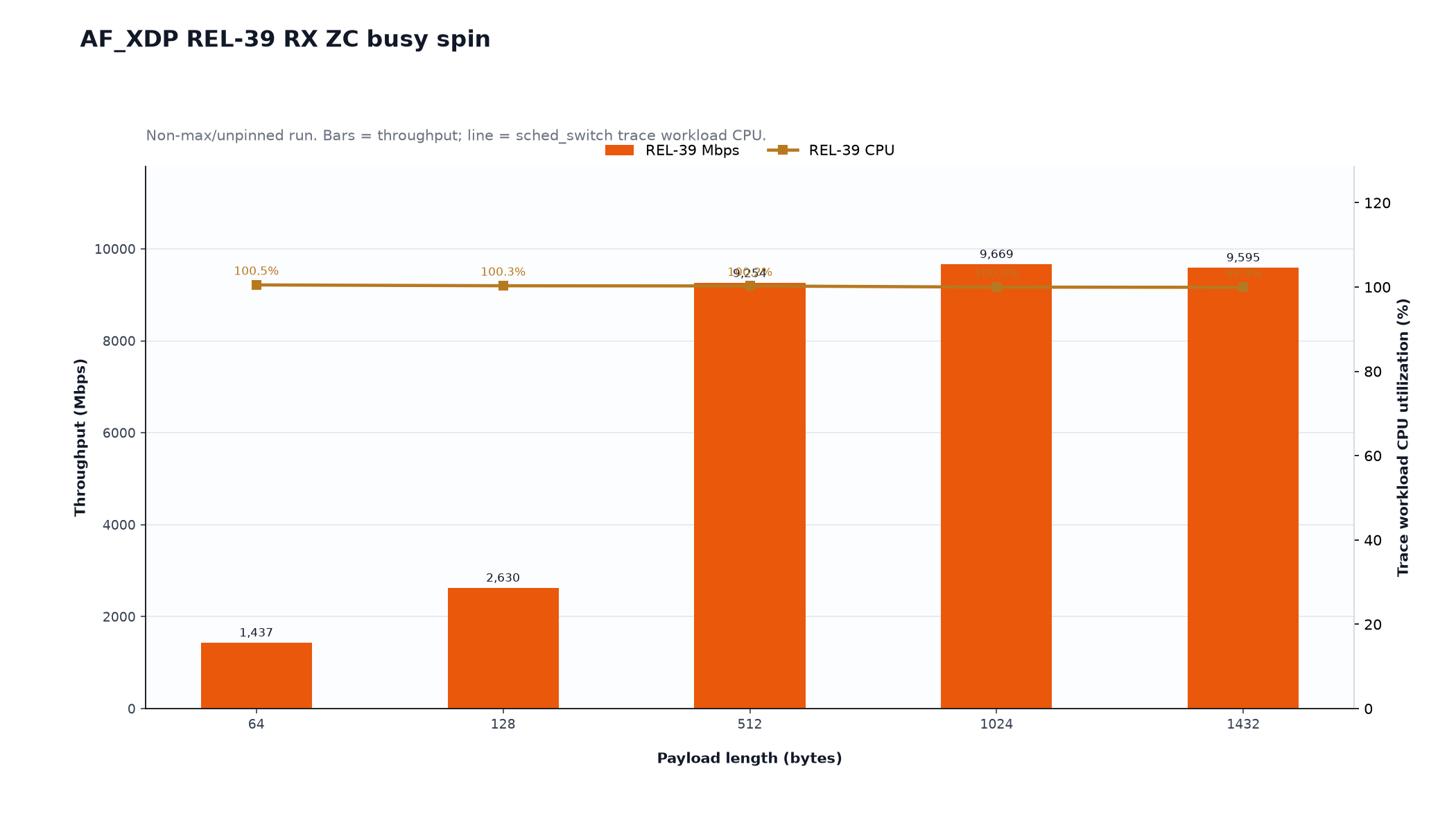
The validation run passed all 20 zero-copy performance cases, with no link drops during measurement and no trace overwrite.
Direction |
Wait mode |
Peak throughput |
Peak payload |
CPU range |
|---|---|---|---|---|
TX |
Blocking poll |
9.827 Gbps |
1432 B |
50.2% to 151.2% |
TX |
Busy poll |
9.827 Gbps |
1432 B |
100.5% to 200.3% |
RX |
Blocking poll |
9.674 Gbps |
1024 B |
6.4% to 18.1% |
RX |
Busy poll |
9.669 Gbps |
1024 B |
99.9% to 100.5% |
Key observations:
TX zero-copy reached line rate at 512-byte and larger payloads.
RX zero-copy reached line rate at 512-byte and larger payloads in blocking poll mode.
Busy-poll mode intentionally consumes CPU while polling for low latency.
All performance cases completed successfully with no measured link drop.
Detailed 10 Gbps Zero-Copy Data#
Direction |
Wait |
Payload |
Throughput |
Workload CPU |
|---|---|---|---|---|
TX |
poll |
64 B |
4.314 Gbps |
126.3% |
TX |
poll |
128 B |
7.732 Gbps |
50.2% |
TX |
poll |
512 B |
9.530 Gbps |
151.2% |
TX |
poll |
1024 B |
9.758 Gbps |
52.9% |
TX |
poll |
1432 B |
9.827 Gbps |
54.2% |
TX |
busy |
64 B |
4.229 Gbps |
200.3% |
TX |
busy |
128 B |
7.522 Gbps |
200.2% |
TX |
busy |
512 B |
9.530 Gbps |
200.1% |
TX |
busy |
1024 B |
9.758 Gbps |
102.3% |
TX |
busy |
1432 B |
9.827 Gbps |
100.5% |
RX |
poll |
64 B |
1.448 Gbps |
18.1% |
RX |
poll |
128 B |
2.652 Gbps |
17.5% |
RX |
poll |
512 B |
9.528 Gbps |
16.1% |
RX |
poll |
1024 B |
9.674 Gbps |
9.1% |
RX |
poll |
1432 B |
9.569 Gbps |
6.4% |
RX |
busy |
64 B |
1.437 Gbps |
100.5% |
RX |
busy |
128 B |
2.630 Gbps |
100.3% |
RX |
busy |
512 B |
9.254 Gbps |
100.3% |
RX |
busy |
1024 B |
9.669 Gbps |
100.0% |
RX |
busy |
1432 B |
9.595 Gbps |
99.9% |
Motor-Control Latency Results#
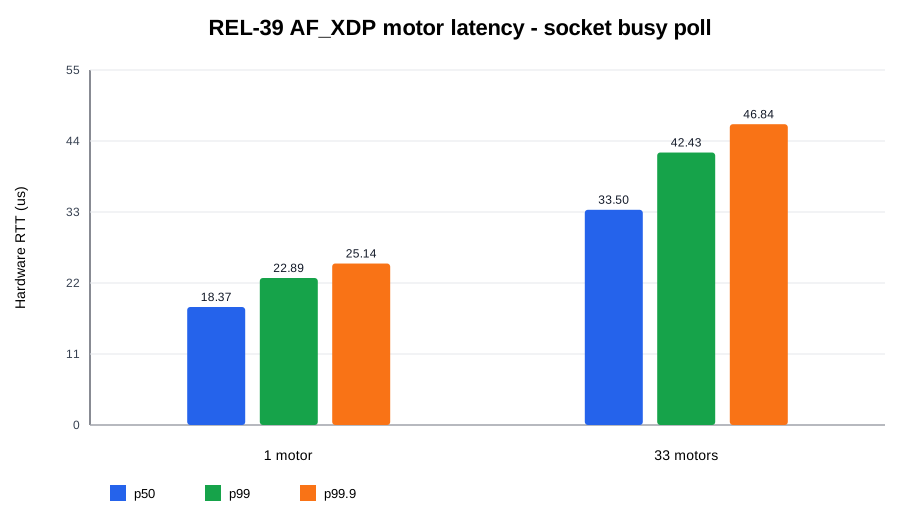
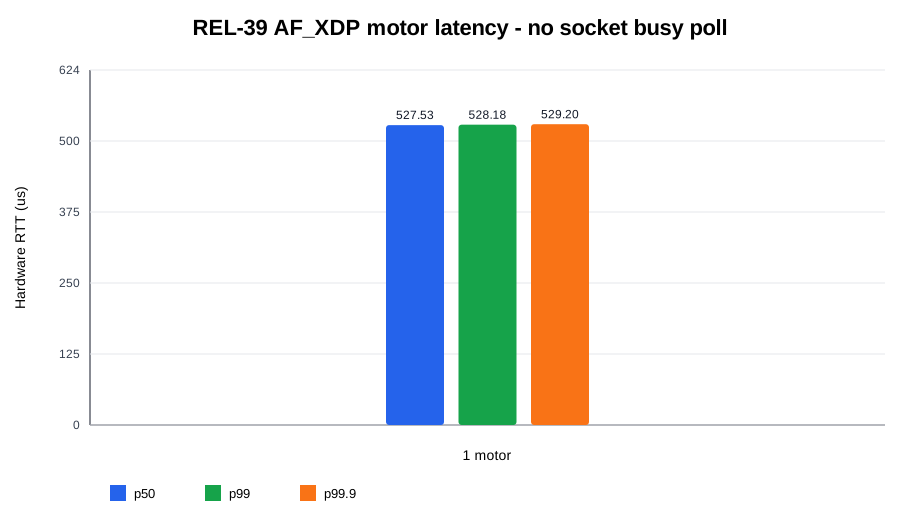
The validation recorded hardware-timestamped latency. The accepted cases used 64-byte payloads at 1 kHz for 300 seconds. All cases passed with 100% delivery.
Mode |
Motors |
HW p50 |
HW p99 |
HW p99.9 |
HW max |
Workload CPU |
Delivery |
|---|---|---|---|---|---|---|---|
socket busy poll |
1 |
18.37 µs |
22.89 µs |
25.14 µs |
71.76 µs |
100.2% |
100% |
socket busy poll |
33 |
33.50 µs |
42.43 µs |
46.84 µs |
943.23 µs |
100.1% |
100% |
no socket busy poll |
1 |
527.53 µs |
528.18 µs |
529.20 µs |
535.55 µs |
100.1% |
100% |
How to Reproduce the Setup#
The exact application can vary by release package, but the validation flow is:
Install a Jetson Linux image that contains the MGBE AF_XDP driver support.
Connect the Jetson MGBE port directly to a 10 GbE Linux host port.
Configure a private subnet on both ends.
# Jetson
sudo ip link set <jetson-mgbe-interface> up
sudo ip addr replace 192.168.100.2/24 dev <jetson-mgbe-interface>

# Host
sudo ip link set <host-ethernet-interface> up
sudo ip addr replace 192.168.100.1/24 dev <host-ethernet-interface>
Confirm basic connectivity.
ping -c 5 192.168.100.1
Configure RSS so the traffic reaches the AF_XDP queue being tested.
sudo ethtool -X <jetson-mgbe-interface> equal 1
Run the AF_XDP test application with the selected queue, direction, wait mode, and payload size.
Capture throughput, link status, driver logs, and CPU trace data.
Commands Used for the TX and RX Performance Tests#
The following commands reproduce one zero-copy data point from the accepted
performance sweep. Repeat them with PAYLOAD set to 64, 128, 512,
1024, and 1432. Set WAIT_MODE=poll for blocking poll or
WAIT_MODE=busy for busy poll.
Set the common variables on the DUT:
DUT_IF=mgbe0_0
DUT_IP=192.168.100.2
HOST_MAC=<host-test-interface-mac>
APP=/path/to/nveth_xsk_perf
PAYLOAD=64
WAIT_MODE=poll
AF_XDP zero-copy attach was performed while the DUT interface was down. After
the application printed READY, a second DUT terminal brought the interface
up and reapplied the IP address and single-queue RSS configuration.
TX Zero-Copy#
Run the following in DUT terminal 1:
sudo ip link set "$DUT_IF" down
sudo taskset -c 0-13 "$APP" \
    --if "$DUT_IF" --op tx --mode zc --queue 0 \
    --warmup 10 --seconds 60 --payload "$PAYLOAD" \
    --ring-size 16384 --umem-frames 131072 \
    --rx-batch 64 --tx-batch 128 --rx-budget-per-loop 1024 \
    --tx-kick-mode need --wait-mode "$WAIT_MODE" \
    --poll-timeout-ms 1 --dst "$HOST_MAC" --tx-start-delay 5
When terminal 1 prints READY, run this in DUT terminal 2:
sudo ip link set "$DUT_IF" up
sudo ip addr replace "$DUT_IP"/24 dev "$DUT_IF"
sudo ethtool -X "$DUT_IF" equal 1
Check the host RX counters before and after the test. The packet delta should
track the DUT application’s tx_completed value:
ip -s link show dev <host-test-interface>
ethtool -S <host-test-interface>
RX Zero-Copy#
Run the following in DUT terminal 1:
sudo ip link set "$DUT_IF" down
sudo taskset -c 0-13 "$APP" \
    --if "$DUT_IF" --op rx --mode zc --queue 0 \
    --warmup 10 --seconds 60 --payload "$PAYLOAD" \
    --ring-size 16384 --umem-frames 131072 \
    --rx-batch 64 --tx-batch 128 --rx-budget-per-loop 1024 \
    --tx-kick-mode need --wait-mode "$WAIT_MODE" \
    --poll-timeout-ms 1
After the application prints READY, bring the DUT interface up from DUT
terminal 2 using the same three commands shown for TX. Reapplying
ethtool -X after READY is important because the zero-copy attach can
cycle the interface and reset queue steering.
On the traffic-generator host, configure kernel pktgen with the DUT MAC.
The example runs for 72 seconds, covering the 10-second application warm-up,
60-second measurement, and a two-second margin:
HOST_IF=<host-test-interface>
HOST_MAC=$(cat /sys/class/net/"$HOST_IF"/address)
DUT_MAC=<dut-mgbe-mac>
DUT_IP=192.168.100.2
PAYLOAD=64
FRAME_LEN=$((PAYLOAD + 14))
if [ "$FRAME_LEN" -lt 60 ]; then FRAME_LEN=60; fi

sudo modprobe pktgen
sudo bash -c "
    echo reset > /proc/net/pktgen/pgctrl
    echo rem_device_all > /proc/net/pktgen/kpktgend_0 2>/dev/null || true
    echo add_device $HOST_IF > /proc/net/pktgen/kpktgend_0
    echo clone_skb 0 > /proc/net/pktgen/$HOST_IF
    echo pkt_size $FRAME_LEN > /proc/net/pktgen/$HOST_IF
    echo count 0 > /proc/net/pktgen/$HOST_IF
    echo delay 0 > /proc/net/pktgen/$HOST_IF
    echo queue_map_min 0 > /proc/net/pktgen/$HOST_IF
    echo queue_map_max 0 > /proc/net/pktgen/$HOST_IF
    echo dst_mac $DUT_MAC > /proc/net/pktgen/$HOST_IF
    echo src_mac $HOST_MAC > /proc/net/pktgen/$HOST_IF
    echo dst $DUT_IP > /proc/net/pktgen/$HOST_IF
    echo udp_src_min 9 > /proc/net/pktgen/$HOST_IF
    echo udp_src_max 9 > /proc/net/pktgen/$HOST_IF
    echo udp_dst_min 10 > /proc/net/pktgen/$HOST_IF
    echo udp_dst_max 10 > /proc/net/pktgen/$HOST_IF
    (echo start > /proc/net/pktgen/pgctrl) &
    PKTGEN_PID=\$!
    sleep 72
    echo stop > /proc/net/pktgen/pgctrl
    wait \$PKTGEN_PID || true
    cat /proc/net/pktgen/$HOST_IF
"
Before accepting an RX result, verify that traffic reached queue 0 rather than another RSS queue:
ethtool -S "$DUT_IF" | grep 'chan_rx_pkt_n\[0\]'
For both directions, accept the point only when the application reports a
successful RESULT, the expected counters increase, no link drop occurs
during the measurement interval, and no new driver error appears in dmesg.
10 Gbps and Motor-Control Result Interpretation#
The 10 Gbps single-queue and motor-control latency results show that AF_XDP zero-copy is functional and stable on the validated Jetson AGX Thor stack:
TX zero-copy reaches line rate for medium and large packets.
RX zero-copy reaches line rate for 512-byte and larger packets in blocking poll mode.
Busy-poll mode provides low latency but intentionally consumes CPU.
Motor-control latency completed with 100% delivery in all tested cases.
These results are representative of the tested release, topology, clock state, payload sizes, and queue configuration. Different cables, peers, interrupt affinity, CPU governor settings, or application behavior can change both throughput and latency.
25 Gbps Multiqueue Back-to-Back Validation#
A separate validation used two Jetson AGX Thor devices connected directly
through one or four pairs of 25 Gbps MGBE ports. Both endpoints ran
nveth_xsk_perf in zero-copy mode with four queues per controller. A Linux
control host with SSH access to both devices ran the automated sweep; it did
not generate the test traffic. This setup does not require kernel pktgen.
The single-controller test reached near-line-rate application throughput in both directions. With four controllers active in parallel, average DUT TX throughput reached 99.481 Gbps across the four 25 Gbps links. Average DUT RX throughput was 93.712 Gbps. These results supplement the preceding 10 Gbps single-queue and latency results; they use a different topology and method.
Test Configuration#
For the 25 Gbps multiqueue tests, each device needs 4 GiB of RAM for UMEM with one controller, or 16 GiB with four controllers. Additional RAM is required for the OS and other allocations. UMEM usage is frame size multiplied by frame count per queue, queues per controller, and controller count. Ring size adds separate descriptor and bookkeeping memory and affects the minimum buffer supply; it is not another multiplier of the UMEM allocation.
Connect matching ports on the two devices: mgbe0_0 to mgbe0_0, and
similarly for mgbe1_0 through mgbe3_0. Each link must report 25 Gbps
full duplex and carrier before traffic starts.
Parameter |
Validated configuration |
|---|---|
Endpoints |
Two Jetson AGX Thor devices |
Link capacity |
25 Gbps per controller; 100 Gbps across four controllers |
Queues per controller |
0, 1, 2, and 3; RSS distributed across all four queues |
Application mode |
AF_XDP zero-copy, busy polling |
Packet format |
UDP, with varying flows for RSS distribution |
Requested interface MTU |
3792 bytes |
Reported interface MTU |
3758 bytes on the tested MACsec-enabled driver configuration |
Application payload / Ethernet frame length |
3758 / 3772 bytes |
UMEM frame size / count |
4096 bytes / 262144 frames per queue |
Ring size |
32768 descriptors per RX, TX, fill, and completion ring, per queue |
UMEM allocation per device |
4 GiB for one controller; 16 GiB for four controllers |
Warm-up / measurement |
10 / 60 seconds for each direction |
Repetitions |
One for the single-controller result; five for four controllers |
--payload specifies bytes after the 14-byte Ethernet header, including the
network and transport headers when UDP packet generation is selected. Thus,
payload 3758 produces a 3772-byte Ethernet frame, excluding the Ethernet FCS.
Throughput is calculated from application frame bytes; it does not include
the Ethernet FCS, preamble, or inter-packet gap and is not a wire-rate counter.
The tested driver subtracts 34 bytes from the requested MTU for MACsec. This MTU adjustment does not by itself establish that test packets are encrypted. The runner reports both requested and effective MTU values and verifies that the selected payload fits the effective MTU.
Important
Both devices need driver support for XDP with MTUs above 1500 bytes, including validation that the RX buffer fits each attached XSK pool. Do not disable UMEM frame-size checks to enable this test. A 4096-byte UMEM frame does not imply that an interface MTU of 4096 is supported, because RX headroom and driver overhead also occupy buffer space. With the documented 4096-byte UMEM frames and zero configured UMEM headroom, the maximum requested MTU is 3792 bytes for the tested driver configuration, reported as 3758 bytes after the MACsec adjustment.
Limits and Troubleshooting#
Error |
Cause and action |
|---|---|
|
The required RX buffer exceeds usable UMEM space. With the documented 4096-byte frames, use a requested MTU no greater than 3792 bytes (reported as 3758 bytes on the tested MACsec-enabled configuration). |
|
Too few FILL buffers are available to initialize the hardware RX ring. The tested setup requires at least 4096 valid FILL buffers per affected queue. Use the documented ring size and UMEM frame count; increasing frame count alone does not help if the FILL ring is too small. |
Test Tools and Deployment#
Use the nveth_af_xdp_src.tbz2 archive downloaded from the
Jetson Downloads page.
It includes the prebuilt AArch64 nveth_xsk_perf executable and matching
run_af_xdp_perf_sweep.sh and run_af_xdp_perf_sweep.py host scripts for
both the single-controller and four-controller tests. Compilation is not
required to run these tests. The executable must support --queues,
--packet, and --start-file.
On a Linux control host with SSH access to both devices, extract the archive where you copied it. Copy the two host scripts and the prebuilt executable to your test directory:
cd /path/to/archive-directory
tar -xjf nveth_af_xdp_src.tbz2
mkdir -p /path/to/package-directory/af-xdp /path/to/package-directory/bins
cp af-xdp/host_scripts/run_af_xdp_perf_sweep.sh \
    af-xdp/host_scripts/run_af_xdp_perf_sweep.py \
    /path/to/package-directory/af-xdp/
cp af-xdp/bins/nveth_xsk_perf /path/to/package-directory/bins/
Place the three supplied files on the control host in the following layout:
<package-directory>/
    af-xdp/
        run_af_xdp_perf_sweep.sh
        run_af_xdp_perf_sweep.py
    bins/
        nveth_xsk_perf
Replace the example package path in the following commands with its actual location. Make the launcher and executable runnable, then verify that the binary is AArch64, even if the control host itself is x86:
cd /path/to/package-directory/af-xdp
chmod +x run_af_xdp_perf_sweep.sh ../bins/nveth_xsk_perf
file ../bins/nveth_xsk_perf
The control host needs bzip2 to extract the archive, Python 3, OpenSSH
client tools, file, and sshpass when password authentication is used.
Both devices need the runtime packages listed earlier, including
libbpf1, and permission to run the setup commands as root. The runner
copies the executable to both
devices, so manual copying to the DUTs is not required. No separate BPF
objects, compilers, or kernel sources are required to run these tests.
Do not execute the AArch64 binary on an x86 control host.
Run the following commands from <package-directory>/af-xdp/ on the
control host.
Replace the management addresses and credentials with your setup.
Management addresses are used for SSH; the per-interface addresses in the
test commands are used for the MGBE links. MAC addresses are discovered
automatically on both devices.
export AF_XDP_DUT_HOST='<dut-management-ip>'
export AF_XDP_PEER_HOST='<peer-management-ip>'
export AF_XDP_DUT_USER='<dut-user>'
export AF_XDP_PEER_USER='<peer-user>'
read -r -s -p 'DUT SSH/sudo password: ' AF_XDP_DUT_PASS
printf '\n'
read -r -s -p 'Peer SSH/sudo password: ' AF_XDP_PEER_PASS
printf '\n'
export AF_XDP_DUT_PASS AF_XDP_PEER_PASS

unset AF_XDP_DUT_APP AF_XDP_PEER_APP AF_XDP_REMOTE_DIR
unset AF_XDP_DUT_CPUSETS AF_XDP_PEER_CPUSETS
export AF_XDP_BIN_DIR="$PWD/../bins"
export AF_XDP_DEPLOY=1
export AF_XDP_TEST_TOPOLOGY=back-to-back
export AF_XDP_STREAM_MODE=multi
export AF_XDP_QUEUES='0,1,2,3' AF_XDP_RSS_QUEUES=4
export AF_XDP_PACKET=udp AF_XDP_MODES=zc
export AF_XDP_OPS='tx rx' AF_XDP_WAIT_MODES=busy
export AF_XDP_MTU=3792 AF_XDP_PAYLOADS=3758
export AF_XDP_KEEP_MTU=0
export AF_XDP_RING_SIZE=32768 AF_XDP_UMEM_FRAMES=262144
export AF_XDP_DURATION_SECONDS=60 AF_XDP_WARMUP_SECONDS=10
export AF_XDP_REPEATS=1
With deployment enabled, the runner copies the host executable to
/tmp/af-xdp-perf-b2b/nveth_xsk_perf on both devices before testing. It
does not compile the application. Set AF_XDP_DEPLOY=0 for subsequent runs
only when the matching executable is already installed at both destinations.
The runner configures the selected interface addresses, changes MTU while
the interfaces are down when required, brings the links up, and configures
RSS. Use a dedicated test network. Do not run this sweep concurrently with
the original pktgen workflow on the same devices.
Single-Controller Test#
This command runs four queues on mgbe0_0. Example interface addresses are
shown; replace them if needed without changing the management addresses.
AF_XDP_DUT_IFS='mgbe0_0' \
AF_XDP_PEER_IFS='mgbe0_0' \
AF_XDP_DUT_IPS='192.168.100.1/24' \
AF_XDP_PEER_IPS='192.168.100.2/24' \
AF_XDP_REPEATS=1 \
AF_XDP_RESULTS_DIR="/tmp/af_xdp_mgbe0_multi_$(date +%Y%m%d_%H%M%S)" \
./run_af_xdp_perf_sweep.sh
Four-Controller Parallel Test#
After the single-controller test completes, run all four controller pairs. Interface and address lists must have matching lengths and ordering. This command repeats the TX and RX tests five times.
AF_XDP_DUT_IFS='mgbe0_0 mgbe1_0 mgbe2_0 mgbe3_0' \
AF_XDP_PEER_IFS='mgbe0_0 mgbe1_0 mgbe2_0 mgbe3_0' \
AF_XDP_DUT_IPS='192.168.100.1/24 192.168.101.1/24 192.168.102.1/24 192.168.103.1/24' \
AF_XDP_PEER_IPS='192.168.100.2/24 192.168.101.2/24 192.168.102.2/24 192.168.103.2/24' \
AF_XDP_REPEATS=5 \
AF_XDP_RESULTS_DIR="/tmp/af_xdp_4mgbe_multi_r5_$(date +%Y%m%d_%H%M%S)" \
./run_af_xdp_perf_sweep.sh
In each repetition, all selected controllers transmit concurrently from DUT to peer, then all receive concurrently from peer to DUT. TX and RX are separate tests, not simultaneous full-duplex traffic. The runner waits for the applications to be ready and coordinates their measurement windows. The total elapsed time includes allocation, setup, warm-up, measurement, log collection, and cleanup; it is longer than 60 seconds.
Measured Results#
Test |
DUT TX |
DUT RX |
|---|---|---|
One controller, four queues |
24.883 Gbps |
24.842 Gbps |
Four controllers, four queues each; five-run average |
99.481 Gbps |
93.712 Gbps |
The five four-controller repetitions produced the following aggregate rates:
Repetition |
DUT TX (Gbps) |
DUT RX (Gbps) |
|---|---|---|
1 |
99.473 |
94.033 |
2 |
99.404 |
93.656 |
3 |
99.493 |
93.019 |
4 |
99.520 |
94.107 |
5 |
99.515 |
93.744 |
All five TX and five RX cases passed the runner’s functional and timing checks. The conservative common measurement overlap exceeded 59 seconds for every case. Clock-calibration uncertainty was approximately 0.241 seconds.
Read results from the timestamped directory on the control host, not from
the DUT’s /tmp directory:
af_xdp_4x25g_links.csvcontains one row per controller and direction. Usedut_tx_gbpsfor TX rows anddut_rx_gbpsfor RX rows.af_xdp_4x25g_aggregate.csvsums the selected controllers. Useaggregate_dut_tx_gbpsfor TX andaggregate_dut_rx_gbpsfor RX.aggregate_primary_gbpsselects the appropriate DUT direction.
25 Gbps Result Interpretation#
The four-controller tests achieved 99.481 Gbps aggregate DUT TX and 93.712 Gbps aggregate DUT RX, averaged over five repetitions.
During the DUT TX tests, aggregate peer RX averaged 94.016 Gbps, below the 99.481 Gbps DUT TX average. The results demonstrate near-line-rate aggregate TX capability and approximately 94 Gbps received throughput.
The original single-queue pktgen workflow remains the default when
AF_XDP_TEST_TOPOLOGY is unset. Clear the variable before returning to that
workflow; merely omitting it from a command does not override an exported
back-to-back value.
Rebuild the Application on the DUT (Optional)#
The supplied AArch64 executable can be used without compilation. To rebuild
it, copy nveth_af_xdp_src.tbz2 to /tmp/ on an Ubuntu 24.04 Jetson DUT.
The archive includes the kernel source files needed by this application; a
full kernel checkout and Makefile changes are not required.
Install the build prerequisites on the DUT:
sudo apt-get update
sudo apt-get install -y build-essential clang \
    libbpf-dev libelf-dev zlib1g-dev \
    linux-tools-common linux-tools-generic file bzip2
Extract the archive and locate
bpftool:cd /tmp tar -xjf nveth_af_xdp_src.tbz2 cd af-xdp export BPFTOOL="$(find /usr/lib -type f -name bpftool -executable -print -quit)" echo "BPFTOOL=$BPFTOOL" test -n "$BPFTOOL" && "$BPFTOOL" version ls -l /usr/include/bpf/bpf_helper_defs.h
Continue only if
bpftoolreports its version and the header exists. Use the executable path found in/usr/libto avoid a wrapper requiring tools for the exact Tegra kernel version.Compile the application:
make -B \
    KERNEL_SRC="$PWD/kernel" \
    BPFTOOL="$BPFTOOL" \
    build/nveth_xsk_perf
Verify the new executable:
file build/nveth_xsk_perf
ldd build/nveth_xsk_perf
./build/nveth_xsk_perf --help
Confirm that
filereports AArch64, no runtime library is reported asnot found, and the application displays its help output.
On the control host, copy the rebuilt executable and the two host scripts from the DUT into the same test layout:
DUT='<dut-user>@<dut-management-ip>'
mkdir -p /path/to/package-directory/af-xdp /path/to/package-directory/bins
scp "$DUT:/tmp/af-xdp/host_scripts/run_af_xdp_perf_sweep.sh" \
    "$DUT:/tmp/af-xdp/host_scripts/run_af_xdp_perf_sweep.py" \
    /path/to/package-directory/af-xdp/
scp "$DUT:/tmp/af-xdp/build/nveth_xsk_perf" /path/to/package-directory/bins/
cd /path/to/package-directory/af-xdp
chmod +x run_af_xdp_perf_sweep.sh ../bins/nveth_xsk_perf
Run the single-controller or four-controller commands from this directory.
Keep AF_XDP_DEPLOY=1 so the runner deploys the rebuilt executable to both
devices.