

Introduction#
Featuring NVIDIA DGX GB200 and GB300 NVL72
This document details NVIDIA’s public facing guide for deploying the North-South Networking for the DGX GB200 or GB300 NVL72 SuperPOD.
Complete the physical installation of the network switches (SN5600 and SN2201) before deploying the switches either manually or with the NVIS Team.
Reference Documentation#
Reference Document |
Description |
|---|---|
NVIDIA DGX SuperPOD |
DGX SuperPOD Guides |
Ethernet Switching for AI and the Cloud | NVIDIA |
Ethernet Switch Recommendation |
Hardware Compatibility List |
Physical Cable / Optics / Transceiver compatibility |
Downloads#
Download File |
Description |
|---|---|
NVLink Switch (NVOS) |
NVOS (Downloads > Switches & Gateways > Switch Software > NVOS_NVLINK4) |
Cumulus OS 5.14.0 |
CumulusOS (Downloads > Switches & Gateways > Switch Software > NVIDIA Cumulus Switch) |
InfiniBand OS |
InfiniBand (Downloads > Switches & Gateways > Switch Software > NVIDIA Onyx) |
Ethernet Switch Hardware#
Switch Model |
Description |
|---|---|
SN5600 |
(INBAND) Cumulus OS, 64 ports of 800Gb |
SN2201 |
(OOB) 48 1G Base-T |
Compute Tray Network Ports#
The following table describes the function and type of each of the compute tray network ports.
GB200 Compute Tray#
The following figure shows the rear panel of the GB200 compute tray (high-speed data and management interfaces) and the associated network port types. Legend: Green — RJ-45; Yellow — OSFP (InfiniBand); Light Blue — QSFP (Ethernet).
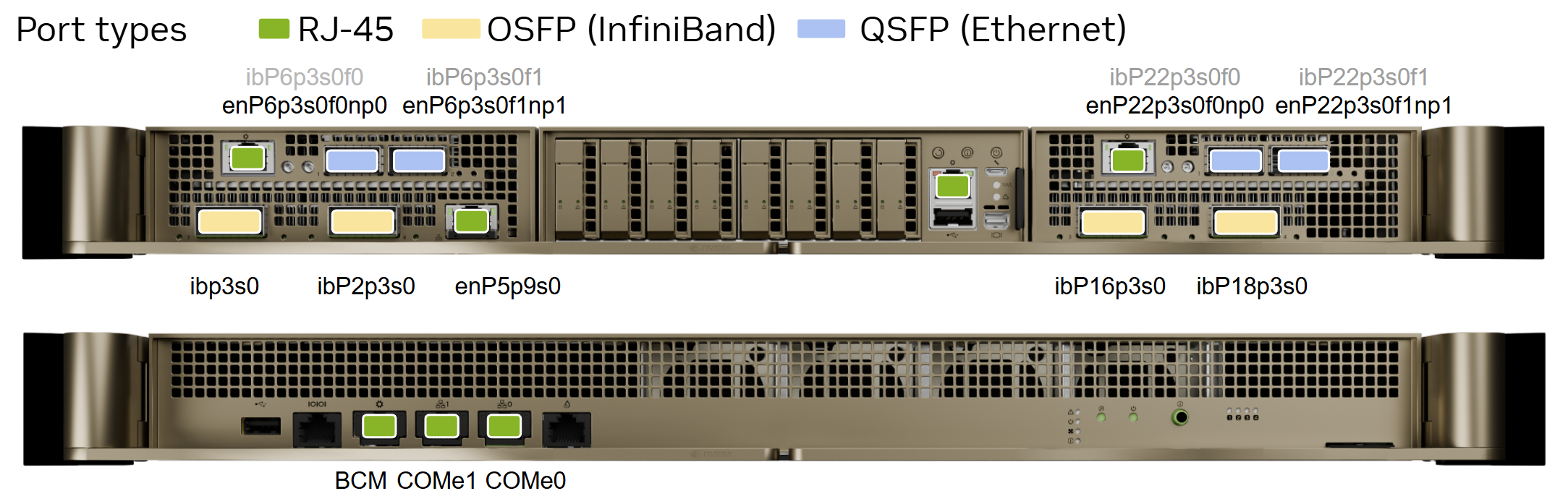
Figure 1 GB200 compute tray network port types#
The following table lists the network interface names for the GB200 compute tray:
Port |
PCIe Bus |
Interface name |
RDMA |
|---|---|---|---|
Left Bay OSFP P3 |
00:03:00.0 |
|
mlx5_0 |
Left Bay OSFP P4 |
02:03:00.0 |
|
mlx5_1 |
Right Bay OSFP P3 |
10:03:00.0 |
|
mlx5_4 |
Right Bay OSFP P4 |
12:03:00.0 |
|
mlx5_5 |
Left Bay BF3 P1 |
06:03:00.0 |
|
mlx5_2 |
Left Bay BF3 P2 |
06:03:00.1 |
|
mlx5_3 |
Right Bay BF3 P1 |
16:03:00.0 |
|
mlx5_6 |
Right Bay BF3 P2 |
16:03:00.1 |
|
mlx5_7 |
LAN |
— |
|
— |
Rear panel management ports: BCM, COMe0, and COMe1 (RJ-45).
GB300 Compute Tray and NVLink Switch#
The GB300 compute tray has fewer network interfaces than the GB200 tray. The following figure shows the GB300 compute tray and NVLink Switch network port types.
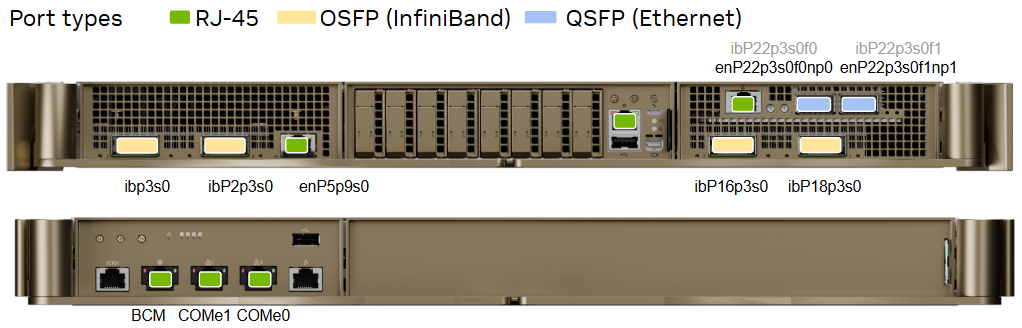
Figure 2 GB300 compute tray and NVLink Switch network port types#
The following table lists the network interface names for the GB300 compute tray:
Port |
PCIe Bus |
Interface name |
RDMA |
|---|---|---|---|
Left Bay OSFP P3 |
00:03:00.0 |
|
mlx5_0 |
Left Bay OSFP P4 |
02:03:00.0 |
|
mlx5_1 |
Right Bay OSFP P3 |
10:03:00.0 |
|
mlx5_2 |
Right Bay OSFP P4 |
12:03:00.0 |
|
mlx5_3 |
Right Bay BF3 P1 |
16:03:00.0 |
|
mlx5_4 |
Right Bay BF3 P2 |
16:03:00.1 |
|
mlx5_5 |
LAN |
05:09:00.0 |
|
— |
Use the same general port-type legend as for GB200: Green — RJ-45; Yellow — OSFP (InfiniBand); Light Blue — QSFP (Ethernet).