

Leak Detection#
The GB200/GB300 systems use liquid cooling to achieve their scale-out density and efficiency. With a liquid, there is the chance for leaks and the GB200/GB300 systems implement several fail-safes to avoid the worst effects of these. From an administrative point of view, these events will be collated within BCM.
Leak Example in cmsh#
In this example, two nodes that are in a leak detection status.
[a03-p1-head-01]% device
[a03-p1-head-01->device]% list -r a06 -t physicalnode --status DOWN -v
Type             Hostname (key)     MAC               Category        IP              Network         Status
---------------- ------------------ ------------------ ---------------- ---------------- ---------------- --------------------------------
PhysicalNode     a06-p1-dgx-02-c05  72:14:AF:B4:FC:7E  hwqa-gb200      7.241.18.33     dgxnet1         [  DOWN  ], leak:large (going
                                                                                                          down timeout reached: 10m),
                                                                                                          health check failed, health
                                                                                                          check unknown, restart
                                                                                                          required (interface:enP22p3s0f0np0)
PhysicalNode     a06-p1-dgx-02-c15  1A:A7:F7:32:98:AD  hwqa-gb200      7.241.18.43     dgxnet1         [  DOWN  ], leak:large (going
                                                                                                          down timeout reached: 10m),
                                                                                                          health check failed, health check unknown
You can also use the leakinfo command to show current and historical leak events.
[a08-u04-p01-bcm-01->device]% leakinfo
Hostname         Timestamp    Severity     Info
---------------- ------------ ------------ ----------------
[a08-u04-p01-bcm-01->device]% leakinfo --history 10
Hostname            Timestamp            Severity     Info
------------------- -------------------- ------------ --------------------------------------------------------------------------------------------
a05-p01-dgx-03-c18  2026/01/30 19:19:28  large        The state of resource `Chassis_0_LeakDetector_1_ColdPlate` has changed to Degraded., resolu+
a05-p01-dgx-03-c18  2026/01/30 19:20:41  none
a06-p01-dgx-02-c04  2025/12/27 20:51:30  large        The state of resource `Chassis_0_LeakDetector_1_Manifold` has changed to Degraded., resolut+
a06-p01-dgx-02-c04  2025/12/27 20:52:07  none
a06-p01-dgx-02-c04  2026/01/07 23:23:28  large        The state of resource `Chassis_0_LeakDetector_1_ColdPlate` has changed to Degraded., resolu+
a06-p01-dgx-02-c04  2026/01/07 23:25:16  none
a06-p01-dgx-02-c04  2026/01/17 06:43:29  large        The state of resource `Chassis_0_LeakDetector_1_Manifold` has changed to Degraded., resolut+
a06-p01-dgx-02-c04  2026/01/17 06:45:10  none
[a08-u04-p01-bcm-01->device]%
For additional commands useful for advanced rack management, refer to Section 3.3.2 of the BCM Nvidia Mission Control Manual.
Leak Example in BCM UI#
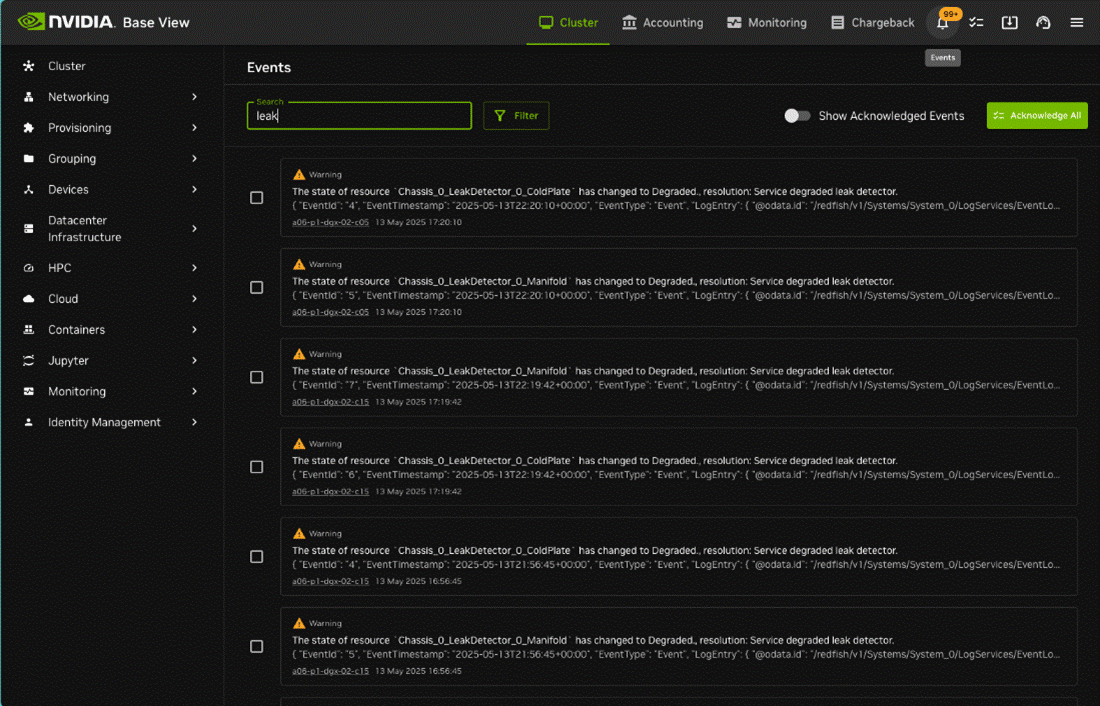
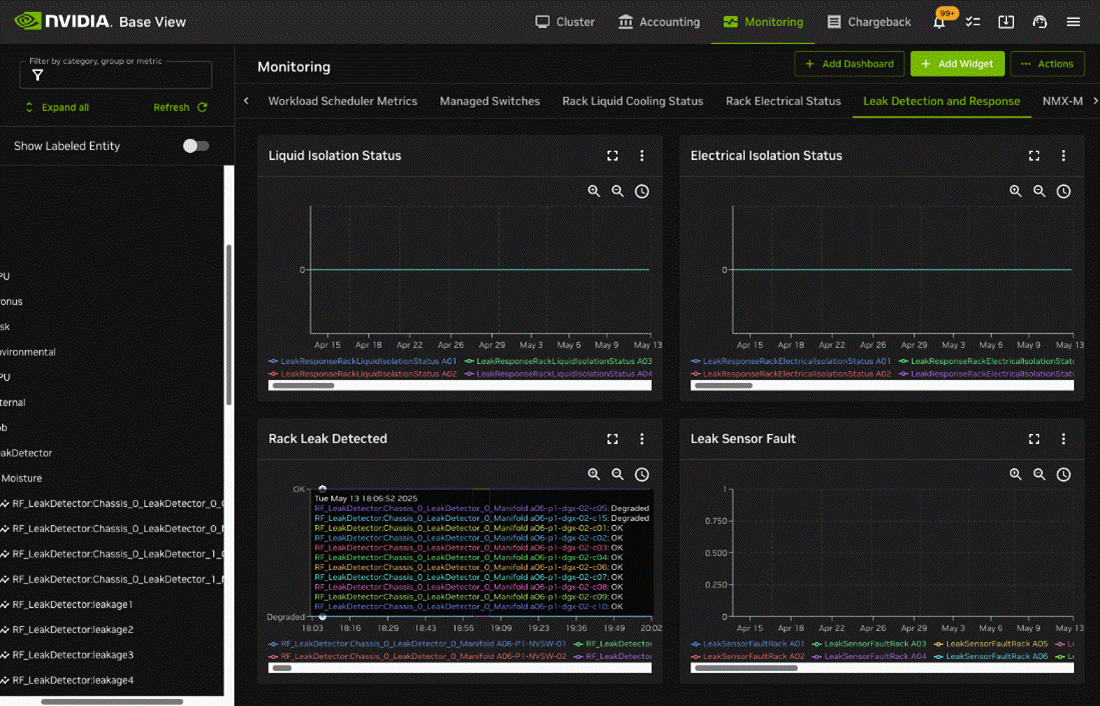
BCM also shows this within the UI in several locations.
Events
Monitoring -> Leak Detection and Response
Leak Related Metrics#
BCM integrates with several data sources for leak detection:
Redfish API at the device level using BMC.
Building management System (BMS) at the rack and data center level.
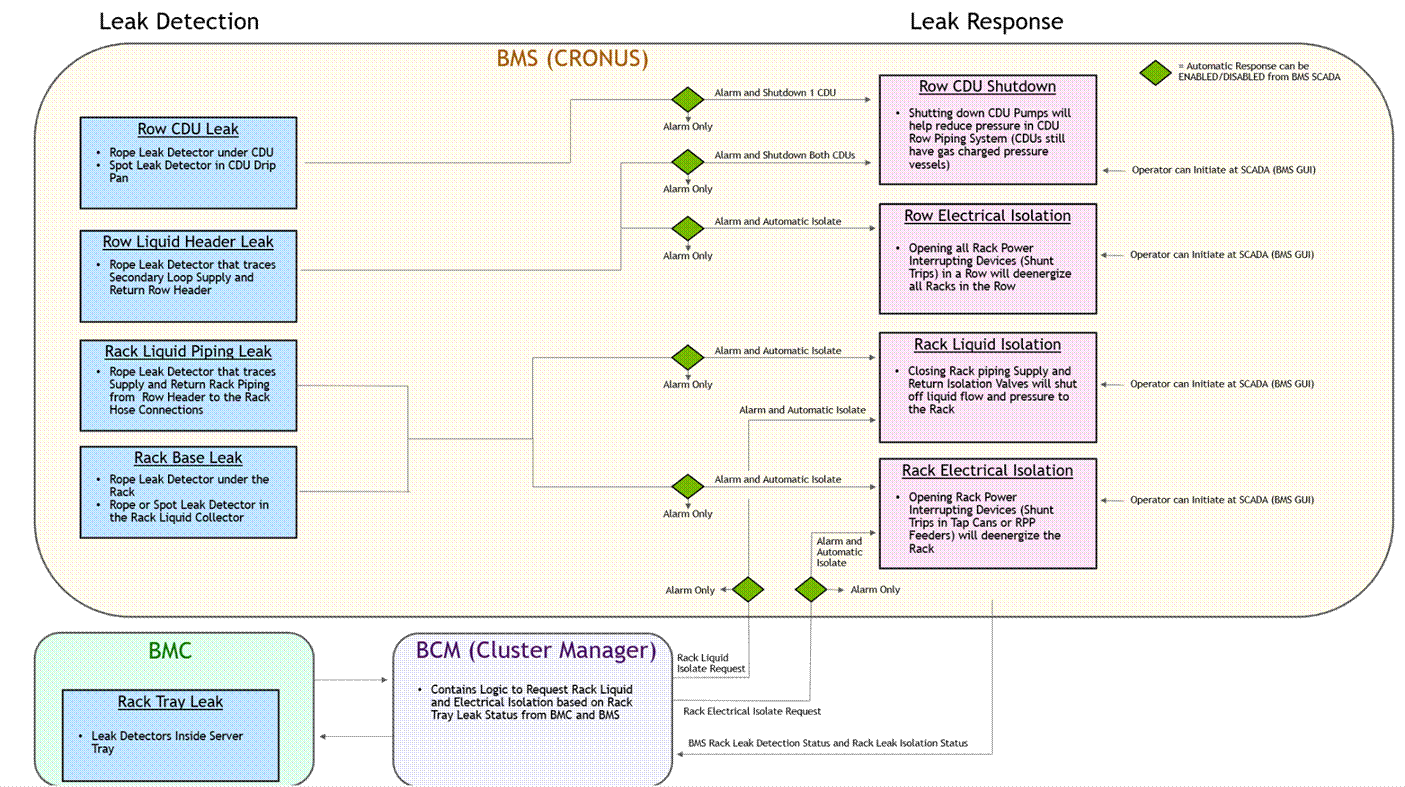
These metrics are available through the UI, using the in-built reporting, or as metrics using the Prometheus endpoint.
Examples of these metrics through the exporter endpoint:
for i in $(curl -sk https://localhost:8081/exporter | grep -i 'leak' | grep -Ev '# HELP|# TYPE' | cut -d '{' -f1 | sort -u); do echo Example metric $i; curl -sk https://localhost:8081/exporter | grep $i | head -n 3; done
Example metric deviceswithleaks
# HELP deviceswithleaks Number of devices that have detected a leak
# TYPE deviceswithleaks gauge
deviceswithleaks{base_type="Rack",name="B04"} 0
Example metric leakdetectrack
# HELP leakdetectrack undefined
# TYPE leakdetectrack gauge
leakdetectrack{base_type="Rack",name="A05"} 0
Example metric leakdetectracktray
# HELP leakdetectracktray undefined
# TYPE leakdetectracktray gauge
leakdetectracktray{base_type="Rack",name="A06"} 0
Example metric leakresponserackelectricalisolationstatus
# HELP leakresponserackelectricalisolationstatus undefined
# TYPE leakresponserackelectricalisolationstatus gauge
leakresponserackelectricalisolationstatus{base_type="Rack",name="A06"} 0
Example metric leakresponserackliquidisolationstatus
# HELP leakresponserackliquidisolationstatus undefined
# TYPE leakresponserackliquidisolationstatus gauge
leakresponserackliquidisolationstatus{base_type="Rack",name="A06"} 0
Example metric rf_chassis_0_leakdetector_0_coldplate
# HELP rf_chassis_0_leakdetector_0_coldplate Chassis 0 LeakDetector 0 ColdPlate
# TYPE rf_chassis_0_leakdetector_0_coldplate gauge
rf_chassis_0_leakdetector_0_coldplate{base_type="Device",category="perf-team",hostname="b05-p1-dgx-05-c12",type="PhysicalNode"} 1.7047
Example metric rf_chassis_0_leakdetector_0_manifold
# HELP rf_chassis_0_leakdetector_0_manifold Chassis 0 LeakDetector 0 Manifold
# TYPE rf_chassis_0_leakdetector_0_manifold gauge
rf_chassis_0_leakdetector_0_manifold{base_type="Device",category="perf-team",hostname="b05-p1-dgx-05-c12",type="PhysicalNode"} 1.7055
Example metric rf_chassis_0_leakdetector_1_coldplate
# HELP rf_chassis_0_leakdetector_1_coldplate Chassis 0 LeakDetector 1 ColdPlate
# TYPE rf_chassis_0_leakdetector_1_coldplate gauge
rf_chassis_0_leakdetector_1_coldplate{base_type="Device",category="perf-team",hostname="b05-p1-dgx-05-c12",type="PhysicalNode",parameter="state"} 0
Example metric rf_chassis_0_leakdetector_1_manifold
# HELP rf_chassis_0_leakdetector_1_manifold Chassis 0 LeakDetector 1 Manifold
# TYPE rf_chassis_0_leakdetector_1_manifold gauge
rf_chassis_0_leakdetector_1_manifold{base_type="Device",category="perf-team",hostname="b05-p1-dgx-05-c12",type="PhysicalNode",parameter="state"} 0
Example metric rf_ld_leakdetection
# HELP rf_ld_leakdetection Leak Detection Systems
# TYPE rf_ld_leakdetection gauge
rf_ld_leakdetection{base_type="Device",category="perf-team",hostname="b05-p1-dgx-05-c12",type="PhysicalNode"} 0
Example metric rf_leakdetector
# HELP rf_leakdetector Chassis 0 LeakDetector 1 ColdPlate
# TYPE rf_leakdetector gauge
rf_leakdetector{base_type="Device",category="perf-team",hostname="b05-p1-dgx-05-c12",type="PhysicalNode",parameter="Chassis_0_LeakDetector_1_ColdPlate"} 0