

Architecture
NeMo Curator’s video curation system builds on Ray, a distributed framework for scalable, high‑throughput data processing across machine clusters.
Ray Foundation
NeMo Curator leverages two essential Ray Core capabilities:
- Distributed Actor Management: Creates and manages Ray actors across a cluster. Cosmos-Xenna supports per-stage runtime environments. In Curator today, per-stage
runtime_envis not user-configurable through stage specs; the integration sets only limited executor-level environment variables. - Ray Object Store and References: Uses Ray’s object store and data references to reduce data movement and increase throughput.
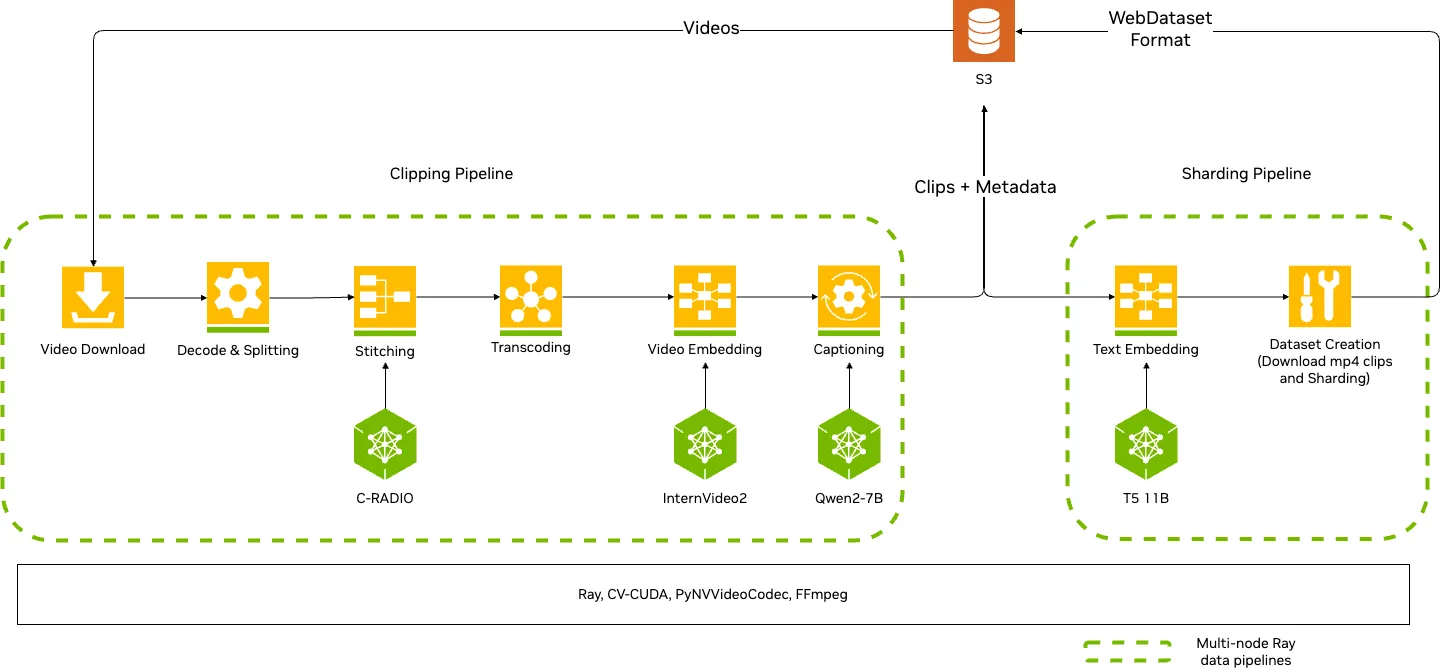
Execution and Auto Scaling
Curator runs pipelines through an executor. The Cosmos-Xenna executor (XennaExecutor) translates ProcessingStage definitions into Cosmos-Xenna stage specifications and runs them on Ray in either streaming or batch mode. During streaming execution, the auto-scaling mechanism:
- Monitors each stage’s throughput
- Dynamically adjusts worker allocation
- Optimizes pipeline performance by balancing resources across stages
This dynamic scaling reduces bottlenecks and uses hardware efficiently for large-scale video curation tasks.
Key executor configuration (actual keys):
logging_interval: Seconds between status logs (default: 60)ignore_failures: Continue on failures (default: False)execution_mode: “streaming” or “batch” (default: “streaming”)cpu_allocation_percentage: CPU allocation ratio (default: 0.95)autoscale_interval_s: Auto-scaling interval in seconds (applies in streaming mode; default: 180)
Use Pipeline.describe() to review stage resources and input/output requirements at a glance during development.