

Use the Hermes Agent Adapter
You can use Hermes Agent through the NVIDIA NeMo Fabric adapter in four ways:
- SDK: Invoke the embedded agent programmatically and receive normalized NeMo Fabric results.
- HTTP API: Send requests to Hermes’s native API and receive native HTTP responses.
- Dashboard/browser TUI: Chat with Hermes through its dashboard in a browser.
- Terminal TUI: Chat with Hermes from a terminal attached to the managed TUI backend.
SDK execution is enabled by default; native interfaces are explicit options. All four paths use the normalized FabricConfig, which the adapter translates into Hermes’s native configuration and agent settings.
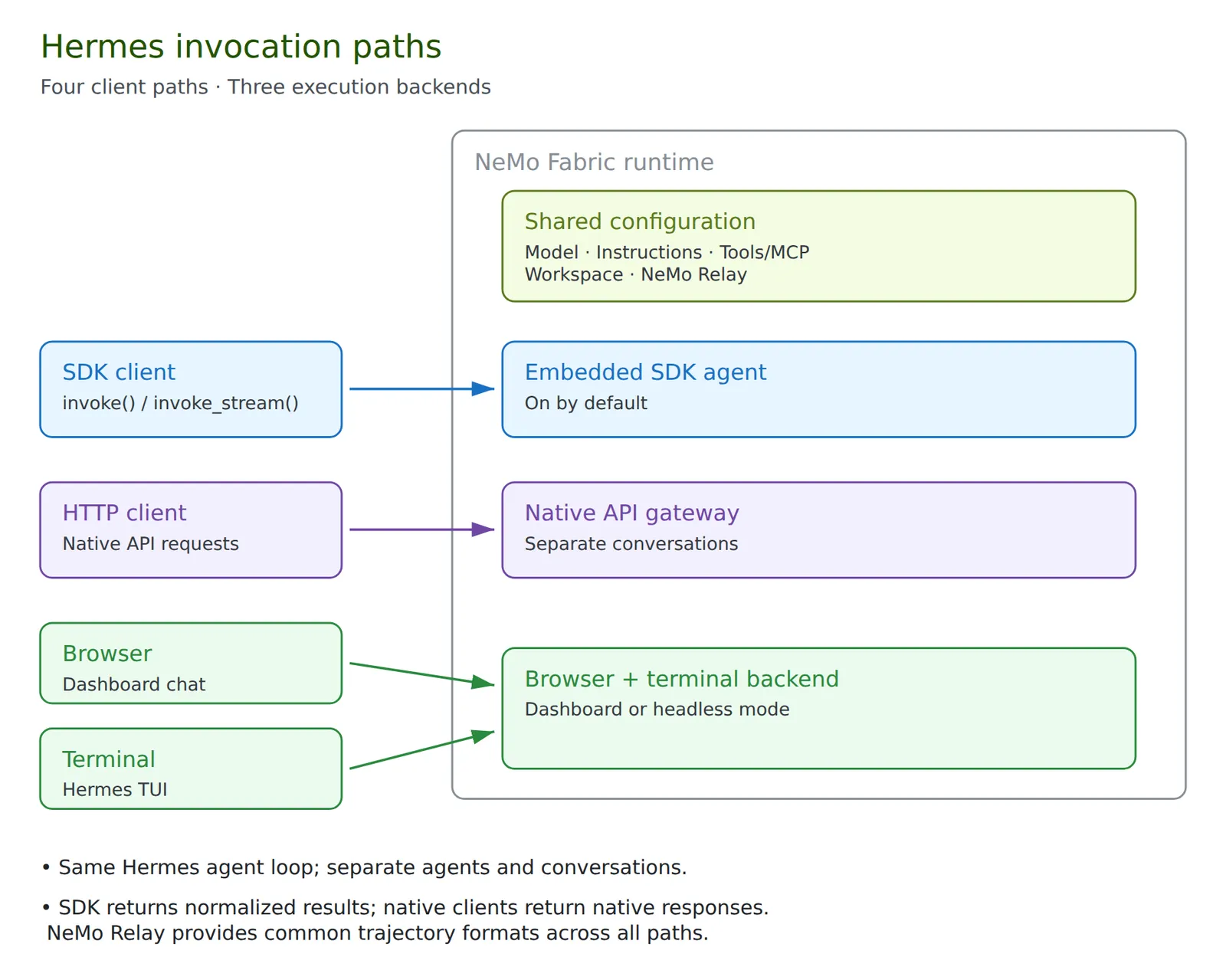
- Agent execution: All four paths use the same Hermes agent loop, with separate live agents and conversations.
- Runtime ownership: One NeMo Fabric runtime owns up to three backend processes: the adapter host, API gateway, and TUI service.
- TUI clients: Browser and terminal clients share the TUI service and use separate conversations. Neither requires the API gateway.
Install the Adapter
Use Hermes Agent v0.22.7 with Python 3.14. The adapter package supports Python 3.11 through 3.14, but Hermes Agent must be installed separately from source; versions 0.20 and later are not available from PyPI. Follow the Hermes Agent installation guide and select v0.22.7.
Install the runtime and adapter in the environment that runs Hermes:
If the application runs NeMo Fabric in a separate environment, install nemo-fabric-adapters-hermes in the Hermes environment and set ADAPTER_PYTHON in the application’s environment to that interpreter. Use matching runtime and adapter release versions unless a different pairing has been validated.
For Relay, install the adapter’s relay extra in the Hermes environment. It accepts nemo-relay>=0.10,<0.12; select the Relay line required by the installed Hermes release:
Startup requires a stable Relay 0.10 or 0.11 release and Hermes’s callable agent.relay_runtime.resolve_plugin_sources hook. Keep environments using the legacy pairing separate from applications requiring Relay 0.11.
For repository development, the following recipe checks out v0.22.7 at b200f5bc60e31588ba2cb60e288029c4a54ba5fa and prepares an isolated Python 3.14 environment with Relay support:
The installer preserves local checkout changes and stops rather than overwriting them. Set HERMES_AGENT_CHECKOUT to a separate clean checkout or a new directory to install without changing external/hermes-agent; the target environment remains .venv-hermes.
Hermes reports its Python package version as 0.0.0, so use its Git tag and commit to identify the installed release. The pinned release includes dependency security fixes absent from v2026.9.24.
Select Execution Paths
Use normalized FabricConfig fields for model credentials/routing, instructions, tools, MCP, skills, workspace, turn limits, and telemetry. The SDK guide shows a complete model configuration. Use harness.settings to select Hermes execution paths:
This example enables three native client paths without an embedded SDK agent. Omit sdk to preserve the default SDK agent. Omit an interface to turn it off; a present interface is on unless enabled is false. Current closed schemas require a port even for a disabled interface. Native interfaces require POSIX. Reject a configuration with no enabled execution path.
- Ports: Dashboard and terminal must use the same port when both are enabled because they share one TUI service. The API requires a separate port.
- Startup: Terminal-only mode starts
hermes serve; dashboard mode startshermes dashboard --isolated --skip-build. Build the required frontends before runtime startup; terminal-only mode needs no browser assets. - Startup timeout: Defaults to 60 seconds and must be greater than zero and no more than 75 seconds.
What NeMo Fabric Normalizes
Shared Configuration and Ownership
Configuration Translation
Use a single FabricConfig to define supported settings for all four Hermes paths through NeMo Fabric’s common configuration schema:
- Model: provider, model, endpoint, credential references, and sampling settings.
- System instructions: the replacement system prompt.
- Tool filters: enabled and blocked Hermes toolsets.
- MCP: server definitions and supported authentication settings.
- Skills: skill folders, bundled-skill selection, and duplicate handling. Refer to Skills.
- Plugins: bundled plugins and external plugin folders. Refer to Plugins.
- Workspace: the agent’s working directory.
- Execution limits: maximum agent turns and response tokens.
- NeMo Relay: telemetry and export configuration, when enabled.
NeMo Fabric resolves FabricConfig into AgentConfig. The adapter translates it into Hermes’s native configuration and agent settings, applying the same explicit instructions and behavioral settings to agents in managed native processes.
The adapter writes native config.yaml under the Hermes home. When NeMo Relay is enabled, the adapter creates a relay-config directory beside the file specified by FABRIC_RELAY_CONFIG_PATH and writes plugins.toml there. This location follows FABRIC_RELAY_CONFIG_PATH even with runtime.keep_state enabled. When native interfaces are enabled, it also writes an owner-only interfaces/agent-config.json snapshot for the managed processes.
Model credentials are supplied through child process environments, not public attachment metadata. For an OpenAI-compatible custom endpoint, native configuration binds the endpoint to its declared credential environment variable, including gateway placeholder keys, so unrelated provider credentials in the host environment do not override that route. Hermes’s API server, dashboard, and terminal UI send an anthropic model’s requests to its base_url whatever the path, such as https://MODEL_HOST/v1, through Anthropic’s Messages API with the key in x-api-key; Hermes’s own anthropic provider would use only an Anthropic, Claude, or Azure host, or a path ending in /anthropic or /anthropic/v1. For OpenAI without an explicit base URL, the adapter removes inherited OPENAI_BASE_URL from managed children so it cannot redirect the configured credential.
Setting Precedence
- Configured instructions, turn/token limits, sampling, and reasoning settings override Hermes’s native defaults.
- Explicit enabled tools, including an empty list, override native tool selection. A nonempty blocked list overrides native exclusions.
- Unspecified native tool policies can differ from SDK defaults. Set explicit policies when comparing behavior across paths.
Native Harness Controls
The following optional harness.settings fields use Hermes’s native config.yaml structure:
The adapter writes only the fields you set into config.yaml before the SDK agent or any native interface starts, so the SDK, API, dashboard, and terminal paths all read the same values. Omitting a field preserves the current behavior. The closed descriptor schema rejects unknown fields and invalid values, such as tool_search.enabled: maybe.
- Title generation and Relay: An explicit
title_generation.enabledvalue always wins. When it is omitted, a Relay-enabled runtime disables title generation, as before, and other runtimes use Hermes’s default. - Tool selection:
harness.settings.toolsis Hermes’s native tools section. It is separate from NeMo Fabric’s normalized top-leveltools.enabledandtools.blockedselectors, which still choose the Hermes toolsets. - Scope: These controls reduce automatic background model calls; they do not stop context compaction calls. They configure every conversation in the runtime the same way and do not correlate concurrent sessions, so a consumer that tracks only the latest model request must use one session at a time.
Skills
Configure Skills describes the skills fields, the common setups, the start checks, and the run report. Its Harness Differences table compares Hermes Agent with OpenClaw. This section covers the rest of Hermes’s behavior.
The adapter writes skills.paths or skills.directories to Hermes’s skills.external_dirs in config.yaml, so the SDK, API, dashboard, and terminal paths load the same skills.
- Names: The adapter reads each skill with Hermes’s own front-matter parser and skill catalog rules, so the name under
loadedis the name Hermes reads. Hermes reads front matter only when a line break follows its closing---. Anamewritten as a list loads as its string form. - Skipped skills: The report lists a skill that Hermes doesn’t load under
skipped, with one of these reasons:excluded_path: The skill’s path contains a folder name that Hermes skips, such asnode_modulesorsite-packages.unreadable: TheSKILL.mdcan’t be read.not_loaded_by_hermes: Hermes’s catalog drops the skill, for example because itsnameordescriptionis null or a number.no_name: Thenameis an empty string. Hermes lists the skill but can’t load it.native_conditions: Hermes hides the skill on the current platform or environment.ambiguous: The skill’s name is another skill’s folder name, so Hermes refuses it.
- Overlapping entries: When an entry lies inside another entry’s folder, such as a
skillentry inside afolderentry, the adapter passes only the outer folder, because Hermes refuses a skill it reaches through two folders. An entry under a folder Hermes skips, such asnode_modulesor a skill’sscriptsfolder, is still passed. - Agent-written skills: Hermes’s
skill_managetool writes new skills to the Hermes home’sskillsfolder, because the adapter doesn’t set Hermes’sskills.create_dir. That folder persists only withruntime.keep_state, which makes the agent’s state folder the Hermes home, so the next runtime for the same agent loads the skills it wrote. Hermes edits an existing skill fromskills.directoriesin its configured folder. On a read-only mount, the edit fails, the file stays as it was, and the tool returns the permission error to the agent.
Bundled Skills
Hermes copies its bundled skills into the skills folder of its home. The embedded SDK agent doesn’t copy them, so with skills.bundled omitted, an SDK-only runtime with a new home has no bundled skills. A runtime with the API, dashboard, or terminal interface gets Hermes’s own copy, because those processes copy the bundled skills at start. When such a runtime has a skill report, the adapter makes the same copy before it starts the interfaces, so the report lists those bundled skills and the interfaces’ own copy finds nothing left to do. As in the interfaces, a failure of that copy is logged and doesn’t stop startup when skills.bundled is omitted. Whenever skills.bundled is set, the adapter copies the selected bundled skills into the home at startup, as Hermes does. The copy always includes hermes-agent, and it removes an earlier copy of a bundled skill that an external skill now provides.
Hermes always loads hermes-agent, so NeMo Fabric rejects a selection that leaves it out rather than load a skill you didn’t select. Hermes supports skills.bundled: {} (every bundled skill) and an exclude list. To load the fewest bundled skills, exclude every bundled skill except hermes-agent.
- The descriptor advertises
supports_include: falseandsupports_disable: false, so planning rejects anyincludelist, includinginclude: []andinclude: [hermes-agent], andenabled: falsebefore the runtime starts. Hermes would still loadhermes-agent, so neither can mean what it says. A runtime started without planning fails startup withhermes_skill_invalid, the reasonessential_bundled_skill, the fieldskills.bundled.includeorskills.bundled.enabled, and the namehermes-agent. - An
excludelist that nameshermes-agentfails startup the same way, with the fieldskills.bundled.exclude.
When the selection leaves skills out, the adapter stages the selected bundled skills in a temporary folder, laid out as in the Hermes installation, and points HERMES_BUNDLED_SKILLS at it. Hermes copies bundled skills from that folder, both at the adapter’s startup copy and in the API, dashboard, and terminal processes, which inherit the variable. Stop removes the folder. The adapter doesn’t use Hermes’s skills.disabled, so a skill that shares a left-out skill’s name loads normally:
- External skills: When a selected bundled skill has the same name, or folder name, as an external skill, Hermes doesn’t copy the bundled skill and loads the external one.
- The agent’s own skills: A skill in the Hermes home that Hermes didn’t copy from its bundled skills, such as one the agent wrote in a kept state folder, loads wherever it is in the home. When the selection keeps a bundled skill whose name the agent’s own skill holds, the agent’s skill loads, and the report lists the bundled skill under
bundled.unavailablewith the reasonprovided_by_local_skill. - Earlier copies in a kept home: A kept state folder can hold Hermes’s copy of a bundled skill from an earlier runtime that selected it. Hermes records each bundled skill it copies, with a hash of the copy, in the home’s
skills/.bundled_manifestfile. When a left-out skill’s copy still matches that hash, or the installed skill, the adapter removes the copy and its manifest entry before Hermes copies the bundled skills, so a later runtime that selects the skill gets a fresh copy. A selected bundled skill nested in the removed folder loses its copy too, so its entry also goes and Hermes copies it again in the same start. The adapter first records the entries to drop, with the files each copy holds, inskills/.nemo_fabric_pending_manifest, which Hermes doesn’t read as a skill, and removes the record when it is done. If a start fails part way, the next start completes the record before Hermes copies the bundled skills: it removes what is left of a copy when every remaining file is one it recorded, unchanged. Like Hermes’s own copy check, the record and the comparison skip runtime cache files, such as__pycache__folders and a.pycfile beside its.pysource, which running a skill’s scripts writes. When a file in a partly removed copy was changed or added since, the adapter keeps the copy and startup fails with the same error as for a changed copy below; move or delete the copy. When the copy at the place Hermes put it was changed, the adapter doesn’t remove it. Startup fails withhermes_skill_invalid, the reasonexcluded_bundled_skill_modified, the fieldskills.bundled.exclude, the skillname, and the copy’spath. Select the skill, or move or delete the copy.
Skill Report
The run report has the shape that Configure Skills describes, with these Hermes details:
- When it appears: Whenever
skills.directories, even[], orskills.bundledis set. loaded: Lists every skill Hermes’s catalog loads, that is, every skill Hermes resolves its name to and shows on this platform. The configured skills come first, in entry order, withorigin: external. Every other skill follows, by name, with itspath: Hermes’s copy of a bundled skill in the Hermes home asbundled, and the agent’s own skills in the home, project skills, skills fromskills.paths, and any other skill Hermes reads aslocal. A skill the agent created in a kept state folder appears aslocalfrom the next runtime on. An empty list means Hermes loads no skill. When Hermes’s catalog can’t be read, the report lists only the configured skills.duplicates: Lists each name that more than one skill folder provides among the skills Hermes sees, including a bundled copy and the agent’s own skill in the Hermes home with no external copy. The outcome isselectedwhen a configured copy loads, or, with no configured copy, when Hermes loads one copy. It isshadowedwhen a copy in the Hermes home wins over the configured copies, andambiguouswhen Hermes refuses the name.bundled: Addsessential, the skills Hermes always loads.selectedalso lists them.
Plugins
harness.settings.plugins names each plugin by where it comes from. The adapter writes it to Hermes’s native plugins section in config.yaml:
bundled.entries: Plugins that ship with Hermes, keyed by registry key or manifest name.enabled: falseturns off a plugin Hermes loads by default.external: Plugin folders that something else provides, such as a mounted volume. The adapter links each folder into$HERMES_HOME/pluginsat start and removes the link at stop. A folder’s Python dependencies must already be importable. A path alone doesn’t turn a plugin on.- Entries: Each takes
enabled,config(written toplugins.entries.<id>.settings), andcapabilities(written toplugins.entries.<id>.granted_capabilities). A plugin id may appear in only one section. - Hermes controls:
load_timeout_seconds,hook_callback_timeout,clone_timeout_seconds,auto_update_check_hours,auto_apply,isolation, andhost.launcherare written as they are.
After Hermes discovers its plugins, startup fails unless every entry with enabled: true loaded. Each error names the setting in metadata.field:
NeMo Fabric doesn’t support plugins the agent installs itself. Hermes builds a Python environment for each install, and importing Hermes later switches the whole adapter process to it, which removes NeMo Fabric’s packages. With runtime.keep_state, startup fails before Hermes is imported; delete the folder and provide the plugin through external instead.
Shared Runtime Home
The default Hermes home is <artifact root>/.fabric/hermes/runtimes/<runtime-id>. With runtime.keep_state, the Hermes home is <artifact root>/.fabric/state/nvidia.fabric.hermes/<agent name>, so runtimes of the agent share the session database, memory, skills, and logs. The SDK starts a new conversation for each runtime, and earlier sessions remain in the database. The adapter rewrites config.yaml at each start.
Startup removes stale interfaces/api.token, interfaces/tui.json, interfaces/tui.token, and interfaces/agent-config.json files from the Hermes home. A removal failure stops startup with hermes_interface_cleanup_failed before Hermes setup.
Process Ownership
Managed native processes run through the adapter’s launcher without modifying the installed Hermes source. Independently started processes do not automatically receive the adapter’s configuration mapping.
The managed API gateway disables ambient messaging platforms and profile multiplexing. Inherited settings such as TELEGRAM_BOT_TOKEN do not start chat-channel dependency installers in this runtime.
Health and Shutdown
Startup checks every enabled interface: API /health and TUI /api/status; TUI startup also verifies an authenticated RPC without creating a conversation. An enabled interface that fails startup still fails runtime startup.
When the SDK agent is enabled, runtime health and idle/busy activity describe that SDK agent. A separate API or TUI process failure does not fail SDK runtime health. Observe native endpoints and interface logs separately; a normalized interface health target is planned under #566.
With sdk.enabled: false, runtime checks inspect the enabled native children and endpoints. Native activity remains unknown because native turns are not fully aggregated. There is no unified live-agent inventory.
Stop removes API/TUI credentials and attachment descriptors, sends SIGTERM to owned interface process groups, and escalates to SIGKILL after five seconds. API gateway drain is three seconds. The configuration snapshot is removed and owned SDK resources are closed. Cleanup errors are logged; failed private-file removal is retried on a later stop.
Limitations and Planned Work
- Native response normalization, complete native usage accounting, and session-scoped artifact collection remain separate work.
- Child crash recovery, listener process-ownership checks, and stronger descendant cleanup when process-group signals are denied remain planned. HTTP/RPC readiness is not a live model or tool execution check.
- Browser chat is restricted to the managed runtime profile. Named-profile switching, gateway restart/migrate controls, and other dashboard operations can escape the supported ownership/configuration model. Do not use those controls to replace managed processes.
- Dashboard pages have no separate NeMo Fabric sign-in on loopback. Terminal credentials do not add a browser sign-in gate. Clients share filesystem/tools; separate conversations do not provide user isolation.
- TUI approvals and client detach/cancellation behavior need their own qualification; the adapter currently inherits
HERMES_YOLO_MODE(defaulting to enabled). Detaching is not an explicit stop/cancel operation. - Relay export errors are logged without replacing the execution outcome. Verify completed artifacts. Standard formatting does not establish complete telemetry coverage for every native control or background operation.
- Runtime-wide native activity discovery, same-conversation multi-client policy, cold resume, and SDK/native conversation handoff remain planned work.
Try the Interfaces
See the interfaces examples for manual startup, real input, output checks, and Relay trajectory inspection. Coverage and remaining qualification limits are described there.