

About Model-Free NIM
Model-free NIM lets you run any supported model in NIM LLM and VLM without a model-specific container image.
By default, NIM containers ship with a built-in model manifest that defines which model to serve. In model-free mode, you point a generic NIM container at any supported model, such as a Hugging Face repository, an S3 bucket, or a local directory. NIM then generates a manifest at startup and serves that model.
How It Works
When you start a model-free container, you supply a model location with NIM_MODEL_PATH or with the backend positional argument. NIM generates a runtime manifest for that source, selects a profile, and serves the model.
If you do not set a served name, NIM derives one from the model source by removing the URI scheme and any trailing :<version>, then replacing any : that remains. That derived name is the value to use in the model field of inference requests, and it is what /v1/models reports.
For air-gap redeploys, the first network-connected start can persist the generated manifest in the container cache (NIM_CACHE_PATH). Later starts that mount the same cache with the same image and model reuse the manifest with no outbound network or authentication calls. For the full air-gap workflow, refer to Air-Gap Deployment.
Some images also ship optimized profiles for specific checkpoints. NIM recognizes those checkpoints from the model’s own config.json and adds the optimized profiles to the available choices. Automatic selection prefers these profiles within each memory category. For details, refer to Optimized Profiles for Recognized Models.
Profile listing, URI schemes, and download behavior are documented in the configuration sections that follow. For profile selection details, refer to Model Profiles and Selection. For source-specific download steps, refer to Model Download.
For models that require more than one node, refer to Multi-Node Deployment instead of the single-host examples on this page.
Related Use Cases
Model-free NIM supports the following capabilities:
- Flexible single-container deployments: One container image can pass security review and serve any supported model.
- Day-zero model support: You can serve newly released models without waiting for a model-specific NIM container.
- Custom and fine-tuned models: You can serve your own models from any supported source.
Limitations and Considerations
The following limits apply when you choose a model-free NIM container.
- Unsupported architectures: The backend in the container (vLLM or SGLang) must support the model architecture.
- Remote URI first deploy: A remote
NIM_MODEL_PATH(for example,ngc://orhf://) requires network access and credentials on the first deployment so NIM can generate and cache the runtime manifest.
Regardless of where the model is hosted, if its architecture is unsupported by the inference backend in your container (vLLM or SGLang), it is also unsupported by NIM.
Configuring the Model-Free NIM Container Image
The latest model-free NIM container images are in the NGC Catalog:
Set NIM_LLM_IMAGE to the image name and tag from the catalog page. Model download commands use this value.
Configuring the Model
Supply the model path and name using either of these methods. If both are provided, the CLI positional argument takes precedence.
NIM_MODEL_PATH Environment Variable
Use NIM_MODEL_PATH to point the container to the model at runtime:
Model Path as a Container Argument
Pass the model path as the first positional argument to the container:
Default Model Name
If you do not set a name, NIM derives one from the model source by removing the URI
scheme and any trailing :<version>, then replacing any : still left. The result is
the name to use in the model field of inference requests, and it is what /v1/models
reports.
The derived name is the same regardless of which inference backend the image uses.
A derived name never contains :. If the model source has one, NIM replaces it, because
some backends read : in the model field as a base-model:lora-adapter separator and
would reject every request.
A name you set yourself is used verbatim and is not adjusted. On a backend that reserves
:, setting one that contains it fails at startup with a message naming the value,
rather than starting and rejecting every request.
NIM_SERVED_MODEL_NAME Environment Variable
Use NIM_SERVED_MODEL_NAME to set the model name used in inference requests:
CLI Argument
Use the CLI argument --served-model-name to pass the model name used in inference requests.
Run with a Downloaded Serving Recipe
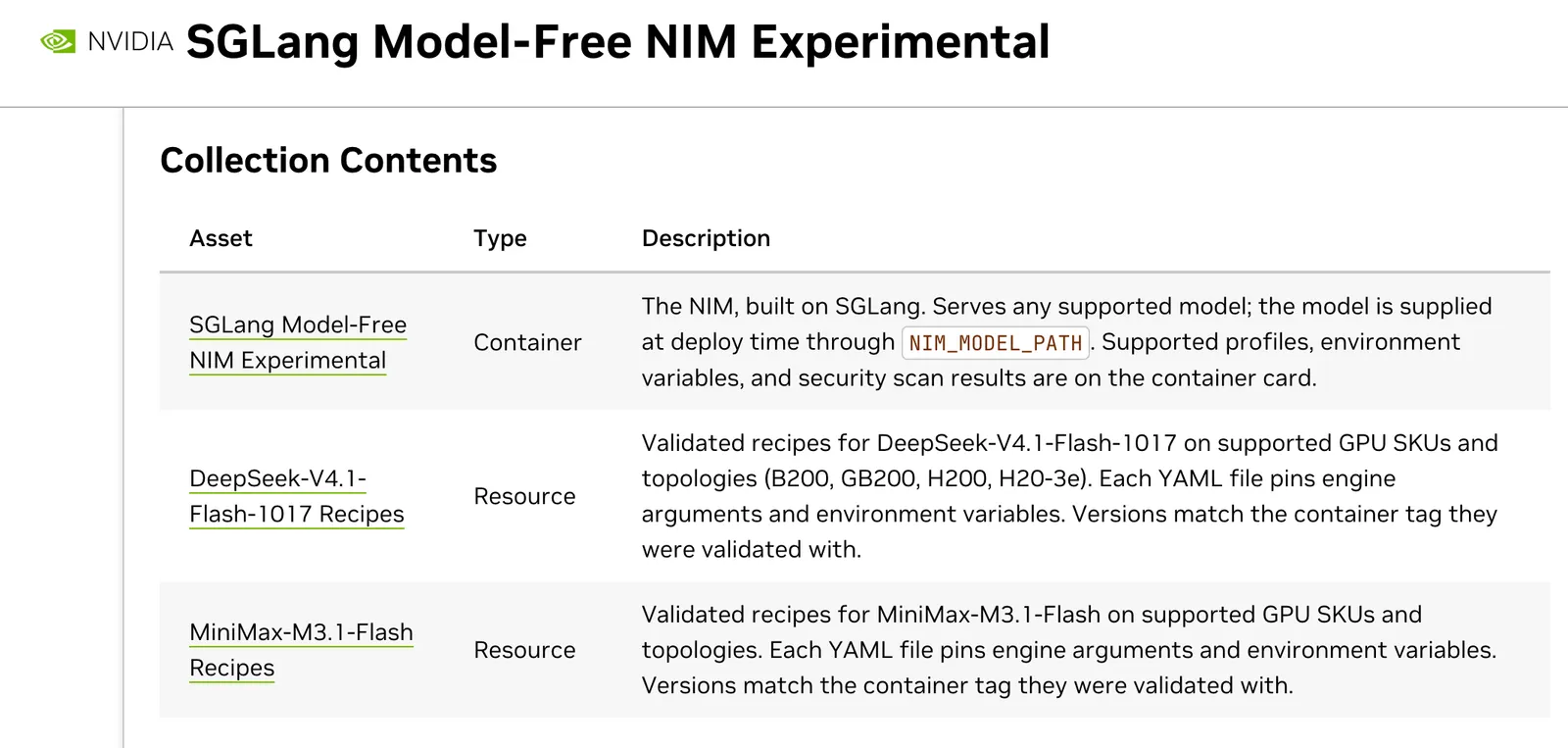
Model-free NIM can use generic defaults, an automatically selected built-in recipe, or a separately downloaded serving recipe. Use this workflow only when the model-free NIM specifies an NGC collection that includes a separate recipe for the model. Otherwise, use the standard launch commands on this page and any model-specific startup settings.
Before starting, check the model entry in the
Support Matrix for NIMs under Model-Free NIM. If the
entry says that you need to download and select the recipe from a collection,
then use the following steps to download the applicable recipe and select it
using NIM_CONFIG_FILE.
-
Install and configure the NGC CLI. Run
ngc config setand follow the prompts to configure your NGC account before downloading resources. -
Open the model’s NGC collection and find the correct recipes asset. It should have type Resource.
-
Click the link to the recipe.
-
Select the recipe version specified by the model guide for your container image. Click the Download button and then the copy button to copy the recipe download command.
-
Run the copied command in your terminal to download the recipes. The command has the following format:
-
Select the YAML file for your checkpoint, GPU, and topology. Set the image, model source, absolute host path to the downloaded file, and required GPU count using values from the model guide:
The recipe must be readable by the container user. Downloading the recipe does not download the model weights. NIM downloads those from
NIM_MODEL_PATHat startup. -
Configure
LOCAL_NIM_CACHEand model-source credentials by following Configuration. Apply any additional options required by the model guide, such as custom-code permissions, shared memory, or GPU interconnect settings. For multiple nodes, follow Multi-Node Deployment.Mount the recipe read-only and set
NIM_CONFIG_FILEto its path inside the container. The following command is a single-node launch template with Hugging Face credentials and a persistent cache: -
In another terminal, wait for readiness, then query the served model name:
Repeat the readiness check until it returns HTTP 200. Use the
idreturned by/v1/modelsin inference requests. A recipe can supply the served name.
Supported Model Sources
The following table lists the model sources supported by model-free NIM, along with the required URI prefix and authentication method.
For details on downloading models from each source (including URI formats, proxy configuration, and cache management), refer to Model Download.
Configuring Deployment Options
Model-free NIM generates profiles for combinations of tensor parallelism (TP), pipeline parallelism (PP), and LoRA. To select a deployment configuration, use either of the following methods. If both are provided, backend CLI arguments take precedence.
NIM_MODEL_PROFILE Environment Variable
Run list-model-profiles to see available profiles, then select one:
Generated descriptions take the form <engine>-tp<N>-pp<M>[-feat_lora]-<hash>, where <engine> is vllm or sglang depending on the image (for example vllm-tp2-pp1-<hash> or sglang-tp2-pp1-<hash>). Copy the exact ID or description from list-model-profiles output.
Container Arguments
Use NIM environment variables or canonical CLI flags to configure settings shared by both inference engines:
Alternatively, pass the canonical flag --tensor-parallel-size 2 after the model path:
NIM translates canonical flags into the selected inference engine’s arguments. Common settings include:
For LoRA profile selection, refer to Fine-Tuning with LoRA. For backend-specific arguments and configuration precedence, refer to Advanced Configuration.
Listing Profiles
Use the list-model-profiles command to view the profiles generated for a given model:
For more details on profile selection, refer to Model Profiles and Selection.
Optimized Profiles for Recognized Models
Some model-free images include optimized profiles: serving configurations that NVIDIA measured on a specific checkpoint and hardware combination.
A built-in tuned recipe defines which checkpoints match and which optimized profiles become available.
These recipes are separate from the downloaded serving recipes selected with NIM_CONFIG_FILE.
When a checkpoint matches, NIM adds the optimized profiles to its generated manifest alongside the generic profiles.
Automatic selection prefers compatible optimized profiles within each memory category; no environment variable is needed to enable this behavior.
You can still select a generic profile explicitly with NIM_MODEL_PROFILE.
Matching uses the checkpoint’s config.json, not its model name, repository name, or weights.
A fine-tune that changes only the weights retains the base model’s match.
Changing the architecture, quantization, precision, context length, or another field constrained by the recipe can break the match.
For the exact matching rules, refer to Optimized Profiles in Model-Free NIM.
For fine-tunes served by a model-specific NIM, refer to Serving a Fine-Tuned Checkpoint on a Model-Specific NIM.
To identify optimized profiles, pin a profile, or confirm which profile NIM selected, follow the profile inspection procedure. If you expected a match but received generic profiles, refer to Troubleshoot Recipe Matching.
When No Recipe Matches
If no built-in recipe matches your checkpoint, NIM uses generic profiles.
NIM_MODEL_PROFILE cannot select an optimized profile that is absent from the generated manifest.
You can manually override engine settings; refer to Reuse Settings from a Built-In Recipe.
Applying those settings does not make the checkpoint a recognized match.
S3-Specific Environment Variables
The following environment variables authenticate and configure S3 and S3-compatible endpoints:
For complete authentication and configuration details for each source, refer to Model Download.
Air-Gap Deployments
How model-free NIM behaves in an air-gap environment depends on the type of NIM_MODEL_PATH value
you use.
Local Path (/abs/path/to/model)
NIM generates the manifest from the local directory with no network access or credentials. This is the simplest air-gap workflow — ensure the model directory is pre-staged and mounted into the container.
Remote URI (ngc://, hf://, s3://, and so on)
NIM generates a runtime manifest from the URI on the first deployment and saves a copy in
NIM_CACHE_PATH. On subsequent restarts, including in a strict air-gap environment, NIM finds the
cached manifest in the same cache volume and reuses it without any outbound network or
authentication calls. No additional environment variables are required. For offline use,
prepare the cache with the same model and container image and include all required model assets.
The cached manifest is reused this way only when its key, nim_runtime_manifest.key.json next
to it, shows it was generated for the same NIM_MODEL_PATH by the same container image. If the
model, the image or its tuned recipes have changed, an earlier generation could not complete, or
the cache predates the key, NIM tries to regenerate the manifest first and falls back to the cached
one only if that fails, logging a warning. It does not fall back to a cached manifest whose key
shows it was generated for a different NIM_MODEL_PATH or backend: without network access, that
start exits with an error rather than serving the other model’s files or the other backend’s
profiles.
This enables the following workflow for air-gap redeployment:
- First deploy (network-connected): Run the container with credentials and the remote URI.
NIM downloads the model, generates the manifest, and saves a copy to
NIM_CACHE_PATH. - Transfer: Ensure the NIM cache is on a PVC or persistent volume that survives pod restarts,
or transfer the cache directory, including
nim_runtime_manifest.key.json, to the air-gap environment. - Redeploy (air-gapped): Mount the same cache volume and use the same image and
NIM_MODEL_PATH. NIM finds the cached manifest and skips regeneration without network access. Do not pass registry credentials.
Use a separate cache for each model and container image. Before changing either in an air-gapped deployment, prepare and transfer a matching cache on a network-connected host.
The cached manifest is also reused on network-connected restarts while the image and
NIM_MODEL_PATH are unchanged, so a moving reference (such as a :latest tag or a Hugging Face
branch) keeps serving the files it was first resolved to. Pin NIM_MODEL_PATH to a fixed version,
or, to force manifest regeneration after an upstream model update, delete nim_runtime_manifest.yaml
or nim_runtime_manifest.key.json from your persistent cache directory (for example, the host machine directory in LOCAL_NIM_CACHE) mounted to /opt/nim/.cache (the default value of NIM_CACHE_PATH inside the container) before restarting.
For a complete walkthrough, refer to Air-Gap Deployment.
Examples
Use the following examples to run model-free NIM with different model sources and profile selection methods. Each example lists the commands in order.
Hugging Face Model with Profile Selection
Use this example to inspect available profiles for a Hugging Face model, select a profile, or override tensor parallelism.
-
Set the model path:
-
List the available profiles:
Example output:
The example output above is from a vLLM model-free image. On an SGLang model-free image, the profile descriptions are prefixed sglang- instead (for example, sglang-tp1-pp1-...).
- Start NIM by using one of the following methods:
-
Select a profile with
NIM_MODEL_PROFILE, using an ID or description from your image’slist-model-profilesoutput: -
Override tensor parallelism with
NIM_TENSOR_PARALLEL_SIZE=2or the canonical flag--tensor-parallel-size 2:
Model Hosted in S3 Using Default Profile from Automatic Profile Selection
Use this example to serve a model from S3 and let NIM select the default compatible profile automatically.
-
Set the model path:
-
Start NIM with the required S3 credentials:
Local Model with TP=8 Profile Specified
Use this example to serve a local model and select a TP=8 profile explicitly.
-
Set the model path:
-
Start NIM with the selected profile: