TTS Riva Magpie Flow (ASqFlow) Programming Guide
The focus of this guide is on using AI Inference Manager to integrate a TTS model into an application. The model is known as Riva Magpie Flow, but the plugin is named A-Squared Flow (ASqFlow), based upon the original name of the model as shipped in NVIGI 1.1.1. To avoid issues with applications upgrading from 1.1.1 to a newer version, the plugin name was retained.
MIN RUNTIME SPEC: Note that all TTS Riva Magpie Flow backends require a CPU supporting AVX2 instructions. Support for this instruction extension is ubiquitous in modern gaming CPUs, but older hardware may not support it.
IMPORTANT: This guide might contain pseudo code, for the up to date implementation and source code which can be copy pasted please see the SDK’s Basic command line sample. For modern C++ examples, see basic_tts.cpp which demonstrates both the low-level C API and the modern C++ wrapper with RAII,
std::expected, and builder patterns. The wrapper code is located in tts.hpp.
RECOMMENDED: For new projects, consider using the Modern C++ Wrapper (sections 1.2.1, 2.1, 3.1, 4.3, 6.1, and 7.1) which provides a cleaner API with automatic resource management, error handling via
std::expected, and game-loop friendly async operations.
IMPORTANT NOTE: The CUDA backend (nvigi.plugin.tts.asqflow-ggml.cuda.dll) strongly recommends an NVIDIA R580 driver or newer in order to avoid a potential memory leak if CiG (CUDA in Graphics) is used and the application deletes D3D12 command queues mid-application.
IMPORTANT NOTE: Newer releases of the ASqFlow NVIGI plugin are NOT backwards compatible with older versions of the Riva Magpie Flow model. To avoid compatibility issues, please always use the Riva Magpie Flow model that ships with the SDK release that is being integrated.
A general overview of the components within the cpp ASqFlow implementation, including its capabilities, expected inputs, and outputs is shown in the diagram below:
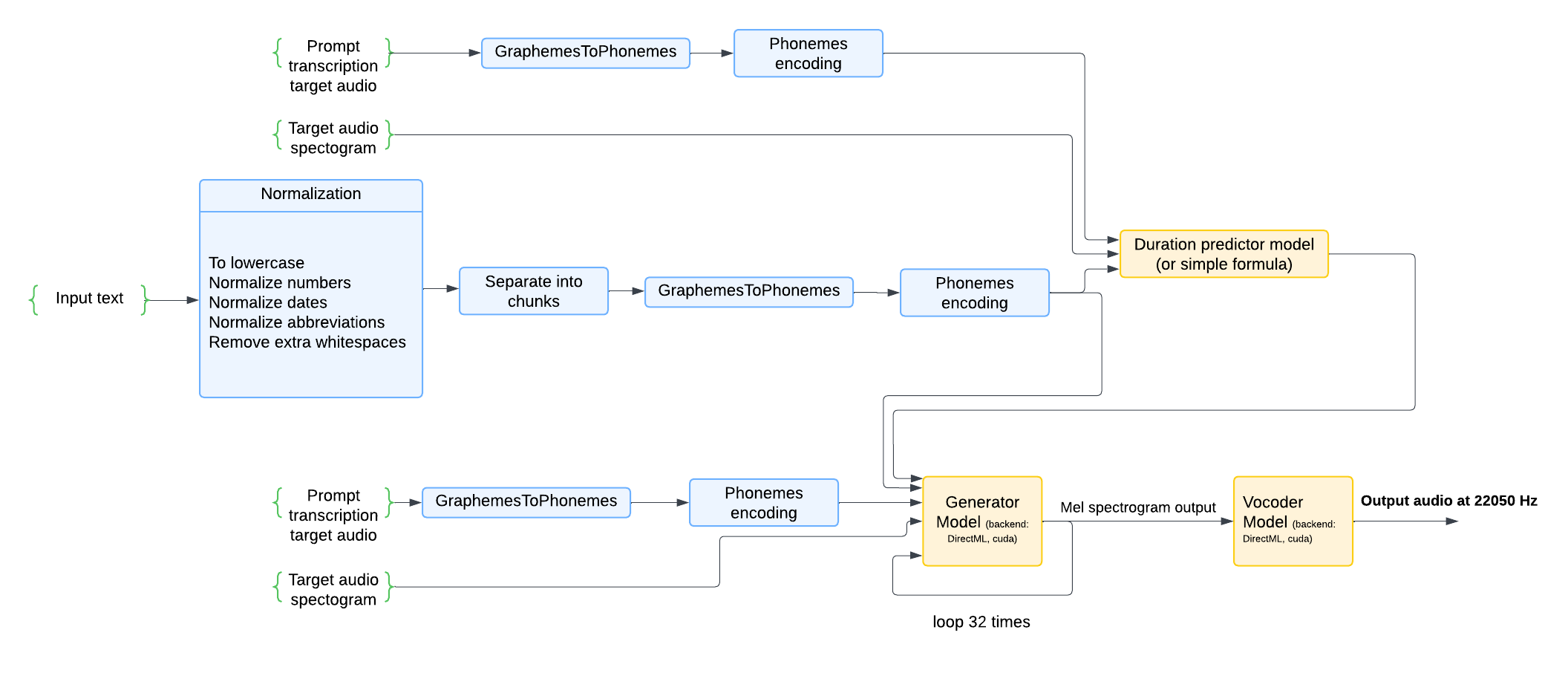
1.1 INPUT FLOW ARCHITECTURE
The ASqFlow TTS system processes inputs through a multi-stage pipeline as illustrated in the diagram above. This section explains how the inputs flow through the system:
Text-to-Phoneme Processing
Input Text Processing
The system accepts raw text input that undergoes comprehensive normalization, including but not limited to:
Conversion to lowercase
Number normalization (e.g., “123” → “one hundred twenty-three”)
Date normalization (e.g., “12/25/2023” → “December twenty-fifth, twenty twenty-three”)
Abbreviation expansion (e.g., “Dr.” → “Doctor”)
Removal of extra whitespaces and formatting cleanup
NOTE: Handling Formatted Text from LLM Outputs
When using text generated by Large Language Models (like GPT), the output may contain formatting symbols that get normalized in undesired ways. For example:
To improve your focus during study sessions, try using the Pomodoro Technique:

* Set a timer for 25 minutes of deep work
* Take a 5-minute break afterward
* After 4 sessions, take a longer break (15–30 minutes)
In this case, the normalizer will convert
*to “asterisk” which may not be the intended speech output. It’s recommended to perform pre-processing on LLM outputs to remove or replace unwanted formatting symbols before passing the text to ASqFlow TTS.
Text Chunking
The normalized text is intelligently separated into manageable chunks
Chunk size can be controlled via
minChunkSizeandmaxChunkSizeparametersThe algorithm avoids splitting sentences when possible to maintain natural speech
Grapheme-to-Phoneme Conversion
Each text chunk is converted from written text (graphemes) to phonetic representations (phonemes)
Uses both dictionary lookup and neural G2P model for unknown words
The default phoneme dictionary is located in the model folder and named
ipa_dict_phonemized.txtCustom phoneme dictionaries can extend the default mappings
Phoneme Encoding
Phonemes are encoded into numerical representations suitable for the tts model
This encoding serves as input to both the duration predictor and generator models
Audio Timing and Reference Inputs
Duration Prediction
A simple formula determines timing for each phoneme
This ensures natural speech rhythm and pacing
The
speedparameter can modify the overall speech rate (0.5-1.5 multiplier)
Target Audio Inputs (Optional)
Prompt transcription target audio: The transcription (text) of the audio that was used to compute the target spectrogram
Target audio spectrogram: Pre-computed spectrograms needs to be provided via
kTTSDataSlotInputTargetSpectrogramPathThese inputs help guide the voice characteristics and prosody of the generated speech
Model Inference Pipeline
Generator Model Processing
Combines phoneme encodings and duration predictions
Generates mel spectrograms representing the audio characteristics
Operates in an iterative loop to refine the spectrograms
In GGML backend, advanced samplers have been implemented to reduce iterations to 16 (controlled via
n_timestepsparameter)
Vocoder Processing
Converts mel spectrograms into final audio waveforms
Outputs high-quality audio at 22050 Hz sample rate
Chunk-by-Chunk Processing
The system processes text in discrete chunks rather than true streaming. This approach allows:
Audio playback to begin after the first chunk is completely processed
The chunking mechanism processes each text segment independently, generating complete audio for each chunk before moving to the next one.
1.2 INITIALIZE AND SHUTDOWN
Please read the Programming Guide located in the NVIGI Core package to learn more about initializing and shutting down NVIGI SDK.
1.2.1 MODERN C++ WRAPPER (RECOMMENDED)
The NVIGI SDK provides modern C++ wrappers that simplify initialization and provide a cleaner API with RAII, std::expected, and builder patterns. The wrappers are located in source/samples/nvigi.basic.cxx/ and can be used in your projects.
#include "core.hpp"
#include "tts.hpp"

using namespace nvigi::tts;

// Initialize NVIGI core with builder pattern
nvigi::Core core({
    .sdkPath = "path/to/sdk",
    .logLevel = nvigi::LogLevel::eDefault,
    .showConsole = true
});

// Access system information
const auto& sysInfo = core.getSystemInfo();
std::cout << "Detected " << sysInfo.getNumPlugins() << " plugins\n";
std::cout << "Detected " << sysInfo.getNumAdapters() << " adapters\n";
NOTE: The C++ wrappers provide the same functionality as the low-level API but with modern C++ idioms. Both approaches are valid and can be mixed if needed.
2.0 OBTAIN TTS INTERFACE(S)
Next, we need to retrieve TTS’s API interface based on ASqFlow. ASqFlow supports multiple backends:
TRT Backend: Optimized TensorRT implementation
GGML CUDA Backend: Experimental GGML-based implementation with additional runtime configuration options and language selection support. The GGML backend provides two model variants:
FP16 Model:
{16EEB8EA-55A8-4F40-BECE-CE995AF44101}- Higher precision, better qualityQ4 Model:
{3D52FDC0-5B6D-48E1-B108-84D308818602}- Quantized model, smaller memory footprint
nvigi::ITTS ittsLocal{};
// Here we are requesting interface for the TRT implementation
if(NVIGI_FAILED(res, nvigiGetInterface(nvigi::plugin::tts::asqflow::trt::kId, ittsLocal))
{
    LOG("NVIGI call failed, code %d", res);
}

// Alternative: GGML CUDA backend
if(NVIGI_FAILED(res, nvigiGetInterface(nvigi::plugin::tts::asqflow::ggml::cuda::kId, ittsLocal))
{
    LOG("NVIGI call failed, code %d", res);
}
2.1 LANGUAGE SUPPORT (GGML Backend Only)
The GGML backend provides support for multiple languages, allowing you to generate speech in different languages by setting the appropriate language code at runtime.
Supported Languages
The GGML plugin reads supported languages exclusively from the model configuration file. The exact set of supported languages varies by model, but commonly include:
“en”: English (default)
“en-us”: American English
“en-uk”: British English
“es”: Spanish
“de”: German
The specific languages supported by your model are defined in the languages_supported field of the model configuration file (nvigi.model.config.json). This field contains a JSON array of language codes, for example:
{
  "languages_supported": ["en", "en-us", "en-uk", "es", "de"]
}
If the languages_supported field is not present in the model configuration, the system will default to supporting only English (“en”).
Querying Supported Languages
You can programmatically query the list of supported languages from the capabilities and requirements:
nvigi::TTSCapabilitiesAndRequirements* info{};
getCapsAndRequirements(ittsLocal, params, &info);

if (info->supportedLanguages != nullptr && info->n_languages > 0) {
    for (uint32_t i = 0; i < info->n_languages; ++i) {
        std::cout << "Supported language: " << info->supportedLanguages[i] << std::endl;
    }
}
Setting Language at Runtime
To specify the language for text-to-speech synthesis, set the language parameter in your runtime parameters:
nvigi::TTSASqFlowRuntimeParameters runtime{};
runtime.language = "es";  // Generate Spanish speech
NOTE: Language selection is only available with the GGML backend. The TRT backend does not currently support language selection and will use the default English model.
3.0 CREATE TTS INSTANCE(S)
Now that we have our interface we can use it to create our TTS instance. To do this, we need to provide information about the TTS model we want to use, CPU/GPU resources which are available and various other creation parameters.
Here is an example:
//! Here we are creating two instances for different backends/APIs
//!
//! IMPORTANT: This is totally optional and only used to demonstrate runtime switching between different backends

nvigi::InferenceInstance* ttsInstanceLocal;
{
    //! Creating local instance and providing our D3D12 or VK and CUDA information (all optional)
    //!
    //! This allows host to control how instance interacts with DirectX, Vulkan (if at all) or any existing CUDA contexts (if any)
    //!
    //! Note that providing DirectX/Vulkan information is mandatory if at runtime we expect instance to run on a command list.

    nvigi::TTSCreationParameters params{};
    nvigi::TTSASqFlowCreationParameters paramsAsqflow{};

    nvigi::CommonCreationParameters common{};
    common.numThreads = myNumCPUThreads; // How many CPU threads is instance allowed to use
    common.vramBudgetMB = myVRAMBudget;  // How much VRAM is instance allowed to occupy
    common.utf8PathToModels = myPathToNVIGIModelRepository; // Path to provided NVIGI model repository (using UTF-8 encoding)
    // Model GUID for ASqFlow model - choose based on your requirements:
    // For TRT backend:
    common.modelGUID = "{81320D1D-DF3C-4CFC-B9FA-4D3FF95FC35F}"; // TRT model

    // For GGML backend - two options available:
    // common.modelGUID = "{16EEB8EA-55A8-4F40-BECE-CE995AF44101}"; // GGML FP16 model (higher quality)
    // common.modelGUID = "{3D52FDC0-5B6D-48E1-B108-84D308818602}"; // GGML Q4 model (smaller memory footprint)
    params.warmUpModels = true; // faster inference, disable it if you want faster creation time. Default True.

    // Asqflow tts parameters
    paramsAsqflow.extendedPhonemesDictPath = "Path to a phoneme dictionary, which will extend the default dictionary present in the model's folder."

    // Note - this is pseudo code; the return value of chain() should always be checked
    params.chain(common);
    params.chain(paramsAsqflow);

    //! Optional but highly recommended if using D3D context, if NOT provided performance might not be optimal
    nvigi::D3D12Parameters d3d12Params{};
    d3d12Params.device = myDevice;
    d3d12Params.queue = myQueue;
    params.chain(d3d12Params);

    //! Query capabilities/models list and find the model we are interested in.
    nvigi::TTSCapabilitiesAndRequirements* info{};
    getCapsAndRequirements(ittsLocal, params1, &info);
    REQUIRE(info != nullptr);

    //! GGML Backend: Query supported languages (only available with GGML plugin)
    if (info->supportedLanguages != nullptr && info->n_languages > 0) {
        LOG("Supported languages:");
        for (uint32_t i = 0; i < info->n_languages; ++i) {
            LOG("  - %s", info->supportedLanguages[i]);
        }
    }

    if(NVIGI_FAILED(res, ittsLocal.createInstance(params, &ttsInstanceLocal)))
    {
        LOG("NVIGI call failed, code %d", res);
    }
}
TTSCreationParameters and TTSASqFlowCreationParameters
The TTSCreationParameters structure allows you to specify some parameters for creating a TTS instance. Here are the parameters:
warmUpModels:
Type:
boolDescription: If set to
true, the models will be warmed up during creation, leading to faster inference times. If set tofalse, the creation time will be faster, but the first inference might be slower. The default value istrue.
The TTSASqFlowCreationParameters structure allows you to specify some parameters for creating a Asqflow TTS instance. Here are the parameters:
extendedPhonemesDictPath:
Type:
const char*Description: Path to a phoneme dictionary, which will extend the default dictionary. This allows you to provide additional phoneme mappings that are not present in the default dictionary.
TTSASqFlowRuntimeParameters
The TTSASqFlowRuntimeParameters structure allows you to control inference behavior at runtime. Here are the parameters:
speed:
Type:
floatDescription: Speech rate multiplier (0.5-1.5, default: 1.0). Lower values make speech slower, higher values make it faster.
minChunkSize:
Type:
intDescription: Minimum chunk size in characters for streaming output (default: 100). Lower values provide faster time to first audio but may impact efficiency/quality.
maxChunkSize:
Type:
intDescription: Maximum chunk size in characters for streaming output (default: 200). The algorithm tries to split text into chunks between minChunkSize and maxChunkSize while avoiding splitting sentences.
seed:
Type:
intDescription: Random seed for generation (default: -725171668). Controls the randomness of the generation process. Use the same seed for reproducible results.
GGML Backend Specific Parameters:
n_timesteps:
Type:
intDescription: Number of timesteps for TTS inference (12-32, default: 16). Lower values result in faster inference but potentially lower quality. Higher values improve quality but increase inference time.
sampler:
Type:
intDescription: Sampler type (0-1, default: 1). 0 = EULER sampler, 1 = DPM++ sampler. DPM++ generally provides better quality but may be slightly slower.
dpmpp_order:
Type:
intDescription: DPM++ solver order (1-3, default: 2). Higher order can provide better quality but may be slower. Only used when sampler is set to DPM++ (1).
use_flash_attention:
Type:
boolDescription: Enable flash attention for better performance (default: true). Flash attention can significantly improve memory efficiency and speed.
language:
Type:
const char*Description: Language code for input text (default: “en”). Works only with GGML plugin currently. The supported languages are read from the model configuration file’s
languages_supportedfield. You can query the exact list of supported languages from the capabilities and requirements.
IMPORTANT: Providing D3D or Vulkan device and queue is highly recommended to ensure optimal performance
NOTE: NVIGI model repository is provided with the pack in nvigi.models.
NOTE: One can only obtain interface for a feature which is available on user system. Interfaces are valid as long as the underlying plugin is loaded and active.
2.1 MODERN C++ WRAPPER APPROACH
The C++ wrapper handles interface loading automatically during instance creation. You don’t need to manually obtain interfaces:
// No manual interface loading needed!
// Just create the instance with your desired backend
See section 3.1 for complete instance creation examples using the wrapper.
3.1 MODERN C++ WRAPPER APPROACH
The C++ wrapper simplifies instance creation with builder patterns and automatic resource management:
#include "d3d12.hpp"  // or "vulkan.hpp"

using namespace nvigi::tts;

// Setup D3D12 (if using D3D12 or CUDA backend)
auto deviceAndQueue = nvigi::d3d12::D3D12Helper::create_best_compute_device();
nvigi::d3d12::D3D12Config d3d12_config = {
    .device = deviceAndQueue.device.Get(),
    .command_queue = deviceAndQueue.compute_queue.Get(),
    .create_committed_resource_callback = nvigi::d3d12::default_create_committed_resource,
    .destroy_resource_callback = nvigi::d3d12::default_destroy_resource
};

// Or setup Vulkan (if using Vulkan backend)
auto vk_objects = nvigi::vulkan::VulkanHelper::create_best_compute_device();
nvigi::vulkan::VulkanConfig vk_config = {
    .instance = vk_objects.instance,
    .physical_device = vk_objects.physical_device,
    .device = vk_objects.device,
    .compute_queue = vk_objects.compute_queue,
    .transfer_queue = vk_objects.transfer_queue,
    .allocate_memory_callback = nvigi::vulkan::default_allocate_memory,
    .free_memory_callback = nvigi::vulkan::default_free_memory
};

// Create TTS instance with builder pattern
auto instance = Instance::create(
    ModelConfig{
        .backend = "d3d12",  // or "cuda", "vulkan"
        .guid = "{16EEB8EA-55A8-4F40-BECE-CE995AF44101}",  // GGML FP16 model
        .model_path = "path/to/nvigi.models",
        .num_threads = 8,
        .vram_budget_mb = 2048,
        .warm_up_models = true
    },
    d3d12_config,      // Pass your config based on backend
    vk_config,         // Can pass both, unused ones are ignored
    core.loadInterface(),
    core.unloadInterface()
).value();  // Will throw if creation fails

// Query supported languages
auto supported_langs = instance->get_supported_languages();
if (!supported_langs.empty()) {
    std::cout << "Supported Languages: ";
    for (const auto& lang : supported_langs) {
        std::cout << lang << " ";
    }
    std::cout << "\n";
}

// Instance is ready to use!
// RAII ensures proper cleanup when instance goes out of scope
The wrapper automatically:
Loads the correct plugin based on backend
Chains all creation parameters correctly
Manages interface lifetimes
Provides clear error messages via
std::expectedCleans up resources when destroyed
4.0 RECEIVE INFERRED DATA
There are two ways to receive data from TTS inference when using evaluateAsync: using a callback or polling for results.
4.1 CALLBACK APPROACH
To receive audio data via callback, set up the callback handler like this:
// Callback when tts Inference starts sending audio data
playAudioWhenReceivingData = true
// Callback when tts Inference starts sending audio data
auto ttsOnComplete = [](const nvigi::InferenceExecutionContext *ctx, nvigi::InferenceExecutionState state,
                        void *userData) -> nvigi::InferenceExecutionState {
    // In case an error happened
    if (state == nvigi::kInferenceExecutionStateInvalid)
    {
        tts_status.store(state);
        return state;
    }

    if (ctx)
    {
        auto outputData = (OutputData *)userData;
        auto slots = ctx->outputs;
        std::vector<int16_t> tempChunkAudio;
        const nvigi::InferenceDataByteArray *outputAudioData{};
        const nvigi::InferenceDataText *outputTextNormalized{};
        slots->findAndValidateSlot(nvigi::kTTSDataSlotOutputAudio, &outputAudioData);
        slots->findAndValidateSlot(nvigi::kTTSDataSlotOutputTextNormalized, &outputTextNormalized);

        CpuData *cpuBuffer = castTo<CpuData>(outputAudioData->bytes);

        for (int i = 0; i < cpuBuffer->sizeInBytes / 2; i++)
        {
            int16_t value = reinterpret_cast<const int16_t *>(cpuBuffer->buffer)[i];
            outputData->outputAudio.push_back(value);
            tempChunkAudio.push_back(value);
        }

        outputData->outputTextNormalized += outputTextNormalized->getUTF8Text();

        // Create threads to start playing audio
        if (playAudioWhenReceivingData)
        {
            std::lock_guard<std::mutex> lock(mtxAddThreads);
            playAudioThreads.push(std::make_unique<std::thread>(
                std::thread(savePlayAudioData<int16_t>, tempChunkAudio, "", 22050, true, false)));
        }
    }

    tts_status.store(state);
    return state;
};
IMPORTANT: Input and output data slots provided within the execution context are only valid during the callback execution. Host application must be ready to handle callbacks until reaching
nvigi::InferenceExecutionStateDoneornvigi::InferenceExecutionStateCancelstate.
NOTE: To cancel TTS inference make sure to return
nvigi::InferenceExecutionStateCancelstate in the callback.
4.2 POLLING APPROACH
Alternatively, when using evaluateAsync, you can poll for results instead of using a callback. This is useful when you want more control over when to process results or need to integrate with a polling-based architecture:
// Start async evaluation without a callback
ttsContext.callback = nullptr;
if (NVIGI_FAILED(res, ttsContext.instance->evaluateAsync(&ttsContext))) {
    LOG("NVIGI async evaluation failed, code %d", res);
    return;
}

// Get polled interface
nvigi::IPolledInferenceInterface* polledInterface{};
if (NVIGI_FAILED(res, nvigiGetInterface(nvigi::plugin::tts::asqflow::ggml::cuda::kId, &polledInterface))) {
    LOG("Failed to get polled interface, code %d", res);
    return;
}

// Poll for results
while (true) {
    nvigi::InferenceExecutionState state;

    // Get current results - pass true to wait for new data, false to check immediately
    if (NVIGI_FAILED(res, polledInterface->getResults(&ttsContext, true, &state))) {
        LOG("Failed to get results, code %d", res);
        break;
    }

    // Process the current results if available
    if (ttsContext.outputs) {
        const nvigi::InferenceDataByteArray* audioData{};
        const nvigi::InferenceDataText* textNormalized{};

        ttsContext.outputs->findAndValidateSlot(nvigi::kTTSDataSlotOutputAudio, &audioData);
        ttsContext.outputs->findAndValidateSlot(nvigi::kTTSDataSlotOutputTextNormalized, &textNormalized);

        if (audioData) {
            CpuData* cpuBuffer = castTo<CpuData>(audioData->bytes);
            // Process audio chunk (e.g., play it or save it)
            std::vector<int16_t> audioChunk;
            for (int i = 0; i < cpuBuffer->sizeInBytes / 2; i++) {
                audioChunk.push_back(reinterpret_cast<const int16_t*>(cpuBuffer->buffer)[i]);
            }
            playAudioChunk(audioChunk);  // Your audio playback function
        }
    }

    // Release the current results to free resources
    if (NVIGI_FAILED(res, polledInterface->releaseResults(&ttsContext, state))) {
        LOG("Failed to release results, code %d", res);
        break;
    }

    // Check if inference is complete
    if (state == nvigi::kInferenceExecutionStateDone) {
        break;
    }
}

// Clean up
nvigiUnloadInterface(nvigi::plugin::tts::asqflow::ggml::cuda::kId, polledInterface);
4.3 MODERN C++ WRAPPER APPROACH
The C++ wrapper provides both blocking and non-blocking (polling) approaches for audio generation:
Blocking Mode with Callback:
using namespace nvigi::tts;

// Configure runtime parameters with builder pattern
auto config = RuntimeConfig{}
    .set_speed(1.0f)
    .set_language("en")
    .set_timesteps(16)
    .set_flash_attention(true);

// Create WAV writer
WAVWriter wav_writer("output.wav");

// Generate speech (blocking call with callback)
auto result = instance->generate(
    "Hello! This is a test of the text to speech system.",
    "path/to/target_voice.bin",
    config,
    [&wav_writer](const int16_t* audio, size_t samples, ExecutionState state) -> ExecutionState {
        // Called for each audio chunk
        if (state == ExecutionState::DataPending || state == ExecutionState::Done) {
            wav_writer.write_samples(audio, samples);

            // Optionally play audio in real-time (Windows only)
            #ifdef NVIGI_WINDOWS
            AudioPlayer::play_audio(audio, samples);
            #endif

            if (state == ExecutionState::DataPending) {
                std::cout << "." << std::flush;  // Progress indicator
            }
        }

        // Cancel if needed
        if (should_stop) {
            return ExecutionState::Cancel;
        }

        return state;  // Continue normally
    }
);

wav_writer.close();

if (!result) {
    std::cerr << "Error: " << result.error().what() << "\n";
}
Non-Blocking Mode (Polling - Perfect for Game Loops!):
using namespace nvigi::tts;

// Configure runtime parameters
auto config = RuntimeConfig{}
    .set_speed(1.2f)
    .set_language("en")
    .set_timesteps(16);

// Start async operation (non-blocking!)
auto op = instance->generate_async(
    "Hello! This is a test of the text to speech system.",
    "path/to/target_voice.bin",
    config
).value();

// Create WAV writer
WAVWriter wav_writer("output.wav");

// Game loop integration
std::cout << "Generating";
while (!op.is_complete()) {
    // Try to get results (non-blocking - returns immediately!)
    if (auto result = op.try_get_results()) {
        if (!result->audio.empty()) {
            // Write audio chunk to file
            wav_writer.write_samples(result->audio.data(), result->audio.size());

            #ifdef NVIGI_WINDOWS
            // Play audio in real-time if desired
            AudioPlayer::play_audio(result->audio.data(), result->audio.size());
            #endif

            if (result->state == ExecutionState::DataPending) {
                std::cout << "." << std::flush;
            }
        }

        if (result->state == ExecutionState::Done) {
            std::cout << " Done!\n";
        } else if (result->state == ExecutionState::Invalid) {
            std::cerr << "\nError during speech generation!\n";
            break;
        }
    }

    // Game continues running smoothly!
    // - Rendering at 60 FPS
    // - Physics updates
    // - Player input
    render_frame();
    update_physics();
    process_input();

    // Optional: Cancel on user input
    if (user_pressed_cancel()) {
        op.cancel();
    }

    // Small sleep to avoid busy-wait
    std::this_thread::sleep_for(std::chrono::milliseconds(10));
}

wav_writer.close();

// Get all accumulated audio if needed
auto full_audio = op.take_audio();
std::cout << "Generated " << full_audio.size() << " audio samples\n";
The wrapper provides:
Clean lambda syntax with modern C++ types
Enum-based state management (
ExecutionState::Done,ExecutionState::Cancel)std::expectedfor error handlingBuilder pattern for configuration
Automatic resource management
Game-loop friendly polling API
No manual memory management needed
5.0 PREPARE THE EXECUTION CONTEXT AND EXECUTE INFERENCE
Before TTS can be evaluated the nvigi::InferenceExecutionContext needs to be defined. Among other things, this includes specifying input slots.
// Define inputs slots
std::string inputPrompt = "Here an example of imput prompt";
nvigi::InferenceDataTextSTLHelper inputPromptData(inputPrompt);

std::string targetPathSpectrogram = "../../../data/nvigi.test/nvigi.tts/ASqFlow/mel_spectrograms_targets/sample_3_neutral_se.bin";
nvigi::InferenceDataTextSTLHelper inputPathTargetSpectrogram(targetPathSpectrogram);

std::vector<nvigi::InferenceDataSlot> inSlots = { {nvigi::kTTSDataSlotInputText, inputPromptData},
                                    {nvigi::kTTSDataSlotInputTargetSpectrogramPath, inputPathTargetSpectrogram } };
InferenceDataSlotArray inputs = { inSlots.size(), inSlots.data() };


// Define Runtime parameters
nvigi::TTSASqFlowRuntimeParameters runtime{};
runtime.speed = 1.0; // You can adjust the desired speed of the output audio if you like. It is recommended to not go lower than 0.7 and higher than 1.3. The value will be clipped between 0.5 and 1.5.

// GGML backend specific parameters (these apply only to GGML backend)
runtime.n_timesteps = 16;    // Number of timesteps for TTS inference (12-32, default: 16). Lower values = faster inference, higher values = better quality.
runtime.minChunkSize = 100;  // Minimum chunk size in characters for streaming output (default: 100). Lower values = faster time to first audio.
runtime.maxChunkSize = 200;  // Maximum chunk size in characters for streaming output (default: 200).

// Advanced generation parameters (optional)
runtime.seed = -725171668;           // Random seed for reproducible results
runtime.sampler = 1;                 // Use DPM++ sampler (0=EULER, 1=DPM++)
runtime.dpmpp_order = 2;             // DPM++ solver order (1-3, higher = better quality)
runtime.use_flash_attention = true;  // Enable flash attention for better performance
runtime.language = "en";             // Language code for input text (GGML backend only)

// Run inference
nvigi::InferenceExecutionContext ctx{};
ctx.instance = ttsInstanceLocal;
ctx.callback = ttsOnComplete;
ctx.callbackUserData = &outputAudio;
ctx.inputs = &inputs;
ctx.runtimeParameters = runtime;
ctx.outputs = nullptr;

//Evaluate
nvigi::Result res;
res = ctx.instance->evaluate(&ctx);

// Wait until the inference is done
while (!(tts_status == nvigi::kInferenceExecutionStateDone || tts_status == nvigi::kInferenceExecutionStateInvalid)
        && res == nvigi::kResultOk)
    continue;


// If an audio is playing, wait for it to finish and destroy the corresponding threads
while (true){
    std::lock_guard<std::mutex> lock(mtxAddThreads);
    std::unique_ptr<std::thread> thread;
    {
    if (playAudioThreads.empty())
        break;
    thread = std::move(playAudioThreads.front());
    playAudioThreads.pop();
    }

    if (thread->joinable()) {
        thread->join();
    }
}
tts_status.store(nvigi::kInferenceExecutionStateDataPending);
IMPORTANT: The execution context and all provided data (input, output slots) must be valid at the time
instance->evaluateis called
IMPORTANT: The host app CANNOT assume that the inference callback will be invoked on the thread that calls
instance->evaluate. In addition, inference (and thus callback invocations) is NOT guaranteed to be done wheninstance->evaluatereturns.
5.1 CANCELLING ASYNC EVALUATION
When using evaluateAsync, you can cancel an ongoing inference operation early using the cancelAsyncEvaluation API. This is useful when you need to interrupt audio generation due to user actions (e.g., pressing ESC), timeouts, or changing contexts.
The cancellation mechanism is designed to interrupt the evaluation loop as early as possible, including during text chunk processing.
Here’s how to cancel an async evaluation:
// Start async evaluation for text-to-speech
ttsContext.callback = nullptr;

if (NVIGI_FAILED(res, ttsContext.instance->evaluateAsync(&ttsContext))) {
    LOG("NVIGI async evaluation failed, code %d", res);
    return;
}

// ... continue sending text chunks via evaluateAsync ...

// User decides to cancel
if (NVIGI_FAILED(res, ttsInstance->cancelAsyncEvaluation(&ttsContext))) {
    if (res == kResultNoImplementation) {
        LOG("No async evaluation is currently running");
    } else {
        LOG("Failed to cancel evaluation, code %d", res);
    }
}

// The processing will stop as soon as possible
// Continue polling to clean up
nvigi::IPolledInferenceInterface* polledInterface{};
nvigiGetInterface(nvigi::plugin::tts::asqflow::ggml::cuda::kId, &polledInterface);

nvigi::InferenceExecutionState state;
while (true) {
    if (NVIGI_FAILED(res, polledInterface->getResults(&ttsContext, false, &state))) {
        break;
    }

    // Release any remaining results
    polledInterface->releaseResults(&ttsContext, state);

    if (state == nvigi::kInferenceExecutionStateDone ||
        state == nvigi::kInferenceExecutionStateInvalid) {
        break;
    }
}

nvigiUnloadInterface(nnvigi::plugin::tts::asqflow::ggml::cuda::kId, polledInterface);
Important Notes:
cancelAsyncEvaluationreturnskResultNoImplementationif no async job is running (i.e.,evaluateAsyncwas not called or the job has already completed)The cancellation is thread-safe and can be called from any thread
After calling
cancelAsyncEvaluation, continue polling withgetResultsto properly clean up any remaining resourcesThe evaluation loop checks for cancellation at strategic points:
During the main async processing loop
Before processing each text prompt
Inside text chunk processing (between sentence chunks)
Example: User-Initiated Cancellation During Generation
// Track async state
std::atomic<bool> userRequestedCancel = false;
std::thread monitorThread;

// Start monitoring for user input
monitorThread = std::thread([&]() {
    while (!userRequestedCancel) {
        if (checkUserPressedEscape()) {
            userRequestedCancel = true;
            break;
        }
        std::this_thread::sleep_for(std::chrono::milliseconds(16));
    }
});

// Start TTS with polling
ttsContext.callback = nullptr;

std::vector<std::string> textChunks = getTextChunksFromLLM();
for (size_t i = 0; i < textChunks.size(); i++) {
    // Check if user wants to cancel
    if (userRequestedCancel) {
        ttsInstance->cancelAsyncEvaluation(&ttsContext);
        LOG("User cancelled TTS processing");
        break;
    }

    // Send text chunk
    inputTextData.buffer = textChunks[i].data();
    inputTextData.sizeInBytes = textChunks[i].size();

    if (NVIGI_FAILED(res, ttsContext.instance->evaluateAsync(&ttsContext))) {
        LOG("Failed to send text chunk");
        break;
    }
}

// Get polled interface
nvigi::IPolledInferenceInterface* polledInterface{};
nvigiGetInterface(nvigi::plugin::tts::asqflow::ggml::cuda::kId, &polledInterface);

// Poll for any remaining results
nvigi::InferenceExecutionState state;
while (true) {
    if (NVIGI_FAILED(res, polledInterface->getResults(&ttsContext, true, &state))) {
        break;
    }

    // Process partial results if available and not cancelled
    if (ttsContext.outputs && !userRequestedCancel) {
        const nvigi::InferenceDataByteArray* audioData{};
        if (ttsContext.outputs->findAndValidateSlot(kTTSDataSlotOutputAudio, &audioData)) {
            CpuData* cpuBuffer = castTo<CpuData>(audioData->bytes);
            // Play audio chunk...
        }
    }

    polledInterface->releaseResults(&ttsContext, state);

    if (state == nvigi::kInferenceExecutionStateDone ||
        state == nvigi::kInferenceExecutionStateInvalid) {
        break;
    }
}

nvigiUnloadInterface(nvigi::plugin::tts::asqflow::ggml::cuda::kId, polledInterface);
monitorThread.join();
NOTE: Cancellation via
cancelAsyncEvaluationis only available for async evaluation started withevaluateAsync. For synchronous evaluation, use the callback return value mechanism (returnkInferenceExecutionStateCancelfrom the callback) as described in section 4.1.
6.0 DESTROY INSTANCE(S)
Once TTS is no longer needed each instance should be destroyed like this:
//! Finally, we destroy our instance(s)
if(NVIGI_FAILED(res, ittsLocal.destroyInstance(ttsInstanceLocal)))
{
    LOG("NVIGI call failed, code %d", res);
}
6.1 MODERN C++ WRAPPER APPROACH
The C++ wrapper uses RAII for automatic resource management - no manual cleanup needed:
{
    // Initialize core
    nvigi::Core core({ .sdkPath = "path/to/sdk" });

    // Setup backend config (D3D12 or Vulkan)
    auto deviceAndQueue = nvigi::d3d12::D3D12Helper::create_best_compute_device();
    nvigi::d3d12::D3D12Config d3d12_config = {
        .device = deviceAndQueue.device.Get(),
        .command_queue = deviceAndQueue.compute_queue.Get(),
        .create_committed_resource_callback = nvigi::d3d12::default_create_committed_resource,
        .destroy_resource_callback = nvigi::d3d12::default_destroy_resource
    };

    // Create TTS instance
    auto instance = Instance::create(
        ModelConfig{
            .backend = "d3d12",
            .guid = "{16EEB8EA-55A8-4F40-BECE-CE995AF44101}",
            .model_path = "path/to/nvigi.models",
            .num_threads = 8,
            .vram_budget_mb = 2048,
            .warm_up_models = true
        },
        d3d12_config,
        {},  // empty vulkan config
        core.loadInterface(),
        core.unloadInterface()
    ).value();

    // Use instance for TTS generation...
    auto result = instance->generate(
        "Hello world",
        "target_voice.bin",
        RuntimeConfig{}.set_speed(1.0f)
    );

    // Automatic cleanup when leaving scope!
    // 1. instance destructor -> calls destroyInstance() and unloads interfaces
    // 2. core destructor -> calls nvigiShutdown()
}
// All resources cleaned up automatically - no manual calls needed!
Key Benefits:
No manual
destroyInstance()calls neededNo manual
nvigiUnloadInterface()calls neededException-safe: cleanup happens even if exceptions are thrown
Impossible to forget cleanup or get order wrong
Reference counting ensures interfaces stay valid while in use
7.0 AVAILABLE FEATURES IN ASQFLOW TTS
Async mode
The asynchronous mode (evaluateAsync) allows you to provide input prompts while processing continues in the background. This is particularly useful if you’re expecting long outputs from a GPT model and need TTS to begin processing before the GPT model has finished responding.
Adding Custom Phonemes
To improve pronunciation accuracy for specific words or add support for words not present in the default dictionary, you can create a custom phoneme dictionary that extends the default ipa_dict_phonemized.txt.
Dictionary Format
The phoneme dictionary uses a simple text format where each line contains a word followed by its IPA (International Phonetic Alphabet) phonetic transcription:
WORD phonetic_transcription_with_IPA_symbols
Example Entries
ABRAM  ˈ eɪ b ɹ æ m
ABRAM'S  ˈ eɪ b ɹ æ m z
ABRAMCZYK  ˈ eɪ b ɹ ɐ m k z ˌ ɪ k
ABRAMO  ˈ eɪ b ɹ ə m ˌ oʊ
ABRAMOVITZ  ˈ eɪ b ɹ ɐ m ˌ u ː v ɪ ts
ABRAMOWICZ  ˈ eɪ b ɹ ɐ m ˌ oʊ v ɪ t ʃ
ABRAMOWITZ  eɪ b ɹ ˈ æ m oʊ v ˌ ɪ ts
ABRAMS  ˈ eɪ b ɹ æ m z
ABRAMS'S  ˈ eɪ b ɹ æ m z ᵻ z
ABRAMSON  ˈ eɪ b ɹ æ m s ə n
Key Format Rules
Word: Must be in UPPERCASE
Spacing: Use spaces to separate the word from phonemes and between individual phonemes
Stress Markers:
ˈindicates primary stress (placed before the stressed syllable)ˌindicates secondary stress (placed before the stressed syllable)
IPA Symbols: Use standard International Phonetic Alphabet symbols for accurate pronunciation
Creating a Custom Dictionary
Create a new text file with your custom phoneme mappings following the format above
Save with UTF-8 encoding to ensure proper handling of IPA symbols
Specify the path during instance creation using the
extendedPhonemesDictPathparameter:
nvigi::TTSASqFlowCreationParameters paramsAsqflow{};
paramsAsqflow.extendedPhonemesDictPath = "path/to/your/custom_phonemes.txt";
Understanding IPA Symbols
If you’re unfamiliar with IPA symbols, here are some resources and tips to help you create accurate phonetic transcriptions:
Helpful Resources:
Reference the default dictionary: Look at
ipa_dict_phonemized.txtfor examples of similar wordsEnglish IPA chart: Wikipedia’s IPA for English provides a comprehensive guide
Pronunciation tools: Websites like https://ipa-reader.com/ provide audio pronunciations from IPA
Practical Tips:
Start with similar words: Find a word in the default dictionary that sounds similar to your target word
Break down syllables: Transcribe each syllable separately, then combine them
Test iteratively: Create the entry, test the pronunciation, and refine as needed
Example Process: For the word “NVIDIA”:
Break it down: “N-VI-DI-A”
Find similar sounds: “N” like in “NO”, “VI” like in “VEE”, “DI” like in “DEE”, “A” like in “AH”
Result:
ɛ n ˈ v ɪ d i ə(with primary stress on “VI”)
Dictionary Precedence
Custom dictionary entries will override default dictionary entries for the same word
Words not found in either dictionary will use the neural G2P model for pronunciation prediction
The system first checks the custom dictionary, then the default dictionary, then falls back to G2P
7.1 COMPLETE MODERN C++ EXAMPLE
Here’s a complete example using the modern C++ wrapper that demonstrates both sync and async modes:
#include <iostream>
#include <format>
#include <chrono>
#include <thread>

// NVIGI includes
#include <nvigi.h>
#include "nvigi_tts.h"
#include "nvigi_d3d12.h"
#include "nvigi_vulkan.h"

// C++ wrappers
#include "core.hpp"
#include "d3d12.hpp"
#include "vulkan.hpp"
#include "tts.hpp"

using namespace nvigi::tts;

int main(int argc, char** argv) {
    try {
        // Initialize NVIGI core
        nvigi::Core core({
            .sdkPath = "path/to/sdk",
            .logLevel = nvigi::LogLevel::eDefault,
            .showConsole = true
        });

        // Print system info
        core.getSystemInfo().print();

        // Setup backend (D3D12 example)
        auto deviceAndQueue = nvigi::d3d12::D3D12Helper::create_best_compute_device();
        nvigi::d3d12::D3D12Config d3d12_config = {
            .device = deviceAndQueue.device.Get(),
            .command_queue = deviceAndQueue.compute_queue.Get(),
            .create_committed_resource_callback = nvigi::d3d12::default_create_committed_resource,
            .destroy_resource_callback = nvigi::d3d12::default_destroy_resource
        };

        // Create TTS instance
        std::cout << "\n=== Creating TTS Instance ===\n";
        auto instance = Instance::create(
            ModelConfig{
                .backend = "d3d12",
                .guid = "{16EEB8EA-55A8-4F40-BECE-CE995AF44101}",  // FP16 model
                .model_path = "path/to/nvigi.models",
                .num_threads = 8,
                .vram_budget_mb = 2048,
                .warm_up_models = true
            },
            d3d12_config,
            {},  // empty vulkan config
            core.loadInterface(),
            core.unloadInterface()
        ).value();

        std::cout << "TTS instance created successfully!\n";

        // Print supported languages
        auto supported_langs = instance->get_supported_languages();
        if (!supported_langs.empty()) {
            std::cout << "Supported Languages: ";
            for (size_t i = 0; i < supported_langs.size(); ++i) {
                std::cout << supported_langs[i];
                if (i < supported_langs.size() - 1) std::cout << ", ";
            }
            std::cout << "\n\n";
        }

        // Example 1: Synchronous (Blocking) Mode
        {
            std::cout << "=== Sync Mode Example ===\n";

            // Configure runtime parameters
            auto config = RuntimeConfig{}
                .set_speed(1.0f)
                .set_language("en")
                .set_timesteps(16)
                .set_flash_attention(true);

            // Create WAV writer
            WAVWriter wav_writer("output_sync.wav");

            size_t total_samples = 0;
            auto start_time = std::chrono::steady_clock::now();

            // Generate speech (blocking with callback)
            auto result = instance->generate(
                "Hello! This is a test of the text to speech system.",
                "path/to/target_voice.bin",
                config,
                [&wav_writer, &total_samples](const int16_t* audio, size_t samples, ExecutionState state) -> ExecutionState {
                    if (state == ExecutionState::DataPending || state == ExecutionState::Done) {
                        wav_writer.write_samples(audio, samples);
                        total_samples += samples;

                        if (state == ExecutionState::DataPending) {
                            std::cout << "." << std::flush;
                        }
                    }
                    return state;
                }
            );

            wav_writer.close();

            auto end_time = std::chrono::steady_clock::now();
            auto duration = std::chrono::duration_cast<std::chrono::milliseconds>(end_time - start_time);

            if (result) {
                std::cout << " Done!\n";
                std::cout << "Total Samples: " << total_samples << "\n";
                std::cout << "Duration: " << (total_samples / static_cast<float>(kSampleRate)) << " seconds\n";
                std::cout << "Generation Time: " << (duration.count() / 1000.0f) << " seconds\n\n";
            } else {
                std::cerr << "Error: " << result.error().what() << "\n\n";
            }
        }

        // Example 2: Asynchronous (Polling) Mode
        {
            std::cout << "=== Async Mode Example (Game-Loop Friendly) ===\n";

            auto config = RuntimeConfig{}
                .set_speed(1.2f)
                .set_language("en")
                .set_timesteps(16);

            // Start async operation
            auto op = instance->generate_async(
                "This is an asynchronous test. The main thread can continue working.",
                "path/to/target_voice.bin",
                config
            ).value();

            WAVWriter wav_writer("output_async.wav");
            size_t total_samples = 0;
            auto start_time = std::chrono::steady_clock::now();

            std::cout << "Generating";

            // Game loop style
            while (!op.is_complete()) {
                // Try to get results (non-blocking!)
                if (auto result = op.try_get_results()) {
                    if (!result->audio.empty()) {
                        wav_writer.write_samples(result->audio.data(), result->audio.size());
                        total_samples += result->audio.size();

                        if (result->state == ExecutionState::DataPending) {
                            std::cout << "." << std::flush;
                        }
                    }

                    if (result->state == ExecutionState::Done) {
                        std::cout << " Done!\n";
                    } else if (result->state == ExecutionState::Invalid) {
                        std::cerr << "\nError during generation!\n";
                        break;
                    }
                }

                // Simulate game loop work
                // In real game: render_frame(), update_physics(), process_input()
                std::this_thread::sleep_for(std::chrono::milliseconds(10));
            }

            wav_writer.close();

            auto end_time = std::chrono::steady_clock::now();
            auto duration = std::chrono::duration_cast<std::chrono::milliseconds>(end_time - start_time);

            std::cout << "Total Samples: " << total_samples << "\n";
            std::cout << "Duration: " << (total_samples / static_cast<float>(kSampleRate)) << " seconds\n";
            std::cout << "Generation Time: " << (duration.count() / 1000.0f) << " seconds\n\n";
        }

        std::cout << "=== All Examples Complete ===\n";

        // Automatic cleanup when leaving scope!

    } catch(const std::exception& e) {
        std::cerr << "Error: " << e.what() << std::endl;
        return -1;
    }

    return 0;
}
This complete example demonstrates:
Core initialization with modern C++ wrapper
Backend setup (D3D12 in this case)
TTS instance creation with builder pattern
Querying supported languages
Synchronous (blocking) speech generation with callbacks
Asynchronous (polling) speech generation for game loops
WAV file output
Error handling with
std::expectedAutomatic resource cleanup with RAII
8.0 KNOWN LIMITATIONS
Currencies
The current text normalization may have certain limitations when handling currencies.
Words that are not present inside the dictionary
When a word is not found in the dictionary, the system uses a graph-to-phoneme (g2p) model to predict its pronunciation. This model is based on a small neural network, sourced from https://github.com/Kyubyong/g2p. However, the predicted pronunciation may not always match your expectations.
You can create a custom phoneme dictionary to extend the default one. Provide the path to this custom dictionary during instance creation using the extendedPhonemesDictPath parameter.
Words may have different pronounciations
Some words in the dictionary have multiple pronunciations. The system will always choose the first one, which may not be the desired pronunciation.