

Overview
What Is NVIDIA Kumo?
NVIDIA Kumo is a family of open models and accelerated libraries for tabular, relational, and time-series data.
It brings the latest model architectures to structured data, including foundation models, in-context learning, and graph neural networks, enabling teams to get better accuracy than traditional approaches like boosted trees and MLPs.
All models and libraries are fully open. Practitioners can download any of the pretrained foundation models from Hugging Face to get started quickly. Engineers and researchers can use Kumo Engine to fine-tune or train their own models on large-scale structured data.
Getting Started
To start using Kumo Tabular or Kumo Relational, use the sdm package to download and run the models from Hugging Face.
To train or fine-tune your own model, use the kumo-engine package:
To train a Kumo Engine model with your coding agent, install the Kumo Engine agent skill for Claude Code, Codex, Snowflake Cortex Code, or Databricks Genie Code, then describe the prediction you need.
Kumo Foundation Models
Kumo has four pretrained foundation models that deliver great out-of-the-box performance. Because Kumo Tabular and Kumo Relational are trained using millions of datasets simulated with structural causal models, they outperform traditional ML when your training data is messy and sparse.
For example, Kumo Tabular is about 3× faster at inference and more accurate than tuned and ensembled LightGBM on BeyondArena, which contains 142 datasets from a variety of different domains.
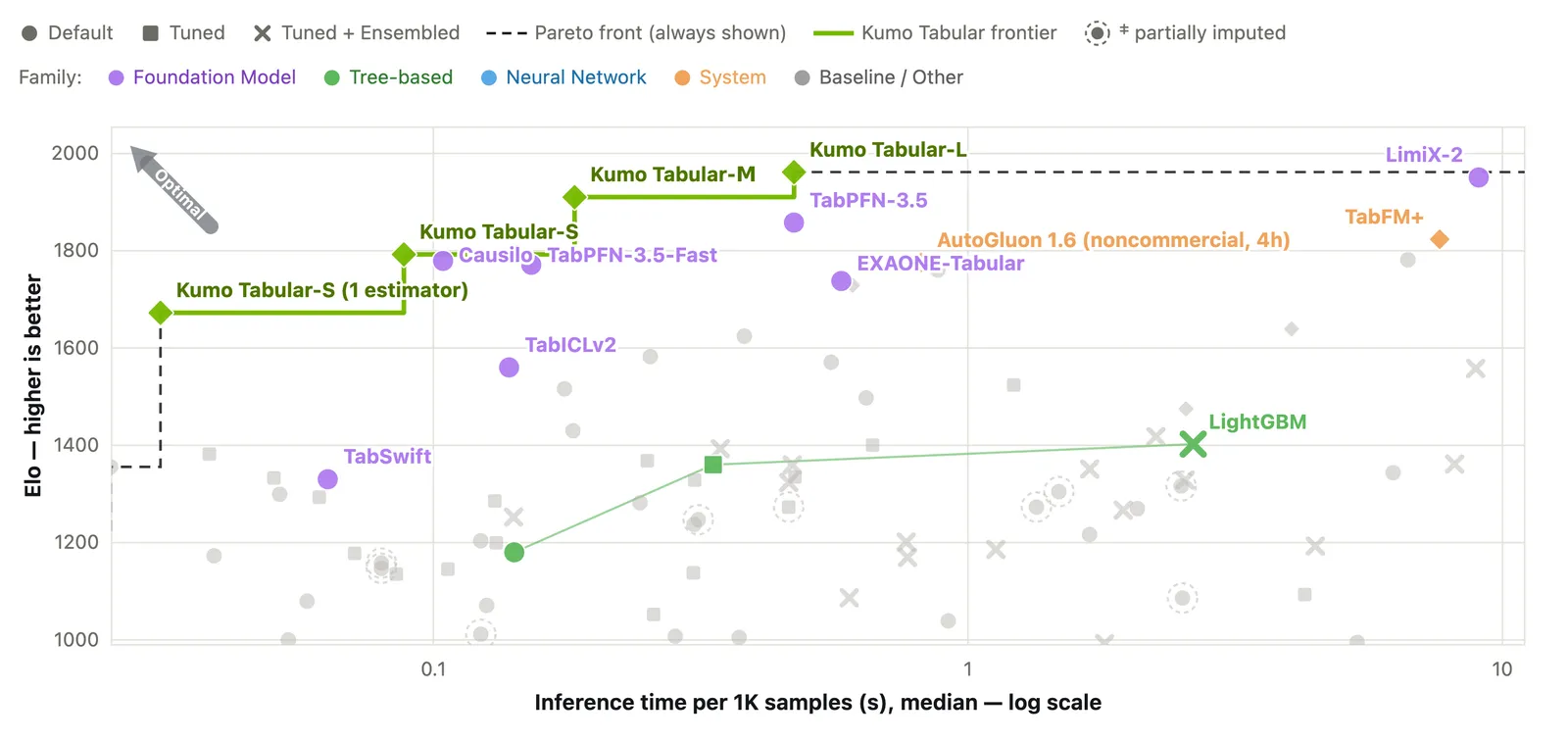
TabArena leaderboard.
The Kumo family contains a wide variety of foundation models:
For Tabular and Relational, you can also try a hosted NIM API (NVIDIA Build) or download a NIM container to deploy on your own infrastructure (NGC).
Kumo Libraries
Build Your First Workflow
Structured Data Models
Kumo-TS
Structured Data Models Client
Kumo Engine
Run Kumo Tabular or Kumo Relational in Python
Install the library
Check Python, PyTorch, and device requirements in the SDM installation guide and your model card. Then install Structured Data Models (SDM).
Prepare the rows you want to predict
Use rows with known outcomes as labeled context, and keep the rows you want to predict separate. For Relational, include the related tables and their keys. The table semantics guide explains how to represent your columns.
Examples You Can Run
Explore a use case to find the model, tools, and example to start with.
Classify records from labeled examples
Classify breast masses from four clinical features using Kumo Tabular and the UCI Mammographic Mass dataset. The notebook runs the small model on CPU, uses labeled examples as context, and returns class probabilities for held-out rows. It compares prediction accuracy and ROC AUC with a majority-class baseline.
A GPU is not required. The notebook installs its dependencies and downloads the dataset and pretrained weights, so you need internet access. Use a separate notebook environment for its pinned dependencies.
- Model: Kumo Tabular
- Library: Structured Data Models
- Example: Open the Kumo Tabular CPU notebook guide
- Benchmarks: Tabular evaluation results and limitations
Predict customer churn
Predict churn labels for customer rows from a single table. The Kumo Tabular quickstart uses labeled rows with age and spend features as context, builds a classification request for new rows, and returns predicted labels and class probabilities. Before running, install the client and prepare a compatible Kumo Tabular NIM endpoint.
The quickstart uses tiny illustrative tables to demonstrate the API. It does not evaluate real-world churn prediction quality.
- Model: Kumo Tabular
- Library: Structured Data Models Client
- Setup: Connect to a Kumo Tabular NIM
- Example: Run the Kumo Tabular classification quickstart
Recommend products a customer may buy
Use purchase history and the relationships between customers, orders, and products to suggest what a customer may buy next. The AdventureWorks notebook requests the top 10 products a customer is likely to order in the next 30 days. You will learn how to express a recommendation task in a predictive query and read the ranked product IDs and scores returned by Kumo Relational. Before running, install the client and prepare a compatible NIM endpoint and the AdventureWorks data files.
- Model: Kumo Relational
- Setup: Connect Structured Data Models Client to NIM
- Example: Open the AdventureWorks notebook and follow “Recommend products.”
Forecast future readings from a time series
Predict future values from a history of timestamped measurements. The Kumo Forecast example reads an ETTh sample CSV and predicts the next 100 values of its LULL signal. Install the Forecast environment and provide the CSV files expected by the script, or update the paths and columns for your own data. Context-enhanced forecasting requires a separate history CSV. Kumo Forecast is intended for research and development only.
- Model: Kumo Forecast
- Library: Kumo-TS Forecast setup and guide
- Example: Open the forecasting code
Spot unusual sensor readings
Find readings that depart from the usual patterns across a set of sensors. The Kumo Anomaly example generates synthetic sensor data with spikes, dips, shifts, and noise, then returns anomaly flags and error scores. Install the Anomaly environment and allow model-weight downloads or supply local weights. Confirm that inference produced the Anomaly flags and MAE scores; a dataset preview alone does not confirm prediction. Kumo Anomaly is intended for research and development only.
- Model: Kumo Anomaly
- Library: Kumo-TS Anomaly setup and guide
- Example: Open the anomaly-detection code
Train a model to predict repeat purchases
Build a model for a prediction task you define on your own relational data. This Kumo Engine guide uses AdventureWorks to predict whether active customers will order again in the next 90 days. You will prepare the tables and graph, train and evaluate the model, then save it with its training metrics and predictions for later use. Before running, configure the documented GPU environment and writable local scratch, then download and prepare the AdventureWorks data.
- Tool: Kumo Engine
- Training: Define and train a task-specific model
- Guide and code: Predict a yes or no outcome on Linux
Continue Building
Integrate with APIs
Structured Data Models model API · Relational Client Python API · Relational NIM REST API
Deploy and manage execution
Kumo Engine deployment options · Relational NIM deployment and connection
Check compatibility and resolve issues
For SDM import, model download, device, or input errors, start with SDM Troubleshooting.
For setup requirements, follow SDM installation, Structured Data Models Client setup, Kumo Engine prerequisites, or Kumo-TS package requirements. For prediction issues, check the input schema and expected outputs in your selected example.