

Platform Overview
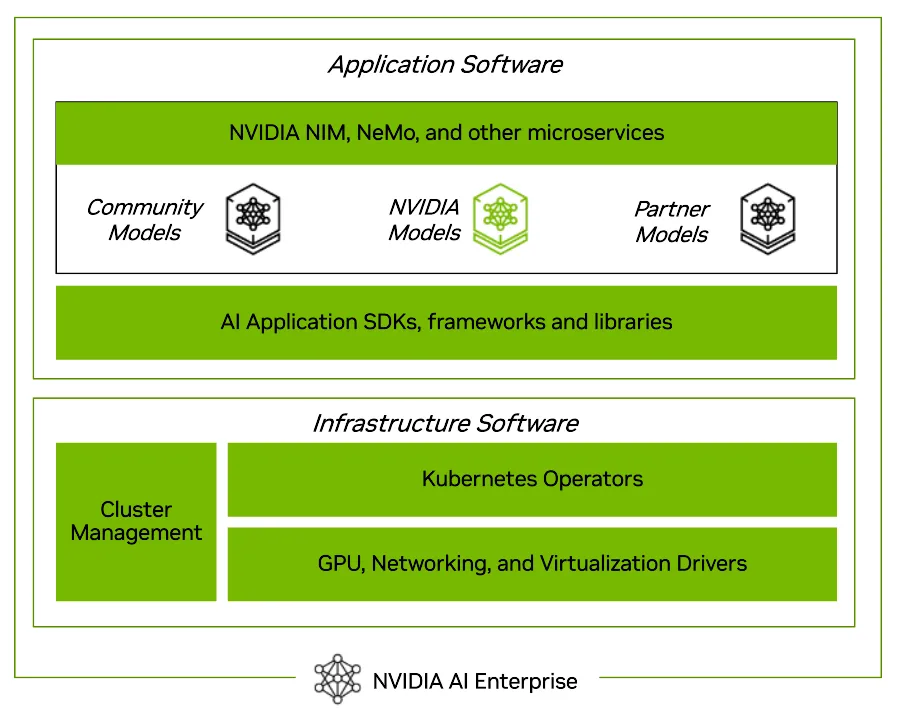
NVIDIA AI Enterprise is a cloud-native suite of software tools, libraries and frameworks designed to deliver optimized performance, robust security, and stability for production AI deployments. Easy-to-use microservices optimize model performance with enterprise-grade security, support, and stability, ensuring a streamlined transition from prototype to production for enterprises that run their businesses on AI. It consists of two primary layers: the infrastructure layer and the application layer.
Application Layer
The application layer provides specialized SDKs, frameworks and state of the art AI models for developing AI applications. It includes:
- Optimized microservices that enhance AI model performance and speed time to deployment for a wide range of AI workflows.
- Development and deployment tools: Support for popular AI tools like Triton, TensorFlow, PyTorch, and NVIDIA’s own SDKs.
- Optimized libraries for deep learning, data science, and machine learning.
- Access to a repository of pre-trained models for various AI tasks.
By separating the infrastructure layer (which is versioned) from the application layer, NVIDIA AI Enterprise ensures that foundational updates and improvements do not disrupt the development and deployment of AI applications. This modular approach allows for flexibility and scalability in AI projects.
Application Layer Software
NVIDIA AI application frameworks, NVIDIA pretrained models and all other NVIDIA AI software available on NGC are supported with an NVIDIA AI Enterprise license. With 100+ AI frameworks and pretrained models including NeMo, Maxine, cuOpt and more, look for the NVIDIA AI Enterprise Supported label on NGC.
Organizations start their AI journey by using the open, freely available NGC libraries and frameworks to experiment and pilot. Now, when they’re ready to move from pilot to production, enterprises can easily transition to a fully managed and secure AI platform with an NVIDIA AI Enterprise subscription. This gives enterprises deploying business critical AI, the assurance of business continuity with NVIDIA Enterprise Support and access to NVIDIA AI experts.
Application Layer Software
Infrastructure Layer
The infrastructure layer includes various components that ensure efficient deployment, management, and scaling of AI applications. Key features include:
- Versioning to maintain compatibility and stability across different deployments. Each version provides feature updates, security patches, and performance improvements.
- Drivers to optimize utilization of NVIDIA GPUs and Networking in bare metal and virtualized environments.
- Kubernetes operators for managing GPU and networking in containers and the lifecycle of microservices and AI pipelines.
- Cluster Management software to provision and monitor servers at scale.
Infrastructure Layer Software
The NVIDIA AI Enterprise Infrastructure Release packages all software for managing and optimizing infrastructure and workloads.
Infrastructure Layer Software
NVIDIA virtual GPU (vGPU) C-Series drivers allow virtual machines to utilize the full performance of GPUs and access advanced features such as sharing, live migration, and monitoring. The host driver is installed in the hypervisor of each physical host, while the guest driver is installed on each virtual machine.
NVIDIA AI Enterprise is certified to run across public cloud, data centers, workstations, DGX platform to edge. A complete list of supported configurations is listed in the NVIDIA AI Enterprise Infra Support Matrix.
Infra Software Branch Support Matrix
✨ New: Interactive Support Matrix
Explore the support matrix with interactive filtering and version comparison across releases 7.0-7.7 and 8.0-8.1:
Interactive Features:
- Compare configurations across multiple releases side-by-side
- Filter by deployment type (bare metal, virtualized, cloud)
- Progressive filtering guides you through OS, hypervisor, and orchestration options
- Interactive footnotes with hover tooltips
- Dynamic version badges show exactly which releases support each configuration
Which Version Should I Use?
Use the Interactive Tool for:
- Comparing support across multiple releases (7.0-7.4)
- Exploring complex deployment scenarios with guided filtering
- Real-time filtering by version, platform, OS, and hypervisor
- Modern, visual browsing experience
Use This Static Reference for:
- Deep linking to specific sections
- Printing or saving as PDF for compliance documentation
- Offline access or text-based browsing
- Searching all content at once with browser search (Ctrl+F)
- Referencing from external documentation or support tickets