


Configuring Virtual Machines#
There are two ways you can accurately mirror the underlying hardware topology inside the Virtual Machine:
Customize the virtual machine configuration with stub PCIe switches, presenting the devices within the PCIe groups with their matching components and in the correct sequence, or
Customize the NCCL topology file (XML) to match your virtual machine resources in their natural enumeration order with the underlying real topology
The tested B300 configuration uses the domain XML as the primary system representation. A custom NCCL file can still encode routing policy, but it must be regenerated and validated against the guest inventory; it is not a substitute for correct vNUMA, memory and PCIe placement.
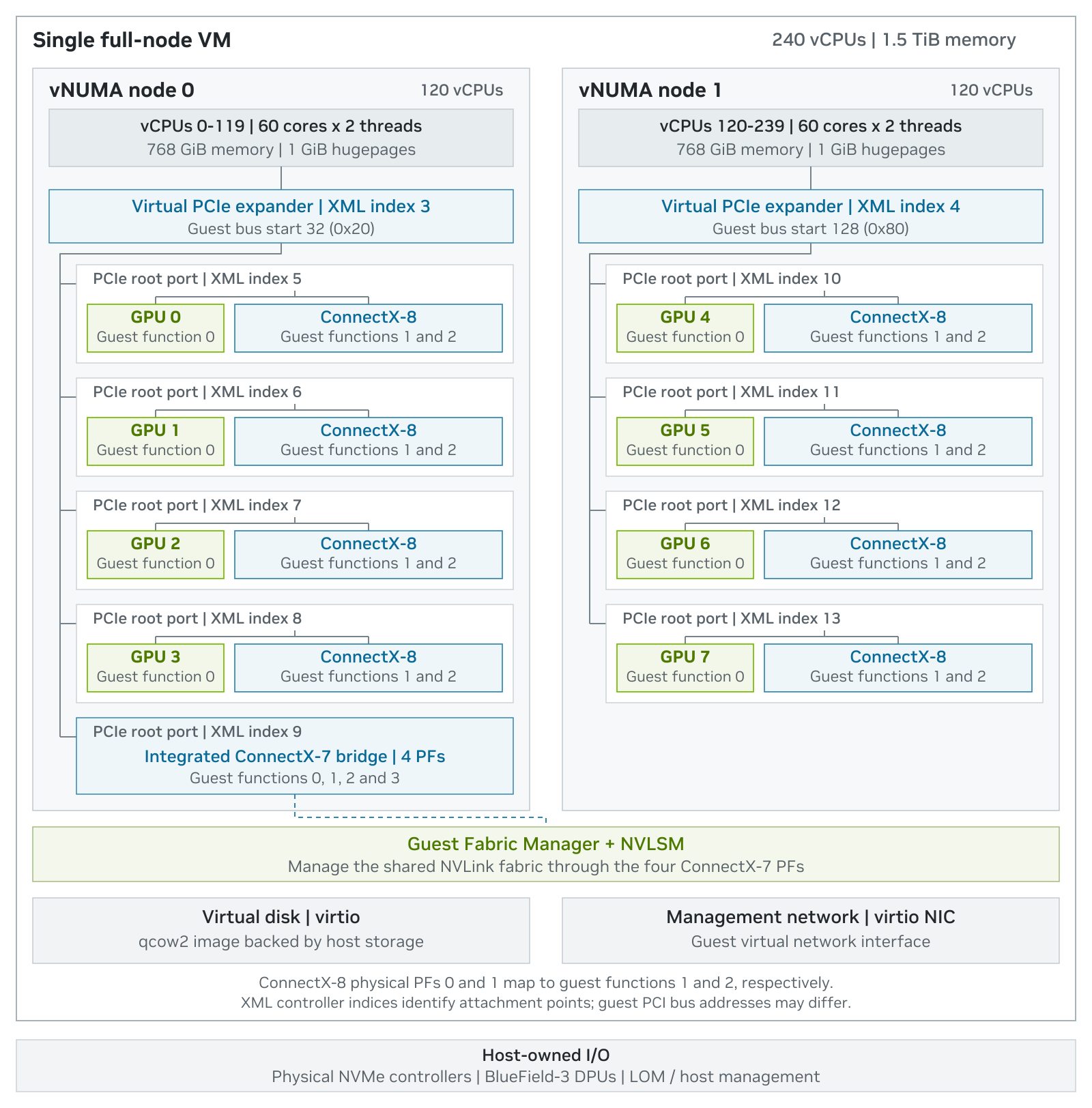
Figure 4. Full-node B300 virtual machine topology.
VM Configuration Pre-requisites#
Install the guest operating system with a virtio management interface and confirm console access.
Install the NVIDIA GPU Operator in the guest; the tested guest used v26.3.3 with driver 580.178.04 (open kernel modules) and the operator-managed container toolkit. Its driver container provides the driver, GSP firmware and Fabric Manager.
Disable the nouveau and nova_core modules in the guest before the NVIDIA driver is activated and lock devices to avoid resource conflict and to prevent the GPUs from being used by the OS.
Confirm the VM is shut off before editing the inactive domain XML.
Label the node nvidia.com/gpu.deploy.operands=false and wait for the operator’s driver/FM/NVLSM Pods to stop. Remove the label when returning to bare metal.
Confirm that each NUMA node has 768 available 1 GiB hugepages.
Back up the inactive XML and record its SHA-256 before making changes.
Confirm that the host management route does not depend on any ConnectX-8 function that will be detached.
Confirm that the eight GPUs, sixteen ConnectX-8 functions and four ConnectX-7 functions are bound to vfio-pci (see Installing the Hypervisor). The expected counts are 8, 16 and 4:
lspci -nnk -d 10de:3182 | grep -c 'in use: vfio-pci' # GPUs: 8
lspci -nnk -d 15b3:1023 | grep -c 'in use: vfio-pci' # ConnectX-8 functions: 16
lspci -nnk -d 15b3:1021 | grep -c 'in use: vfio-pci' # ConnectX-7 functions: 4
# Guest nouveau and nova_core blacklist
printf '%s\n' 'blacklist nouveau' 'options nouveau modeset=0' 'blacklist nova_core' | sudo tee /etc/modprobe.d/blacklist-nouveau.conf
sudo update-initramfs -u
# Host preflight
sudo virsh domstate b300-ubuntu24-full-passthrough # expect: shut off
kubectl get node "$(hostname)" -o jsonpath='{.metadata.labels.nvidia\.com/gpu\.deploy\.operands}'; echo # expect: false
kubectl -n nvidia-gpu-operator get pods # expect: no nvidia-driver-daemonset pod
lsmod | grep -E '^nvidia' || echo "no NVIDIA modules loaded"
grep -H . /sys/devices/system/node/node*/hugepages/hugepages-1048576kB/{nr_hugepages,free_hugepages}
Editing a VM’s XML definition#
The guest VM’s domain XML requires editing to achieve the correct vCPU, vNUMA, and virtual PCIe topology configuration. This is achieved by using the virsh command. Save a copy of the current inactive XML file before making any changes.
‘virsh edit’ checks the XML syntax when the editor closes. For reviewed file-based changes, validate the XML first, then define the updated file. The <name> element determines the domain name.
After applying the change, dump the inactive domain XML file again and compare it with the reviewed source. Libvirt may reorder XML elements or add generated attributes, so review vCPU, vNUMA and PCIe information. Preserve the reviewed source XML and the post-change inactive XML dump as separate artifacts.
sudo virsh dumpxml --inactive b300-ubuntu24-full-passthrough > b300-before.xml
sha256sum b300-before.xml

sudo virsh edit b300-ubuntu24-full-passthrough

# Or apply a reviewed file
virt-xml-validate b300-reviewed.xml
sudo virsh define b300-reviewed.xml
sudo virsh dumpxml --inactive b300-ubuntu24-full-passthrough
Scenario: Full passthrough- All GPUs, NICs, and NVSwitches#
In this B300 configuration, one guest VM receives all eight GPUs, all sixteen ConnectX-8 functions, and all four ConnectX-7 bridge functions. The guest receives most CPU and memory capacity but no physical NVMe controller and no BlueField-3 DPU. Eight physical cores and 480 GiB of the host’s 2,016 GiB usable memory remain with the host for QEMU support threads, services and operational headroom.
Resource |
Guest VM assignment |
Remains on the Host |
|---|---|---|
CPU |
240 vCPUs / 120 physical cores |
8 physical cores for the QEMU emulator thread, two IOThreads and host services |
Memory |
1.5 TiB, strict 1 GiB hugepages |
480 GiB of the 2016 GiB usable host memory |
GPU |
8 x B300 |
None while VM runs |
ConnectX-8 |
16 PFs |
None while VM runs |
ConnectX-7 bridge |
1 integrated bridge exposing 4 PFs |
None while VM runs |
BlueField-3 / NVMe |
Not assigned |
Remain host-owned |
Virtual CPU configuration#
Virtual CPU sockets and NUMA nodes#
The guest matches the host’s two-socket, two-NUMA-node structure but leaves four physical cores per socket outside the guest. It exposes two virtual sockets with 60 cores and two threads per core.
vNUMA node 0 contains vCPUs 0-119 and 768 GiB
vNUMA node 1 contains vCPUs 120-239 and 768 GiB
<memory unit='KiB'>1610612736</memory>
<memoryBacking>
<hugepages>
<page size='1048576' unit='KiB' nodeset='0'/>
<page size='1048576' unit='KiB' nodeset='1'/>
</hugepages>
<nosharepages/>
</memoryBacking>
<vcpu placement='static'>240</vcpu>
<cpu mode='host-passthrough' check='none' migratable='off'>
<topology sockets='2' dies='1' clusters='1' cores='60' threads='2'/>
<maxphysaddr mode='passthrough'/>
<numa>
<cell id='0' cpus='0-119' memory='805306368' unit='KiB'/>
<cell id='1' cpus='120-239' memory='805306368' unit='KiB'/>
</numa>
</cpu>
<numatune>
<memory mode='strict' nodeset='0-1'/>
<memnode cellid='0' mode='strict' nodeset='0'/>
<memnode cellid='1' mode='strict' nodeset='1'/>
</numatune>
Physical core, logical CPU, vCPU and memory mapping#
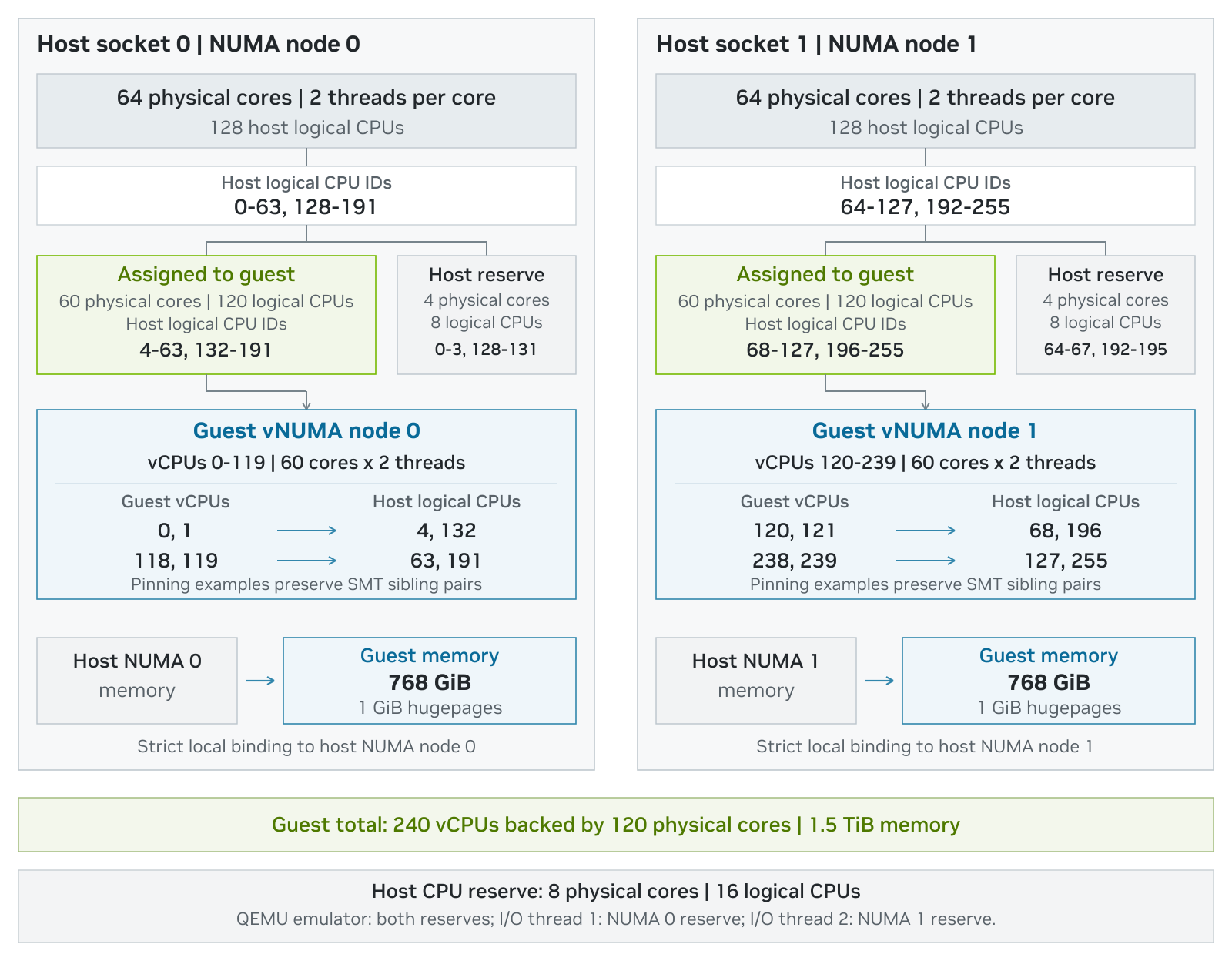
Figure 5. Physical CPU, guest vCPU and memory mapping.
Virtual CPU pinning#
To take full advantage of NUMA configurations, it’s essential that the guest’s vCPUs are scheduled consistently on the same physical CPU socket / NUMA node. This can be achieved by pinning virtual CPUs to specific physical CPU cores using the <cputune> element. Use lscpu or virsh capabilities to determine how physical CPU cores on the server are numbered (this frequently differs between different server models).
This example XML configuration pins every guest vCPU to exactly one host logical CPU and preserves SMT sibling pairs. On socket 0, guest vCPU 0 maps to host CPU 4 and guest vCPU 1 maps to its sibling CPU 132; the pattern continues through guest vCPU 119. On socket 1, guest vCPU 120 maps to host CPU 68 and guest vCPU 121 maps to sibling CPU 196.
Guest vCPUs use the host CPU set 4-63, 68-127, 132-191, 196-255. Reserve the CPUs 0-3,64-67,128-131,192-195 for QEMU emulator and I/O threads. The emulator can use the full reserve; the reference example pins each I/O thread to the reserve cores local to its NUMA node.
The Intel Xeon 6776P supports Intel Priority Core Turbo (PCT), which is enabled on the tested system. On each socket, eight high-priority (HP) cores can turbo up to 4.6 GHz, while the other 56 cores are limited to 2.3 GHz. The BIOS divides each socket into four partitions and makes the first two cores of each partition HP cores: host logical CPUs 0, 1, 16, 17, 32, 33, 48 and 49 on socket 0, and 64, 65, 80, 81, 96, 97, 112 and 113 on socket 1, together with their SMT siblings (CPU number + 128). With the pinning above, HP cores 0-1 and 64-65 (and siblings 128-129 and 192-193) run the QEMU emulator and IOThreads, and the remaining HP cores back guest vCPUs 24-27, 56-59 and 88-91 on vNUMA node 0 and 144-147, 176-179 and 208-211 on vNUMA node 1. The guest cannot read the PCT configuration. Confirm it on the host with the intel-speed-select tool from the linux-tools package that matches the running kernel; older versions fail with “Incompatible API versions”.
# HP cores report clos:0; all other cores report clos:3
for c in 0 1 4 16 17 64 65 68; do
echo "cpu $c $(sudo intel-speed-select -o /dev/stdout --cpu $c core-power get-assoc 2>&1 | grep -o 'clos:[0-9]')"
done
# Expect bucket-0 high-priority-cores-count:8, high-priority-max-level-0-frequency(MHz):4600
# and low-priority-max-level-0-frequency(MHz):2300
sudo intel-speed-select --cpu 0 turbo-freq info -l 1
After every boot, check the emulator and IOThread CPU masks with virsh emulatorpin and virsh iothreadinfo, and reapply the configured cpusets with virsh emulatorpin and virsh iothreadpin if they differ.
The example XML below shows the mapping pattern. The Appendix contains the complete <cputune> block.
<cputune>
<vcpupin vcpu='0' cpuset='4'/>
<vcpupin vcpu='1' cpuset='132'/>
<vcpupin vcpu='2' cpuset='5'/>
<vcpupin vcpu='3' cpuset='133'/>
<!-- one-to-one sibling pattern continues through vCPU 239 -->
<emulatorpin cpuset='0-3,64-67,128-131,192-195'/>
<iothreadpin iothread='1' cpuset='0-3,128-131'/>
<iothreadpin iothread='2' cpuset='64-67,192-195'/>
</cputune>
Virtual PCI Express configuration#
To create a virtual PCIe hierarchy that’s the equivalent of the physical PCIe hierarchy on the B300 NVL8 host system, it is necessary to create two separate hierarchies, each associated with one of the two virtual NUMA nodes in the system. This is achieved using virtual PCIe Expander Bus devices, PCIe root ports, and PCIe switches. The expander bus devices are each associated with a virtual NUMA node; everything below them in the hierarchy is then automatically associated with the same virtual NUMA node.
The B300 NVL8 example XML creates one pxb-pcie expander for each node and four GPU/NIC root-port groups under each expander. One additional root port (index 9, below the node 0 expander) carries all four ConnectX-7 bridge functions as guest functions 0-3. Guest bus numbers define the virtual hierarchy and do not need to match the physical host bus numbers.
Please refer to the sample libvirt domain XML for B300 NVL8 8-GPU platform in the Appendix section of this document.
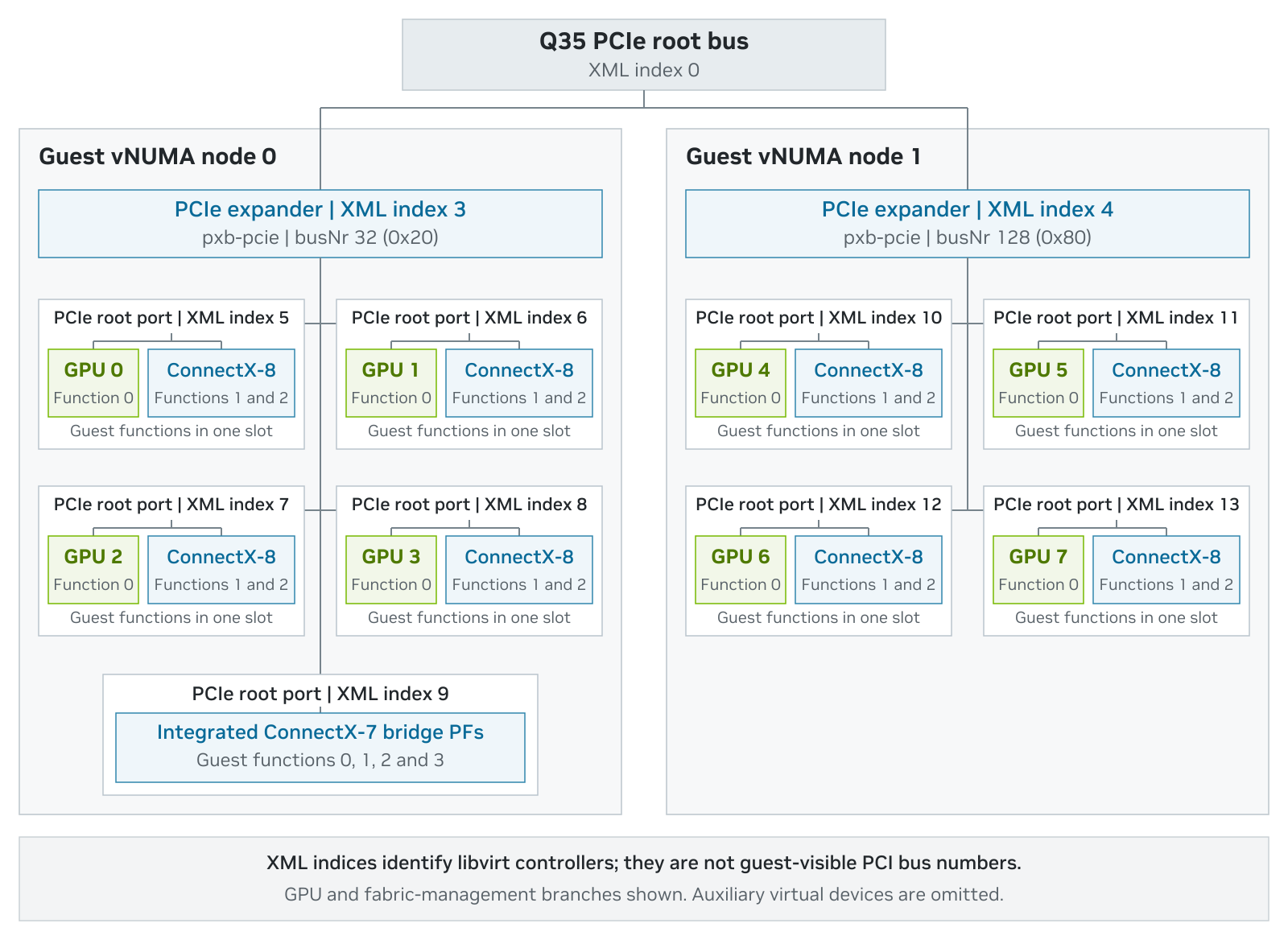
Figure 6. Virtual PCIe hierarchy for the B300 guest
Virtual PCIe expander bus#
Create virtual PCIe Expander Bus devices, each associated with one of the VM’s NUMA nodes. Note that the NUMA nodes per socket is not just dependent on the actual CPU model, but it can also be modified in some CPUs as a firmware parameter, usually referred to as NUMA Per Socket, or NPS.
In this example, two pcie-expander-bus controllers are created. Index 3 uses busNr 32 and NUMA node 0. Index 4 uses busNr 128 and NUMA node 1. The node element ties everything below an expander to the matching guest NUMA domain.
<controller type='pci' index='3' model='pcie-expander-bus'>
<model name='pxb-pcie'/>
<target busNr='32'><node>0</node></target>
<address type='pci' domain='0x0000' bus='0x00' slot='0x03' function='0x0' multifunction='on'/>
</controller>
<controller type='pci' index='4' model='pcie-expander-bus'>
<model name='pxb-pcie'/>
<target busNr='128'><node>1</node></target>
<address type='pci' domain='0x0000' bus='0x00' slot='0x03' function='0x1'/>
</controller>
index is libvirt’s unique controller identifier and becomes the bus reference used by downstream virtual controllers.
model: set to ‘pcie-expander-bus’ to define a PCIe expansion bus root.
busNr: Reserves the beginning of a guest bus-number range; 32 and 128 leave sufficient separation for both hierarchies.
node: Associates the expander and its descendants with a guest NUMA node defined in the CPU element.
address: defines where the expansion bus roots exist in the virtual PCIe hierarchy. In this example, it places both expander functions on the Q35 root bus. It is not the physical B300 endpoint address.
Virtual PCIe root ports#
Root ports 5–8 (below expander 3, vNUMA node 0) and 10–13 (below expander 4, vNUMA node 1) each carry one GPU and its two ConnectX-8 functions. Root port 9, also below expander 3, carries the four ConnectX-7 fabric-management functions. The virtio disk, NIC, USB, serial and RNG devices use separate root ports (indices 1, 2 and 14–16) on the Q35 root bus, outside the NUMA-aligned expanders.
<controller type='pci' index='5' model='pcie-root-port'>
<model name='pcie-root-port'/>
<target chassis='5' port='0x15'/>
<address type='pci' domain='0x0000' bus='0x03' slot='0x00' function='0x0' multifunction='on'/>
</controller>
<!-- indices 6-9 continue on bus 0x03 for node 0 -->

<controller type='pci' index='10' model='pcie-root-port'>
<model name='pcie-root-port'/>
<target chassis='10' port='0x1a'/>
<address type='pci' domain='0x0000' bus='0x04' slot='0x00' function='0x0' multifunction='on'/>
</controller>
<!-- indices 11-13 continue on bus 0x04 for node 1 -->
The controller index is a libvirt reference. The PCI bus attribute on the controller address points to the upstream expander index, and the guest later assigns its own BDFs. Confirm the running layout inside the guest rather than assuming the host and guest bus numbers match.
Virtual PCIe switches#
The tested B300 XML does not add QEMU pcie-switch controllers. It represents each physical GPU/ConnectX-8 group as multifunction endpoints beneath one root-port group, while the pxb-pcie expanders preserve the two NUMA domains. This is intentional, not an omitted configuration step.
Do not add emulated switches simply to make the guest tree look more like the physical lspci tree. Additional bridge layers consume bus numbers and can change how libraries classify the path. Use the reviewed canonical XML and validate nvidia-smi topo -m, RDMA enumeration and endpoint link state after boot.
Passthrough device assignment#
Each physical function is represented by a managed PCI <hostdev> element using vfio. The <source> address is the physical host BDF. The final <address> places the device in the guest hierarchy. In the tested grouping, GPU 0 and both functions of ConnectX-8 adapter 0 are attached to root port index 5 (bus=’0x05’ in the XML) as functions 0, 1 and 2. The guest enumerates them as 21:00.0, 21:00.1 and 21:00.2.
<!-- GPU 0 -->
<hostdev mode='subsystem' type='pci' managed='yes'>
<driver name='vfio'/>
<source><address domain='0x0000' bus='0x1a' slot='0x00' function='0x0'/></source>
<rom bar='off'/>
<address type='pci' domain='0x0000' bus='0x05' slot='0x00' function='0x0' multifunction='on'/>
</hostdev>
<!-- paired ConnectX-8 PF 0 -->
<hostdev mode='subsystem' type='pci' managed='yes'>
<driver name='vfio'/>
<source><address domain='0x0000' bus='0x17' slot='0x00' function='0x0'/></source>
<rom bar='off'/>
<address type='pci' domain='0x0000' bus='0x05' slot='0x00' function='0x1'/>
</hostdev>
<!-- paired ConnectX-8 PF 1 uses function 0x2 -->
rom bar='off' prevents QEMU from mapping endpoint option ROM BARs that the tested preinitialized GPU and NIC functions do not require. Keep this setting tied to the validated device set rather than copying it to unrelated PCI devices.
Repeat the pattern for all eight GPU groups, then pass the four ConnectX-7 bridge functions at 27:00.0-27:00.3 on one dedicated root port (index 9). BlueField-3 at 53:00.0/.1 and cc:00.0/.1, its management functions, and every NVMe controller remain outside the hostdev set.
Large BARs require a correspondingly large 64-bit PCI MMIO aperture. `<maxphysaddr mode=’passthrough’/>` exposes the host physical-address width to the guest so firmware can reach the configured 16 TiB MMIO64 window. The tested domain configures both the OVMF window and Q35 hole for the complete device set:
<qemu:commandline>
<qemu:arg value='-fw_cfg'/>
<qemu:arg value='name=opt/ovmf/X-PciMmio64Mb,string=16777216'/>
<qemu:arg value='-global'/>
<qemu:arg value='q35-pcihost.pci-hole64-size=16384G'/>
</qemu:commandline>
If a device does not appear in the guest, or a required BAR is unassigned, check the QEMU, firmware and guest kernel logs before changing the MMIO settings. Adjusting the window or temporarily removing devices can help isolate the problem. Before accepting the final configuration, restore the full passthrough device set and confirm that all required BARs are assigned and every device initializes successfully.