NVIDIA Omniverse applications have available a CloudXR Extension which enables streaming without SteamVR. Omniverse supports the following CloudXR streaming modes:
VR with SteamVR
(Tablet) AR with CloudXR
SteamVR
Omniverse can function as a normal SteamVR application, and stream over CloudXR just like any other SteamVR-supported VR application.
Install CloudXR Server Driver for SteamVR
Connect the client application to SteamVR
In Omniverse: Select SteamVR as the VR provider
Or select OpenXR as the VR provider, and ensure SteamVR is configured as the system OpenXR runtime
In Omniverse: Start VR
AR with CloudXR
Omniverse can also directly stream AR to tablet form factor devices. For iOS devices, there is a published streaming application available on the iOS App Store.
Install the CloudXR extension in Omniverse
In Omniverse: Select CloudXR as the AR provider
In Omniverse: Start AR
Connect the client application to Omniverse
CloudXR Versions
Omniverse Kit 106.0 enables CloudXR 4.0 through Omniverse Extensions. Please verify your version of Omniverse Kit is 106.0 in order to successfully stream with CloudXR 4.0
The CloudXR SDK does not include client binaries for Android or iOS devices.
The CloudXR SDK comes with C headers, compiled libraries, and simple sample client projects for three platforms: Windows (x86_64), Android (ARM64), and iOS.
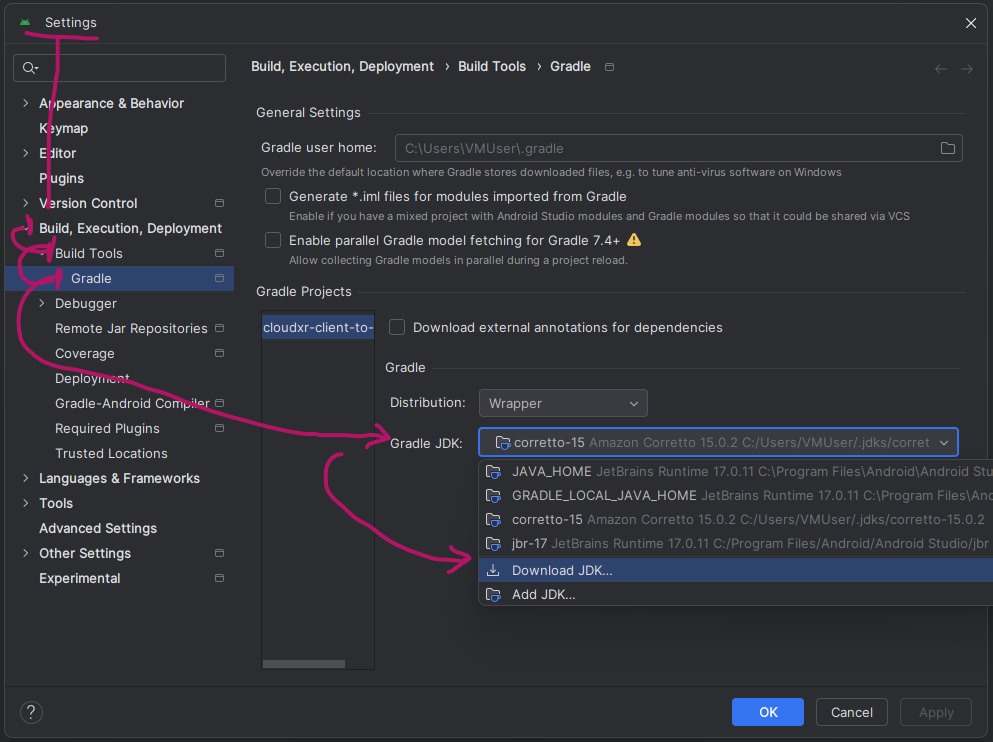
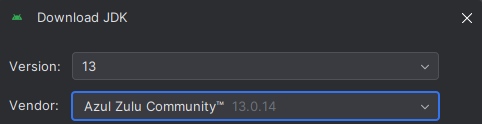
The sample clients provided with CloudXR 4.0 use Gradle 6.1.1. Upgrading the projects to support Gradle may cause issues, but as of 2024, Android does not ship with a version of Java compatible with Gradle 6.1.1. A JDK of version 13 is known to work. You can download the JDK from within Android Studio.
Opening Android Studio’s JDK settings (click image for details)#
Android Studio is not strictly required, only Android SDK, NDK, build tools and a matching JDK. Exact versions can be determined from the sample project build and project files, if wanting to build without Android Studio.
CloudXR ships with three server applications and one client application (all prebuilt) that can be helpful for debugging deployments and client applications. See CloudXR Tools for Testing for details.