

XR Opaque Data Channel#
Overview#
This guide covers the usage of the NV Opaque Data Channel extension in OpenXR. This extension allows applications to create, manage, and use opaque data channels for communicating arbitrary data with the NVIDIA CloudXR™ clients.
The opaque data channel provides a bidirectional communication mechanism between CloudXR server and client applications, allowing custom data to be sent alongside video/audio streaming, enabling rich interactions between server and client.
Note
This documentation covers the server-side OpenXR extension API. For the client-side Swift API (MessageChannel), refer to Message Channel API.
Note
See CloudXR Runtime Opaque Data API for the complete definition of APIs and data structures.
Functions#
Creating and Destroying Channels#
xrCreateOpaqueDataChannelNV#
Description: Creates an opaque data channel.
Parameters:
instance: OpenXR instancecreateInfo: Pointer to anXrOpaqueDataChannelCreateInfoNVstructureopaqueDataChannel: Pointer to the handle of the created opaque data channel
Return:
XR_SUCCESSon success, or an appropriate error code
xrDestroyOpaqueDataChannelNV#
Description: Destroys an opaque data channel.
Parameters:
opaqueDataChannel: Handle of the opaque data channel to be destroyed
Return:
XR_SUCCESSon success, or an appropriate error code
Managing Channel State#
xrGetOpaqueDataChannelStateNV#
Description: Retrieves the current state of an opaque data channel.
Parameters:
opaqueDataChannel: Handle of the opaque data channelstate: Pointer to anXrOpaqueDataChannelStateNVstructure to receive the state
Return:
XR_SUCCESSon success, or an appropriate error code
xrShutdownOpaqueDataChannelNV#
Description: Shuts down an opaque data channel.
Parameters:
opaqueDataChannel: Handle of the opaque data channel
Return:
XR_SUCCESSon success, or an appropriate error code
Data Transmission#
Warning
Known limitation: Opaque data channel messages are currently limited to 1000 bytes per message. For larger payloads, implement application-level fragmentation and reassembly.
xrSendOpaqueDataChannelNV#
Description: Sends data through the opaque data channel.
Parameters:
opaqueDataChannel: Handle of the opaque data channelopaqueDataInputCount: Number of bytes to sendopaqueDatas: Pointer to the data to be sent
Return:
XR_SUCCESSon success, or an appropriate error code
xrReceiveOpaqueDataChannelNV#
Description: Receives data from the opaque data channel.
Parameters:
opaqueDataChannel: Handle of the opaque data channelopaqueDataCapacityInput: Capacity of the buffer to receive dataopaqueDataCountOutput: Pointer to the variable to receive the number of bytes receivedopaqueDatas: Pointer to the buffer to receive the data
Return:
XR_SUCCESSon success, or an appropriate error code.
Key Structures and Enums#
Structures#
XrOpaqueDataChannelCreateInfoNV#
type: Must be set to
XR_TYPE_OPAQUE_DATA_CHANNEL_CREATE_INFO_NVnext:
NULLor a pointer to the next structure in a structure chainsystemId: ID of the system where the channel is created
uuid: Unique identifier for the opaque data channel
XrOpaqueDataChannelStateNV#
type: Must be set to
XR_TYPE_OPAQUE_DATA_CHANNEL_STATE_NVnext:
NULLor a pointer to the next structure in a structure chainstate: Current state of the opaque data channel, represented by
XrOpaqueDataChannelStatusNV
Enums#
XrOpaqueDataChannelStatusNV#
XR_OPAQUE_DATA_CHANNEL_STATUS_CONNECTING_NV: Channel is in the process of connectingXR_OPAQUE_DATA_CHANNEL_STATUS_CONNECTED_NV: Channel is connectedXR_OPAQUE_DATA_CHANNEL_STATUS_SHUTTING_NV: Channel is shutting downXR_OPAQUE_DATA_CHANNEL_STATUS_DISCONNECTED_NV: Channel is disconnected
Extending XrResult#
XR_ERROR_CHANNEL_ALREADY_CREATED_NV: Channel has already been createdXR_ERROR_CHANNEL_NOT_CONNECTED_NV: Channel is not connected
State#
The state transitions for the channel object are as follows:
Connecting State:
The channel starts in this state when it is created.
Messages cannot be sent or received in this state.
The
shutdownfunction is allowed to be called.The channel can transition to:
Connected State: If the CloudXR streaming client connects and accepts the channel
Disconnected State: If the CloudXR streaming client connects but then disconnects without accepting the channel
Connected State:
The channel can send and receive messages in this state.
The channel can transition to:
Disconnected State: If the CloudXR streaming client disconnects or the client closes the channel
Shutting State: When the
shutdownfunction is called
Shutting State:
The application can receive any outstanding messages from the CloudXR streaming client.
The channel transitions to:
Disconnected State: Once the last message has been received or if there were no messages in flight and the
shutdownfunction was called
Disconnected State:
The only allowed operation is
destroy.
State Diagram#
Below is a state diagram illustrating the transitions:
The channel starts in the Connecting state when it is created.
From Connecting, it can move to Connected if the CloudXR client connects and accepts the channel, or to Disconnected if the client connects and then disconnects without accepting the channel.
In the Connected state, the channel can send and receive messages. It can move to Disconnected if the client disconnects or closes the channel, or to Shutting if the shutdown function is called.
From Connecting, it transitions directly to Shutting if shutdown is called.
In the Shutting state, the application can receive any outstanding messages. After it receives the last message, or if no messages were in flight when shutdown was called, it transitions to Disconnected.
In the Disconnected state, the only allowed operation is to destroy the channel.
The state diagram visually represents these transitions and the allowed operations in each state.
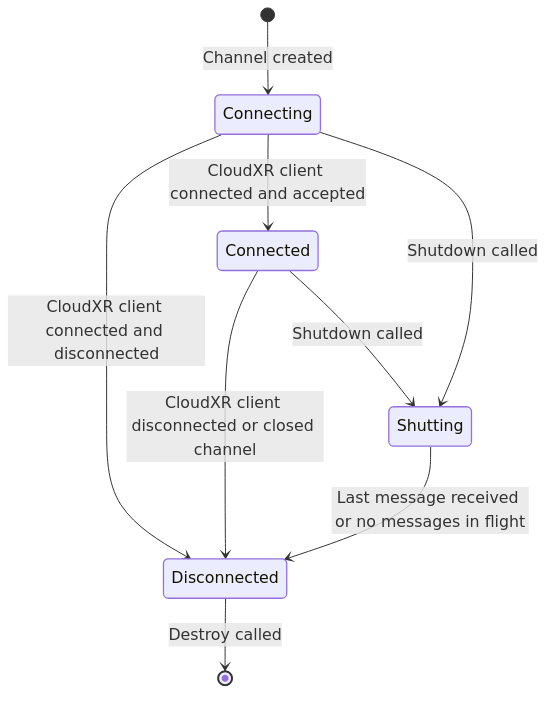
Channel state transitions and lifecycle#
Usage Examples#
Basic Usage Pattern#
The following example shows the typical usage pattern for creating, using, and destroying an opaque data channel:
XrResult WaitForConnection(XrOpaqueDataChannelNV dataChannel) {
    XrResult result;
    XrOpaqueDataChannelStateNV state = {
        .type = XR_TYPE_OPAQUE_DATA_CHANNEL_STATE_NV,
        .next = NULL
    };

    // Polling until the channel becomes connected
    do {
        result = xrGetOpaqueDataChannelStateNV(dataChannel, &state);
        if (result != XR_SUCCESS) {
            return result;  // Handle error
        }

        if (state.state == XR_OPAQUE_DATA_CHANNEL_STATUS_CONNECTED_NV) {
            return XR_SUCCESS;  // Connection established
        }

        // Sleep or wait for a short period before polling again
        // This is to avoid busy-waiting
        // Example: usleep(100000);  // Sleep for 100 ms

    } while (state.state == XR_OPAQUE_DATA_CHANNEL_STATUS_CONNECTING_NV);

    // If we exit the loop, the channel is not in the connecting state anymore
    return XR_ERROR_CHANNEL_NOT_CONNECTED_NV;  // Or appropriate error handling
}
XrOpaqueDataChannelCreateInfoNV createInfo = {
    .type = XR_TYPE_OPAQUE_DATA_CHANNEL_CREATE_INFO_NV,
    .next = NULL,
    .systemId = mySystemId,
    .uuid = myUuid,
};

XrOpaqueDataChannelNV dataChannel;
XrResult result = xrCreateOpaqueDataChannelNV(instance, &createInfo, &dataChannel);
if (result != XR_SUCCESS) {
    // Handle error
}

result = WaitForConnection(dataChannel);
if (result != XR_SUCCESS) {
    // Handle error
}

// Send data
const uint8_t data[] = {0x01, 0x02, 0x03};
result = xrSendOpaqueDataChannelNV(dataChannel, sizeof(data), data);
if (result != XR_SUCCESS) {
    // Handle error
}

// Receive data
uint8_t buffer[256];
uint32_t receivedBytes;
result = xrReceiveOpaqueDataChannelNV(dataChannel, sizeof(buffer), &receivedBytes, buffer);
if (result != XR_SUCCESS) {
    // Handle error
}

// Shutdown
result = xrShutdownOpaqueDataChannelNV(dataChannel);
if (result != XR_SUCCESS) {
    // Handle error
}

// Destroy
result = xrDestroyOpaqueDataChannelNV(dataChannel);
if (result != XR_SUCCESS) {
    // Handle error
}
Multiple Channels#
Applications can create multiple channels for different purposes:
// Game state channel
XrUuidNV gameStateUuid = /* ... */;
OpaqueDataChannelManager gameStateChannel(instance);
gameStateChannel.CreateChannel(systemId, gameStateUuid);

// Telemetry channel
XrUuidNV telemetryUuid = /* ... */;
OpaqueDataChannelManager telemetryChannel(instance);
telemetryChannel.CreateChannel(systemId, telemetryUuid);
Best Practices#
State Management#
Always check the channel state before attempting to send or receive messages.
Handle all state transitions appropriately in your application logic.
Implement timeout logic when waiting for connections to avoid indefinite blocking.
Call
xrShutdownOpaqueDataChannelNVbeforexrDestroyOpaqueDataChannelNV.
Error Handling#
Always check return values from XR functions.
Handle
XR_ERROR_CHANNEL_NOT_CONNECTED_NVwhen attempting operations on disconnected channels.Handle
XR_ERROR_CHANNEL_ALREADY_CREATED_NVwhen attempting to create duplicate channels.Implement proper error recovery and logging.
Data Encoding#
Use consistent encoding between server and client (e.g., UTF-8 for text).
Consider using structured formats like JSON or Protocol Buffers for complex data.
Define clear message protocols and version handling.
Handle endian conversion for binary data if needed.
Resource Management#
Clean up all channels during application shutdown.
Avoid creating excessive channels (each consumes resources).
Monitor channel state to detect unexpected disconnections.
Implement proper cleanup in error paths.
Performance Considerations#
Message channels share bandwidth with video/audio streaming.
Avoid sending large amounts of data frequently.
Consider batching small messages to reduce overhead.
Use asynchronous patterns to avoid blocking the render loop.
Poll channel state efficiently without busy-waiting.
Troubleshooting#
Channel Creation Fails#
Verify that the OpenXR instance supports the
XR_NV_opaque_data_channelextension.Check that the extension is enabled when creating the XrInstance.
Ensure UUIDs are properly formatted (16 bytes).
Verify that the systemId is valid.
Client Cannot Connect#
Verify that the channel is created before the client attempts to connect.
Ensure that the UUID matches exactly between server and client.
Check that CloudXR streaming session is active.
Confirm thast the client is connected to the server.
Channel Stuck in Connecting State#
Ensure that the client is properly discovering and attempting to open the channel.
Check network connectivity between server and client.
Verify that the firewall settings allow CloudXR communication.
Review server and client logs for connection errors.
Messages Not Sent or Received#
Check that the channel state is
CONNECTEDbefore sending/receiving.Verify that buffer sizes are sufficient for incoming data.
Ensure that data encoding matches between sender and receiver.
Check for network congestion or bandwidth issues.
Channel Transitions to Disconnected Unexpectedly#
Monitor client-side logs for errors or disconnections.
Check network stability and connectivity.
Verify proper error handling in message processing.
Review server logs for runtime errors.