

NVIDIA cuPotential
cuPotential is in early-access mode. Its C API is experimental: expect breaking changes, including to its structure, in upcoming releases.
cuPotential is a CUDA-X library for efficient computation of molecular interactions found in standard forcefields for molecular dynamics. It provides harmonic bonds and angles, periodic torsions, periodic electrostatics, repulsion and dispersion interactions, and custom radial pair potentials, with an OpenMM plugin for simulation workflows.
Get started · Explore the samples · View releases
How cuPotential works
The cuPotential library computes bonded and nonbonded forces on the GPU. The
OpenMM plugin connects that library to an OpenMM simulation through replacements
for NonbondedForce, CustomNonbondedForce, LangevinMiddleIntegrator, and
MonteCarloBarostat.
Standard mode supplies built-in Coulomb and Lennard-Jones interactions. Custom
mode evaluates a radial expression with per-particle parameters and global
parameters that can be updated in the OpenMM Context. Both modes use the same
CUDA backend.
The plugin also accelerates nonperiodic harmonic bonds, harmonic angles, and
periodic torsions through cuPotential’s tuples backend. These forces
remain in the OpenMM System; the plugin selects their GPU implementation when
the Context is created.
Key features
OpenMM components
Here, nv refers to the nv_openmm_plugin Python module. Standard and custom
modes share the same force class: nv.CustomNonbondedForce is an alias for
nv.NonbondedForce.
For usage examples, follow the NonbondedForce guide for standard interactions and custom expressions.
Getting started
The recommended environment is the repository’s Docker setup, which provides OpenMM, the CUDA toolkit, and the plugin’s build dependencies. Start with the installation guide for GPU, driver, and platform requirements and the choice of wheel, conda package, or source installation.
Benchmarks
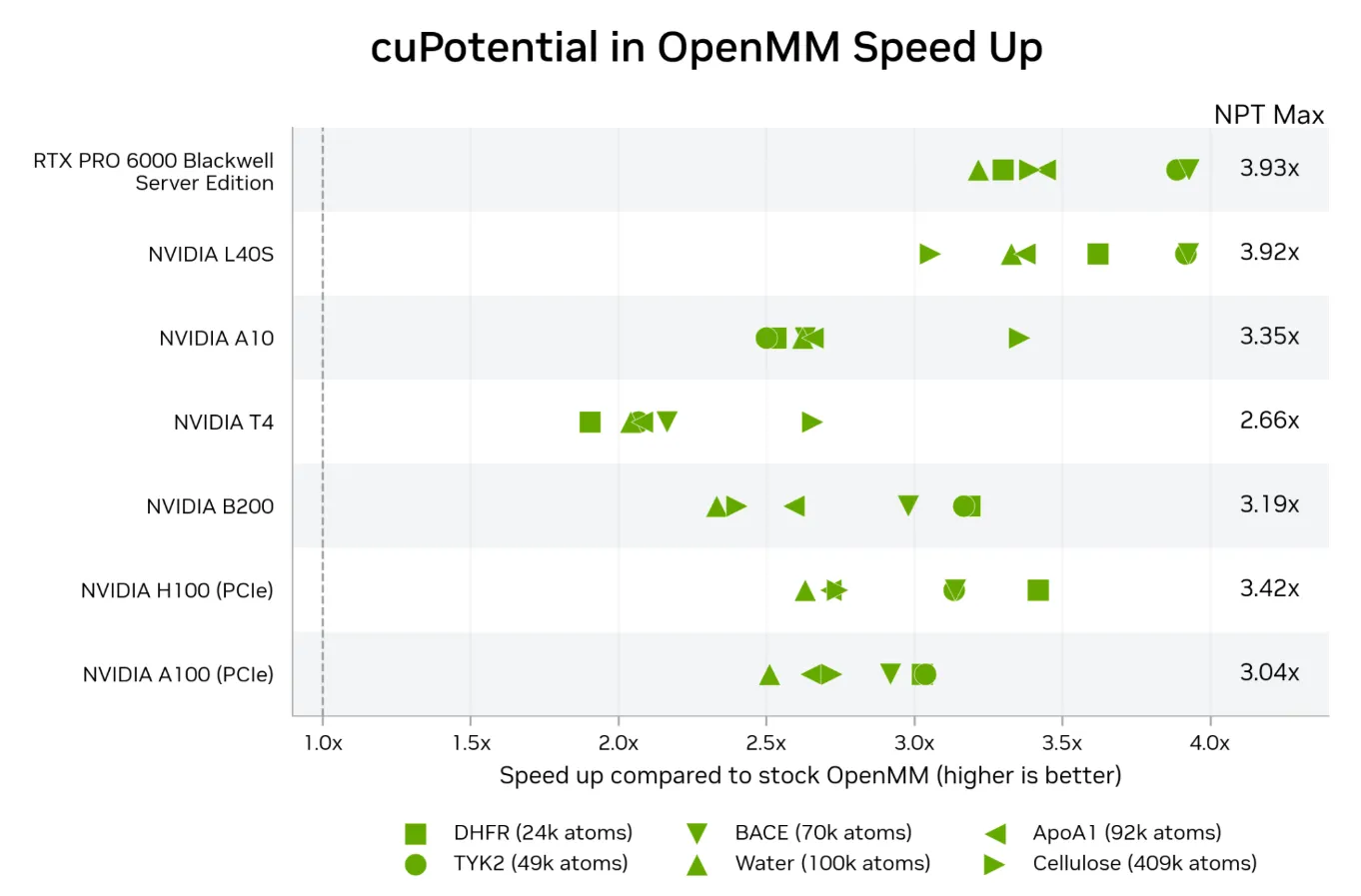
The chart shows cuPotential’s speedup over stock OpenMM for six molecular systems on seven NVIDIA GPUs in NPT simulations. Each marker represents one system; the “NPT Max” column gives the largest speedup for each GPU. A speedup of 1× means equal throughput; higher is faster.
Run the benchmarks on your GPU
From the repository root, run:
This command starts the Docker container through ./run_docker, builds the
plugin, and measures APOA1 throughput in the NVT ensemble at mixed precision.
After the build, the benchmark typically finishes in under a minute.
The -k option selects benchmarks by name, as it does in pytest. Without -k,
openmm_bench runs every system in NVT and NPT at mixed and single precision,
which takes about an hour on one GPU. Runtimes depend on the GPU.
Results are saved in plugins/openmm/build/bench-results/. Release packages do
not include reference measurements, so a completed benchmark is reported as
“measured, not compared”.
Run export NV_GPU=0 before ./run_test to select the first host GPU. GPU indices
start at 0. If NV_GPU is unset, all GPUs are available to the Docker container.
Benchmarks fail immediately if another process is using the selected GPU.
Benchmarks lock the GPU clocks for the session. This requires passwordless
sudo nvidia-smi inside the container and the SYS_ADMIN capability, which
./run_docker provides. If the clocks cannot be locked, the benchmarks fail
with instructions for fixing the problem.
Set CUPO_ALLOW_UNLOCKED_CLOCKS=1 to run with the GPU’s current clocks instead.
The results are marked “clocks not locked” and are not compared with reference
measurements.
More resources
- C API: use cuPotential directly from C or C++, with a complete energy and force example and a guide to the public headers.
- Theory: splitting, spreading, and error analysis.
- Changelog: OpenMM plugin release history.
- Licenses: the component licensing overview on GitHub.
- Source code: the library, plugin, and examples.