


Architecture#
Background#
CUDA is a general purpose parallel computing platform and programming model that leverages the parallel compute engine in NVIDIA GPUs to solve many complex computational problems in a more efficient way than on a CPU.
A CUDA program starts by creating a CUDA context, either explicitly using the driver API or implicitly using the runtime API, for a specific GPU. The context encapsulates all the hardware resources necessary for the program to be able to manage memory and launch work on that GPU.
Launching work on the GPU typically involves copying data over to previously allocated regions in GPU memory, running a CUDA kernel that operates on that data, and then copying the results back from GPU memory into system memory. A CUDA kernel consists of a hierarchy of thread groups that execute in parallel on the GPU’s compute engine.
All work on the GPU launched using CUDA is launched either explicitly into a CUDA stream, or implicitly using a default stream. A stream is a software abstraction that represents a sequence of commands, which may be a mix of kernels, copies, and other commands, that execute in order. Work launched in two different streams can execute simultaneously, allowing for coarse grained parallelism.
CUDA streams are aliased onto one or more ‘work queues’ on the GPU by the driver. Work queues are hardware resources that represent an in-order sequence of the subset of commands in a stream to be executed by a specific engine on the GPU, such as the kernel executions or memory copies. GPUs with Hyper-Q have a concurrent scheduler to schedule work from work queues belonging to a single CUDA context. Work launched to the compute engine from work queues belonging to the same CUDA context can execute concurrently on the GPU.
The GPU also has a time sliced scheduler to schedule work from work queues belonging to different CUDA contexts. Work launched to the compute engine from work queues belonging to different CUDA contexts cannot execute concurrently. This can cause underutilization of the GPU’s compute resources if work launched from a single CUDA context is not sufficient to use up all resource available to it.
Additionally, within the software layer, to receive asynchronous notifications from the OS and perform asynchronous CPU work on behalf of the application the CUDA driver may create internal threads: an upcall handler thread and potentially a user callback executor thread.
MPS clients submit work directly to the GPU without passing through the MPS server. Each MPS client owns its own GPU address space instead of sharing GPU address space with all other MPS clients and supports limited execution resource provisioning for Quality of Service (QoS).
Client-server Architecture#
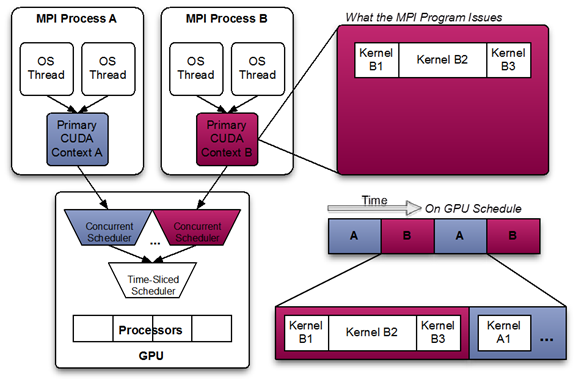
This diagram shows a likely schedule of CUDA kernels when running an MPI application consisting of multiple OS processes without MPS. Note that while the CUDA kernels from within each MPI process may be scheduled concurrently, each MPI process is assigned a serially scheduled time-slice on the whole GPU.
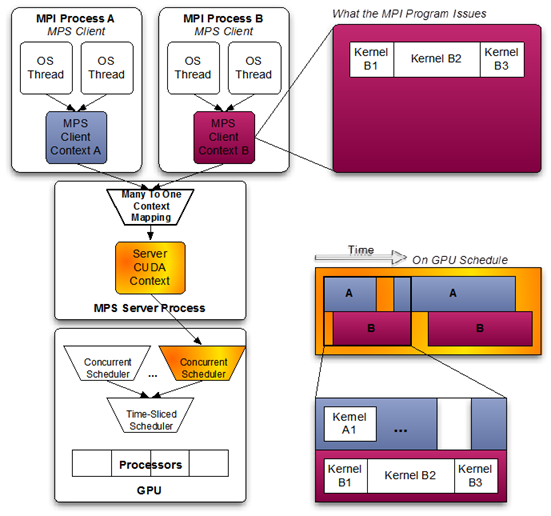
Volta provides new hardware capabilities to reduce the types of hardware resources the MPS server must managed. A client CUDA context manages most of the hardware resources on Volta, and submits work to the hardware directly. The Volta MPS server mediates the remaining shared resources required to ensure simultaneous scheduling of work submitted by individual clients, and stays out of the critical execution path.
The communication between the MPS client and the MPS server is entirely encapsulated within the CUDA driver behind the CUDA API. As a result, MPS is transparent to the CUDA program.
MPS clients CUDA contexts retain their upcall handler thread and any asynchronous executor threads. The MPS server creates an additional upcall handler thread and creates a worker thread for each client.
Provisioning Sequence#
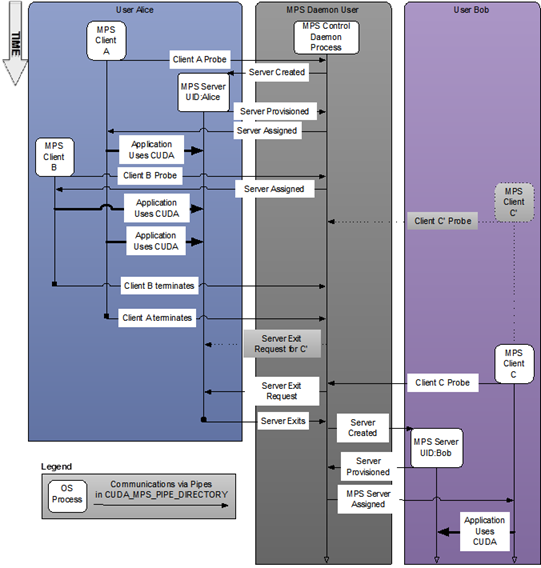
Figure 1 System-wide provisioning with multiple users.#
Server#
The MPS control daemon is responsible for the startup and shutdown of MPS servers. The control daemon allows at most one MPS server to be active at a time. When an MPS client connects to the control daemon, the daemon launches an MPS server if there is no server active. The MPS server is launched with the same user id as that of the MPS client.
If there is an MPS server already active and the user ID of the server and client match, then the control daemon allows the client to proceed to connect to the server. If there is an MPS server already active, but the server and client were launched with different user IDs, the control daemon requests the existing server to shutdown once all its clients have disconnected. Once the existing server has shutdown, the control daemon launches a new server with the same user ID as that of the new user’s client process. This is shown in the figure above where user Bob starts client C’ before a server is available. Only once user Alice’s clients exit is a server created for user Bob and client C’.
The MPS control daemon does not shutdown the active server if there are no pending client requests. This means that the active MPS server process will persist even if all active clients exit. The active server is shutdown when either a new MPS client, launched with a different user id than the active MPS server, connects to the control daemon or when the work launched by the clients has caused a fault. This is shown in the example above, where the control daemon issues a server exit request to Alice’s server only once user Bob starts client C, even though all of Alice’s clients have exited.
The restriction of one Linux user per MPS server may be relaxed to avoid
reprovisioning the MPS server on each new user request. Under this mode, clients from
all Linux users will appear as clients from the root user and connect to the root MPS
server. It is important to make sure that isolation between different users (including the
root user) can be safely disregarded before enabling this mode. Clients from all users
will share the same MPS log files. The same error containment rules (refer to Memory Protection and Error Containment) also
apply in this mode across clients from all users. For example, a fatal fault from one client
may bring down a different user’s client that shares any GPU with the faulting client. To
allow multiple Linux users share one MPS server, start the control daemon under
superuser with the -multiuser-server option. This option is not supported on Tegra platforms.
An MPS server may be in one of the following states: INITIALIZING, ACTIVE or
FAULT. The INITIALIZING state indicates that the MPS server is busy initializing
and the MPS control will hold the new client requests in its queue. The ACTIVE state
indicates the MPS server is able to process new client requests. The FAULT state
indicates that the MPS server is blocked on a fatal fault caused by a client. Any new
client requests will be rejected with error CUDA_ERROR_MPS_SERVER_NOT_READY.
A newly launched MPS server will be in the INITIALIZING state first. After successful
initialization, the MPS server goes into the ACTIVE state. When a client encounters a
fatal fault, the MPS server will transition from ACTIVE to FAULT. On pre-Volta MPS, the MPS
server shuts down after encountering a fatal fault. On Volta MPS, the MPS
server becomes ACTIVE again after all faulting clients have disconnected.
The control daemon executable also supports an interactive mode where a user with sufficient permissions can issue commands, for example to see the current list of servers and clients or startup and shutdown servers manually.
Client Attach/Detach#
When CUDA is first initialized in a program, the CUDA driver attempts to connect to the MPS control daemon. If the connection attempt fails, the program continues to run as it normally would without MPS. If however, the connection attempt succeeds, the MPS control daemon proceeds to ensure that an MPS server, launched with same user ID as that of the connecting client, is active before returning to the client. The MPS client then proceeds to connect to the server.
All communication between the MPS client, the MPS control daemon, and the MPS
server is done using UNIX domain sockets. The MPS server launches a
worker thread to receive commands from the client. Successful client connection will be
logged by the MPS server as the client status becomes ACTIVE. Upon client process
exit, the server destroys any resources not explicitly freed by the client process and
terminates the worker thread. The client exit event will be logged by the MPS server.