


Introduction#
At a Glance#
MPS#
The Multi-Process Service (MPS) is an alternative, binary-compatible implementation of the CUDA Application Programming Interface (API). The MPS runtime architecture is designed to transparently enable cooperative multi-process CUDA applications, typically MPI jobs, to utilize Hyper-Q capabilities on the latest NVIDIA (Kepler and later) GPUs. Hyper-Q allows CUDA kernels to be processed concurrently on the same GPU; this can benefit performance when the GPU compute capacity is underutilized by a single application process.
Volta MPS#
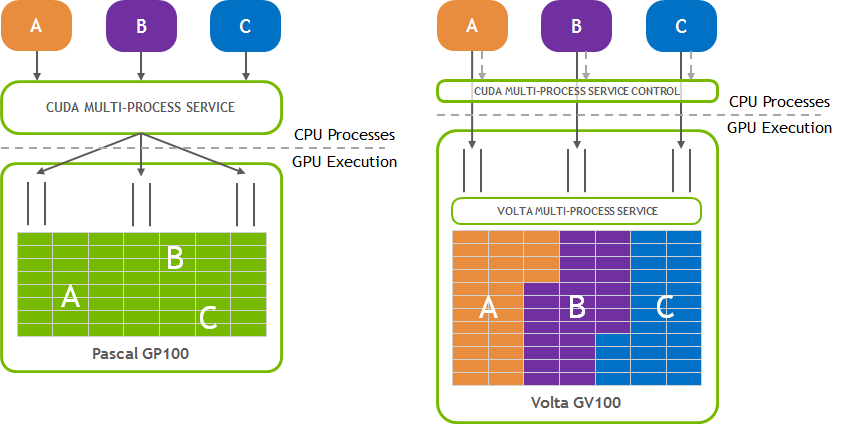
The Volta architecture introduced new MPS capabilities. Compared to MPS on pre-Volta GPUs, Volta MPS provides a few key improvements:
Volta MPS clients submit work directly to the GPU without passing through the MPS server.
Each Volta MPS client owns its own GPU address space instead of sharing GPU address space with all other MPS clients.
Volta MPS supports limited execution resource provisioning for Quality of Service (QoS).
This document will introduce the new capabilities and note the differences between Volta MPS and MPS on pre-Volta GPUs. Running MPS on Volta will automatically enable the new capabilities.
Intended Audience#
This document is a comprehensive guide to MPS capabilities and usage. It is intended to be read by application developers and users who will be running GPU calculations and intend to achieve the greatest level of execution performance. It is also intended to be read by system administrators who will be enabling the MPS capability in a user-friendly way, typically on multi-node clusters.
Organization of This Document#
The order of the presentation is as follows:
Introduction and Concepts – describes why MPS is needed and how it enables Hyper-Q for multi-process applications.
When to Use MPS – describes what factors to consider when choosing to run an application with or choosing to deploy MPS for your users.
Architecture – describes the client-server architecture of MPS in detail and how it multiplexes clients onto the GPU.
Appendices – Reference information for the tools and interfaces used by the MPS system and guidance for common use-cases.
Quick Start#
For an in-depth guide on MPS usage, refer to Appendix: Common Tasks.
For an in-depth guide on commands, environment variables, and more, refer to Appendix: Tools and Interface Reference.
Starting the MPS controller#
To start the MPS controller as a daemon (recommended):
nvidia-cuda-mps-control -d
Launching an application under MPS#
When the MPS controller is active, CUDA applications will use MPS:
./cuda_application
This can be verified with the ps command while the application is running:
echo ps | nvidia-cuda-mps-control
This can also be verified by using nvidia-smi after the application is launched to verify the existence of the nvidia-cuda-mps-server process. While the application is running, it will also appear in nvidia-smi with the M+C type specified.
Quitting MPS#
To quit the MPS controller and any associated MPS servers:
echo quit | nvidia-cuda-mps-control
Explicitly starting an MPS server#
To explicitly start an MPS server for user $UID:
echo start_server -uid $UID | nvidia-cuda-mps-control
Note that servers are started implicitly when a CUDA application is launched while the MPS controller is active.
Starting multiple control/server pairs#
To start multiple MPS servers for the same user, you can use different CUDA MPS directories to start different controllers.
export CUDA_MPS_PIPE_DIRECTORY=/tmp/nvidia-mps-0 # Select a location that's accessible to the given $UID
export CUDA_MPS_LOG_DIRECTORY=/tmp/nvidia-log-0 # Select a location that's accessible to the given $UID
nvidia-cuda-mps-control -d # Start an MPS controller on pipe 0
export CUDA_MPS_PIPE_DIRECTORY=/tmp/nvidia-mps-1 # Select a location that's accessible to the given $UID
export CUDA_MPS_LOG_DIRECTORY=/tmp/nvidia-log-1 # Select a location that's accessible to the given $UID
nvidia-cuda-mps-control -d # Start an MPS controller on pipe 1
To start an application under one of the controllers, the same CUDA_MPS_PIPE_DIRECTORY must be set for the controller and the application.
CUDA_MPS_PIPE_DIRECTORY=/tmp/nvidia-mps-0 CUDA_MPS_LOG_DIRECTORY=/tmp/nvidia-log-0 ./cuda_application # This will use the MPS controller on pipe 0
CUDA_MPS_PIPE_DIRECTORY=/tmp/nvidia-mps-1 CUDA_MPS_LOG_DIRECTORY=/tmp/nvidia-log-1 ./cuda_application # This will use the MPS controller on pipe 1
Starting an MPS server with MLOPart#
To start a server configured to use MLOPart on supported devices for user $UID:
echo start_server -uid $UID -mlopart | nvidia-cuda-mps-control
For more information, refer to Memory Locality Optimized Partitions.
Enabling static SM partitioning#
Static SM partitioning must be enabled at MPS controller start time:
nvidia-cuda-mps-control -d -S
For more information, refer to Static SM Partitioning.
Prerequisites#
Portions of this document assume that you are already familiar with:
the structure of CUDA applications and how they utilize the GPU via the CUDA Runtime and CUDA Driver software libraries
concepts of modern operating systems, such as how processes and threads are scheduled and how inter-process communication typically works
the Linux command-line shell environment
configuring and running MPI programs via a command-line interface
Concepts#
Why MPS is Needed#
To balance workloads between CPU and GPU tasks, MPI processes are often allocated individual CPU cores in a multi-core CPU machine to provide CPU-core parallelization of potential Amdahl bottlenecks. As a result, the amount of work each individual MPI process is assigned may underutilize the GPU when the MPI process is accelerated using CUDA kernels. While each MPI process may end up running faster, the GPU is being used inefficiently. The Multi-Process Service takes advantage of the inter-MPI rank parallelism, increasing the overall GPU utilization.
What MPS Is#
MPS is a binary-compatible client-server runtime implementation of the CUDA API which consists of several components:
Control Daemon Process – The control daemon is responsible for starting and stopping the server, as well as coordinating connections between clients and servers.
Client Runtime – The MPS client runtime is built into the CUDA Driver library and may be used transparently by any CUDA application.
Server Process – The server is the clients’ shared connection to the GPU and provides concurrency between clients.
See Also#
Manpage for
nvidia-cuda-mps-control (1)Manpage for
nvidia-smi (1)