

NVIDIA DSX Flex Grid Services Integration Guide
Connect a grid services solution to DSX Flex, from a grid-event power-limit request through the reported response of managed loads.
What You Will Implement
When a grid event calls for a power limit on AI factory loads managed by NVIDIA Dynamic Power Software (DPS), your grid services solution needs to send that request and interpret the reported response. Your agent integrating with DSX Flex acts as the Grid Event Publisher: it translates the requirement into a load target, sends the command through DSX Exchange, and reads Power State Status published by the DSX Flex Agent, the factory-side message role that reports the state of DPS-managed loads.
This guide covers the DPS 0.10 integration using the DSX Flex 1.7.0 schema. Capabilities beyond that baseline are called out where they affect implementation. The roles involved in this implementation are explained in more detail under Participants and Message Boundary.
Integration Path at a Glance
-
Prepare the feed mapping and connection. Map the site feeds covered by a request. Gather broker access, identifiers, and signing-key handoff.
-
Listen, then publish. Subscribe to Power State Status before sending a command so an early response is not missed. Build and sign the command data, wrap it as a Load Target Set (
grid.loadtarget.set.v1) event, then publish it through DSX Exchange. This is a request to schedule and apply a constraint, not a synchronous operating result. -
Confirm the schedule. The DSX Flex Agent receives the command and publishes Power State Status (
grid.powerstate.status.v1) snapshots for all feeds. A snapshot whose relevant feed haseventset totarget_setsays the schedule was updated; a broker acknowledgement (PUBACK) says only that the command reached Exchange. Neither says the managed load has reached the limit. -
Read the reported response. Later snapshots show which target is active and the operating state DPS reports as the load changes. Use those updates to assess the managed load’s response. Grid-program compliance reporting also needs the site or utility evidence that DSX Flex status does not provide.
-
Follow the exception branch only when supported. If the deployment supports breach and enforcement events, the DSX Flex Agent can publish a breach alert and the Infrastructure Management Agent can publish the associated enforcement outcome. Subscribe, verify, and correlate those events as part of the same target’s result path; they are not a required step in the baseline exchange.
Participants and Message Boundary
The DSX Flex schema identifies the participant roles in this integration. These roles and their responsibilities indicate how your integration will operate with the rest of the AI factory to handle responses.
-
Grid Event Publisher (
isv): Your agent signs and publishes load targets, then consumes status and supported exception events. -
DSX Exchange: Carries the messages between participants.
-
DSX Flex Agent (
dsx-flex-agent): Receives targets and publishes full power-state snapshots and, when supported, breach alerts. DPS applies the constraints through its internal power-management functions; that internal function is not another message source role. -
Infrastructure Management Agent (
infra): On a supported exception path, receives breach alerts and publishes enforcement outcomes.
DSX Flex messages use CloudEvents: an outer envelope identifies the event and its sender and carries a signed data payload. The procedures below introduce each field and topic when the reader uses it.
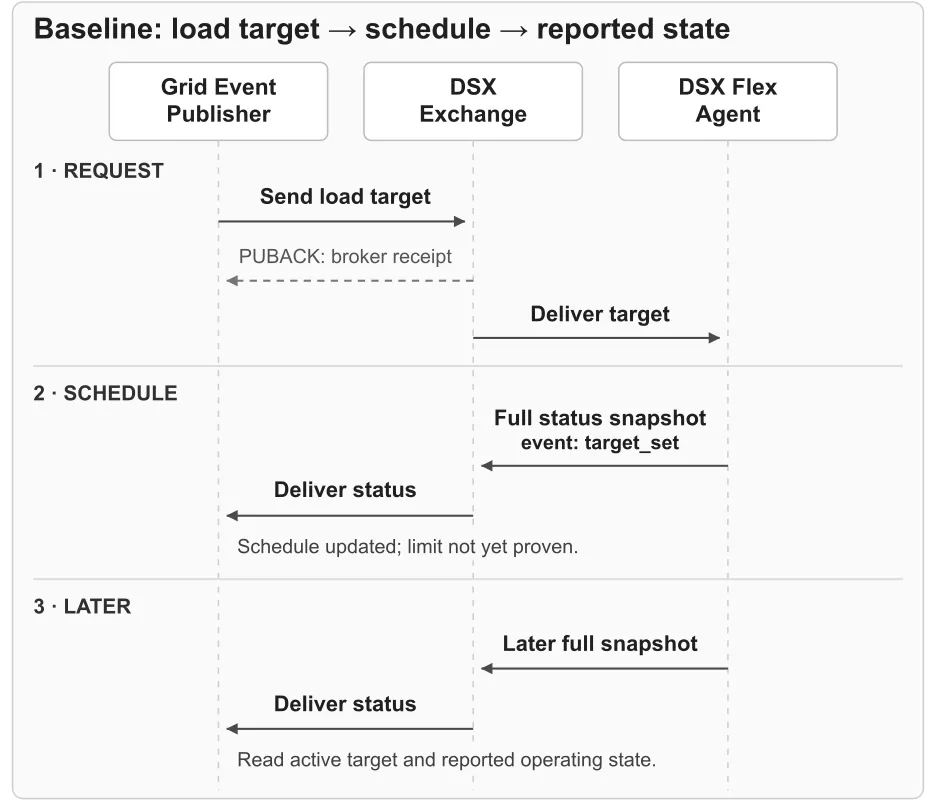
Figure 1. Broker receipt, schedule update, and later operating status are separate signals in the baseline load-target exchange.
Figure 1 shows the message flow when communication succeeds. The Grid Event Publisher must also monitor its Power State Status subscription for missing or unexpected updates. How it responds depends on the failure and the specific deployment.
Prepare the Feed Mapping and Connection
-
Obtain the deployment’s configured feed tags and the site feed each identifies from the deployment operator.
-
Obtain the broker endpoint and network path, MQTT authentication mode and credentials, topic permissions, and publisher and agent identifiers from the deployment operator. At the same time, confirm supported event paths and the expected status heartbeat cadence.
-
Obtain an ES256- or RS256-compatible signing key pair and its
kid. With the operator, coordinate registration of your public signing key and obtain the public keys needed to verify DSX Flex Agent status and, when supported, Infrastructure Management Agent enforcement events. -
Deploy the publisher where it can reach the broker and protect both broker and signing credentials. Use an MQTT 3.1.1 SDK with the assigned authentication mode. Use the DSX Exchange Integrator Quickstart and Authentication guide for broker connectivity and permissions. For each Flex publish or subscription, use its linked operation page for the topic, message format, and MQTT delivery level (QoS).
Subscribe and Publish the Load Target
A load target is a requested power constraint and the interval in which it applies. One grid.loadtarget.set.v1 command can contain one or more targets. Build its plaintext JSON data first, sign that data, and then publish it inside a CloudEvent.
-
Subscribe to status. Subscribe to Power State Status on
grid/v1/dsx-flex-agent/{agentIdentifier}/powerstate/statuswith the assigned permissions before sending the first command. Use the assigned DSX Flex Agent identifier and keep the subscription active to receive an early response. The DSX Flex Agent publishes full status snapshots periodically, independently of your subscription or commands; use the first snapshot received after subscribing as your initial view of the managed feeds. -
Build the load-target data. Create
SetLoadTargetDatawith at least one item intargets. Each item needsintervalandload_constraint; usefeed_tagsto select feeds andstrategywhen needed:-
Power limit and unit. Set
load_constraintto the requested limit for the grid event, expressed in watts, kilowatts, or megawatts. -
Timing. Set
intervalto when the target applies.interval.start_timedefaults to immediate application when omitted; withoutinterval.end_time, the target remains until replaced.
An omitted or empty
feed_tagslist applies the target to all feeds. The DSX Flex schema supplies the complete field definitions and allowed values. -
-
Sign the data. Sign the plaintext JSON data payload with JWS using ES256 or RS256, and include the signing-key identifier in the protected
kidheader. Put the resulting JWS compact serialization string in the CloudEventsdatafield. The wire-formatdatavalue is the signed string, not the unsigned JSON object. -
Wrap the command. Build a structured CloudEvent JSON envelope around the signed data. Include its required attributes in these groups:
-
Event identity:
specversion: "1.0.2", a new UUIDv4id,source: "//grid/v1/isv/{publisherIdentifier}", andtype: "grid.loadtarget.set.v1". -
Context:
timeas an ISO 8601 timestamp,datacontenttype: "application/json", a resourcesubjectsuch as"loadtarget", and a W3C Trace Contexttraceparent. Propagate optionaltracestatewhen present. -
Payload and matching: the signed
datastring. A UUIDv4 envelopecorrelationidis optional in the published schema and recommended to associate a command with later status.
-
-
Validate and publish. Check the completed message against the DSX Flex message format and signing rules. Use the same assigned
{publisherIdentifier}in the source and the publish topic, then publish Load Target Set togrid/v1/isv/{publisherIdentifier}/loadtarget/set. A broker PUBACK confirms receipt of that publish, not a schedule update or operating result.
Target ramp rate. To follow a site-defined target ramp rate—the expected pace of change in DPS-managed load—repeat steps 2–5 for each stage, publishing a separate Load Target Set message for the affected feeds. Set each target’s interval and power limit so the first makes an incremental change, intermediate targets progress at the desired pace, and the final target reaches the intended limit. Compare subsequent Power State Status snapshots with that sequence.
Other target choices. strategy.best_effort defaults to false. Set load_constraint to null to remove an active grid constraint and return the affected feed to its configured default constraint.
Example: Map a Grid Event to a DSX Flex Command
Suppose a grid event calls for a 500-kilowatt limit on feed main-a for a defined interval. Your Grid Event Publisher maps that requirement into this outbound DSX Flex SetLoadTargetData payload:
For a real command, the publisher fills in the requested start and end times, signs the completed data payload, and places the resulting JWS compact string in a CloudEvent envelope. The outbound wire message then has this shape:
Uppercase values are placeholders; supply actual values and the signed JWS before publishing. The example includes the recommended but schema-optional correlationid.
Interpret Power-State Status
The DSX Flex Agent publishes full snapshots for all feeds, including updates unrelated to your latest command. Verify the agent’s JWS signature in the CloudEvents data field before decoding PowerStateStatusData. Use snapshot_time and the relevant feed’s target and operating fields together; one status field alone is not an operating result.
First, inspect feeds.<feed_tag>.event in the verified status payload. A value of target_set means the schedule was updated; check that the reported target, feed scope, and interval match the command. It does not mean the requested load has already been reached. A broker PUBACK is an earlier transport signal and cannot substitute for this status.
Then follow later snapshots as the interval starts, the target becomes active, and the managed load changes. A feed’s targets[] includes active and scheduled entries; active: true marks a target currently being enforced. Read the active target with these reported fields:
-
When a transition begins, the DSX Flex Agent publishes a Power State Status snapshot whose affected feed reports
start_ramp_downorstart_ramp_upas itseventvalue. Use anend_ramp_downorend_ramp_upstatus and itssnapshot_timeto report when DPS says the transition completed. -
calculated_load,in_flight, andcompliantdescribe the state known to DPS.calculated_loadcan differ from measured facility power during a transition.compliantcan also be true when no target is active; for an active target, check it before reporting that the limit was met. -
periodicis a heartbeat without a state change; its cadence is deployment-specific. Use the cadence confirmed during setup to recognize a late heartbeat.
To associate a snapshot with the command, distinguish identifiers by their location in the message:
Use the later active target and operating snapshot to say what DPS reports about the managed load. Power-state status is one input to grid-program reporting, not a complete utility-compliance record. The grid services solution must obtain and reconcile the site metering and program evidence required by the applicable grid program or utility.
Handle the Exception Branch When Supported
A Power Breach Alert reports a detected exceedance of a feed’s load target, with the target constraint and measured load at the event. The alert alone does not establish whether DPS can subsequently meet the target.
When breach alerts (grid.powerbreach.alert.v1) and enforcement outcomes (grid.powerbreach.enforcement.v1) are supported, as confirmed during connection setup, extend the result path as follows:
-
Subscribe with the assigned permissions to the breach alert and enforcement outcome topics. Verify each event sender’s signature before processing its data. Both linked breach and enforcement operations specify MQTT QoS 2; use that setting when subscribing to those events.
-
When a breach alert arrives, use its required
target.correlation_idto associate the alert with the target. That requirement differs from the optionalcorrelation_idin a power-state status target. Retainbreach.breach_idacross lifecycle updates and for the enforcement outcome. -
Follow
status(active,escalated, orresolved) for the alert’s lifecycle, and readseverityandmeasured_loadwith the target limit. The alert can include advisoryshed_hints; itsinfrastructure_actionslist describes possible infrastructure responses. -
Match an enforcement event to the alert by
breach_id, then readaction(appliedorreverted), the overallcode(success,partial, orerror), and the per-resourceresults. Do not treat an alert or a suggested action as evidence that enforcement occurred.
Verify the Basic Integration Path
These are minimum end-to-end checks for the message path described here. They show whether the publisher can send a target and interpret DSX Flex’s reported response; they do not by themselves establish production readiness or grid-program compliance. Use a known grid-event request to exercise the sequence:
-
Confirm broker connectivity, authentication, and topic permissions. Subscribe to status before sending the command.
-
Publish a schema-valid signed command with a known limit, feed scope, and interval. Check for
target_setwith the expected schedule. This establishes that the target was accepted into the schedule, not that the limit was reached. -
Exercise activation and expiration. Inspect the active target, transition event,
in_flight,calculated_load, andcompliantbefore reporting that DPS says the managed load met the target. After a target with anend_timeexpires, confirm it is no longer active. Keep site-level compliance evidence separate. -
Test invalid fields and signatures, reconnect and duplicate delivery, periodic and delayed or out-of-order snapshots, and commands from another publisher. If the deployment supports exception events, also test alert lifecycle and alert-to-enforcement correlation.
Extend these checks with the deployment’s failure, scale, performance, and program-specific reporting tests before production use. If the site specifies a ramp-rate expectation, record it and compare reported load and timing across successive Power State Status snapshots. With multiple scheduled targets, also check the reported schedule and active target at transitions or overlaps.
Roadmap
-
Breach signaling: Planned after DPS 0.10, with Q4 2026 as the current target.
-
Native ramp rate and target severity support: Anticipated for Q1 2027. The DSX Flex 1.7.0 load-target message carries neither field. Where supported, an integration can approximate a ramp by scheduling multiple targets; native support would let the publisher specify the requested rate in the message. Target severity would let the publisher assign severity to a constraint for use in a resulting breach notification if DPS cannot meet it.
These dates and feature details are planning expectations and may change.