

Sidecar Backends
Experimental. Sidecar integration is under active development, so this page and the linked support notes may become stale. The sidecar path does not yet match every feature of the in-process backends.
A Dynamo sidecar runs beside the inference engine process. It registers the engine with Dynamo discovery, forwards engine events into the Dynamo event plane, and serves requests from the Dynamo frontend by calling the engine’s native gRPC API.
Backend Support Matrix
Legend: Supported = available through the sidecar; Limited = available with restrictions; Engine-configured = enabled in the native engine; No = unavailable. See the linked backend support notes for details.
Deployment
Operations and Recovery
For engine-version requirements and launch examples, see vLLM, SGLang, and TensorRT-LLM.
Design Goals
- Keep the upstream engine’s native serve path and argument surface.
- Move toward public, versioned gRPC contracts with explicit backward compatibility instead of importing private engine APIs.
- Isolate Dynamo and engine dependencies in separate processes.
- Attribute failures through engine-specific and Dynamo-specific logs and health checks.
- Reuse Dynamo’s frontend, routing, planning, and disaggregated-serving orchestration.
Architecture
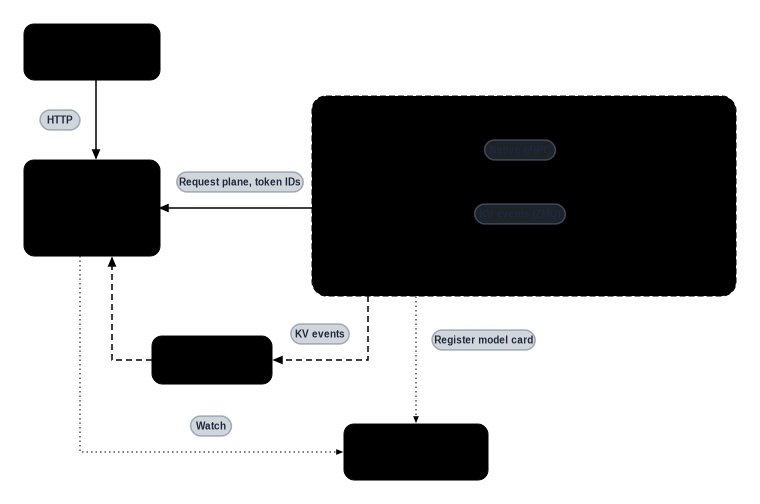
The frontend and router discover sidecars and send requests to them over the Dynamo request plane. Each sidecar converts requests to the engine’s native gRPC API and streams responses back.
Responsibilities
Container Packaging
The sidecar Dockerfile builds all four engine-specific sidecar executables into
one CPU-only image. Deployments select an engine by setting the container
command:
The image’s default entrypoint, dynamo-sidecar, maps the short names vllm,
sglang, trtllm, and lpx onto those executables. It is a convenience for ad-hoc
docker run; the deployment manifests override it with command. The inference
engine remains in a separate GPU container, so the sidecar image does not
include vLLM, SGLang, TensorRT-LLM, LPX engines, CUDA, or engine-specific Python
dependencies. The image runs as the non-root dynamo user with numeric user ID
1000 and declares port 9090 for Dynamo system endpoints, so Kubernetes can
enforce runAsNonRoot.
The sidecar image is published to NGC for each release, starting with 1.6.0:
To build it from source instead, run from the repository root with the sidecar Dockerfile:
Pod Layout
The engine and sidecar share one worker pod. The engine is the main
container; the sidecar is a
native sidecar:
an init container named runtime with restartPolicy: Always, which requires
Kubernetes 1.29 or later. The two connect over loopback or a Unix socket.
Kubernetes starts the sidecar before the engine and keeps it running for the
life of the pod. Declaring the runtime init container enables sidecar mode in
the Dynamo operator, which gives the sidecar /live and /health probes on
port 9090; in host-network LPX Agent Pods the sidecar keeps only the probes its
template declares. These probes do not track engine loading, so keep the engine’s own
probes on main. Sidecar mode supports worker, prefill, and decode components,
and LPX components through their role templates.
SGLang, vLLM, and TensorRT-LLM multinode deployments require explicit leader and
worker role PodTemplates. Set backendFramework explicitly, as the examples do: the
operator does not infer a backend from a native engine command. The leader declares
runtime. Worker placement depends on the engine topology. See the
SGLang guide,
the vLLM guide,
and the TensorRT-LLM guide.
Topologies
Each engine page shows its single-node TP, multi-node TP, and multi-node DP topologies: vLLM, SGLang, TensorRT-LLM.