Reference Architecture#
Typical Agent Execution Loop#
Before the workspace pattern, the typical agent execution loop looks like this — a user query is handled by an agent that invokes an LLM, selects tools, runs them in a code-interpreter session (shell, code, filesystem), emits telemetry to an observability plane, and returns the result.
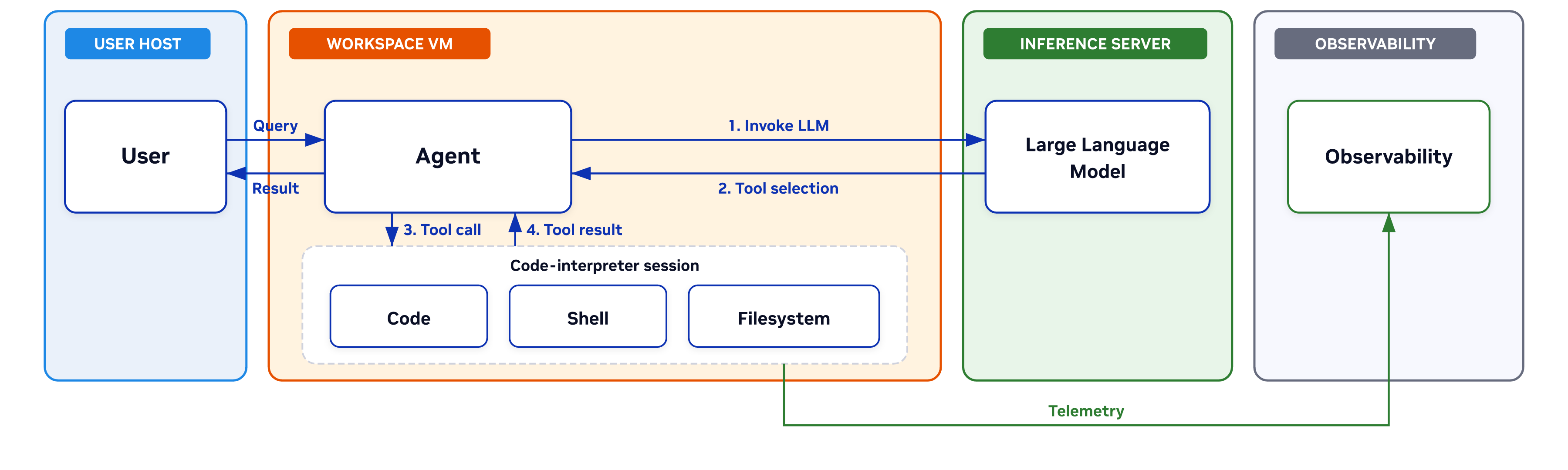
Figure 3 Typical agent execution loop#
The agent, the model call, the tool execution, and the observability plane are all present — but nothing in this picture says where any of it runs, who the agent is authenticated as, what the tools can reach, or how policy is enforced. Those are the questions Secure Agent Workspace answers.
A note on future evolution. Today the agent, its tools, and the execution context share one workspace VM. A future variant could host the agent in a separate control plane and reduce the workspace to a tool-execution sandbox. Out of scope for this reference design.
Secure Agent Workspace — Where Everything Fits#
The Secure Agent Workspace pattern wraps the baseline loop in a managed environment. User and enterprise services sit outside the VM; Secure Agent Workspace is the thing in between — the integrating concept that gives every part of an always-on agent stack a controlled place to live. Containment from the inside out: agent loop → runtime sandbox → single-user workspace VM → Secure Agent Workspace envelope.
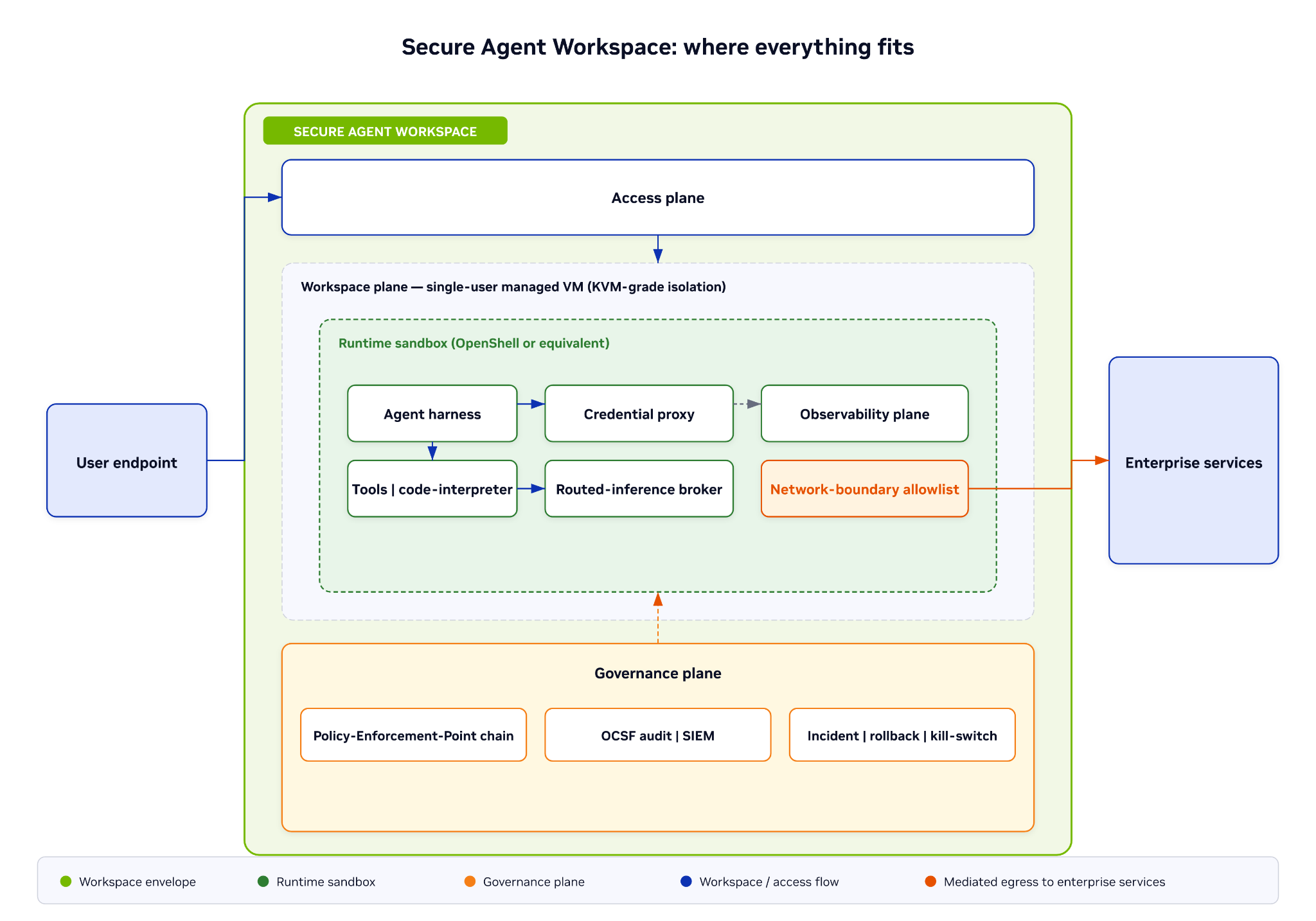
Figure 4 Secure Agent Workspace: where everything fits#
Secure Agent Workspace — Seven Logical Planes#
The architecture has seven logical planes. The endpoint attaches, but the workspace executes.
The endpoint is the user’s interface - IDE, terminal, or coding agent. The managed workspace is the execution and policy boundary.
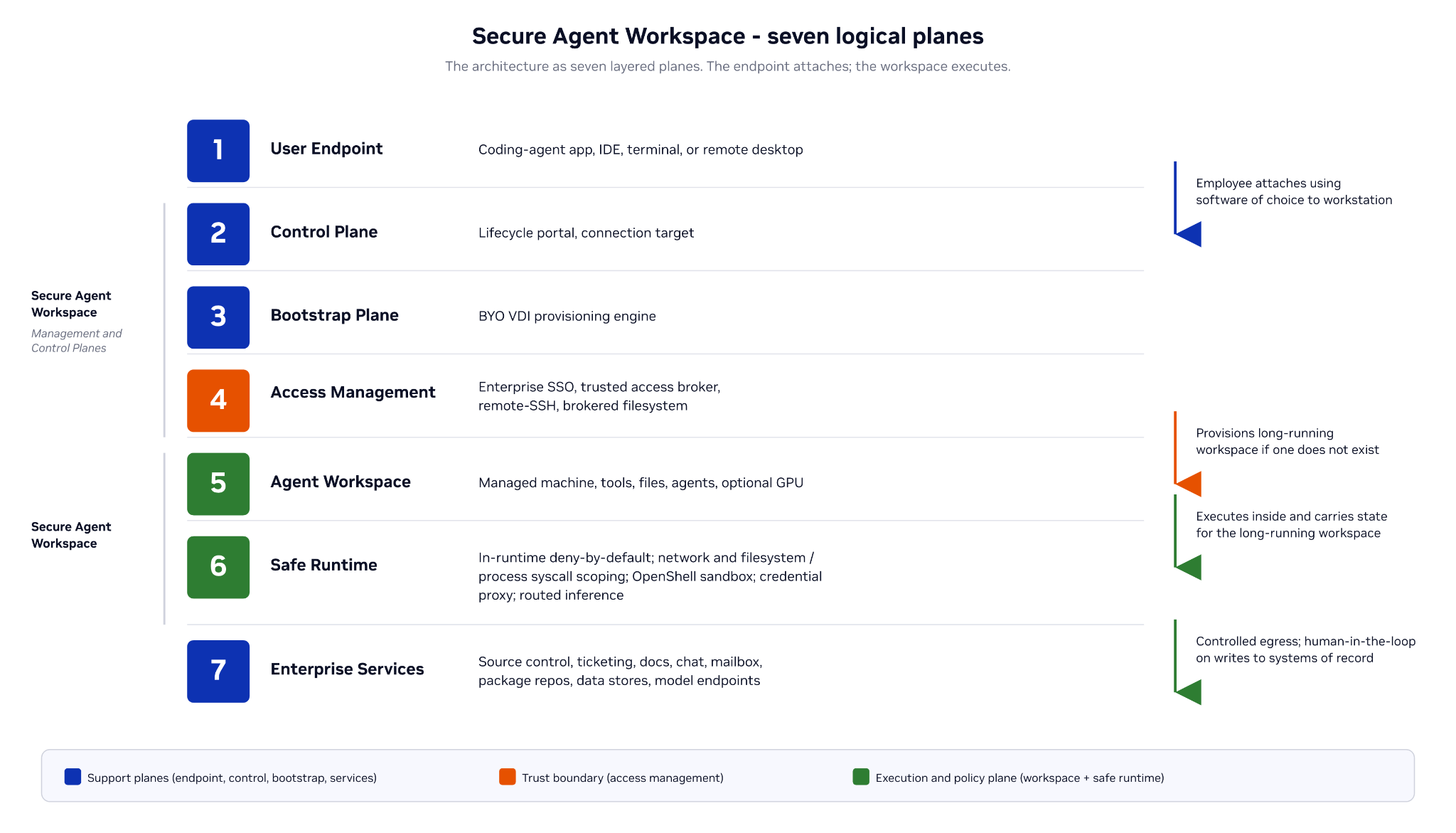
Figure 5 Secure Agent Workspace - seven logical planes#
Architectural Invariants the Design Preserves#
No raw provider credentials reach the agent. Enforced in the runtime sandbox (Plane 6). The credential proxy rewrites Authorization headers at egress; the agent receives capabilities, not secrets.
No self-granted authority. Enforced at the runtime sandbox (Plane 6) and the control plane. The agent operates with a policy-defined subset of the user’s permissions, bound by the per-engagement delegation record; it cannot widen its own scope, tools, or policy — that requires a re-issued, signed delegation / policy from the control plane.
No connection to an unlisted destination. Enforced at two layers (defense-in-depth): the workspace network boundary (Plane 5 → 7) and runtime-sandbox egress (Plane 6), both deny-by-default. Outbound destinations come from the signed profile allowlist; adding one is a control-plane allowlist change, not a runtime approval the user or agent can request.
No tampering with system binaries. Enforced in the runtime sandbox (Plane 6). Filesystem is read-only outside the writable agent home; LSM-level enforcement on supported kernels. (Sandbox-layer control, not a workspace/VM control.)
No agent-created persistence. Enforced in the runtime sandbox (Plane 6); mutable only from the control plane. Shell startup files (
.bashrc), shell hooks, and MCP-server / agent config are deny-write from inside the sandbox (protected-paths policy, LSM / file-attribute enforcement); a write there would otherwise run every session, independent of the prompt. These paths change only through a control-plane operator action.No agent-controlled lifecycle. Enforced at the control plane (operator-owned). Sandbox creation, policy change, and image upgrade are control-plane operator actions — not actions the agent can request.
No suppressed audit. Enforced outside the agent’s reach. OCSF telemetry is emitted from the trust-boundary endpoints — the out-of-VM workspace perimeter and the in-VM runtime — not from within the agent process; the agent cannot disable, alter, or withhold it. The out-of-VM perimeter stream keeps flowing even if the in-VM OS is compromised; the in-VM runtime stream is best-effort under in-VM root and is corroborated by the perimeter stream.
Network Architecture#
Corporate-profile workspaces use an end-to-end brokered network shape — both directions of traffic pass through one trust boundary:
Flow 1 (inbound). A consumer reaches the workspace through the trusted access broker over a secure tunnel such as SSH.
Flow 2 (outbound). The agent inside the workspace reaches corp-net through the same broker over a per-session reverse tunnel.
The broker is the only path for inbound user attach and for workspace-to-corporate-network access — nothing reaches the sandbox unbrokered, and nothing reaches the corporate network unbrokered. Internet egress to allowlisted external destinations is a separate outbound path, mediated by the platform-layer egress firewall rather than the broker (see below).
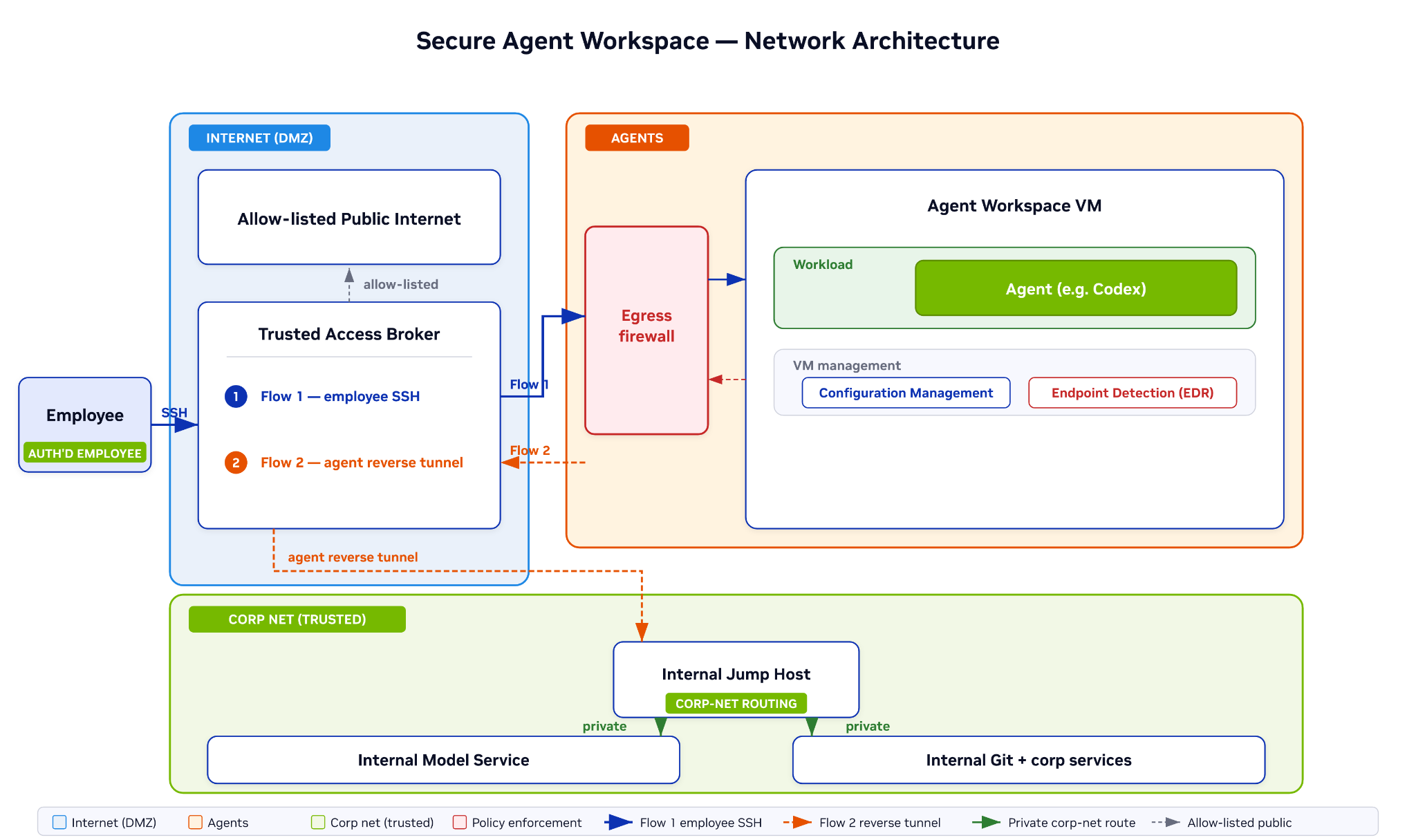
Figure 6 Secure Agent Workspace - Network Architecture#
From inside the workspace, all internet egress is mediated by the platform-layer egress firewall against an allow-list of approved destinations — source repositories, partner agent endpoints, hosted inference, approved SaaS. These destinations are scoped policy targets, with L7 protocol-aware filtering further constraining access by protocol-specific attributes such as host, path and method for HTTP. Anything outside the allow-list is denied at the platform layer in Phase I; in Phase II the same allow-list is also enforced in-runtime by OpenShell as deny-by-default.
Corporate network resources — internal model service, internal git, ticketing, docs — are not reachable directly from the workspace. The path is workspace → reverse tunnel → trusted access broker → internal jump host → corp service. The jump host is the corporate network trust boundary; every agent reaches the corporate network through it, and the broker multiplexes all per-session reverse tunnels onto the same jump-host pair.
Trusted Access Broker — What It Is and What It Must Satisfy#
The trusted access broker is the single trust boundary between the user’s endpoint and the agent workspace, and between the workspace and the corporate network. It is an enterprise-SSO-backed authentication and session-brokering service, not a VPN or a network appliance — the broker authenticates, scopes, and audits each session; the network path follows.
What the broker does:
Authenticates the user against the enterprise IdP (OIDC / SAML), with no alternative path.
Issues short-lived, browser-driven sessions — no long-lived session tokens, no client-side credential storage.
Multiplexes per-session reverse tunnels for outbound agent traffic.
Audits every session and revokes on demand via an administrative kill switch.
What the broker must satisfy:
Single path. No route into the workspace bypasses the broker.
SSO-only. No local user database; identity is upstream.
OCSF audit. Every session emits OCSF-normalized events to the SIEM.
Revocation propagation. When SSO entitlement is revoked or the lifecycle API issues a kill, the broker drops the active session within seconds.
Brokers sessions, not tokens. Per-service application tokens (OAuth, API keys) are held and exchanged by the credential proxy (Plane 6), not the broker: the proxy holds the credentials, adds authorization at egress, and gives the agent a scoped, short-lived capability — never the raw token. By default the proxy runs inside the VM; for sovereign or residency-constrained profiles the proxy is located outside the VM.
Revocation spans three layers, not just the user↔workspace session: the lifecycle kill switch stops the VM and its session; SSO entitlement revocation propagates through the broker and blocks future sessions; and the sponsor’s revocation of the delegation record cuts the agent’s downstream authority at the next tool call.
Credential Proxy — Where Tokens Live#
The credential proxy sits in the egress path between the agent/sandbox and external services (Plane 6), in-VM by default — not at the access broker. Per-service credentials live in the enterprise secret store (Vault) and are used only by the proxy: on each outbound call it resolves the agent’s capability to a service and scope under the per-engagement delegation record, adds the provider’s authorization at egress (Authorization-header rewrite), and forwards the call. Token acquisition and refresh stay inside the proxy; the agent receives a scoped, short-lived capability — never the raw token. The same proxy fronts routed inference, so model endpoints are reached under the identical capability rule.
Inference — A Hard Dependency, Not a Workspace Feature#
Inference is a hard dependency for any agent loop — every tool call requires tokens. It is not a feature of Secure Agent Workspace itself; the workspace integrates with it. The two are architecturally separate.
Two delivery modes:
Local inference. A model runs on a GPU local to the workspace. The GPU may be passed through to the workspace VM (with the inference process running in a separate container or namespace from the agent), or held by an adjacent host-level service the workspace calls. Either way, the inference process sits outside the OpenShell / runtime-sandbox trust boundary — the agent can call it, but cannot inspect or tamper with it. This is the same boundary that prevents the agent from modifying its own runtime configuration: changes to either are operator actions or human-reviewed, never agent-initiated.
Routed inference (managed endpoint). A model runs in a hosted inference service — internal model service, external LLM gateway, partner endpoint. The workspace reaches it via the credential proxy and routed-inference broker in Plane 6, with the same trust-boundary rule: the agent receives capabilities (the proxy holds the credentials); the inference path is allow-listed at the egress firewall.
GPU acceleration is independent of inference. A workspace may have a GPU for accelerated tools, scientific computing, or vector work without running local inference; a workspace using routed inference may have no GPU at all. A GPU is just one kind of VM-local resource the agent can use without it being an inference source — like local inference, it sits inside the workspace VM but outside the runtime-sandbox boundary, and the agent reaches it through the runtime’s mediated tool-call path (deny-by-default, capability-brokered), so it can use the resource but cannot inspect or tamper with it.