
2. GPUDirect Storage Benefits#
This section provides the benefits of using GDS.
Using the GDS functionality avoids a “bounce buffer” in CPU system memory, where the bounce buffer is defined as a temporary buffer in system memory to facilitate data transfers between two devices such as a GPU and storage.
The following performance benefits can be realized by using GPUDirect Storage:
Bandwidth: The PCIe bandwidth into and out of a CPU may be lower than the bandwidth capabilities of the GPUs. This difference can be due to fewer PCIe paths to the CPU based on the PCIe topology of the server. GPUs, NICs, and storage devices sitting under a common PCIe switch will typically have higher PCIe bandwidth between them. Utilizing GPUDirect Storage should alleviate those CPU bandwidth concerns, especially when the GPU and storage device are sitting under the same PCIe switch. As shown in Figure 1, GDS enables a direct data path (green) rather than an indirect path (red) through a bounce buffer in the CPU. This boosts bandwidth, lowers latency, and reduces CPU and GPU throughput load. In addition, it enables the DMA engine near storage to move data directly into GPU memory.
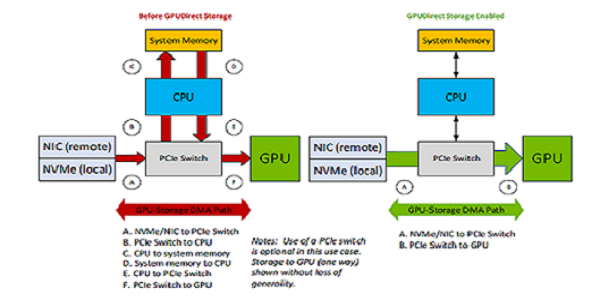
Figure 2.1 Comparing GPUDirect Storage Paths#
Latency: The use of a bounce buffer results in two copy operations:
Copying data from the source into the bounce buffer.
Copying again from the bounce buffer to the target device.
A direct data path has only one copy, from source to target. If the CPU performs the data movement, latencies may be impacted by conflicts over CPU availability, which can lead to jitter. GDS mitigates those latency concerns.
CPU Utilization: If the CPU is used to move data, overall CPU utilization increases and interferes with the rest of the work on the CPU. Using GDS reduces the CPU workload, allowing the application code to run in less time. As a result, both compute and memory bandwidth bottlenecks are avoided with GDS. Both components are relieved with GDS.
Once data no longer needs to follow a path through CPU memory, new possibilities are opened.
New PCIe Paths: Consider systems where there are two levels of PCIe switches. NVMe drives hang off the first level of switches with up to four drives per PCIe tree. There may be two to four NVMe drives in each PCIe tree, hanging off the first level of switches. If fast enough drives are used, they can nearly saturate the PCIe bandwidth through the first level PCIe switch. For example, the NVIDIA GPUDirect Storage engineering team measured 13.3 GB/s from a set of 4 drives in a 2x2 RAID 0 configuration on a PCIe Gen 3 box. Using RAID 0 on the control path via the CPU does not impede a direct data path. In an NVIDIA DGX™-2, eight PCIe slots hang off the second level switches, which may be populated with either NICs or RAID cards. In this Gen 3 configuration, NICs have been measured at 11 GB/s and RAID cards at 14 GB/s. These two paths, from local storage and remote storage, can be used simultaneously, and importantly, bandwidth is additive across the system.
- PCIe ATS: As PCIe Address Translation Service (ATS) support is added to devices, they may no longer need to
use the CPU’s input output memory management unit (IOMMU) for the address translation that’s required for virtualization. Since the CPU’s IOMMU is not needed, the direct path can be taken.
- Capacity and Cost: When data is copied through the CPU’s memory, space must be allocated in CPU memory.
CPU memory has limited capacity, usually on the order of 1TB, with higher density memory being the most expensive. Local storage can have a capacity on the order of 10s of TB, and remote storage capacity can be in petabytes. Disk storage is much cheaper than CPU memory. It does not matter to GDS where storage is, only that it is in the node, in the same rack, or far away.
- Memory Allocation: CPU bounce buffers must be managed: allocated and deallocated. This takes time and energy.
In some scenarios, that buffer management can get on the critical path for performance. If there is no CPU bounce buffer, this management cost is avoided. When no bounce buffer is needed on the CPU, system memory is freed for other purposes.
Migratable Memory: Migration of memory back and forth between CPU and GPU have long been possible with
cudaMallocManaged. More recently, heterogeneous memory management (HMM) for x86-based systems and the integration of the CPU and GPUas of the Grace-Hopper generation, have made support for buffer targets that could be anywhere more important. As of CUDA 12.2, GDS supports targeting buffers with any kind of allocation, whether CPU only or migratable between CPU and GPU.Asynchrony: While the initial set of cuFile APIs were not asynchronous, enhanced APIs in CUDA 12.2 added a CUDA stream parameter, enabling asynchronous submission and execution.
In Figure 2, an NVIDIA DGX A100 system has two CPU sockets, and each has two PCIe trees. Each of the four PCIe trees (just one shown above) has one level of switches. Up to two NVMe drives hang off each switch, along with two PCIe slots that can be populated with DPU, NIC, or RAID cards, and two GPUs.
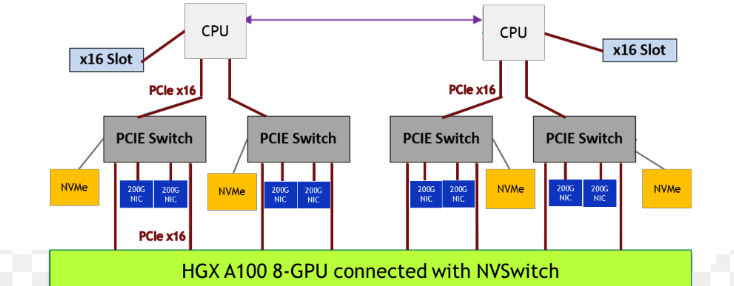
Figure 2.2 Sample Topology for Half a System#