
4. Platform Performance Suitability#
GPUDirect Storage benefits can be maximized under the conditions described in this section.
4.1. Bandwidth from Storage#
Bandwidth into GPUs from remote storage is maximized when the bandwidth from NICs or RAID cards matches the PCIe bandwidth into GPUs, up to the limits of IO demand. Diverse examples include 200 GbE NICs that match Gen 4 PCIe GPUs such as NVIDIA Ampere architecture and NDR400 CX8s or BlueField 3s that match Gen 5 PCIe GPUs such as Hopper.
For local storage, a larger number of drives is needed to approach PCIe saturation. The number of drives is of first order importance. It takes at least 4 x4 PCIe drives to saturate a x16 PCIe link. The IO storage bandwidth of a system is proportional to the number of drives. Many systems such as an NVIDIA DGX-2 can take at most 16 drives attached via the Level- 1 PCIe switches. The peak bandwidth per drive is of secondary importance. NVMe drives tend to offer higher bandwidth and lower latency than SAS drives. Some file systems and block systems vendors support only NVMe drives and non-SAS drives.
4.2. Paths from Storage to GPUs#
PCIe switches aren’t required to achieve some of the performance benefits, since a direct path between PCIe endpoints may pass through the CPU without using a bounce buffer.
Using PCIe switches can increase the peak bandwidth between NICs or RAID cards or local drives and GPUs. One level of switches on each PCIe tree can double potential bandwidth. For example:
Some HGX systems have Gen4 CPUs, which top out at 25 GB/s per tree. But A100 GPUs and CX6 NICs support 50 GB/s.
Having a PCIe switch that enables a direct data path between remote storage reached over the NICs and the GPUs can sustain 50 GB/s bandwidth using GDS, whereas if not for GDS, bandwidth would be reduced to the CPUs limit of 25 GB/s.
Storage controllers are an alternative to remote storage over NICs. Gen 4 RAID cards have been seen to deliver 26 GiB/s with GDS by bypassing the CPU.
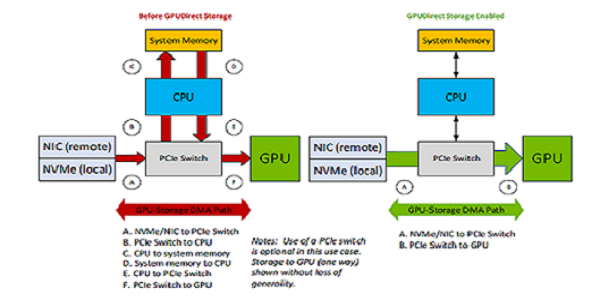
Figure 4.1 Comparing the Paths from Storage to the GPUs#
4.3. GPU BAR1 Size#
The GPU PCIe BAR1 aperture is relevant to DMA engines other than the CPU chipset DMA controller; it’s how they “see” GPU memory. GPUDirect Storage enables DMA engines to move data directly through the GPU BAR1 aperture into or out of GPU memory from devices other than the CPU. The transfer size might exceed the size of the current GPU BAR1 aperture. In such cases, the GPUDirect Storage software recognizes that, chunks the large transfers to fit, and uses an intermediate buffer in GPU memory for the DMA engine to copy into and the GPU to copy out of into the target buffer. This is handled transparently but adds some overhead.
Increasing the GPU BAR1 size, or choosing a GPU with a larger maximum BAR1 size, can reduce or eliminate such copy overheads.
Only a subset of GPUs expose the BAR1, including NVIDIA RTX and Data Center GPUs. Refer to GPUDirect Storage Release Notes for a list of GPUs with the proper support.