

mcap_logger_reference
mcap_logger_reference
Minimal reference application for common/mcap_logger. Every operator is a
holoscan::OnClock-driven generator (20 Hz) with no external driver, and every stream is
deterministic — computed from tick count rather than wall-clock time, so a run’s recorded values
are exactly reproducible regardless of scheduling jitter:
- Two
JointStateWaveOpinstances (joint_state_wave_op.h) each emit a single-jointisaac.JointStateCpu— one tracing a sine wave, the other a cosine wave, both with analytically-correct velocity, not just position (sine_joint_state/cosine_joint_state). - One
CircularMotionOp(circular_motion_op.h) emitsisaac.PoseCpu/isaac.TwistCpu/isaac.TransformCpu, all three describing the same constant-speed circular motion in the XY plane (circular_pose/circular_twist/circular_transform). - One
StaticCameraInfoOp(static_camera_info_op.h) emits a fixedisaac.CameraInfoCpusized to the rawImageCounterOpstream, demonstrating a realistic camera/CameraInfo pairing (camera_info). - Two
ImageCounterOpinstances (image_counter_op.h) each emit an RGB8holoscan.schema.Imagetensor-schema frame: a black background with a white bar that grows left-to-right and resets every 100 ticks (5s) — a simple, human-visible “this stream is advancing” indicator. One runs at 640x480 and is recorded raw (counter_image); the other runs at 1920x1080 and is recorded as hardware-encoded video (counter_image_encoded), only on a machine with a usable hardware video encoder — see “Hardware video encoder required” below.
HsdkMcapLogger attaches to all eight outputs (seven when this host cannot encode) and records them
to a single .mcap file.
Raw vs. encoded
The app records raw and hardware-encoded image topics:
The raw topic is byte-exact; the encoded topic is lossy. Encoded video has a metadata sidecar
for the holoscan.schema.Image fields. Raw images carry those fields in TensorFrame.
The mostly-black synthetic pattern does not represent real-camera compression ratios.
❓ Why are these synthetic recordings so small?
The raw topic stores 640 x 480 x 3 = 900 KiB of pixels per message, accounting for over 99% of the recording’s message bytes. The encoded topic carries nearly seven times the pixels per frame (1920 x 1080 = 2,073,600 against 640 x 480 = 307,200; 5.9 MiB uncompressed) in about 600 bytes per message plus 144 bytes of sidecar. Over a default 10-second run, that is roughly 184 MB of raw messages against 152 KB of encoded video and sidecar, a ratio of about 1200:1.
The resulting .mcap file is only about 1.1 MB: MCAP zstd-compresses the mostly-black raw
stream 183:1, while H.264 inter-frame coding collapses the near-static counter bar to 600 bytes.
Real 1080p motion at the default 10 Mbit/s would use about 60 KB per frame. Neither compression
ratio represents real camera data.
The two instances also use distinct header.frame_id values (camera and camera_encoded) so
their frames stay distinguishable once they are side by side in a viewer.
Recording both topics is not free: the app allocates and clears a fresh 5.9 MiB frame buffer every
50 ms for the 1080p stream on top of the 900 KiB one for the raw stream, and pushes roughly
18.4 MB/s of raw message bytes through the logger’s poll thread. That is comfortable on a desktop
dGPU — a default run drops nothing, with equal message counts on every channel — but this app is
also listed for aarch64, where the headroom is thinner. Shorten --duration-s or drop the
encoded attach if you are demonstrating the logger on a constrained target.
Hardware video encoder required for counter_image_encoded
counter_image_encoded only exists on a machine with a usable NVENC encoder on CUDA device 0. The
logger itself refuses to start a topic that asks for video on a GPU that cannot encode, rather than
quietly recording something else. So where there is no encoder — an A100 or H100, for instance,
ships a video decoder but no encoder — the app logs a warning, leaves that topic out entirely, and
records everything else. There is no counter_image_encoded or counter_image_encoded/metadata
channel in the file, no second Image panel to open, and the 1080p generator never runs, so its
bandwidth is not spent either. The startup line printed before the run says which case you are in.
Files
- reference_graph.h attaches each output to the logger. The two
ImageCounterOpinstances use contracts matching their resolutions; a size mismatch fails at runtime. The encoded output usesTopicLogOptions{.encode = VideoEncodeOptions{}}. - main.cc owns the logger and graph lifecycle. See the recording guide for startup and shutdown order.
- CMakeLists.txt registers the 1-second recording smoke test
test_mcap_logger_reference.
Usage
Run via ./isaac_os run (builds the container if needed, then runs the app):
The default record mode runs for 10 seconds and writes to mcap_logger_output/.
Pass app flags after --:
Pass --stream to also stream every topic live to a connected Foxglove Studio client while the
app runs (defaults to 127.0.0.1:8765; override with --websocket-host=/--websocket-port= if
the running host’s loopback isn’t reachable from wherever Foxglove Studio runs). Add --no-file
alongside --stream to skip writing an .mcap file entirely:
In Foxglove Studio, connect to ws://localhost:8765.
For remote access, follow the
SSH forwarding instructions.
See Foxglove playback for panel setup.
Either way, the app prints its resulting file path on exit, e.g.:
The default output directory is the git-ignored mcap_logger_output/ under the host repository
root. The printed /workspace/isaac_os/... path refers to the same bind-mounted directory.
For persistent custom output, set --output-path to a bind-mounted container directory.
The executable can also be run directly (e.g. from inside an existing container) as
mcap_logger_reference [--duration-s=10] [--output-path=<path>]; the default is then relative to
wherever it’s invoked from, not necessarily the repo root.
Example
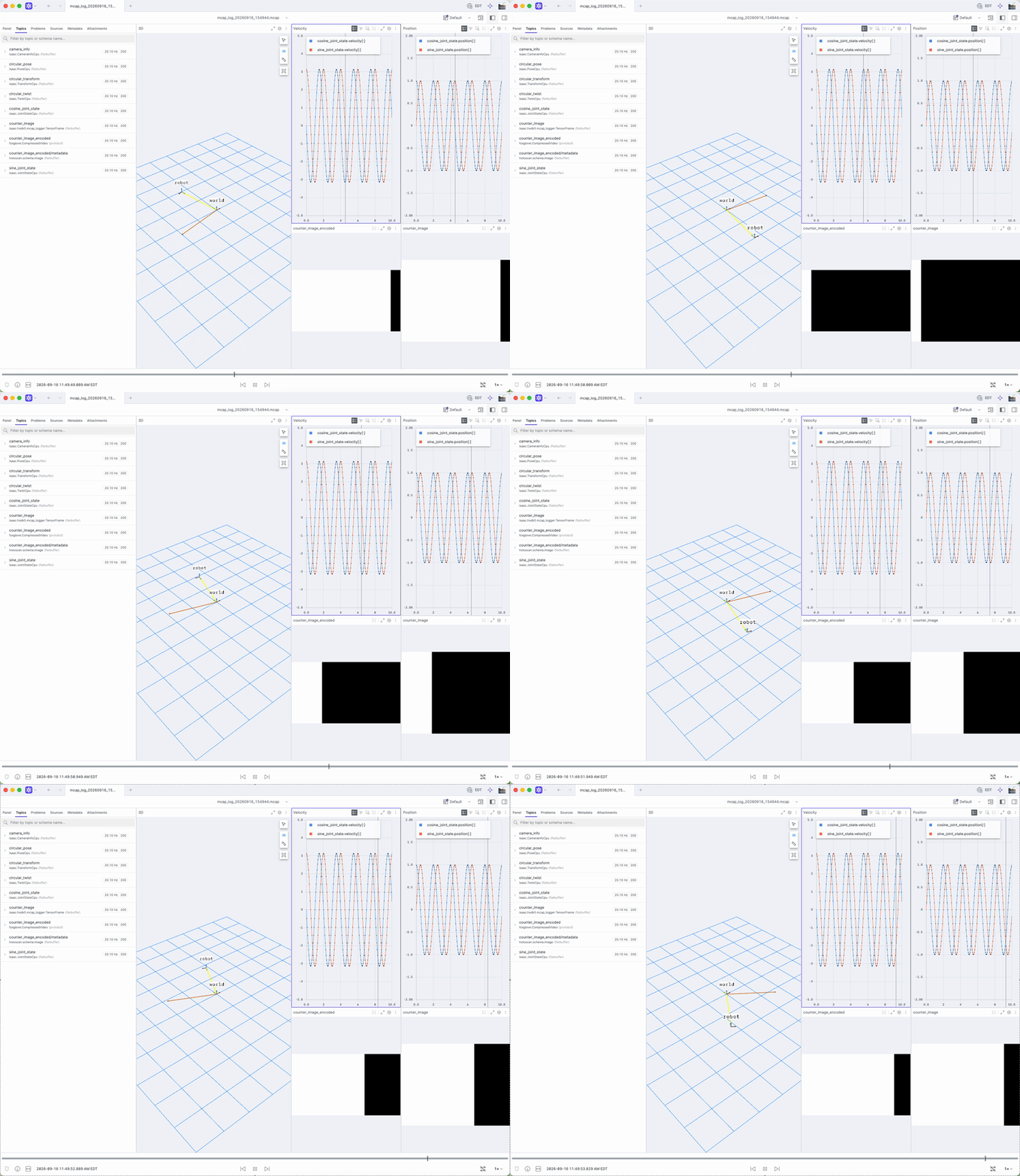
Foxglove showing the joint-state plots, circular-motion topics, and raw and encoded counter images:
Foxglove playback
File playback and live --stream connections use the same encodings and panel setup.
Native rendering of circular_pose, circular_twist, circular_transform, camera_info, and
counter_image requires the isaac-to-foxglove-converter extension.
All flatbuffer topics support Raw Messages and Plot panels without the extension.
The encoded video renders natively in an Image panel without the extension.
Follow the converter installation instructions.
Suggested panel layout:
- 3D panel: add
circular_pose,circular_twist, andcircular_transform— all three trace the same circle in lockstep (circular_pose/circular_transformare computed from the exact same position/orientation each tick, so they sit exactly on top of each other;circular_twistrenders as a solid-orange velocity arrow). Set the panel’s display frame toworld. - Two Image panels, side by side (one if this host cannot encode; see “Hardware video
encoder required” above): one on
counter_image(640x480, raw — needs the extension) and one oncounter_image_encoded(1920x1080, H.264 — works either way). Both show the same counter bar, but they differ in resolution as well as codec, so most of what stands out between them is scaling, not compression: the 1080p panel simply has more pixels to draw the same bar with. The codec artifact to actually look for is at the bar’s leading vertical edge, where H.264 softens or rings the raw stream’s hard black-to-white transition. Selectcamera_infoas the raw panel’s calibration topic (that part does need the extension); it is sized to the raw stream, so it does not apply to the 1080p one. - Plot panel:
sine_joint_state.position[0]/.velocity[0]andcosine_joint_state.position[0]/.velocity[0]— generic message-path plotting, same with or without the extension installed.
See MCAP replay to replay the recording into a graph.