


OP-TEE: Open Portable Trusted Execution Environment#
Applies to the Jetson AGX Thor series, the Jetson AGX Orin series, the Jetson Orin NX series, and the Jetson Orin Nano series.
Open Portable Trusted Execution Environment (OP-TEE) is an open-source trusted execution environment (TEE) based on Arm® TrustZone® technology, created by trustedfirmware.org, and maintained by Linaro.
The overall framework of OP-TEE combines with two major components: optee_os, which is the trusted side of the TEE (the secure world), and optee_client, which is the untrusted, or “normal,” side of the TEE (the normal world).
optee_os is a TEE operating system running at ARMv8 secure EL-1 level. It provides generic OS-level functions
like interrupt handling, thread handling, crypto services, and shared memory. It implements the
GlobalPlatform
TEE Internal Core API.
You can use this API to build Trusted Applications (TAs) that run in the secure world at ARMv8 secure EL-0 level.
optee_client has three components: a normal world user space library, a normal world PKCS #11 crypto interface library, and a normal world user space daemon.
The library libteec.so implements the GlobalPlatform TEE Client API,
which defines the interface that normal world Client Applications (CAs) use to communicate with the TA in the secure world.
The library libckteec.so implements the PKCS #11 Cryptographic Token Interface Base Specification Version 2.40 based on the TEE Client API and a PKCS #11 TA.
The daemon tee-supplicant implements some miscellaneous features for OP-TEE, such as file system access
to load the TAs from the normal world file system into the secure world.
OP-TEE Documentation is available on the Web. The documentation source files are in ReStructuredText (RST) format, and are available from the OPTEE/optee_docs project on GitHub.
The OP-TEE project also provides a sanity test suite,
optee_test,
which offers thousands of tests, collectively known as xtest. See the optee_test project itself and the
optee_test documentation
for more information.
OP-TEE in Jetson Linux#
OP-TEE in NVIDIA® Jetson™ Linux enables you to boot OP-TEE on supported Jetson devices. The version of OP-TEE in NVIDIA® Jetson™ Linux 38.4 is v4.4.0. The following sections explain how to set up and use OP-TEE.
This topic uses some terms that are specific to trusted applications and OP-TEE in particular:
ATF: Arm Trusted Firmware.
CA: Client Application.
TA: Trusted Application; any application that runs within OP-TEE.
TEE: Trusted Execution Environment, the secure environment provided by OP-TEE for running trusted applications.
TOS: An acronym for “Trusted OS.” OP-TEE is a TOS supported by Jetson Linux.
Architecture#
OP-TEE resides in a separate storage partition and boots as part of a chain of trust or a secure boot sequence. It creates two environments in a device with different security modes:
Non-Secure Environment (NSE): An environment for running software components in non-secure mode. This environment constitutes the “normal world.” A rich OS, such as Linux, typically runs in this environment.
Trusted Execution Environment (TEE): A separate environment that provides trusted operations and runs in a secure mode enforced by hardware. This environment constitutes the “secure world.” OP-TEE runs in this environment.
The normal world OS and OP-TEE software operate in a client-server relationship, with OP-TEE as the server.
Bootloader allocates a dedicated carveout, TZ-DRAM, to run OP-TEE or another secure OS. All secure operations are initiated by a client application running in the non-secure environment. A trusted application, in the secure world, never initiates contact with the non-secure environment.
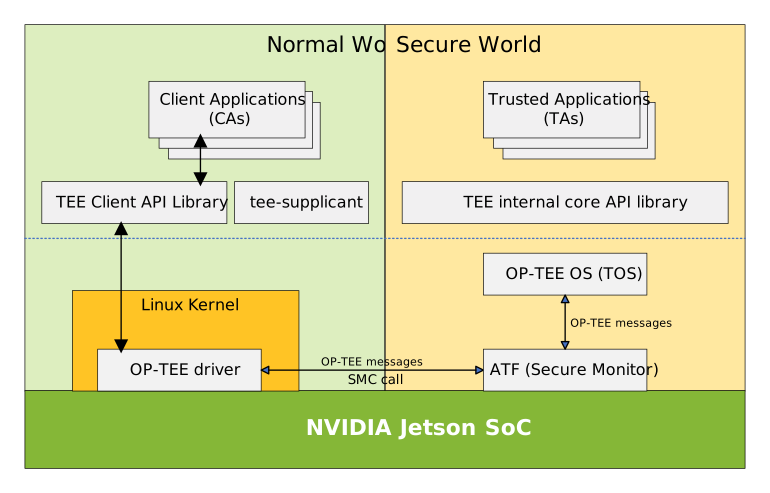
This diagram shows the relationships among the components:
Note
The Jetson Orin series doesn’t have S-EL2 support, so Hafnium (S-EL2) in the preceding diagram applies only to the Jetson AGX Thor series.
Execution Steps#
When a client application (CA) must perform a secure operation, it sends a request to a trusted application (TA) by calling functions in the TEE Client API library.
The TEE Client API library routes the request to the OP-TEE Linux Kernel Driver.
The OP-TEE Linux Driver routes the client application request to Arm Trusted Firmware (ATF).
A monitor routes the request to Hafnium (for the Jetson AGX Thor series) or OP-TEE OS (for the Jetson Orin series).
The Jetson Linux monitor implementation is based on ATF. For more information about ATF, see the Trusted Firmware A (TF-A).
For the Jetson AGX Thor series, Hafnium routes the request to OP-TEE OS.
The OP-TEE OS determines which trusted application (TA) is to handle the request.
The OP-TEE OS passes control to the TA to handle the request. When the TA needs to perform certain specific tasks, such as accessing secure storage or doing crypto operations, it can call functions defined in the TEE internal core API library to communicate with the OP-TEE OS and thereby accomplish these tasks.
Upon completion, execution control returns along the reverse path to the client application, which receives a return value and any processed data.
Trusted Application and Client Application Development#
This section gives a brief overview of the OP-TEE Trusted Application and Client Application (TA/CA) architecture.
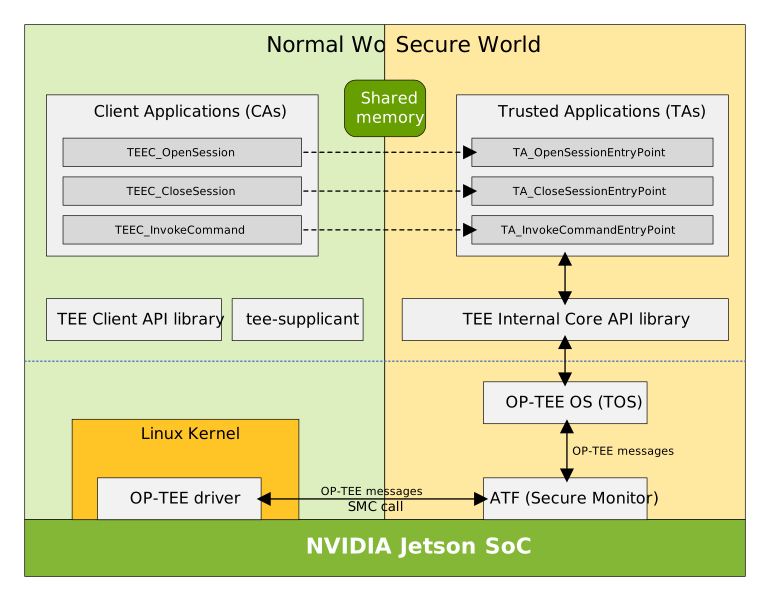
The OP-TEE TA/CA is a client-server model that follows the GlobalPlatform TEE API. The Client Application uses the TEE Client API to invoke the Trusted Application service in the secure world. The Trusted Application implements the functions defined by TEE Internal Core API Specification.
This diagram shows a simplified working model of the OP-TEE TA/CA and the APIs that the TAs must implement to support the model.
Note
The Jetson Orin series doesn’t have S-EL2 support, so Hafnium (S-EL2) in the preceding diagram applies only to the Jetson AGX Thor series.
Shared Memory is a memory block which the OP-TEE framework uses internally to communicate data between CAs in the non-secure world and TAs in the secure world. See the hello_world sample application in GitHub for a working example.
How to Cross Compiling a Trusted Application and Run it on Jetson Devices#
Download the appropriate Jetson-Linux toolchain from Jetson release page (https://developer.nvidia.com/embedded/jetson-linux-archive).
Create a folder and extract the toolchain in this folder:
mkdir jetson-toolchain
cd jetson-toolchain
tar xf <toolchain package>
Download the appropriate Jetson-Linux BSP source package from Jetson release page (https://developer.nvidia.com/embedded/jetson-linux-archive).
Create a folder, extract the BSP source package in this folder, and extract the nvidia-jetson-optee-source.tbz2 file.
mkdir jetson-public-srcs
cd jetson-public-srcs
tar xf <public_sources.tbz2>
cd Linux_for_Tegra/source
mkdir jetson-optee-srcs
cd jetson-optee-srcs
tar xf ../nvidia-jetson-optee-source.tbz2
To build the OP-TEE components (including the OP-TEE image, optee_client, and optee_test files), complete the steps in the
atf_and_optee_README.txtfile. This file is a part of thenvidia-jetson-optee-source.tbz2file. ATF and TOS image building is only needed when plan to change the Jetson OP-TEE.
Note
You need to build the Jetson OP-TEE source package because the user CA and TA building requires the optee_client and optee_os header files and configurations.
Run the following command to build your trusted application.
make -C <source directory> \
     CROSS_COMPILE="<jetson-toolchain-prefix>" \
     TA_DEV_KIT_DIR="<jetson-optee-srcs>/optee/build/<version>/export-ta_arm64/" \
     OPTEE_CLIENT_EXPORT="<jetson-optee-srcs>/optee/install/<version>/usr" \
     TEEC_EXPORT="<jetson-optee-srcs>/optee/install/<version>/usr" \
     -j"$(nproc)"
Replace the placeholders as follows:
<jetson-toolchain-prefix>is the cross-compiling toolchain:For the Jetson Orin series, the toolchain is
<toolchain root directory>/aarch64--glibc--stable-2022.08-1/bin/aarch64-buildroot-linux-gnu-.For the Jetson Thor series, the toolchain is
<toolchain root directory>/x-tools/aarch64-none-linux-gnu/bin/aarch64-none-linux-gnu-.
<version>is the version of the Jetson SoC:For the Jetson Orin series, the version is
t234.For the Jetson Thor series, the version is
t264.
Copy the CA to the
/usr/sbindirectory of your Jetson device.Copy the TA to the
/lib/optee_armtzdirectory of your Jetson device.You can now run the CA. When the CA requests services from the TA, OP-TEE automatically loads the TA from
/lib/optee_armtz.
How to Implement a New Trusted Application or Port an Existing One#
Every TA must conform to a structure determined by the TA/CA model, and when you design a new TA, it must conform too. See the
Trusted Applications
section of the OP-TEE official documentation for a detailed description with a hello_world example. This section explains useful concepts and shows you how to create and set up
a TA step by step from the beginning of the process through TA signing and encryption.
To port an existing TA from another TOS to OP-TEE, you must replace the application’s original API calls with calls to the GlobalPlatform TEE internal core API. For details, see the TEE Internal Core API section of the GlobalPlatform API OP-TEE documentation.
There are two groups of cryptographic functions you may use. The GlobalPlatform TEE Internal Core API provides procedures for using the cryptographic functions
provided by optee_os. Alternatively,you may use the
MbedTLS library,
which is bundled with optee_os. If the original TA already uses one of these groups of functions, no conversion is needed.
Types of Trusted Applications#
There are two types of TAs, user mode TAs and pseudo TAs (PTAs). See the Trusted Applications section in the “Architecture” chapter of the OP-TEE official documentation for a more detailed description. Jetson Linux provides secure sample apps for both types.
A user mode TA runs as a secure application at the ARMv8 S-EL0 exception level, which is the user space layer of the secure world. It gets OS services exclusively by calling the GlobalPlatform TEE Internal Core API. When you implement a new TA or port an existing TA from another TEE, it is of this type.
A pseudo TA runs at the ARMv8 S-EL1 exception level, which is the OS layer of the secure world. Running in this layer, a pseudo TA cannot use the GlobalPlatform TEE Internal Core API. If you need a specific secure function that the API does not provide, you can implement it in a pseudo TA and export it as a function to user mode TAs. For example, you can implement pseudo TAs to provide user mode TAs with access to hardware drivers.
Signing of Trusted Applications#
All REE Filesystem Trusted Applications need to be signed. The signature is verified by optee_os upon loading of the TA. For more details, refer to OP-TEE’s document about Signing of TAs.
Subkeys#
Subkeys is an implementation specific to OP-TEE that provides a public key hierarchy. Subkeys can be delegated to allow different actors to sign different TAs without sharing a private key.
Refer to OP-TEE’s document about Subkeys for more details.
Note
In production design, all TAs must be protected by signatures generated with a proper private key. We strongly recommended that you use the OP-TEE Subkeys to design a key hierarchy that protects each TA and prevents unsigned or improperly signed TAs from running.
EKB: Encrypted Key Blob#
Different security functions often need different types of keys to encrypt, decrypt, authenticate, and verify data. These keys are usually confidential and sensitive, and compromising them would have serious consequences. As a complement to fuse, Encrypted Key Blob (EKB) is designed to meet user’s requirement for additional storage for security keys and data. Its usage is completely defined by the user, making it flexible and scalable.
The EKB is encrypted by the EKB Encryption Key (EKB_EK) and authenticated by the EKB Authentication Key (EKB_AK), both of which are derived from a hardware-backed key (EKB Fuse Key). The EKB content is visible in plaintext only to the secure world. In this section, we will introduce how EKB works and how to use it. Although we designed EKB to store user keys, it can also be used to save any sensitive data.
Note
The EKB can be updated only through OTA but not at runtime.
An EKB binary is often named eks_<version>.img, which is the filename of the EKB binary that is flashed to the EKS partition by default. For example, the EKB binary for the Jetson Orin series is eks_t234.img and for the Jetson Thor series is eks_t264.img.
Note
Currently, the version of eks_t234.img is V2.0; the version of eks_t264.img is V2.1.
Prerequisites#
To better understand how EKB works, you need to understand the following specialized terms.
EKB Fuse Key#
An AES key that is burned into a fuse. This key is not visible to the software.
For the Jetson Orin series, OP-TEE uses the EKB fuse key during boot through the SE to derive EKB_RK, which is the EKB root key. The EKB fuse key has 256 bits and can be burned into the OEM_K1 fuse or the OEM_K2 fuse. We recommend that you use the OEM_K1 fuse as the EKB fuse key.
For the Jetson Thor series, PSC-BL1 uses the EKB fuse key during early boot through the PSC SE to derive TZ_RK, which is the TZ root key. The EKB fuse key has 256 bits and is burned into the PSC_OEM_KDK1 fuse.
KDS#
Abbreviation of Key Distribution System. In the Jetson Thor series, KDS provides a secure and fast way to transfer keys across multiple endpoints in chip without exposing them to SW.
During the early boot, PSC-BL1 derives the TZ root key from the EKB fuse key and moves it to KDS. OP-TEE or MB2 can then move the key from KDS to the SE keyslot to derive the usage root keys from the keyslots.
Keyslot#
A secure storage area in the Jetson Security Engine (SE) that protects the secure keys from unauthorized reading and writing.
For the Jetson AGX Orin series, the Jetson Orin NX series, and the Jetson Orin Nano series, during the early boot, PSC-BL1 loads the secure keys from fuse storage to the keyslots so that OP-TEE can use SE later to derive the keys from the keyslots.
TZ_RK#
The TZ root key, which is a 256-bit AES key derived from the PSC_OEM_KDK1 fuse (Jetson Thor series only).
Note
TZ_RK is the root key of many usage root keys, such as EKB_RK and HUK_RK. Do not use this key directly; use it to derive usage root keys. Then use the derived usage root keys to derive usage keys to encrypt and authenticate data.
EKB_RK#
The EKB root key, which is a 128-bit or 256-bit AES key.
For the Jetson Orin series, the key is a 128-bit AES key derived from OEM_K1 or OEM_K2.
For the Jetson Thor series, the key is a 256-bit AES key derived from the TZ root key (TZ_RK).
Note
Do not use this key directly; use it to derive keys. Then use the derived key to encrypt and authenticate data.
EKB_EK#
A 128-bit (for Jetson Orin series) or 256-bit (for Jetson Thor series) AES key that is derived from EKB_RK and is used to encrypt and decrypt the EKB.
EKB_AK#
A 128-bit (for Jetson Orin series) or 256-bit (for Jetson Thor series) AES key that is derived from EKB_RK, and it is used to authenticate EKB content.
Note
We strongly recommend that you use the same KDF as OP-TEE to generate different keys for different purposes. For example, use EKB_EK to encrypt and decrypt EKB content and use EKB_AK to authenticate EKB content.
SE#
The Jetson Security Engine.
MB2#
The Bootloader stage that passes the EKB to OP-TEE. The boot flow executes MB2 before OP-TEE is initialized.
Key Derivation Function (KDF)#
For the Jetson Orin series#
A key derivation function to derive EKB_EK and EKB_AK.
Pseudocode for the NIST-SP-800-108 AES-CMAC algorithm:
NIST-SP-800-108(KI, KO, L, context_string, label_string) {
    uint8_t count = 0x01;
    for (count=0x01; count<=L/128; count++) {
        AES-128-CMAC(key=KI, count || label_string || 0x00 || context_string || L, output=&KO[count*128]);
    }
}
KIis a 128-bit input key.KOis an output key.Lis a multiple of 128, the bit length of KO.context_stringandlabel_stringhave the values shown in the next table.
The following are the derivation parameters required to derive EKB_EK and EKB_AK from EKB_RK:
Parent key |
Derived Key |
context_string |
label_string |
|---|---|---|---|
|
|
“ekb” |
“encryption” |
|
|
“ekb” |
“authentication” |
Note
For information on how EKB_RK is generated, refer to EKB Generation.
For the Jetson Thor series#
A key derivation function to derive STATIC_RT_KDK1, TZ_RK, EKB_RK, EKB_EK, and EKB_AK from PSC_OEM_KDK1.
Pseudocode for the NIST-SP-800-108 HMAC-SHA256 algorithm:
NIST-SP-800-108(KI, KO, L, context_string, label_string) {
    uint8_t count = 0x00000001;
    for (count=0x01; count<=L/256; count++) {
        HMAC-SHA256(key=KI, count || label_string || 0x00 || context_string || L, output=&KO[count*256]);
    }
}
KIis a 256-bit input key.KOis an output key.Lis a multiple of 128, the bit length of KO.context_stringandlabel_stringhave the values shown in the next table.
The following are the derivation parameters required to derive STATIC_RT_KDK1, TZ_RK, EKB_RK, EKB_EK, and EKB_AK from PSC_OEM_KDK1:
Parent key |
Derived Key |
label_string |
context_string |
|---|---|---|---|
|
|
“STATIC_RT” |
0x00 |
|
|
“STATIC_RT_TZ” |
0x00 |
|
|
“ekb” |
“root” |
|
|
“ekb” |
“encryption” |
|
|
“ekb” |
“authentication” |
The following diagram illustrates the key hierarchy :

EKB Format#
The EKB format is designed to be as generic as possible, giving you full control of the actual key blob structure. The following is the EKB layout:

EKB Header#
The EKB header contains Header (which includes EKB_size, Magic, Major, and Minor), FV (Jetson Orin series only) or Reserved (Jetson Thor series only), and MAC. The EKB header is consumed and parsed by OP-TEE. It must match the following layout:

EKB_size is the length of the EKB binary starting from the Magic field. EKB_size is four bytes long, in little endian format. Its value must be 4 less than the length of the EKB binary in bytes.
Magic is eight bytes long, and must contain the exact string "NVEKBP\0\0".
Major is two bytes long and contains the current major version, which is 2.
Minor is two bytes long and contains the current minor version, which is 0 for the Jetson Orin series or 1 for the Jetson Thor series.
FV is a fixed vector that has a fixed 16-byte value. For Jetson Orin series, it is also used for the EKB_RK key derivation. It can be generated with a random number generator. We recommend using /dev/random or /dev/urandom. The following command generates a 16-byte random number and saves it in hexadecimal form:
$ openssl rand -rand /dev/urandom -hex 16 > fv_hex_file
Reserved is a reserved field in EKB version 2.1 (Jetson Thor series only).
EKB version |
FV |
|---|---|
1.0 |
A hardcoded 16-byte value. |
2.0 |
A random generated 16-byte value. |
2.1 |
A reserved field. |
MAC is a message authentication code, used to authenticate the data from content header to the end. It is generated by the AES-CMAC algorithm using EKB_AK.
EKB Content Header#
The EKB content header contains Content_header (this data included Content_size, Content_magic, and Reserved.) and IV. The EKB content header information is parsed by OP-TEE. It must match the following layout:

Content_size is the length of the encrypted EKB key data starting after the IV field. Content_Size is four bytes long and is in little endian format.
Content_magic is four bytes long and must contain the exact string "EEKB".
Reserved is an 8-byte field reserved for future use. Its default value is zero.
IV is 16 bytes long and is used to encrypt and decrypt the EKB key data with EKB_EK. IV can be generated with a random number generator. We recommend using /dev/random or /dev/urandom. The following command generates a 16-byte random number and saves it in hexadecimal form:
$ openssl rand -rand /dev/urandom -hex 16 > iv_hex_file
EKB Key Format#
The EKB content can contain any number of keys or similar data and is ended by a End_tag1 (0000) and a End_tag2 (0000). The EKB content format is as follows:

Key_tag is the type of data stored in the EKB. Key_tag is four bytes long and is in little endian format.
Key_len is four bytes long and indicates the length of the data that follows.
Key is the data content of the tag. The data content length is indicated by Key_len.
You can add additional keys or data to the EKB by adding key or data that conform to the EKB key format (key_tag, Key_len, Key) and extending the script (see Tool for EKB Generation) to support additional keys.
EKB Binary Size Restrictions#
For security reasons, an EKB binary must be at least 1024 bytes long, and it must not exceed the EKS partition size. If the size of an EKB binary is not in this range, flashing fails.
If you have very little EKB content, the EKB generation tool pads the EKB binary to a length of at least 1024 bytes. The jetson-user-key PTA in OP-TEE decrypts the entire binary and then discards the padding.
EKB Generation#
The sample EKB layout is intended to help you design a sufficiently secure mechanism to protect private data in the EKB. It stores user-defined keys in the EKB. As the figures under EKB Format show, you can easily extend EKB content, for example, by adding EKB keys in the EKB key format for multiple keys.
NVIDIA recommends that you use the EKB layout described in EKB Format. However, you can always replace it with a customized layout.
The following will describe the generation process of EKB in more detail through the formula.
Define a format for the EKB content and generate the EKB content in plaintext.
Generate a symmetric key as an EKB fuse key. For both the Jetson Orin series and the Jetson Thor series, the key size is 256 bits.
Burn the EKB fuse key into the device’s fuse.
For the Jetson Orin series, the fuse is
OEM_K1orOEM_K2. We recommend usingOEM_K1.For the Jetson Thor series, the fuse is
PSC_OEM_KDK1.
For more information about the fuses, see the Fuse Specification Application Note for your Jetson device.
Generate a random FV and save it to the
FVfield in the EKB header (Jetson Orin series only).Derive
EKB_EKandEKB_AKby using the following formulas:For the Jetson Orin series:
Compute
EKB_RKby using AES ECB encryption based on the following formula:EKB_RK= AES-128-ECB(FV, EKB fuse key)Derive
EKB_EKandEKB_AKby using AES-CMAC encryption based on the NIST-SP-800-108 KDF:EKB_EK= NIST-SP-800-108-KDF(Key =EKB_RK, Label = “encryption”, Context = “ekb”)EKB_AK= NIST-SP-800-108-KDF(Key =EKB_RK, Label = “authentication”, Context = “ekb”)
For the Jetson Thor series:
Derive
EKB_EKandEKB_AKby using HMAC-SHA256 encryption based on the NIST-SP-800-108 KDF:STATIC_RT_KDK1= NIST-SP-800-108-KDF(Key =OEK_KDK1, Label = “STATIC_RT_KDK1”, Context = 0x00)TZ_RK= NIST-SP-800-108-KDF(Key =STATIC_RT_KDK1, Label = “STATIC_RT_TZ_KDK1”, Context = 0x00)EKB_RK= NIST-SP-800-108-KDF(Key =TZ_RK, Label = “ekb”, Context = “root”)EKB_EK= NIST-SP-800-108-KDF(Key =EKB_RK, Label = “ekb”, Context = “encryption”)EKB_AK= NIST-SP-800-108-KDF(Key =EKB_RK, Label = “ekb”, Context = “authentication”)
Generate a random IV and save it in
IVfield in EKB content header, encrypt theContent (plaintext)withEKB_EKandIV, using the desired crypto algorithm to obtain theContent (ciphertext).Content (ciphertext)= AES-CBC(IV,EKB_EK,Content (plaintext))Concatenate the
Content_header,IV, and theContent (ciphertext).EKB_content=Content_header+IV+Content (ciphertext)Calculate the MAC of the
EKB_contentwithEKB_AK, using the desired crypto algorithm to obtain a MAC and save it to theMACfield ofEKB_header.MAC= AES−CMAC(Key =EKB_AK,EKB_content)Concatenate
EKB_headerandEKB_contentas described in EKB Format. The resulting file is a fully generated EKB binary.EKB=EKB header+EKB_contentFlash the EKB binary to the Jetson device’s EKS partition.
The following flow diagram illustrates the EKB generation process for the Jetson Orin series :

The following flow diagram illustrates the EKB generation process for the Jetson Thor series :

Tool for EKB Generation#
Before you generate the EKB with your own EKB fuse key, ensure that the key is burned into the corresponding fuse.
You can generate user-defined keys separately by running the openssl tool from the command line and store them in different files.
Note
The current JetPack release supports EKB version 2.0 for the Jetson Orin series and EKB version 2.1 for the Jetson Thor series. The extraction in jetson-user-key PTA for the Jetson Orin series is backward compatible; it still supports EKB version 1. But the extraction in jetson-user-key PTA for the Jetson Thor series is not backward compatible because the EKB fuse key is changed.
The following example shows you how to run the EKB generation tool for the Jetson Orin series and Jetson Thor series:
$ python3 gen_ekb.py -chip t234
                     -oem_k1_key <oem_k1.key> \
                     -in_sym_key <sym_t234.key> \
                     -in_sym_key2 <sym2_t234.key> \
                     -in_auth_key <auth_t234.key> \
                     -out <eks_t234.img>

$ python3 gen_ekb.py -chip t264
                     -oem_kdk1_key <oem_kdk1.key> \
                     -in_sym_key <sym_t264.key> \
                     -in_sym_key2 <sym2_t264.key> \
                     -in_auth_key <auth_t264.key> \
                     -out <eks_t264.img>
<oem_k1.key>is the key that is stored in theOEM_K1fuse (Jetson Orin series only).<oem_kdk1.key>is the key that is stored in thePSC_OEM_KDK1fuse (Jetson Thor series only).<sym_t234.key>and<sym_t264.key>are the UEFI payload encryption keys.In the current L4T reference implementation, this is the UEFI payload encryption key provided by the
--uefi-encoption in the flash command. (For more information, refer to Prepare the User Key in the topic Secure Boot.)Note
The UEFI payload encryption is currently not supported in the Jetson AGX Thor series.
<sym2_t234.key>and<sym2_t264.key>are the disk encryption keys.The disk encryption key is used in two reference implementations. One is the secure sample implemented by hwkey-agent and hwkey-app. This sample uses the key for data encryption and decryption. In the other case, the key is the source key of the key generation of the LUKS key in the disk encryption reference implementation.
<auth_t234.key>and<auth_t264.key>are the UEFI variable authentication keys.In current L4T reference implementation, this is the UEFI Variable Protection key. The authentication key is saved in EKB and used by OP-TEE.
<eks_t234.img>or<eks_t264.img>is the respective output image file, which is intended to be flashed into the EKS partition of the device.
Note
For both the Jetson Orin series and the Jetson Thor series, you can copy and substitute
<Linux_for_Tegra>/bootloader/eks_<version>.imgby using the EKS image you create. As described in the EKB generation section, the EKS image is encrypted and signed by the theEKB_EKandEKB_AKkeys derived from EKB fuse key (OEM_K1for the Jetson Orin series andPSC_OEM_KDK1for the Jetson Thor series).To test the EKS feature on a board where the EKB fuse key has not been burned, OP-TEE uses a pre-defined hard-coded key instead of a fuse key. However, after the
OemKeyValidbit ofBootSecurityInfofuse orSecurityModefuse is burned (ensure that the fuse key is burned before theSecurityModefuse is burned), the EKS image must be created withEKB_AKas the signing key andEKB_EKas the encryption key. Refer toexample.sh, which is the script in the OP-TEE source package that generates the default EKS image with the test key.To update the EKS image in the EKS partitions with Capsule update, refer to To Customize the BUP.
EKB Extraction#
The following outline shows the most logical sequence of operations for extracting information from an EKB. It is essentially the reverse of the
process for EKB generation. During boot, the jetson-user-key PTA in OP-TEE performs the following steps:
PSC prepares
TZ_RK(Jetson Thor series only) orOEM_K1(Jetson Orin series only) for OP-TEE:Derive
EKB_EKandEKB_AK. (Refer to theEKB_EKandEKB_AKgeneration process in EKB Generation.)Authenticates
EKB_contentwithEKB_AKandMACstored in the EKS image using the chosen crypto algorithm.MAC= AES−CMAC(EKB_AK,EKB_content)If authentication is successful, decrypts
EKB_contentwithEKB_EKandIVfromEKB_content_header, using the chosen crypto algorithm to obtain plaintext.Content (plaintext)= AES−CBC(IV,EKB_EK,Content (ciphertext))Extracts user keys in EKB key format from
Content (plaintext), stores the keys in a linked list, and then uses the keys as needed within the PTA.
The following flow diagram illustrates the EKB extraction process for the Jetson Thor series:

The following flow diagram illustrates the EKB extraction process for the Jetson Orin series:

EKB Extraction Sample#
For an example of how to perform EKB extraction, see the source code of the jetson-user-key PTA in OP-TEE.
SE Keyslot Clearing#
The fuse keys are loaded into keyslots during an early boot stage before OP-TEE runs. Because software cannot read them back from the keyslots, a TA can only derive the keys from the keyslots through SE. After the EKB fuse key in the keyslot is being used, the EKB fuse key no longer needs to persist in the keyslot. To prevent a component from using this key after the device boots, we strongly recommend that you wipe the key from the keyslot.
The person who uses the EKB fuse key is responsible for clearing the key. You can clear the keyslot by calling the tegra_se_clear_aes_keyslots() function provided by the SE driver.
Sample Applications#
The following diagram shows an overview of secure sample applications provided by Jetson Linux:
A PTA,
jetson-user-keyPTA in the OP-TEE OS.Three CAs and TAs:
hwkey-agentTA andluksTA with corresponding CAs in the normal world user space, andcpubl-payload-decTA with the corresponding CA in L4T Launcher.

Jetson User Key PTA#
The Jetson user key TA is a pseudo-TA that is bundled with OP-TEE OS and runs at the OS layer. This TA provides APIs to the user TA and exports these APIs to the user TA via the GlobalPlatform TEE API.
Note
Before studying the service interface of this PTA, you should understand how the GlobalPlatform TEE API defines the application communication interface and flow. This pattern applies to communication between TA and TA, TA and PTA, and CA and TA.
The user TA initializes a session with the PTA using
TEE_OpenTASession. Establishing a session requires theUUIDof the PTA as input so that it knows which PTA to communicate with.After the session is created, the TA calls the service in the PTA using
TEE_InvokeTACommand, with the command ID and parameters stored in the structureTEE_Param. TheTEE_Paramstructure can store two types of data, a value or a memory reference pointer.
The jetson-user-key PTA provides EKB key management, user key services, random number generator, key derivation function, and CPUBL payload decryption services.
EKB Key Management#
The jetson-user-key PTA shows how to derive keys from the SE keyslot and derive other keys for different security purposes.
OEM_K1: Root key forRPMB_KeyandEKB_RK(Jetson Orin series only).OEM_K2: Root key forSSK_RK(Jetson Orin series only).PSC_OEM_KDK1: Root key forEKB_RKandHUK_RK(Jetson Thor series only).RPMB_Key: Per-device unique key derived fromOEM_K1. This key should be provisioned to the eMMC device and generated at runtime. The runtime generated key must be exactly the same as the key provisioned to the eMMC device.Note
EMMC RPMB is not supported for the Jetson Thor series.
SSK_RK: Per-device unique key derived fromOEM_K2(Jetson Orin series only). You can use it to encrypt data that is bound to the device. Thejetson-user-keyPTA does not use this key, but only shows how to derive it.HUK_RK: Hardware unique key derived fromTZ_RK(Jetson Thor series only).User Keys: User-defined keys stored in the EKB.
The jetson-user-key PTA extracts user-defined keys from EKB and saves the keys into a linked list. For security reasons, all the keys should not leave the jetson-user-key PTA, at least not leave the secure world, and the PTA services can only be accessed by user TA.
User Key Services#
The jetson-user-key pta provides three APIs for users to get keys.
The user space TA can get a derived key from the user-defined keys through
jetson-user-keyPTA interface via command IDJETSON_USER_KEY_CMD_GEN_KEYandKey_tag.The user space TA can get a per-device unique derived key from a user-defined keys through
jetson-user-keyPTA interface via command IDJETSON_USER_KEY_CMD_GEN_UNIQUE_KEY_BY_EKBandKey_tag.The user space TA can also get the user keys through the
jetson-user-keyPTA interface directly via the command IDJETSON_USER_KEY_CMD_GET_EKB_KEYandKey_tag.
Note
Although we provide the API for the user TA to directly get the user keys, we do not recommend doing so because it will cause the user key to leave the jetson-user-key PTA.
Random Number Generator#
The GlobalPlatform TEE Internal API provides an interface for the user TA to get random numbers from OP-TEE. This hooks into HW RNG.
/* Cryptographic Operations API - Random Number Generation Functions */

void TEE_GenerateRandom(void *randomBuffer, uint32_t randomBufferLen);
In addition to this, the user TA can also access the hardware RNG through jetson-user-key PTA interface via the command ID JETSON_USER_KEY_CMD_GET_RANDOM.
Key Derivation Function#
The software-based NIST-SP 800-108 KDFs in jetson-user-key PTA is implemented by a counter-mode KDF with AES-CMAC and HMAC-SHA256 as PRF.
/*
 * Software-based NIST-SP 800-108 HMAC KDF and NIST-SP 800-108 CMAC KDF
 * derives keys from a key in a key buffer.
 *
 * key          [in] input key for derivation.
 * key_len      [in] length in bytes of the input key.
 * context      [in] a pointer to a NIST-SP 800-108 context string.
 * context_len  [in] length in bytes of the contexct.
 * label        [in] a pointer to a NIST-SP 800-108 label string.
 * label_len    [in] length in bytes of the label.
 * dk_len       [in] length of the derived key in bytes;
 *                   may be 16 (128 bits) or any multiple of 16.
 * out_dk       [out] a pointer to the derived key. The function stores
 *                    its result in this location.
 */
 TEE_Result nist_sp_800_108_hmac_kdf(const uint8_t *key,
                                     uint32_t key_len,
                                     char const *context,
                                     uint32_t context_len,
                                     char const *label,
                                     uint32_t label_len,
                                     uint32_t dk_len,
                                     uint8_t *out_dk);

 TEE_Result nist_sp_800_108_cmac_kdf(const uint8_t *key,
                                     uint32_t key_len,
                                     char const *context,
                                     uint32_t context_len,
                                     char const *label,
                                     uint32_t label_len,
                                     uint32_t dk_len,
                                     uint8_t *out_dk);
The user TA can access the software-based NIST 800-108 KDF through the jetson-user-key PTA interface via the command ID JETSON_USER_KEY_CMD_GEN_KEY.
Note
The default Key Derivation Function for Jetson Orin series is nist_sp_800_108_cmac_kdf, and the default Key Derivation function for Jetson Thor series is nist_sp_800_108_hmac_kdf.
CPUBL Payload Decryption Services#
The jetson-user-key PTA provides UEFI payload decryption services, supporting decryption of UEFI payloads during the boot process. The PTA gets the UEFI payload encryption key from the user key linked list and then uses the key to decrypt the UEFI payload.
Note
The CPUBL payload decryption is currently not supported in the Jetson AGX Thor series.
HWKEY AGENT CA and TA#
The hwkey-agent CA is a command-line program that illustrates how to encrypt and decrypt data using user-defined keys stored in the EKB and get random numbers from the hwkey-agent TA.
This hwkey-agent TA is a user space TA that provides two functions for the hwkey-agent CA: data encryption and decryption, and getting random numbers.
Data Encryption and Decryption#
Typically, the hwkey-agent CA issues a request to encrypt or decrypt data, and then the hwkey-agent TA transparently transmit the request to the jetson-user-key PTA to get a derived key based on a pre-defined user key stored in EKB, and then hwkey-agent TA uses this key to encrypt or decrypt the data.
For demonstration only, the jetson-user-key PTA uses the disk encryption key to derive the encrypt or decrypt key.
Get a Random Number#
Typically, the hwkey-agent CA issue a request to get a random number, and then the hwkey-agent TA does not process the request directly but instead transparently transmit the request to the jetson-user-key PTA to get a random number based on hardware RNG.
LUKS CA and TA#
This is the disk encryption CA and TA. Typically, the luks CA communicates with the luks TA to retrieve the passphrase. The luks TA supports disk encryption functionality with one-time passphrase generation during boot time to unlock the encrypted disk.
Refer to Disk Encryption for more information about the luks CA and TA.
CPUBL Payload Decryption CA and TA#
The L4T launcher takes the role of the cpubl-payload-dec CA, and communicates with cpubl-payload-dec TA to decrypt the UEFI payloads (Kernel, Kernel-DTB and Initrd).
Typically, the cpubl-payload-dec CA (L4T launcher) sends a decryption request to the cpubl-payload-dec TA at boot time. After receiving the request, the cpubl-payload-dec TA passes the request to jetson-user-key PTA, which performs the image decryption operation by using a pre-assigned user key stored in EKB. (For more information, refer to sym_t234.key and sym_t264.key in Tool for EKB Generation.)
For more information about the cpubl-payload-dec CA and TA, refer to UEFI Payload Encryption.
Note
The CPUBL payload decryption is currently not supported in the Jetson AGX Thor series.
PKCS #11 Support in OPTEE#
Cryptoki Introduction#
In cryptography, PKCS #11 is one of the Public-Key Cryptography Standards and refers to the programming interface used to create and manipulate cryptographic tokens, where the secret is a cryptographic key.
The PKCS #11 standard defines a platform-independent API for interacting with cryptographic tokens, such as hardware security modules (HSM) and smart cards. The API is officially named _Cryptoki_ (derived from “cryptographic token interface” and pronounced as “crypto-key”). However, PKCS #11 is often used interchangeably to refer to the API and the standard that defines it.
This API specifies the most commonly used cryptographic object types (RSA keys, X.509 certificates, DES/Triple DES keys, etc.) and all the functions needed to create, generate, modify, delete, and use these objects.
The primary goal of PKCS #11 is to allow applications to securely and consistently use the features of cryptographic tokens. This enables developers to focus on their application’s functionality without worrying about the intricacies of token-specific interfaces.
Some key features of PKCS #11 include token management, key management, encryption, and decryption.
Token Management#
The ability to manage and configure cryptographic tokens, such as loading or unloading keys.
Key Management#
The ability to create, store, and retrieve encryption keys.
Encryption and Decryption#
The ability to perform various types of encryption and decryption operations.
For more details about PKCS #11, please refer to PKCS #11 Cryptographic Token Interface Base Specification Version 2.40.
Cryptoki Implementation in OPTEE#
The Cryptoki specific implementation in OP-TEE is located in the libckteec directory of optee_client, which complies with the PKCS #11 Cryptographic Token Interface Base Specification Version 2.40. The source code is located in the src subdirectory, and to build your own PKCS #11 application, you need to include the header files in the include subdirectory.
This diagram shows the relationships among the components:

Note
The Jetson Orin series doesn’t have S-EL2 support, so Hafnium (S-EL2) in the preceding diagram applies only to the Jetson AGX Thor series.
You can visit PKCS #11 Driver to learn how to integrate PKCS #11 in Linux user land with OPTEE.
PKCS #11 TA#
The PKCS #11 TA is the trusted application that supports PKCS #11 in OPTEE. It serves as the backend of for libteec, with its specific implementation located in the ta/pkcs directory of optee_os. This is a user TA, implemented and maintained by OPTEE. The source code is located in the src subdirectory. To call the PKCS #11 TA, you need include the header files in the include subdirectory.
PKCS #11 SAMPLE CA#
For a working example of Cryptoki in action, refer to the PKCS #11 Sample Application located in the app/samples/pkcs11-sample directory. This application primarily demonstrates the usage of C_GenerateKey to generate keys and C_WrapKey to wrap keys and unwrap keys from the wrapped key object.