

Compare Policies#
Did the stronger slip penalty reduce foot motion during contact? For each command, check whether the robot finished the trial, how closely it followed the command, and how much its feet moved during contact. Then watch the recordings to see what might explain the results. Use the procedure in Evaluating Learned Policies.
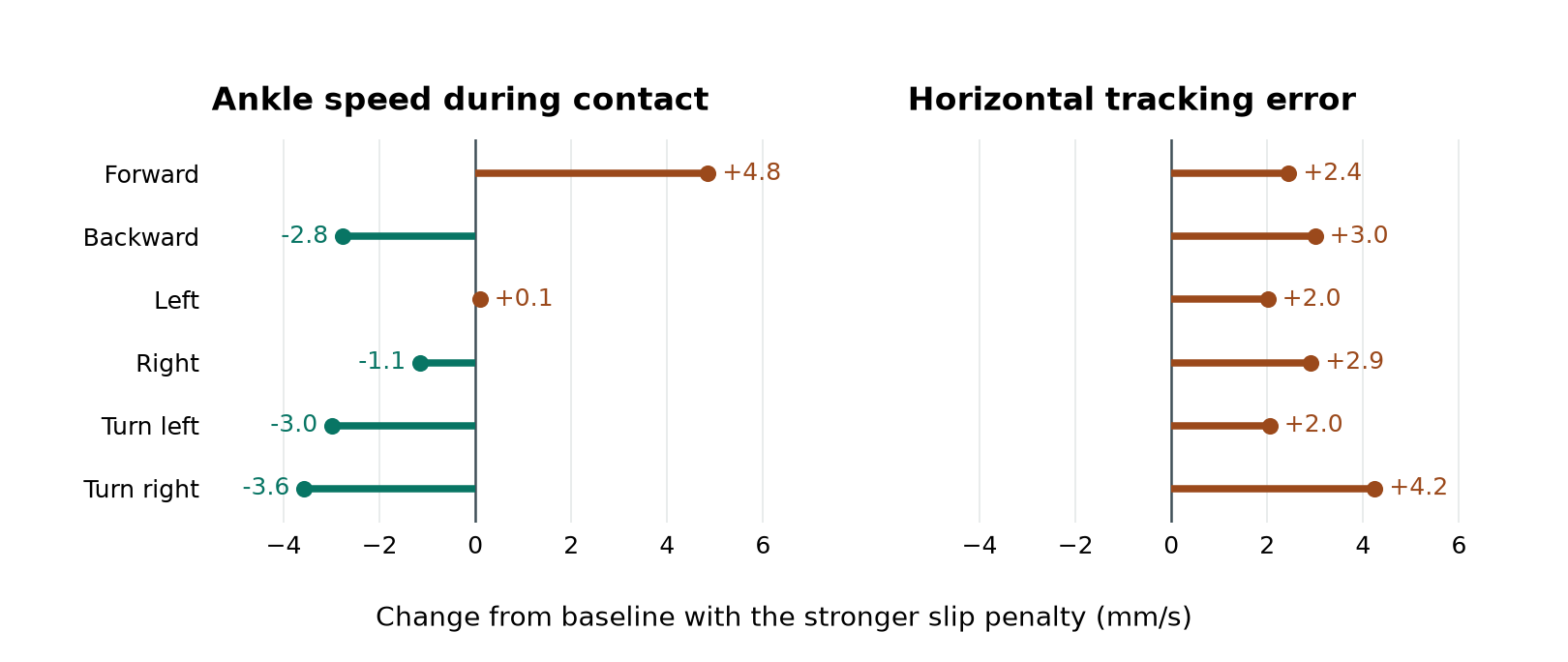
Each dot shows the stronger-penalty policy’s result minus the baseline’s for one command. Zero means the two policies had the same measured value. Both ran 16 trials per command with evaluation seed 123. Which commands show a tradeoff between ankle speed and tracking?#
Keep the Evaluation Conditions Fixed#
You’ll test seven commands. Ask Microduck to stand, walk forward or backward at 0.2 m/s, walk left or right at 0.15 m/s, or turn left or right at 0.5 rad/s. Each command gets 16 trials in parallel with a fixed seed. The evaluator measures the first episode of each trial, up to 20 seconds. Head and body commands are neutral, pushes and curricula are off, and the task’s play-mode physics and observations apply. Manager-added observation noise is off, while modeled IMU (inertial measurement unit) misalignment and latency remain. Physical properties are randomized at startup and reset within the configuration’s initial ranges because the curriculum is off.
The recorder measures the robot at the end of each control step, before any reset. It stops counting when the trial fails or reaches the time limit. That keeps the fresh starting pose from making a failed trial look better.
Measurement |
What to look for |
|---|---|
Completion and failure fractions |
How many trials reach the time limit versus terminate early |
Mean survival time |
Whether errors are measured over a full trial or only a short attempt |
Requested and mean measured velocity |
Whether each motion component follows the intended direction; averages can hide oscillation |
Horizontal velocity error |
How closely motion follows the requested translation |
Yaw-rate error |
How closely turning follows the request |
Foot ordering during forward/backward travel |
Whether each foot repeatedly passes the other; inspect each trial after settling |
Contact-ankle RMS speed |
Root-mean-square (RMS) planar ankle-frame speed during detected contact; both sliding and foot rotation can contribute |
Squared action change |
How abruptly joint-position requests change between control steps |
Tracking errors include only each trial’s survival time. Read them alongside
failure rates: an early fall can produce a deceptively small error average.
The evaluator records checkpoint hash, seed, conditions, per-command results,
and a per_trial row for every first episode.
Read the Evaluation Records
The evaluator marks a trial as failed if the simulation enters an invalid
state. It leaves the invalid sample out of the averages and reports how many
samples it used in valid_metric_samples. Each command’s average includes
every valid step across its trials, so longer trials count for more. Look at
per_trial to see how the results vary by trial. A missing measurement is JSON null. Check invalid_state_trials
before interpreting a mean.
The supplied walking and comparison checkpoints include per-trial reports for
evaluation seeds 123 and 456. The tables below use Isaac Lab 3 and seed 123;
files ending in -seed456.json record the second evaluation.
The JSON field contact_foot_speed_rms_m_s measures the ankle-frame proxy
described above.
Run a Matched Comparison#
Before viewing the comparison, choose a practically useful decrease in ankle speed and an acceptable increase in tracking error. Write down both limits and explain your choices.
Run the commands from the root of your IsaacLabTutorial checkout after
registering Course-Microduck-LessSlip-v0 in lesson 8. Use the same
scripts/evaluate.py you used to check the walking policy in lesson 6.
Choose the policies from your matched training runs or the supplied checkpoints.
Expect the gait check to expose failures as well as successes. In the supplied seed-123 reports, the baseline passes, but the stronger-penalty policy fails the backward-gait check. The evaluator saves its JSON report before returning a nonzero exit status. Read that report alongside tracking and foot speed when deciding whether to keep the change.
Find the checkpoints from the two continuation runs in the previous lesson:
find logs/rsl_rl/course_microduck_walk_symmetry \
    -type f -path '*comparison_baseline*/model_*.pt' | sort
find logs/rsl_rl/course_microduck_less_slip_symmetry \
    -type f -path '*comparison_less_slip*/model_*.pt' | sort
Choose the matched pair of runs, then the highest numbered saved checkpoint within each. Compare checkpoint numbers numerically, not by position in the alphabetical listing. Both continuations must start from the same policy and receive the same additional training budget; do not compare the fresh walking run with only one continuation.
Replace the directory placeholders with the full paths from your listing,
including logs/rsl_rl/, the experiment directory, and the timestamped run
directory. Replace the model filenames with the ones you selected. The course’s
250-update continuations from the supplied walking policy end at model_8249.pt;
a different starting checkpoint can produce different numbers.
BASELINE_RUN_DIR='<baseline-run-directory>'
LESS_SLIP_RUN_DIR='<less-slip-run-directory>'
BASELINE_MODEL_FILE='model_8249.pt'
BASELINE_CHECKPOINT="$BASELINE_RUN_DIR/$BASELINE_MODEL_FILE"

uv run python scripts/evaluate.py \
    --task Course-Microduck-Walk-v0 --trials 16 --seed 123 --check-gait \
    --checkpoint "$BASELINE_CHECKPOINT" \
    --output results/comparison-baseline.json
LESS_SLIP_MODEL_FILE='model_8249.pt'
LESS_SLIP_CHECKPOINT="$LESS_SLIP_RUN_DIR/$LESS_SLIP_MODEL_FILE"

uv run python scripts/evaluate.py \
    --task Course-Microduck-LessSlip-v0 --trials 16 --seed 123 --check-gait \
    --checkpoint "$LESS_SLIP_CHECKPOINT" \
    --output results/comparison-less-slip.json
Use checkpoints/microduck/comparison-baseline.pt and
checkpoints/microduck/comparison-less-slip.pt from your IsaacLabTutorial checkout
to skip the training jobs.
BASELINE_CHECKPOINT='checkpoints/microduck/comparison-baseline.pt'

uv run python scripts/evaluate.py \
    --task Course-Microduck-Walk-v0 --trials 16 --seed 123 --check-gait \
    --checkpoint "$BASELINE_CHECKPOINT" \
    --output results/comparison-baseline.json
LESS_SLIP_CHECKPOINT='checkpoints/microduck/comparison-less-slip.pt'

uv run python scripts/evaluate.py \
    --task Course-Microduck-LessSlip-v0 --trials 16 --seed 123 --check-gait \
    --checkpoint "$LESS_SLIP_CHECKPOINT" \
    --output results/comparison-less-slip.json
Inspect the Comparison Checks
--check-gait applies the forward/backward gait check
to both policies. The other five commands still report completion, tracking,
and foot-motion measurements. Repeat with --seed 456 and a different output
filename to check another set of starting conditions.
Read the results side by side. Did contact-ankle speed decrease? Did completion or tracking suffer? Which command exposed the largest difference? Then replay that behavior to investigate what the metric might be measuring.
The supplied results describe particular checkpoints, training budgets, and seeds. Repeat the matched experiment with additional training seeds to learn whether the tradeoffs persist across runs.
Decide Whether the Stronger Penalty Helped#
Use the supplied results to answer the hypothesis from the previous lesson. Did a stronger slip penalty reduce the ankle-speed proxy without making tracking or stability worse? Your goal is to make a decision and name the evidence behind it.
Both policies started from walk.pt, kept symmetry augmentation enabled, and
received 250 more training updates with the same settings except slip weight.
Both completed all 112/112 trials on Isaac Lab 3 with evaluation seed 123.
Lower values are better for the measurements below:
Command and measurement |
Baseline (−0.1) |
Stronger penalty (−0.5) |
What changed? |
|---|---|---|---|
Right: contact-ankle speed (m/s) |
0.0530 |
0.0518 |
Lower ankle speed |
Right: horizontal tracking error (m/s) |
0.0438 |
0.0467 |
Worse tracking |
Forward: contact-ankle speed (m/s) |
0.0449 |
0.0498 |
Higher ankle speed |
Forward: horizontal tracking error (m/s) |
0.0318 |
0.0342 |
Worse tracking |
Interpret the tradeoff: The stronger penalty lowered contact-ankle speed in four of the six moving commands, while horizontal tracking error increased in all six. Forward travel improved neither measurement. In backward travel, only 12/16 trials passed the foot-order criterion, compared with 16/16 for the baseline: some trials spent too little time with the right ankle leading by the required margin.
With the second evaluation seed, the stronger-penalty policy again lost ground on backward gait: 15/16 trials passed, compared with all 16 for the baseline. Both policies completed all 112 trials, so completion alone would have missed the gait failure.
The saved Isaac Lab 3 report also records 15/16 passing forward trials for the baseline with this seed, causing that evaluation to exit nonzero. A later evaluation of the same checkpoint and seed passed 16/16 forward trials. Fixed seeds do not guarantee identical outcomes across GPU runs. Inspect the report your run produces rather than expecting these counts to repeat exactly.
Make a recommendation: Would you keep the stronger penalty for a task that mostly moves forward? Write one sentence citing the forward results, then name one follow-up test. For example: “I’d keep the baseline for forward travel and repeat the comparison with more training seeds before choosing a new weight.”
Compare these changes with the limits you set before the test. The recordings below help you inspect what changed at the feet.
Inspect All Seven Commands
Values read baseline → stronger penalty. Contact-ankle speed is RMS planar ankle-frame speed during detected contact; XY error measures horizontal velocity tracking.
Command |
Contact-ankle RMS speed (m/s) |
XY error (m/s) |
Yaw-rate error (rad/s) |
|---|---|---|---|
Stand |
0.0006 → 0.0005 |
0.0004 → 0.0004 |
0.0018 → 0.0019 |
Forward |
0.0449 → 0.0498 |
0.0318 → 0.0342 |
0.1349 → 0.1311 |
Backward |
0.1126 → 0.1098 |
0.0386 → 0.0416 |
0.1021 → 0.1191 |
Left |
0.0517 → 0.0518 |
0.0420 → 0.0440 |
0.1479 → 0.1358 |
Right |
0.0530 → 0.0518 |
0.0438 → 0.0467 |
0.1243 → 0.1256 |
Turn left |
0.0328 → 0.0299 |
0.0336 → 0.0357 |
0.1267 → 0.1245 |
Turn right |
0.0343 → 0.0308 |
0.0325 → 0.0367 |
0.1335 → 0.1300 |
The continuations used 4,096 environments and training seed 43. The standing measurement provides context; the slip penalty does not apply during training when the command requests standing.
Watch rightward travel in the comparison below. Look for a planted foot sliding, a shorter step, or sideways sway. Record what you can see and one question the recording leaves open.
Compare the Recorded Motion#
Left: baseline continuation, slip weight −0.1. Right: stronger penalty, −0.5. Both use the same seed and command sequence, with a fresh reset every eight seconds. These illustrative clips finish without automatic resets.
Scrub to 0:32 for rightward travel, then compare the motion with the table. Think of a planted shoe gripping the floor: the reward penalizes horizontal foot motion during detected contact. The video shows whether a foot slides or rotates. The contact-ankle RMS measurement compares the proxy across trials.
Explain a Failure#
Follow the Diagnosing Failures procedure: choose one observed problem and inspect where it starts. For example, look at a trial with poor sideways tracking. Check whether the command reached the actor (the network that chooses actions), whether the robot stayed upright, and whether the feet slipped. Propose one change that addresses the evidence, then state what would count against your explanation.
Revisit the zero-agent result from the balance lesson. Compare it with a trained balance policy. Both receive zero travel commands, but only the trained policy changes its actions in response to observations. This separates “a reasonable standing pose” from feedback that maintains balance.
Your Experiment Report#
Keep a short experiment record with:
Your hypothesis and the single configuration change.
Framework revision, starting checkpoint hash, seeds, and training budget.
Per-command completion, tracking, and slip results under matching conditions.
One replay observation and a tradeoff or unresolved question.
A focused follow-up experiment.
You’re done when you can reproduce the task, explain how its reward shapes behavior, and back up your conclusion with evidence. If the modified policy performs worse, a carefully run comparison is still a useful result.
Optional: Change the Command Within One Trial#
The walking and slip-comparison videos use a separate rollout (one simulated run) for each command. Now test stand → forward → stand → turn left in one 20-second episode, with five seconds per request. Predict which transition will take longest to settle, then run:
Find the saved walking policies:
find logs/rsl_rl/course_microduck_walk_symmetry -type f -name 'model_*.pt' | sort
Choose your walking run and its highest numbered saved checkpoint. For a run
without symmetry augmentation, search logs/rsl_rl/course_microduck_walk/
instead. Replace <run-directory> with the full directory path from your
listing and <iteration> with the selected checkpoint number:
RUN_DIR='<run-directory>'
MODEL_FILE='model_<iteration>.pt'
WALK_CHECKPOINT="$RUN_DIR/$MODEL_FILE"

uv run python scripts/evaluate.py \
    --task Course-Microduck-Walk-v0 --case sequence --trials 16 --seed 123 \
    --checkpoint "$WALK_CHECKPOINT" \
    --output results/command-sequence.json
Reuse the pretrained walking policy from lesson 6. If you skipped that step, use the Use a Pretrained Checkpoint tab in Learn to Walk.
WALK_CHECKPOINT='checkpoints/microduck/walk.pt'

uv run python scripts/evaluate.py \
    --task Course-Microduck-Walk-v0 --case sequence --trials 16 --seed 123 \
    --checkpoint "$WALK_CHECKPOINT" \
    --output results/command-sequence.json
Read sequence for each segment’s tracking errors and sample counts, and
trace for the measured velocity after each control step. Inspect the samples
just after 5, 10, and 15 seconds. How quickly does translation settle after
the stop request? Does turning begin while residual forward motion remains?
Check completion and the per_trial outcomes before comparing the curves.
Inspect the Sequence Option
--case sequence changes the command without resetting the robot or policy.
Each trial still stops contributing after its first failure or timeout; a
trial that falls early contributes no samples to later segments. --seconds
sets the total duration and divides it equally among the four commands.
For a live view, add --viz viser --real-time --start-delay 15 and use
--trials 1 so the camera shows one robot.
Keep this optional test separate from the earlier reward ablation study, which uses a different evaluation protocol. To plan another reward change, revisit Shape Rewards.
For robustness on different surfaces, try the optional Rough Terrain extension. You can also continue to Next Steps to use your experiment report to choose further work on training, sensing, or navigation.