

Optional: Rough Terrain and Robustness#
Once you’ve evaluated walking on flat ground, try Microduck on uneven surfaces. Add the rough-terrain task and its symmetry runner to your IsaacLabTutorial checkout, then test policies on different surfaces and difficulty levels. You can also try the backlash preset, which models the small amount of play between gears.
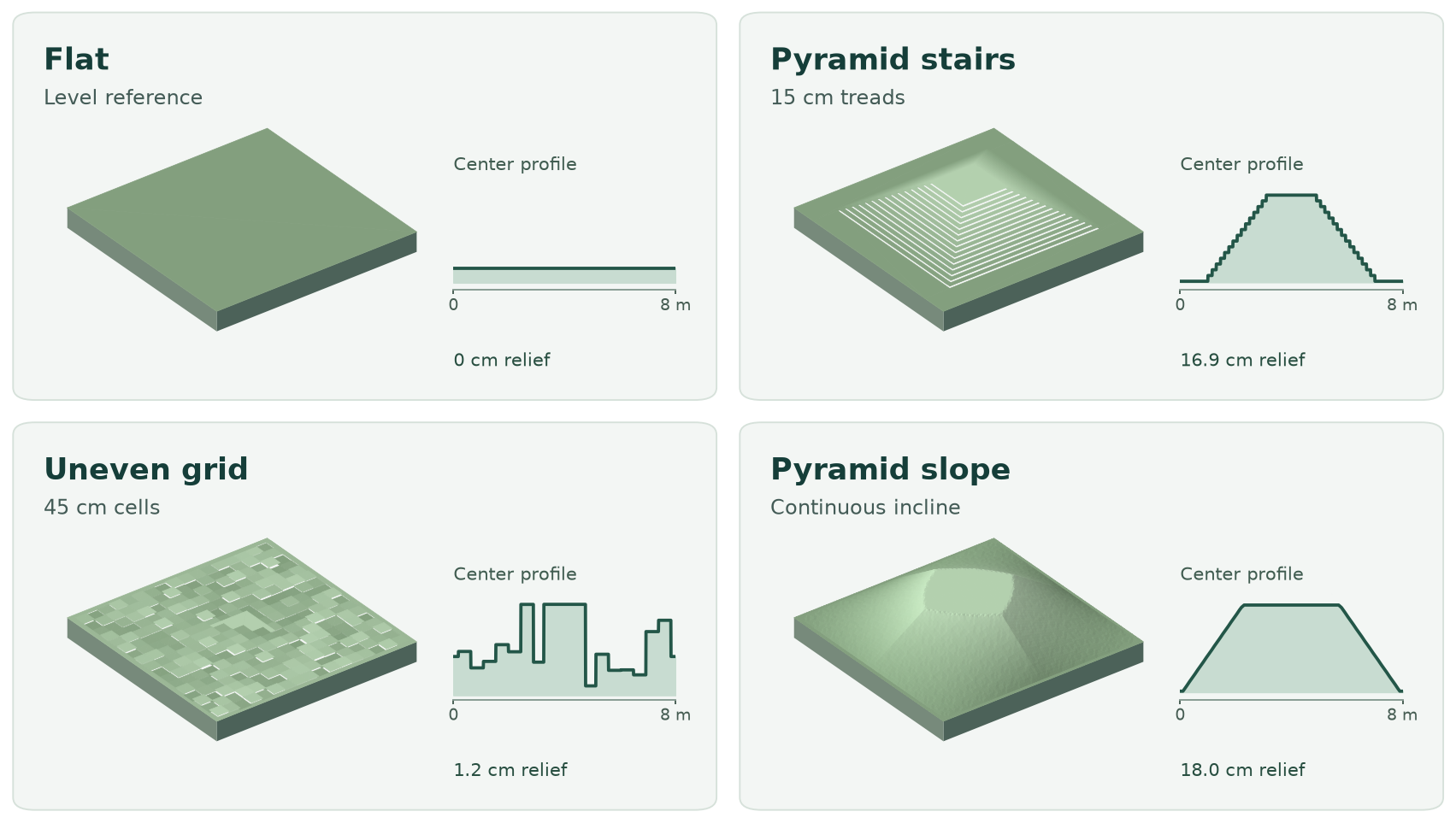
Each tile is 8 m across at difficulty 0.75. Read each profile from one edge through the center to the opposite edge. The height scale varies by panel. Relief is the difference between the highest and lowest points along that profile. Which terrain has small, abrupt height changes even near the edge?#
Add the Included Rough Task#
The rough configuration adds small stairs, uneven grids, slopes, and terrain rays beneath the feet. Those rays feed the critic (the part of training that estimates how good a state is) and the reward calculations for height relative to the ground. The actor retains the same 61-value input layout and responds using its IMU-like readings, joint state, previous actions, and commands. This is called blind rough locomotion: the actor receives no terrain measurements.
In microduck/rough.py,
inspect rough_terrain_generator() for the tile dimensions and sampling
proportions. Use its scene and curriculum in a variant of the walking task
you built in lesson 6.
Add to the imports in env_cfg.py:
from isaaclab_tutorial.tasks.velocity.mdp.commands import MicroDuckRoughVelocityCommand, MicroDuckVelocityCommand

from .rough import MicroDuckRoughCurriculumCfg, MicroDuckRoughSceneCfg, MicroDuckTerrainImporter, rough_terrain_generator
Append to env_cfg.py:
@configclass
class RoughEnvCfg(WalkEnvCfg):
    """MicroDuck rough velocity walking with the flat task's policy interface and BAM servos."""

    scene: MicroDuckRoughSceneCfg = MicroDuckRoughSceneCfg(num_envs=16384, env_spacing=2.0)
    curriculum: MicroDuckRoughCurriculumCfg = MicroDuckRoughCurriculumCfg()

    def __post_init__(self):
        super().__post_init__()
        self.commands.base_velocity.class_type = MicroDuckRoughVelocityCommand
        self.rewards.track_ang_vel.params["std"] = 0.5
        self.scene.terrain.terrain_type = "generator"
        self.scene.terrain.class_type = MicroDuckTerrainImporter
        self.scene.terrain.max_init_terrain_level = 5
        self.scene.terrain.terrain_generator = rough_terrain_generator()
        height_sensor_names = ("left_foot_height", "right_foot_height")
        self.observations.critic.foot_height.params["height_sensor_names"] = height_sensor_names
        self.rewards.foot_clearance.params["height_sensor_names"] = height_sensor_names
        self.rewards.foot_swing_height.params["height_sensor_names"] = height_sensor_names
        self.scene.left_foot_height.update_period = self.sim.dt * self.decimation
        self.scene.right_foot_height.update_period = self.sim.dt * self.decimation
        self.sim.physics.solver_cfg.nconmax = 200
        self.sim.physics.solver_cfg.njmax = 1024

    def play_mode(self):
        """Use a smaller terrain map with randomly sampled difficulty for playback."""
        super().play_mode()
        self.commands.base_velocity.class_type = MicroDuckVelocityCommand
        self.scene.terrain.terrain_generator.curriculum = False
        self.scene.terrain.terrain_generator.num_rows = 5
        self.scene.terrain.terrain_generator.num_cols = 5
        self.curriculum.terrain_levels = None
The terrain curriculum moves the robot to a harder level when it walks far enough and follows commands closely enough. If the robot falls or tracks commands poorly, it can move to an easier level. The curriculum counts distance over the whole episode, including when the robot changes direction.
The rough task uses the same left/right data augmentation you added for flat walking. Inherit its symmetry runner and give rough runs their own log directory.
Append to agents/rsl_rl_ppo_cfg.py:
@configclass
class RoughPPORunnerCfg(SymmetricWalkPPORunnerCfg):
    experiment_name = preset(default="course_microduck_rough", backlash="course_microduck_rough_backlash")
Register the new task with the helper from lesson 6.
Append to microduck/__init__.py:
register_task(
    "Rough",
    "RoughEnvCfg",
    "RoughPPORunnerCfg",
    symmetry_agent_cfg="RoughPPORunnerCfg",
)
Inspect the Terrain and Test Training#
Run the supplied scripts/inspect_terrain.py from the root of IsaacLabTutorial.
It previews a single stair tile at difficulty 0.75 in Viser and keeps the camera
on the robot after a reset.
uv run --extra viser python scripts/inspect_terrain.py --viz viser --real-time
Open Viser using the viewer instructions during the ten-second delay. Expect the duck to fall and reset. It takes random actions for 15 simulated seconds, starting on the flat part in the middle of the tile. Orbit or zoom out to inspect the steps around it and compare them with the flat plane used earlier.
Check that your rough task and its symmetry runner train:
uv run isaaclab train --task Course-Microduck-Rough-v0 \
    --rl_library rsl_rl --num_envs 64 --max_iterations 2 --seed 42
Once the check finishes, load the saved policy and watch how the duck moves.
The rough map can place the duck far from the starting camera. Click the scene so a text field is not active, then use W/S to move forward or backward, A/D to move sideways, Q/E to move down or up, and the arrow keys to rotate the view. Reframe after a reset if needed. These controls move only the camera.
uv run --extra viser isaaclab play --task Course-Microduck-Rough-v0 \
    --rl_library rsl_rl --num_envs 1 --checkpoint latest --viz viser --real-time
Open Viser using the viewer instructions. Press Ctrl+C when you finish.
For a longer rough-terrain run, train for 50,000 iterations with 4,096 parallel
environments. Reduce --num_envs if the run exceeds your GPU memory budget:
uv run isaaclab train --task Course-Microduck-Rough-v0 \
    --rl_library rsl_rl --num_envs 4096 --max_iterations 50000 --seed 42
After training finishes, play the latest rough-terrain checkpoint:
uv run --extra viser isaaclab play --task Course-Microduck-Rough-v0 \
    --rl_library rsl_rl --num_envs 1 --checkpoint latest --viz viser --real-time
Open Viser using the viewer instructions. Press Ctrl+C when you finish.
Connect Physical Variation to Sim-to-Real#
The recipe varies foot friction, body mass, center of mass, encoder bias, joint friction, and motor behavior. Think of randomization as practicing with slightly different robots and floors, so a policy cannot depend on one perfectly repeatable setup. Choose ranges that reflect plausible variation. Closing the Reality Gap connects system identification, randomization, and curricula.
Include Gearbox Play With the Backlash Preset
The Walk and Rough configurations support the reference backlash preset.
It selects an asset with 14 extra passive joints (joints without motors) that
model gearbox play, and it adjusts the observations and selected terms
together. The policy still controls the same 14 servos.
uv run isaaclab train --task Course-Microduck-Walk-v0 \
    --rl_library rsl_rl --num_envs 64 --max_iterations 2 --seed 42 \
    presets=backlash
Once the check finishes, load the saved policy and watch how the duck moves.
uv run --extra viser isaaclab play --task Course-Microduck-Walk-v0 \
    --rl_library rsl_rl --num_envs 1 --checkpoint latest --viz viser --real-time \
    presets=backlash
Open Viser using the viewer instructions. Press Ctrl+C when you finish.
presets=backlash applies to the complete Walk and Rough recipes. The earlier
local Inspect, Balance, BalanceHead, and Track scenes use the regular
asset. Backlash runs have separate log directories; validate their policies
under that preset before drawing conclusions about gearbox play.
Check Your Progress#
Your IsaacLabTutorial checkout now includes the reference flat and rough configurations and the regular and backlash assets. Symmetry augmentation is optional for flat-ground training and enabled by default for the course’s rough-terrain task. The earlier locally assembled tasks remain available for experimentation.
Before deploying to hardware, validate joint order, observation units, timing, limits, and measured actuator response. Continue with Simulation to Reality for that process.
In Next Steps, consider what the actor could do if it received observations beyond body and joint measurements.