

NVIDIA Mission Control autonomous job recovery (air-gapped)#
Install NVIDIA Mission Control autonomous job recovery in air-gapped mode using the BCM cm-mission-control-setup wizard. The bundle must be present in the current directory and the local registry must be configured to pull images from the bundle.
Download all Mission Control autonomous job recovery files and related packages with the
nmc-airgaptool. Use separate output directories for the AMD64 and Arm64 architectures, such asbundle_amd64andbundle_arm64.Copy all files from the
bundle_*/files/subdirectories into a single directory:mkdir -p bundle/files cp -u bundle_*/files/*deb bundle/files/
Install the Mission Control autonomous job recovery dependency and plugin packages from the bundle on all BCM head nodes. The installation wizard fails if these packages are not installed on every head node:
dpkg -i bundle/files/cm-base-view-ajr-bcm11*.deb
dpkg -i bundle/files/cm-setup-ajr-*.deb
Follow the Mission Control autonomous job recovery installation guide at Installation Guide for NVIDIA Mission Control autonomous job recovery with the following notes and modifications:
Note
In NVIDIA Mission Control version 2.3, step 2 still requires internet access to install the observability components. Full air-gapped installation will be available in the next release.
In NVIDIA Mission Control version 2.3.1, the
nmc-airgaptool downloads the observability components to thefiles/subdirectory of the bundle. Step 2 copies these files intobundle/files. Specify this location as the source for the Alloy packages when you run the air-gapped installation wizard.4.1 Export the product version and Helm and container registry locations
Define the following variables before you apply the Mission Control autonomous job recovery patch:
REGISTRY— Your container registry URL. For a BCM-installed private registry, usemaster.cm.cluster:5000/nvidia/nv-mission-control.AJR_FQDN— The fully qualified domain name that matches your TLS certificate.HELM_REPO_URL— Your Helm repository URL. In air-gapped mode, Mission Control autonomous job recovery is installed directly from the Helm chart archive. For step 4 of Installation Guide for NVIDIA Mission Control autonomous job recovery, setHELM_REPO_URLto the full path of the directory that contains thewarthog-1.5.0-patchN.tgzHelm chart package. Use thefile://protocol, as shown in the following example:# ls -la /root/ajr/bundle_amd64/helm drwxr-xr-x 2 root root 38 Jun 8 11:34 . drwxr-xr-x 5 root root 75 Jun 8 11:35 .. -rw------- 1 root root 318527 Jun 8 11:34 warthog-1.5.0-patch5.tgz # export HELM_REPO_URL="file:///root/ajr/bundle_amd64/helm"
The Grafana Alloy Helm chart and container images are not configured through variables. In air-gapped mode, the patch installs the Alloy chart from the BCM internal OCI registry at
oci://master.cm.cluster:5000/helm-charts/alloyand pulls the Alloy container images frommaster.cm.cluster:5000, where thenmc-airgaptool uploads them. No additional variables are required for Alloy.Important
The
file://protocol specifies the full path from the root of the file system and contains three forward slashes.Important
Do not apply the variable overrides described in step 4 of the connected installation procedure.
4.2 Apply the air-gapped Mission Control autonomous job recovery patch. This patches the same files as the connected patch and additionally redirects the Grafana Alloy Helm chart and container images to the BCM internal OCI registry. Run it after exporting the variables above and before starting the installation wizard:
echo "H4sICKvyOGoAA3BhdGNoLWFpcmdhcC5kaWZmAM1YbXPbuBH+zl+BSvG5rUTSchInVpObKI7S+MaxXDm59uYmwwFBiMIJJBgAtKNp+9+7AEiKkujruW2c6oNIAIvFs+8L9n8XxiwPY6yWHsEafY9CnRVhTDKflEqLLCiwJkv04gWazt56vu+jkGQhFwTzEBeFgpGvqC6LkLM4LNZ6KfLHweg4VExTv8BkhVNqqBxRwcuU5SrEpRa5yESpol9EHElKxA2V61DTrOBYww6AECV0gUuuVbDGGfcGg8E3OzzI6a336hXyH4+Go2do4B6vXnkIay1ZXGomcsAibxihYw8hRHMcc5qMkZYlNRMsAzBjz4dXJGkhAKOQ6zHKb4gMmAjzG5YwDA8/Y0oZdkTkWgoeLjDRNW9vsLv/YD798/n1h/lPB9uE9ZFXJefXlEiqlQWGkI9ynNExcElhOvE8dCvkasHFbX0kp9LSZmWe0qiNHNxh+Vsw250OrNvSgunWYOV2EbGc6f/ogA7IdxzXRbljj4c7NFcac3Ay4BrpdQFWAF+z/nJDcx3FZW2kEuzozNSTOI6Zzj73rAc+fzIEB7T/xv86PK3ygIr/GYdApvL8ynOOwxnBaoyeGsmdDn6D4BAnfoZzoLYCV/ta8rYJ4BwiMhgBpp8PWyuHn9rwgPeCpZW4XKQRBx3wMehoIayko8fPjKjuYWMNohbztZ9QTYmNOKYEKFPI7pC7SxH3kfzuM7sV8Sv0Ri8Qb2BnhrlqBF+x6hUhSGoRLlikxYrmkbJRGzkvWFKWJeA6vtngWwKnpNOT4egJaMk9nUtUGoVsl144pZ5fvp3VK0pLnKbgkdNaYR/mH6f1alzGMPmDiNX2su+WiSCrgum3f3lzCa4JzttzEbCzcngw+WEemfeDw5oz/ULABKCSS5HQa83IiuVUqU4UnKaYrCeb5DqnCrJxQ/t2cnFdEYPSjE8bokurKiwzt2KtU6nRxJHLdz2vglu76KeKj0yVHfnN3vs4iKQZBRJr8lao/JqPdG1BaCtMR26iEBIkeH70/MiNm0pjXOB4dDo8RQP3AAfwUAL1PBZYJh1xcR/nb/h0+/pmeU/ZdW0xp+WpBDNHi89J7tLdYHdy11uq1SoudBMsRnDDv7LzL9InVGqnhCePTbJwj00UXLyZXEUf5+dgfp7gQo3DMMMmDfS2KN7PPl5+iK4mH94BoektQsNYbRO9Pr98E1m3J/lLSXEicr6WQuhhQl6SzP67HNOro2Wz72pyff3X2fwN7O6hPpp+gSAkGi2kyPa7miSkmphnYJJkHWCdzB79HlRV2LU5QJoBpCus1L/j+Q9SauQvjpGfHPYO/3BvSG29XE8n87N30evJ9RQA7euiDmnQ/9nkumVAaxKf4IZkRdetlQCGruYdP306HI3Auu65MS/BP2Je0kqpvR3UoqC5YeSgG4OGBAcFhZyFcqHZokob6r8Mky1e3aGyTeKyVuXUikOj2iS2BZQG2lo4W+I8Nxn8b9UP5KxrAcKQxDUijsT53H5+hg1XwIkuBU+oRGZliJhGtww4xBSZ5leyBOoSitcII0UkKzQynbBEIg/QeY70kqJFqUtJh/DOVLOZfjGZimkOO9WKJmghJISvbV9QAZ5U6MD5753l4dvjA3RJ3Oq7xuiP2Vp95pEZuOmlULqZNgPnlyenNunYh828t+a6RLv6kfs4VMWl25XqRTih30c/Cl5mVLmR+b+xE+9FmZuG391ZntvoqZ519FA4X4o8g35kbFRhLgJgIbW5xtwHcntnN+4tij317GX9Pe3VRqgqSD3c7zRUGbt+fO/Iqjp1HfD177au332gu2zrsObuejyyzjraKpBbN41HAvgtbXPZ2xAUUE/gPpOYLFvPVhswS4Ruql0pIU/1llrbOrukPAvylATOaaBuZHf7T9NFOh4H76YX76P59GoGxfvioNfu5wq40FZ9xqYvqO+0O02e+RmRqkg4sRo4aWsAelAQ7LDqlg+b/kuMt0VNJV5Ai7Ylai1ptRakTC/L2MSJkd2HvAwlZ0ewycXF7KeoWzx3OYzM5k1UgJ/DOBJFS1rTu4rcyfTseHiCBvB/2rKqwazAaUyXxLlY1/PgG0brAGQUnASjRks3pooC/0GttJSLGPPWRHNhbs0YRaUMrhPrjWRNvLcsYNDMXBavAfl1DfPQhq799cF8bvJicPuyiBImX+7W9v9tuLiDep7HFuhn6IkgFDZn99CnP5kKkwNSSpYC9V7bNagltmLRL6ADNQT4xRp8CAnJ4DDM0YJxqmzFsV/RzFoQBEYxpIDmC7XO2P/k9FDfujrRtNLH18XhUdfudOnVpog8HaIMr4zuHD4kFo2GVa3PbAWokV9s260R7Vt9NtzS6cOgaVtu6/QF8zySoBB9951zR1DXCL3o/uDreQp6JZ+hnupvSnj/0d/r93/2e9/uS3ALW1P7AVv9/v+CbTvJA8Ctia+Ost1veH00MWkX2ZqEcJ64dK4QltR+TTCtsbn4mU769dl7KEbatAUczc7OmzRvOmfMpJ8CXNiQiYRuGaOjtvUFYc2lOyBZUF0Lx0+Pjo7adTK0deEhlbKHfOPo3XAfEty/ABmbejWaGQAA" | base64 -d | gunzip | bash
4.3 Run the
cm-mission-control-setupwizard with the--skip-packagesoption, which is required in air-gapped environments:cm-mission-control-setup --skip-packages4.4 The Helm chart repository is not used when installing Mission Control autonomous job recovery in air-gapped mode. If prompted, enter placeholder values for the Helm repository username and password.
4.5 During the installation wizard, the air-gapped flow differs from the connected guide on the following screens:
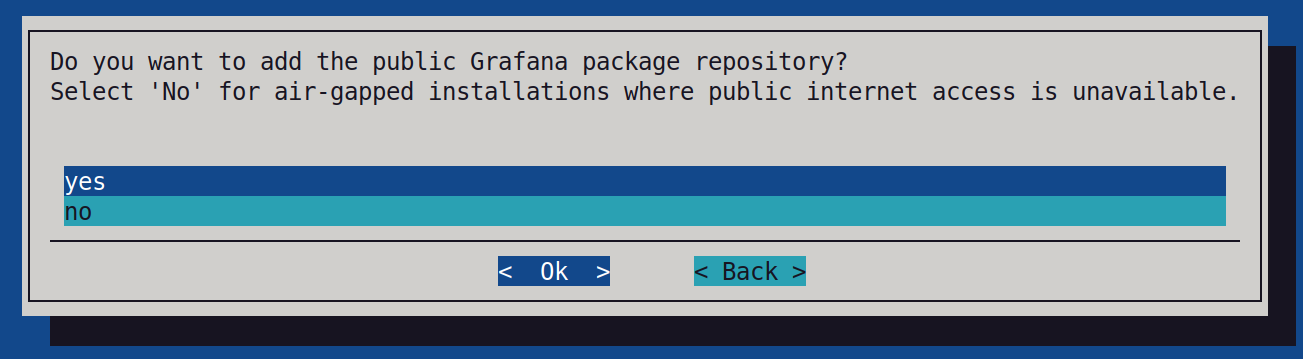
When prompted whether the Grafana public package repository must be configured, select no. In air-gapped mode this repository is not reachable.
The wizard then prompts for the location of the Grafana Alloy packages downloaded by the
nmc-airgaptool. Enter the package location in the Path field, or select a folder with the directory picker and select OK. The wizard verifies that the required packages are present before proceeding. The Alloy packages are installed in the required images during deployment.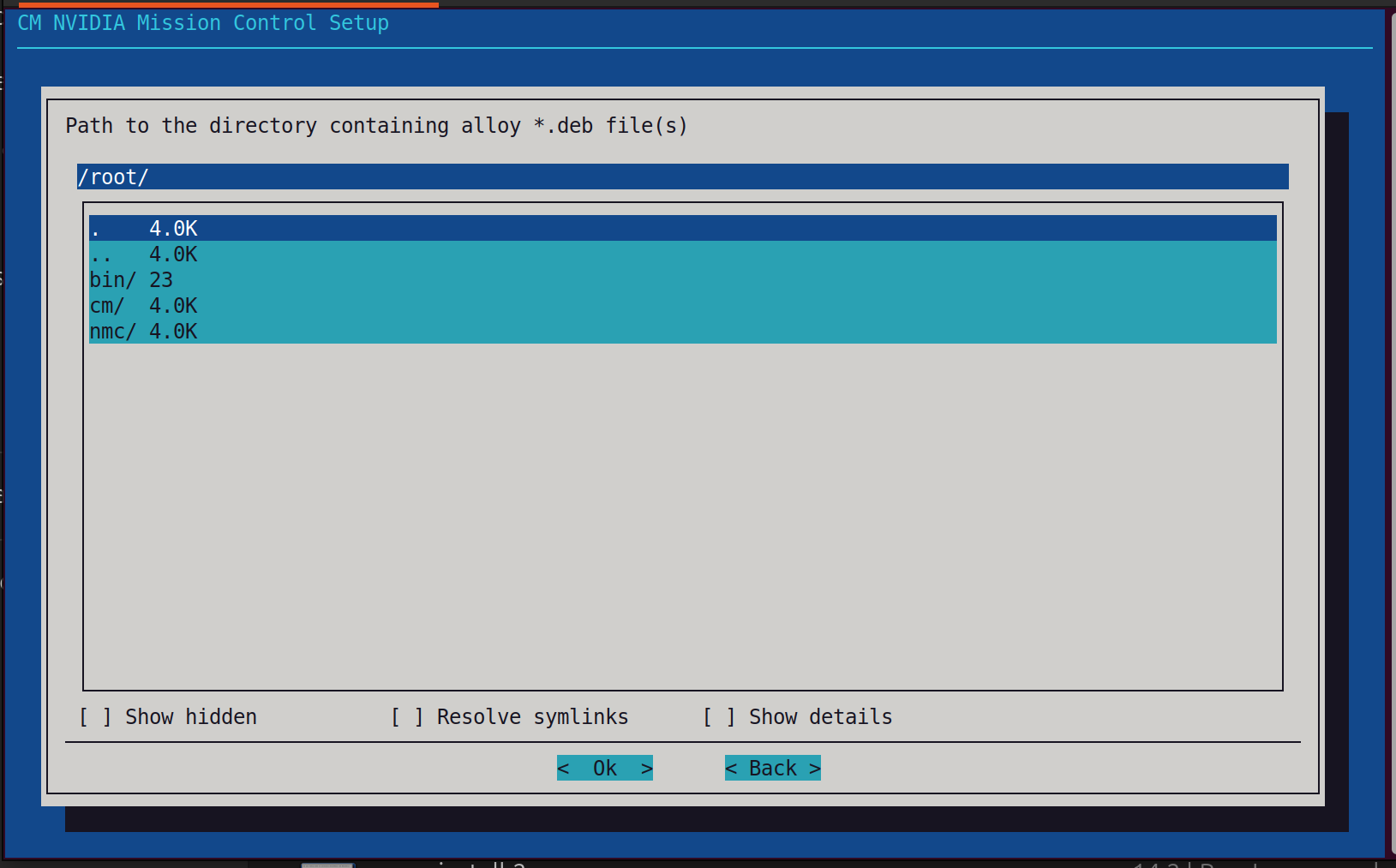
On the final screen, you must select Save config & deploy for the Alloy packages to be deployed during the air-gapped installation.
After the installation finishes, complete Mission Control autonomous job recovery post-installation steps and Mission Control autonomous job recovery verification steps.