

Appendix#
Section 1.1: siteinfo.yaml#
The siteinfo.yaml file is a key configuration file used during the north-south network deployment process. It defines essential site-specific parameters such as DGX system type, network prefixes (OOB, data, storage), time servers, BGP ASNs for switches, and rack mapping information. This file is referenced by automation tools and scripts to generate network configurations, allocate IP addresses, and ensure consistent deployment across the environment. Properly populating siteinfo.yaml is critical for accurate and successful network provisioning.
The following is an example of what the siteinfo.yaml file should look like:
dgx_type: gb200   # or gb300 for GB300 deployments

# The timeservers to be used on the Ethernet switches.
time_servers:
   - 0.cumulusnetworks.pool.ntp.org

networking:
   # root_prefix: 10.0.0.0/20
   oob_prefix: "7.241.0.0/21"
   data_prefix: "7.241.16.0/21"

   # The prefix for storage /31s.
   storage_prefix: "100.127.0.0/16"

   # MODIFIED TO SUPPORT SMALLER SUPERPODS
   ## =======================================================
   oob_prefix: 10.87.208.0/23
   data_prefix: 10.87.210.0/24

   # # The prefix ipminet0
   oob_mgmt_prefixlen: 26

   # # The prefix for PDU/Power
   oob_other_prefixlen: 27

   # # The prefix for DGX OOB
   oob_dgx_prefixlen: 24

   # INBAND NETWORK PREFIXES
   # # internalnet for control plane
   data_mgmt_prefixlen: 26 # internalnet

   # # dgxnet for DGX racks
   data_dgx_prefixlen: 25

   # # loopback for loopback for ethernet switches
   loopback_prefixlen: 27

   # # edge for TOR <-> Edge connections
   edge_prefixlen: 27

   ## =======================================================

   # The ASNs used for the BTOR switches. Provided by the customer.
   bgp_btor_asns:
      - 4260037003
      - 4260037004

   # The ASNs used for the FTOR switches. Provided by the customer.
   bgp_ftor_asns:
      - 4260037001
      - 4260037002

# Mapping customer rack IDs (as used in the P2P file) to rack serial numbers (as
# provided by the factory). This is used to determine MAC addresses/serial
# numbers of devices in DGX racks (GB200/GB300).
rack_mapping:
   A08: '1830625000808'

# EOF
Section 1.2: Standard Point-to-Point (P2P) Column Header#
This section describes the standard column headers used in the P2P connectivity file. The columns are divided into two logical groups: Source (the originating device/port) and Destination (the target device/port). For clarity and ease of use, the following table presents both groups side by side, as they would appear in a typical P2P CSV or spreadsheet.
# |
BUNDLE_ID |
SEQ |
SRC_RACKROLE |
SRC_RACK |
SRC_U |
SRC_NAME |
SRC_HCA_PORT |
SRC_TRANSCEIVER |
DST_RACKROLE |
DST_RACK |
DST_U |
DST_NAME |
DST_PORT |
DST_TRANSCEIVER |
CABLE_LENGTH |
CABLE_TYPE |
CABLE_TRAY |
|---|---|---|---|---|---|---|---|---|---|---|---|---|---|---|---|---|---|
1 |
B1 |
1 |
TOR |
A01 |
10 |
A01-10-S1-TOR-01 |
1 |
QSFP56 |
DGX |
A02 |
20 |
A02-20-S1-DGX-01-C01 |
2 |
QSFP56 |
3m |
DAC |
TRAY-1 |
Column Descriptions:
Column |
Description |
|---|---|
# |
Row number or unique identifier. |
BUNDLE_ID |
Logical bundle or group identifier for the connection. |
SEQ |
Sequence number within the bundle. |
SRC_RACKROLE |
Role of the source rack (e.g., TOR, DGX). |
SRC_RACK |
Source rack identifier. |
SRC_U |
Source rack unit (U position). |
SRC_NAME |
Source device name. |
SRC_HCA_PORT |
Source HCA port. |
SRC_TRANSCEIVER |
Source transceiver type. |
DST_RACKROLE |
Role of the destination rack. |
DST_RACK |
Destination rack identifier. |
DST_U |
Destination rack unit (U position). |
DST_NAME |
Destination device name. |
DST_PORT |
Destination port. |
DST_TRANSCEIVER |
Destination transceiver type. |
CABLE_LENGTH |
Length of the cable. |
CABLE_TYPE |
Type of cable used. |
CABLE_TRAY |
Cable tray or pathway identifier. |
Note
The P2P file should include all columns above, with each row representing a single point-to-point connection. Keeping the source and destination columns grouped together in a single table improves readability and makes the file easier to work with for both humans and automation tools.
Section 1.3: Standard Worksheet Naming#
This section provides an example of the standard worksheet naming.
<TYPE>(ETH)- Ethernet or (IB)- InfiniBand
<SU><SEQ-NUM>Logical grouping of the switch unit (SU). For instance, S1, S2, … , SN.
<Flow>Describes the traffic or connection type that is defined in the table below. See the table in Section 1.4: Connection Type section for more details.
The following usage of the above naming works out to the following string:
(<TYPE>)-[<SU><SEQ-NUM>]-<FlOW>

# Some examples of the above naming convention:
(ETH)-S1-DGX-DATA
(IB)-S1-DGX-OOB
Sample Tables Examples:
Tab Name |
Description |
|---|---|
(ETH)-S1-DGX-DATA (ETH)-S1-DGX-OOBn |
Ethernet S[1-N] covers P2P connections between DGX and TOR (out-of-band management). |
(ETH)-S1-SW-UPLINK (ETH)-S1-SW-EDGE |
Ethernet switch to spine connections and connections to edge devices. |
(ETH)-S1-NODE-OOB (ETH)-S1-NODE-DATA (ETH)-S1-MGMT-OOB |
Ethernet: All OOB connections from node, including SW-to-OOB, Node-to-OOB, and DGX-to-OOB. |
(IB)-S1-DGX-IB (IB)-S1-CLEAF-CSPINE |
InfiniBand: DGX to compute IB, and compute leaf to spine uplinks. |
(TEMPLATE)-DGX-OOB |
Used for GB200/GB300, as the racks are pre-cabled from the factory. |
Validate_Columns |
Just provide column format to compare with other tabs. This column is (Required). |
NAME_MAPPING |
This uses customer naming and combines with default naming to provide a complete naming convention. |
Section 1.4: Connection Type#
This section provides an example of the connection type.
Note
The term “Flow” is used in this context to refer to the type or direction of network connection between devices or components in the system. A more precise term is “Connection Type,” as it describes the nature and endpoints of each network link (e.g., NODE-OOB, DGX-DATA). For a formal definition, see Flow in the Glossary of Terms.
FLOW Name |
Meaning |
|---|---|
NODE-OOB |
Connection from compute node to OOB switch (out-of-band management). |
NODE-DATA |
Compute nodes to data (IB or Ethernet) fabric. |
DGX-OOB |
DGX system to out-of-band switch. |
DGX-DATA |
DGX system to data switch or network fabric. |
NODE-NODE |
Direct connection between compute nodes. |
SW-OOB |
Out-of-band cabling between switches. |
SW-UPLINK |
Uplink from switch to aggregation or spine switch. |
STORAGE-DATA |
Storage (HSS) or (NFS) system connected to a data switch or host. |
STORAGE-OOB |
Storage system to out-of-band switch. |
UFM-OOB |
UFM system (fabric manager) out-of-band connection. |
UFM-DATA |
UFM system connected to a data network. |
EDGE-SW |
Edge switch connections (e.g., border leaf or service leaf). |
DGX-OOB |
In-rack cabling from DGX to OOB switch. |
DGX-DATA |
In-rack cabling from DGX to leaf/data switch. |
NVSW-OOB |
In-rack NVLink Switch to OOB cabling. |
PWR-OOB |
PWR and PDU to OOB cabling. |
ACCESS-OOB |
First OOB Switch will be provisioned with different IP, just to provision SW. |
Section 1.5: Standard Naming Conventions for Network Components#
This section provides the standard naming conventions used for various network components in the DGX SuperPOD Ethernet North-South Network. These conventions ensure consistency and clarity when identifying devices, racks, and network elements across documentation, configuration files, and operational procedures.
- Purpose of These Tables:
The tables below define the naming patterns for different types of devices and racks. Using these conventions helps teams quickly identify the role, location, and function of each component in the network.
Static vs. Incremental Naming:
- Static
Naming is used for components where the number of instances does not change as the system scales (e.g., control plane head nodes). These names remain fixed regardless of cluster size.
- Incremental
Naming is used for components that scale with the size of the deployment (e.g., GPU nodes, storage appliances, switches). The names include incrementing numbers or identifiers to distinguish between multiple instances.
Control Plane (Static Naming)
Naming Pattern |
Description |
|---|---|
|
BCM Head Nodes, per POD; number of head nodes does not increase with scale. |
|
SLogin nodes; number of management nodes is fixed. |
|
Kubernetes Admin|User nodes. |
GPU Rack (Incremental Naming)
Naming Pattern |
Description |
|---|---|
|
RACKNAME, POD#, ROLE: DGX, C#: ComputeTray
Example:
|
|
Example:
|
Storage Rack (Incremental Naming)
Naming Pattern |
Description |
|---|---|
|
Storage Appliance (StorageLeaf) SLEAF |
Ethernet Switches (Incremental Naming)
Naming Pattern |
Description |
|---|---|
|
Pod#: equivalent to scalable units Switch_role: TOR, IPMI, LEAF, SPINE, OOBSPINE, CORE |
|
Must have Edge connection (converged leaf) |
|
ComputeTray, DGX |
|
Fabric Manager, InBand using SN2201 (UFM, NetQ servers) |
|
Storage HSS Leaf |
|
OOB Switch (SN2201) |
NVLink Switch (Incremental Naming)
Naming Pattern |
Description |
|---|---|
|
Pod#, SwitchRole: nvsw, Rack# [1-8] (within pod, there are 8 racks), NVLink Switch incremental [1-9]
Example:
|
Section 1.6: Example Point-to-Point (P2P) format#
This section is an appendix to the How to Format Point-to-Point (P2P) guide and provides examples of how to manually format the Excel file to P2P format. This is necessary because the netautogen tool requires the data to be in a specific format.
GB300 CX card and ports
GB300 has only one CX card with dual ports. The following table summarizes the GB300 CX card configuration and the ports available for P2P connectivity:
Item |
GB300 |
|---|---|
CX card count |
1 |
Ports per card |
2 (dual ports) |
Port names |
M1, S1, BMC, BFBMC |
When building the P2P file for GB300, use M1, S1, BMC, and BFBMC as the port identifiers for the DGX tray connections.
GB300 Cabling
GB300 cabling uses the following interfaces and connections:
1x 400G enP22p3s0f0np0 — Access port (connects to TOR-01/02 INBAND; North/South traffic)
1x 400G enP22p3s0f1np1 — Storage port /31 (connects to TOR-03/04 STORAGE; for example, 100.127.1.64/31)
1x BlueField-3 RJ-45
1x Ethernet RJ-45 BMC
No connection to LOM1 — enP5p9s0 is not connected.
The following diagram shows the GB300 North/South cabling from the device (C1, C2) to the INBAND and STORAGE TOR switch pairs. There is no high availability (HA) on this path: if TOR-01 or TOR-02 goes down, there is no access to the DGX.
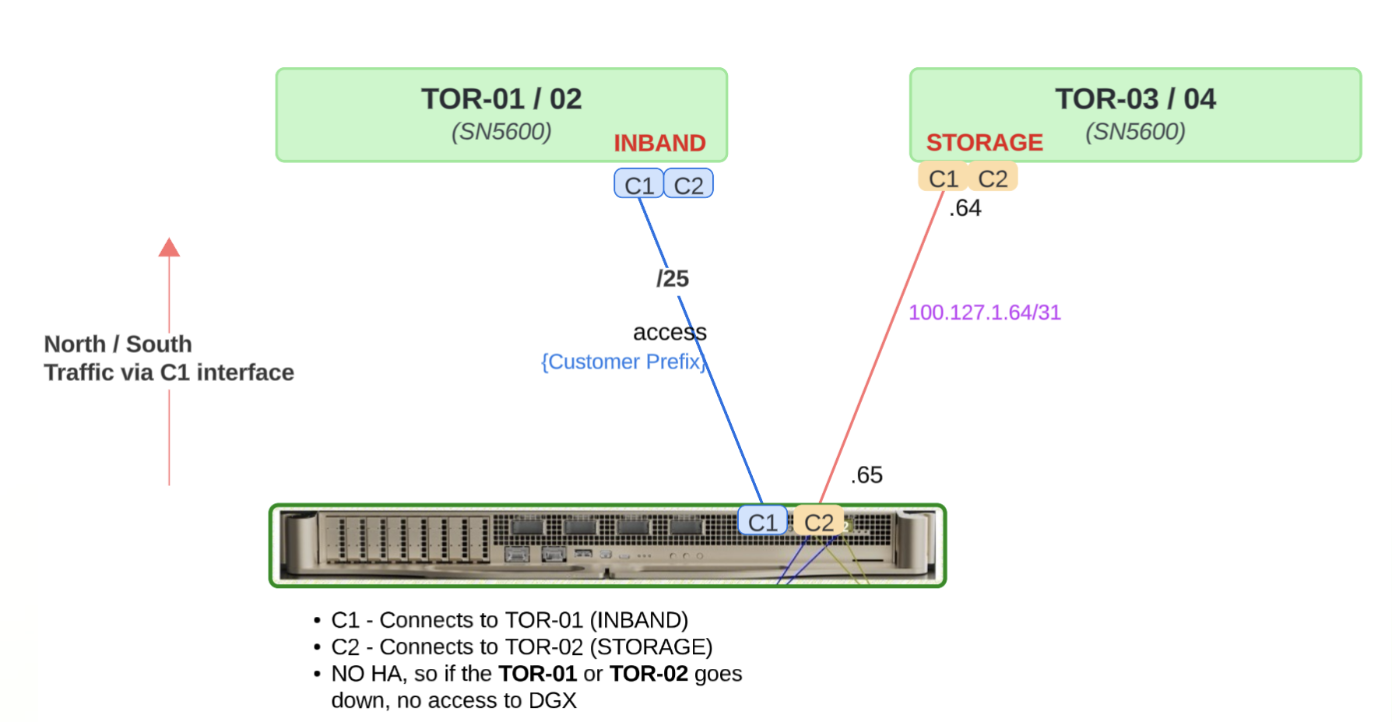
Figure 19 GB300 Cabling: C1 to TOR-01/02 (INBAND), C2 to TOR-03/04 (STORAGE). No HA; loss of TOR-01 or TOR-02 removes DGX access.#
Example P2P in raw CSV format:
FLOW,FROM_RACK,FROM_RACKUNIT,CUSTOMER_SRC_NAME,FROM_NODE,FROM_PHYSICAL_PORT,FROM_PORT,FROM_BREAKOUT,TO_RACK,TO_RACKUNIT,CUSTOMER_DEST_NAME,TO_NODE,TO_PHYSICAL_PORT,TO_PORT,TO_BREAKOUT
NODE-DATA,A4,2,A4-10-S1-BCM-01,A4-10-S1-BCM-01,M1,M1,-,A3,8,A3-10-S1-BTOR-01,A3-10-S1-BTOR-01,1/1/1,1s0,4x
NODE-DATA,A4,5,A4-5-S1-BCM-02,A4-5-S1-BCM-02,M1,M1,-,A3,8,A3-10-S1-BTOR-01,A3-10-S1-BTOR-01,1/1/2,1s1,-
NODE-DATA,A4,8,A4-8-S1-MGMT-03,A4-8-S1-MGMT-03,M1,M1,-,A3,8,A3-10-S1-BTOR-01,A3-10-S1-BTOR-01,1/2/1,1s2,-
STORAGE-DATA,A5,20,A5-20-S1-HSS-05,A5-20-S1-HSS-05,S1,S1,-,A3,8,A3-10-S1-BTOR-01,A3-10-S1-BTOR-01,9/1/1,9s0,4x
IBSW-OOB,A3,43,A3-43-S1-IBLEAF-01,A3-43-S1-IBLEAF-01,bmc,bmc,-,A3,45,A3-10-S1-OOB-01,A3-10-S1-OOB-01,1,1,-
SW-OOB,A3,27,A3-27-S1-SPINE-01,A3-27-S1-SPINE-01,mgmt,mgmt,-,A3,45,A3-10-S1-OOB-01,A3-10-S1-OOB-01,9,9,-
UFM-OOB,A5,44,A5-44-S1-CUFM-01,A5-44-S1-CUFM-01,LOM3,LOM3,-,A3,45,A3-10-S1-OOB-01,A3-10-S1-OOB-01,23,23,-
NODE-OOB,A4,2,A4-2-S1-BCM-01,A4-2-S1-BCM-01,LOM2,LOM2,-,A3,45,A3-10-S1-OOB-01,A3-10-S1-OOB-01,30,30,-
PWR-OOB,A1,6,A1-6-S1-PWR-01,A1-6-S1-PWR-01,mgmt,mgmt,-,A3,46,A3-10-S1-OOB-02,A3-10-S1-OOB-02,1,1,-
UFM-DATA,A5,44,A5-44-S1-CUFM-01,A5-44-S1-CUFM-01,LOM1,LOM1,-,A4,45,A4-10-S1-FTOR-01,A4-10-S1-FTOR-01,1,1,-
STORAGE-OOB,A5,11,A5-11-S1-HSS-01,A5-11-S1-HSS-01,mgmt,mgmt,-,A5,41,A5-10-S1-OOB-01,A5-10-S1-OOB-01,1,1,-
EDGE-BTOR,-,-,EQX-EDGE-01,EQX-EDGE-01,-,-,-,A3,8,A3-10-S1-BTOR-01,A3-10-S1-BTOR-01,49/1/1,49s0,8x
SW-UPLINK,A3,14,A3-14-S1-TOR-01,A3-14-S1-TOR-01,53/1/1,53s0,2x,A4,42,A4-10-S1-SPINE-01,A4-10-S1-SPINE-01,1/1/1,1s0,2x
SW-UPLINK,A3,14,A3-14-S1-TOR-01,A3-14-S1-TOR-01,53/2/1,53s1,-,A4,42,A4-10-S1-SPINE-01,A4-10-S1-SPINE-01,1/2/1,1s1,-
DGX-DATA,A1,11,A1-11-S1-DGX-01-C01,A1-11-S1-DGX-01-C01,M1,M1,-,A3,14,A3-10-S1-TOR-01,A3-10-S1-TOR-01,1/1/1,1s0,4x
DGX-OOB,A2,12,A2-12-S1-DGX-02-C02,A2-12-S1-DGX-02-C02,BF1BMC,BF1BMC,-,A2,44,-,A2-10-S1-OOB-01,2,2,-
DGX-OOB,A1,12,A1-12-S1-DGX-01-C02,A1-12-S1-DGX-01-C02,BF1BMC,BF1BMC,-,A1,44,-,A1-10-S1-OOB-01,2,2,-
NVSW-OOB,A1,19,A1-19-S1-NVSW-01,A1-19-S1-NVSW-01,BMC,BMC,-,A1,45,-,A1-10-S1-OOB-02,9,9,-
The above csv data shown in an HTML table:
FLOW |
FROM_RACK |
FROM_RACKUNIT |
CUSTOMER_SRC_NAME |
FROM_NODE |
FROM_PHYSICAL_PORT |
FROM_PORT |
FROM_BREAKOUT |
TO_RACK |
TO_RACKUNIT |
CUSTOMER_DEST_NAME |
TO_NODE |
TO_PHYSICAL_PORT |
TO_PORT |
TO_BREAKOUT |
|---|---|---|---|---|---|---|---|---|---|---|---|---|---|---|
NODE-DATA |
A4 |
2 |
A4-2-S1-BCM-01 |
A4-2-S1-BCM-01 |
M1 |
M1 |
A3 |
8 |
A3-10-S1-BTOR-01 |
A3-10-S1-BTOR-01 |
1/1/1 |
1s0 |
4x |
|
NODE-DATA |
A4 |
5 |
A4-5-S1-BCM-02 |
A4-5-S1-BCM-02 |
M1 |
M1 |
A3 |
8 |
A3-10-S1-BTOR-01 |
A3-10-S1-BTOR-01 |
1/1/2 |
1s1 |
||
NODE-DATA |
A4 |
8 |
A4-8-S1-MGMT-03 |
A4-8-S1-MGMT-03 |
M1 |
M1 |
A3 |
8 |
A3-10-S1-BTOR-01 |
A3-10-S1-BTOR-01 |
1/2/1 |
1s2 |
||
STORAGE-DATA |
A5 |
20 |
A5-20-S1-HSS-05 |
A5-20-S1-HSS-05 |
S1 |
S1 |
A3 |
8 |
A3-10-S1-BTOR-01 |
A3-10-S1-BTOR-01 |
9/1/1 |
9s0 |
4x |
|
IBSW-OOB |
A3 |
43 |
A3-43-S1-IBCLEAF-01 |
A3-43-S1-IBCLEAF-01 |
bmc |
bmc |
A3 |
45 |
A3-10-S1-OOB-01 |
A3-10-S1-OOB-01 |
1 |
1 |
||
SW-OOB |
A3 |
27 |
A3-27-S1-SPINE-01 |
A3-27-S1-SPINE-01 |
mgmt |
mgmt |
A3 |
45 |
A3-10-S1-OOB-01 |
A3-10-S1-OOB-01 |
9 |
9 |
||
UFM-OOB |
A5 |
44 |
A5-44-S1-CUFM-01 |
A5-44-S1-CUFM-01 |
LOM3 |
LOM3 |
A3 |
45 |
A3-10-S1-OOB-01 |
A3-10-S1-OOB-01 |
23 |
23 |
||
NODE-OOB |
A4 |
2 |
A4-2-S1-BCM-01 |
A4-2-S1-BCM-01 |
LOM2 |
LOM2 |
A3 |
45 |
A3-10-S1-OOB-01 |
A3-10-S1-OOB-01 |
30 |
30 |
||
PWR-OOB |
A1 |
6 |
A1-6-S1-PWR-01 |
A1-6-S1-PWR-01 |
mgmt |
mgmt |
A3 |
46 |
A3-10-S1-OOB-02 |
A3-10-S1-OOB-02 |
1 |
1 |
||
UFM-DATA |
A5 |
44 |
A5-44-S1-CUFM-01 |
A5-44-S1-CUFM-01 |
LOM1 |
LOM1 |
A4 |
45 |
A4-10-S1-FTOR-01 |
A4-10-S1-FTOR-01 |
1 |
1 |
||
STORAGE-OOB |
A5 |
11 |
A5-11-S1-HSS-01 |
A5-11-S1-HSS-01 |
mgmt |
mgmt |
A5 |
41 |
A5-10-S1-OOB-01 |
A5-10-S1-OOB-01 |
1 |
1 |
||
EDGE-BTOR |
EQX-EDGE-01 |
EQX-EDGE-01 |
A3 |
8 |
A3-10-S1-BTOR-01 |
A3-10-S1-BTOR-01 |
49/1/1 |
49s0 |
8x |
|||||
SW-UPLINK |
A3 |
14 |
A3-14-S1-TOR-01 |
A3-14-S1-TOR-01 |
53/1/1 |
53s0 |
2x |
A4 |
42 |
A4-10-S1-SPINE-01 |
A4-10-S1-SPINE-01 |
1/1/1 |
1s0 |
2x |
SW-UPLINK |
A3 |
14 |
A3-14-S1-TOR-01 |
A3-14-S1-TOR-01 |
53/2/1 |
53s1 |
A4 |
42 |
A4-10-S1-SPINE-01 |
A4-10-S1-SPINE-01 |
1/2/1 |
1s1 |
||
DGX-DATA |
A1 |
11 |
A1-11-S1-DGX-01-C01 |
A1-11-S1-DGX-01-C01 |
M1 |
M1 |
A3 |
14 |
A3-10-S1-TOR-01 |
A3-10-S1-TOR-01 |
1/1/1 |
1s0 |
4x |
|
DGX-OOB |
A2 |
12 |
A2-12-S1-DGX-02-C02 |
A2-12-S1-DGX-02-C02 |
BF1BMC |
BF1BMC |
A2 |
44 |
A2-10-S1-OOB-01 |
2 |
2 |
|||
DGX-OOB |
A1 |
12 |
A1-12-S1-DGX-01-C02 |
A1-12-S1-DGX-01-C02 |
BF1BMC |
BF1BMC |
A1 |
44 |
A1-10-S1-OOB-01 |
2 |
2 |
|||
NVSW-OOB |
A1 |
19 |
A1-19-S1-NVSW-01 |
A1-19-S1-NVSW-01 |
BMC |
BMC |
A1 |
45 |
A1-10-S1-OOB-02 |
9 |
9 |
Section 2.1: GB200 and GB300 Rack Inventory#
For GB300 deployments, IP subnetting and rack grouping differ; refer to Subnetting by DGX Model for the GB300 subnetting plan.
How to pull rack inventory from the Splunk database#
Use the following steps to pull rack inventory from the Splunk database:
Launch the URL — Open the Splunk DB (Asset Rack Data board) in your browser.
Select the factory index — In the Asset Rack Data form, open the Index dropdown and choose the factory index (for example, any foxconn or a specific site such as fxhc, fxlh, qsmc). Use the filter field to search if the list is long.
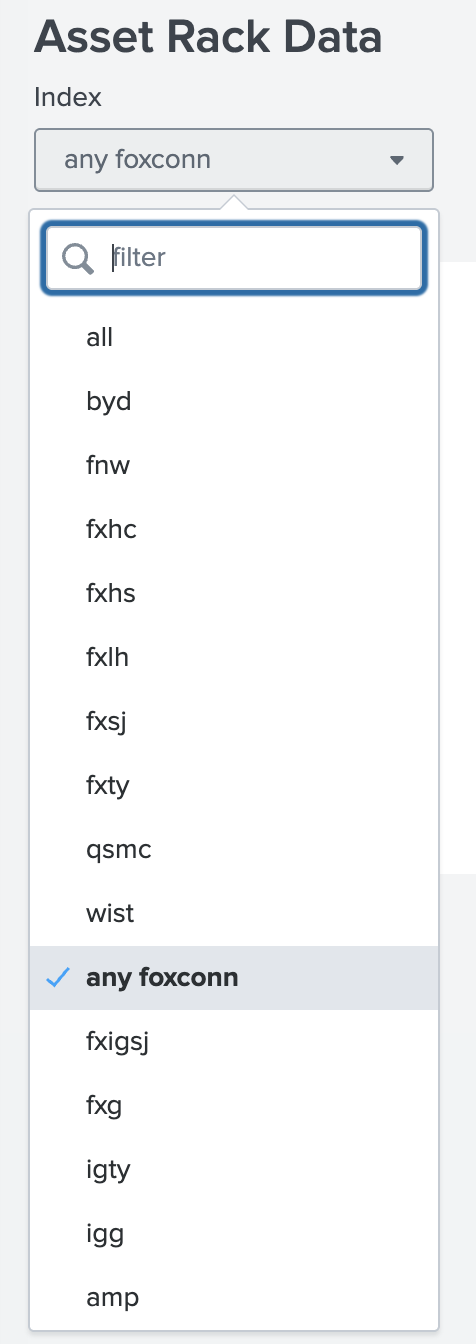
Figure 20 Asset Rack Data: use the Index dropdown to select the factory index.#
Enter the NVSN Rack Serial — In the form, enter the NVSN (rack) serial number for the rack whose inventory you want to retrieve.
Select the data range — Set the date range (earliest and latest) for the data you want to pull, then run the search to display the results.
Export to CSV — Scroll all the way down to the results area and move to the right. Use the download icon (arrow pointing down) to open the export options and choose to download the data in .csv format.
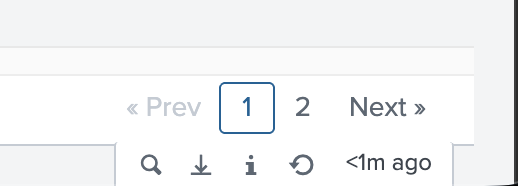
Figure 21 Export option: use the download icon (arrow pointing down) to download results in .csv format.#
After you click the download icon, the Export Results dialog appears. Set Format to CSV, optionally enter a File Name, and leave Number of Results blank to export all results (or enter a limit). Click Export to download the file.
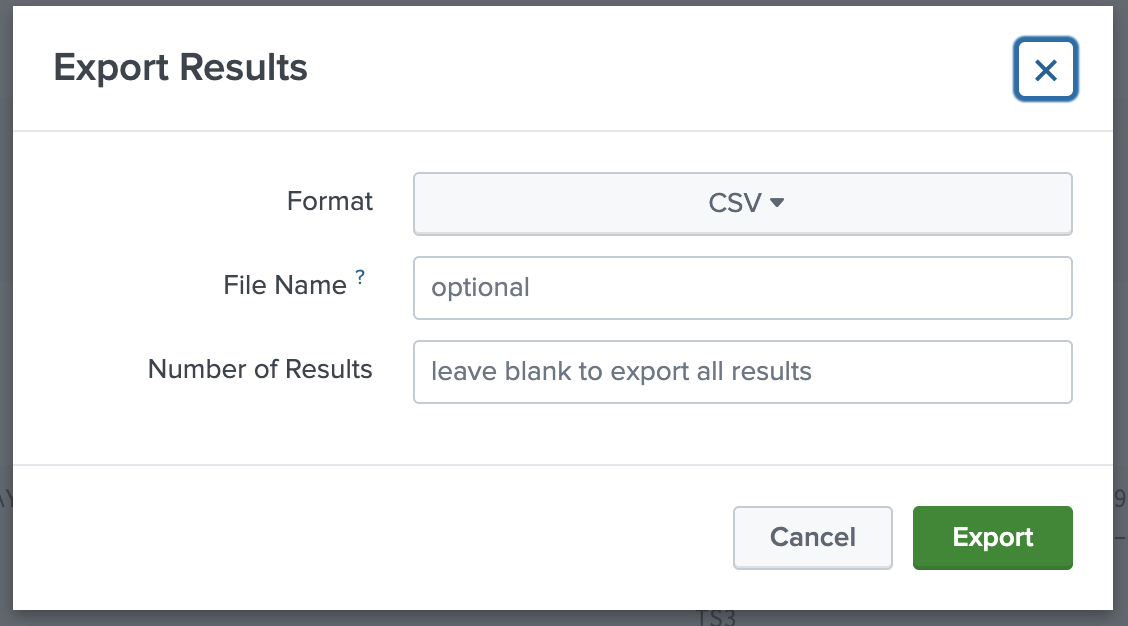
Figure 22 Export Results dialog: choose CSV format, optional file name, and number of results (leave blank for all), then click Export.#
The following CSV file is an example from the Splunk DB. The column header should have the following in the CSV file:
Note
The following CSV information consists entirely of column headers; there is no data content provided.
"COMP_PN","COMP_SN","COMP_SN_DIRECT_NVPN","COMP_SN_DIRECT_NVSN","COMP_TYPE",
DATECODE,LOCATION,NVPN,NVSN,"SCOMP_PN","START_TIME",VENDOR,"comp_pn","comp_sn",
"comp_type","date_hour","date_mday","date_minute","date_month","date_second",
"date_wday","date_year","date_zone",eventtype,filename,host,index,linecount,
location,nvpn,nvsn,punct,"scomp_pn",source,sourcetype,"splunk_server",
"splunk_server_group","start_time",starttime,tag,"tag::eventtype",
"tag::sourcetype",vendor,"_raw","_time"